
How to Change Your Email in Slack (Member and Admin Steps)
Change your Slack email under Account > Settings > Email Address: enter your current password and the new address, then confirm it from the new inbox. Admins can change a member's email only on Pro and Business+.
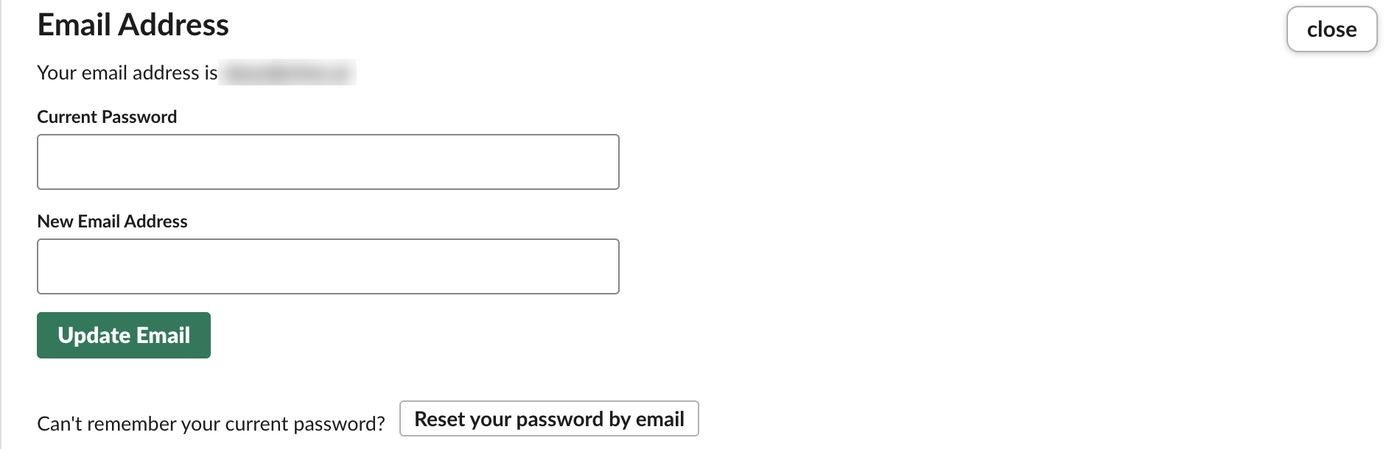
To change your email in Slack, open your workspace's account settings page, click expand next to Email Address, type your current password and the new address, and click Update Email. Slack then emails the new address, and the change takes effect when you confirm it. On October 27, 2026 we opened that form in our Free test workspace as its Primary Owner and checked what an admin can change for someone else. We did not submit the change.
Change your own email
- Open
https://your-workspace.slack.com/account/settingsin a browser, with your own workspace URL in place ofyour-workspace. Where to find your Slack workspace URL shows where to read it. - On the Settings tab, find Email Address. It shows your current address. Click expand.
- Type your Current Password and the New Email Address.
- Click Update Email, then open the confirmation email Slack sends to the new address.
This is the form we saw:
The change applies to one workspace. Each Slack workspace keeps its own account, so if you are in several, repeat the steps in each one; using multiple Slack workspaces explains how those accounts relate.
If you sign in with Google or a magic link
The form asks for your current password, and there is no way around it on that page. If you have always signed in with Google, Apple or an emailed code, you may never have set one. The page offers Reset your password by email right under the form: use it to set a password first, then come back and change the email. Our test account signs in with a password, so we did not run the reset.
Never appear "away" on Slack again
Cloud-based. No downloads. Works 24/7 even when your laptop is off.
Can an admin change a member's email?
Yes, on paid plans. Slack's help says Workspace Owners and Admins can edit a member's email from Admin > People: click the three dots next to the member, choose Edit profile, change the address and save. Slack then sends a confirmation to the new address. The help page lists this for the Pro and Business+ plans, and an admin can only change accounts with a lower role than their own.
On our Free workspace, the Manage members page listed one person, the owner. The three-dot menu on that row had only Edit your profile and Transfer Ownership:
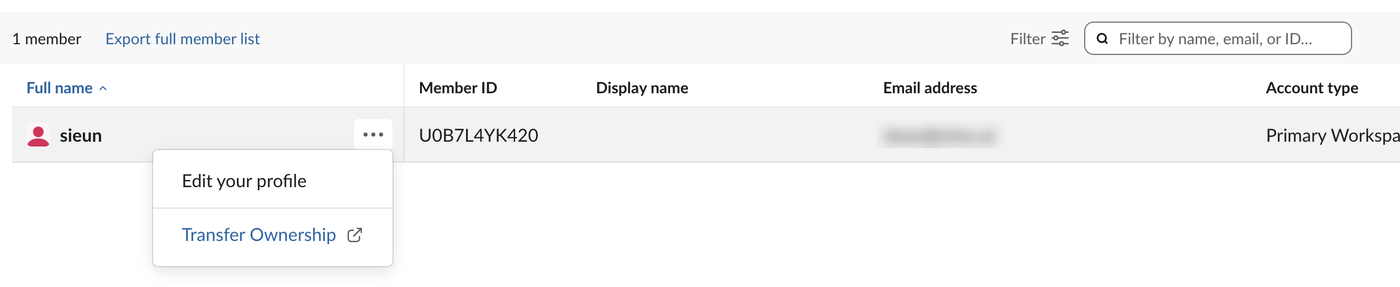
Bot users do not appear on that page, and our test workspace has no second person, so we could not open another member's menu on Free. If you run a Free workspace and someone needs a new address, they can change it themselves with the steps above.
With single sign-on, members can change their email only if the owner allows it in the SSO settings; Slack's help covers that case.
Before you change it
FAQ
Why can't I change my email in Slack?
The usual reasons are a missing password (set one with Reset your password by email), a workspace on SSO that blocks email changes, or a confirmation email that never arrived. Check spam for the confirmation, then try again.
Stop Jiggling Your Mouse.
Join hundreds of remote workers who never worry about their Slack status. Set it up once, stay green forever.
Related Articles
How to Mark a Message Urgent in Slack (There Is No Flag)
Slack has no urgent or priority flag on messages. On October 27, 2026 we checked every menu in the Free plan's message box and message menu and found none. What works instead: a DM, @here or @channel, a reminder on the message, and the reader's VIP and keyword settings.
How to Delete a Thread in Slack (Parent and Replies)
Slack has no delete-thread button. Deleting the first message leaves 'This message was deleted.' with the replies still attached; the thread only disappears once every reply is deleted too. We tested both in the app and through the API on October 27, 2026.
How to Delete Files in Slack (Deleting the Message Is Not Enough)
Delete a Slack file from Files or from the file's own menu with Delete file. In our October 27, 2026 test, Delete message on a file post removed the post but left the file on Slack's servers. We also deleted files in bulk with a short script.