
How to Make a Custom Emoji for Discord (From Any Image)
To make a custom Discord emoji, crop an image to a square, keep it under 256 KB, name it with letters, numbers and underscores, and upload it with Add Emoji in the emoji picker or Server Settings, Emoji. How to make one from a photo, a GIF or text for free, add animation, and use it in other servers.
To make a custom emoji for Discord, start with a square image, keep the file under 256 KB, and give it a name of at least 2 characters using only letters, numbers and underscores. Then upload it: on desktop or in a browser, open the emoji picker and click Add Emoji, which opens Discord's Emoji Studio; or go to Server Settings, Emoji, Upload Emoji. You need to be the server owner or have the Create Expressions permission. Discord accepts JPEG, PNG, GIF and WEBP.
To turn a photo, a GIF or a few words into an emoji file, our free emoji maker crops, removes a plain background, adds animated effects, and downloads a 128 x 128 file. It was built for Slack's 128 KB limit, so every file it makes also fits Discord's 256 KB. Everything runs in your browser.
We build Slack Green, a presence tool for Slack, and a set of free emoji and status tools that work for Discord too. The upload rules below are from Discord's help article "How to Add Custom Emojis on Discord", read on 28 September 2026.
Make the emoji image
Emoji show small in chat, so a simple shape with bold lines reads better than a detailed photo. Crop close to the subject.
From a photo or picture:
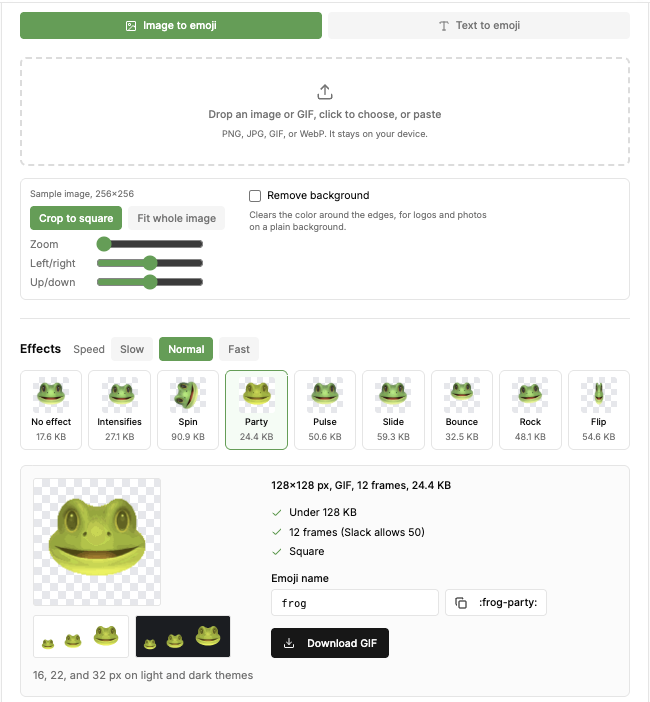
- Open the emoji maker and choose Image to emoji.
- Drop, choose or paste a PNG, JPG, GIF or WebP. It stays on your device.
- Pick Crop to square and use the zoom and position sliders, or Fit whole image.
- Tick Remove background for a logo or a photo on a plain background, so the emoji has no white box in dark mode.
- Download the PNG.
- Open the emoji picker in any message box and click Add Emoji.
- Choose your file.
- Resize, rotate or zoom it, type a name, and pick the server.
- Click Upload Emoji.
- Open the server, then the menu next to the server name, then Server Settings.
- Open the Emoji tab and click Upload Emoji.
- Choose the file, then edit the name in the list if needed.
- • Slots. Discord's FAQ says animated emoji use a separate set of 50 slots that come with Nitro or Nitro Basic.
- • Size. A GIF grows with every frame and color. Keep it at 128 x 128, with few colors and a short loop.
From text: choose Text to emoji and type up to three short lines, such as GG or W. Text emoji are easy to read at small sizes.
Animated: pick an effect: intensifies, spin, party, pulse, slide, bounce, rock or flip. The tool shows each effect's file size under its thumbnail. On the sample frog, Party made a 128 x 128 GIF with 12 frames at 24.4 KB, a tenth of Discord's limit.
One detail to fix before upload: the tool suggests Slack-style names such as frog-party. Discord does not allow hyphens, so rename it frog_party.
Upload the emoji to your Discord server
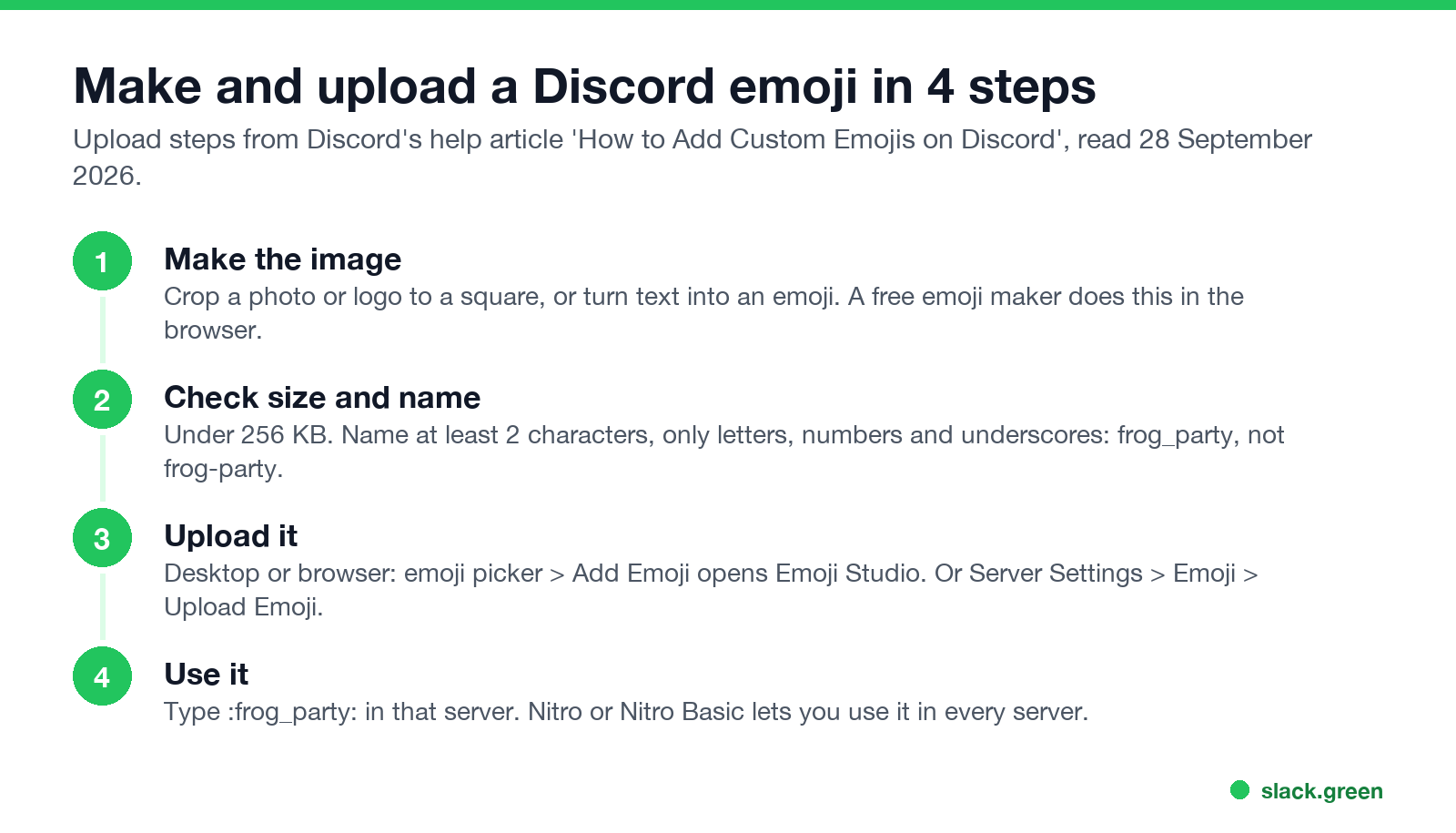
With Emoji Studio (desktop app and browser):
Discord says Emoji Studio is rolling out gradually and is not available on mobile. If you do not see Add Emoji, use Server Settings.
With Server Settings (desktop and mobile):
Anyone who is a member of the server can then use it by typing :frog_party: or picking it from the emoji picker.
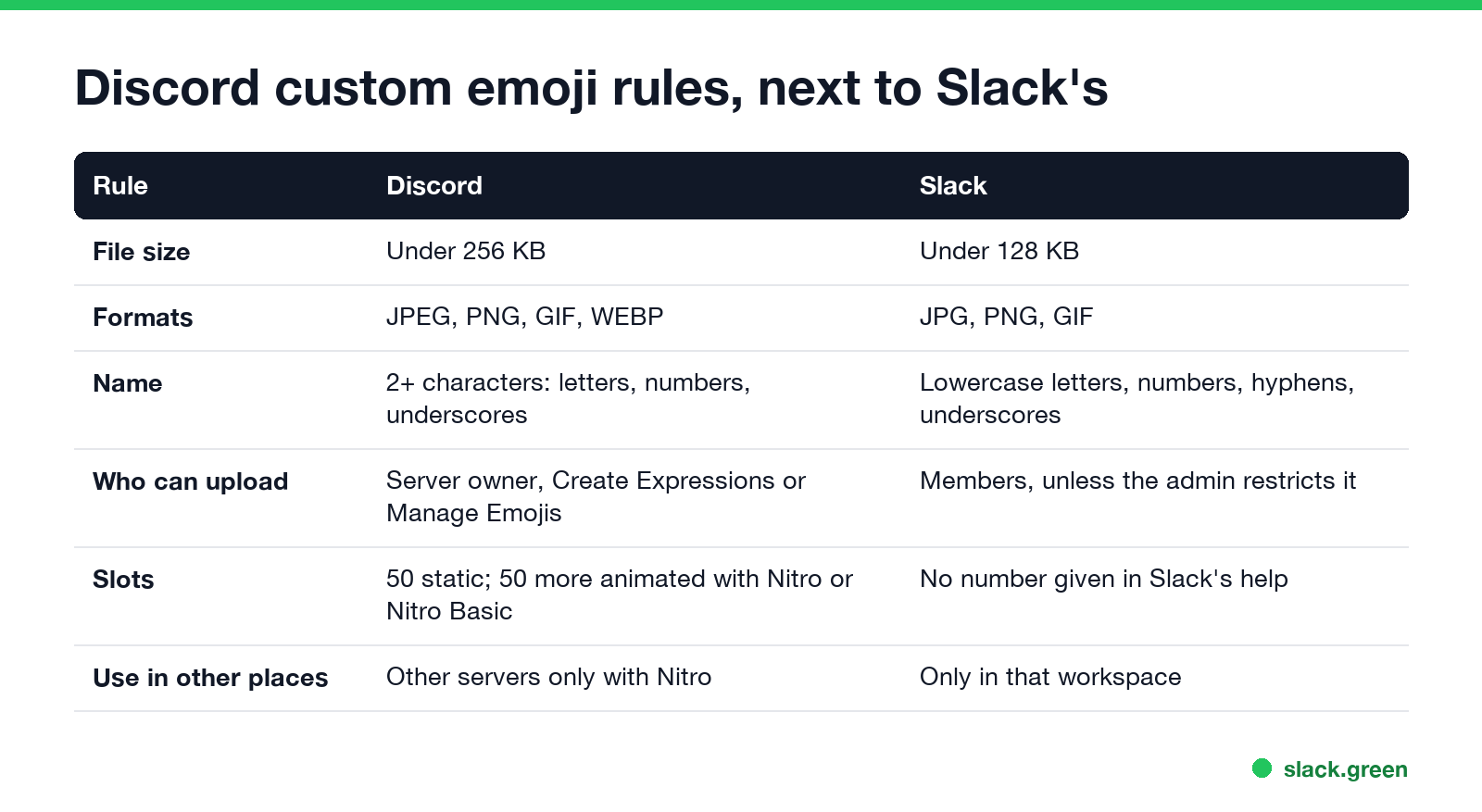
Discord custom emoji rules
| Rule | Discord |
|---|---|
| File size | Under 256 KB |
| Formats | JPEG, PNG, GIF, WEBP |
| Name | At least 2 characters; letters, numbers and underscores only |
| Who can upload | Server owner, or roles with Create Expressions or Manage Emojis |
| Slots | 50 static per server; 50 more for animated emoji with Nitro or Nitro Basic |
| Using it elsewhere | Only in that server, unless you have Nitro or Nitro Basic |
If Discord says the file is too big, the fix is in Discord emoji too big, including a gifsicle command for GIFs. You can also shrink an existing file with our emoji resizer.
Make an animated Discord emoji
Animated emoji are GIFs and upload the same way as static ones. Two things differ:
To make one from a still image, use an effect in the emoji maker. To make one from a video clip, convert the clip to a GIF first; see how to make an emoji from a video.
Use the same emoji in Slack
The file the emoji maker makes works in both apps. Discord needs underscores in the name; Slack accepts hyphens too. Slack's limit is lower, 128 KB, and it adds emoji under Customize workspace, Add custom emoji; see how to add custom emoji to Slack. For ideas, see 40 Slack emoji ideas, and for a status to go with it, the Slack status generator.
FAQ
How do I make a picture into a Discord emoji?
Crop it to a square, keep it under 256 KB, and upload it in Server Settings, Emoji, or with Add Emoji in the emoji picker. A free emoji maker can crop it and remove the background in your browser.
Can I make a Discord emoji on my phone?
You can upload one from Server Settings, Emoji in the mobile app. Emoji Studio, with its crop and rotate tools, is desktop and browser only. The emoji maker runs in a phone browser.
Why can't I add an emoji to my Discord server?
You lack the Create Expressions permission, the server has used its 50 static slots, the file is 256 KB or more, or the name has a hyphen or space.
Do I need Nitro to make custom emoji?
No, for static emoji in your own server. Animated emoji slots and using emoji from one server in another need Nitro or Nitro Basic.
What size should a Discord emoji be?
128 x 128 pixels is the common choice. Discord checks the file size, under 256 KB, not the pixel size.
Related Articles
How to Make an Emoji From a Video (Slack and Discord)
To make an emoji from a video, cut 1 to 2 seconds, crop it to a square, scale it to 128 x 128 and save it as a GIF under 128 KB for Slack or 256 KB for Discord. One tested ffmpeg command, the frame rate and color settings that decide the file size, and a free browser tool that shrinks the GIF for you.
Can Slack Messages Be Subpoenaed? Yes, Here Is How It Works
Yes. Slack messages, including DMs, can be requested in a lawsuit or an investigation. Most requests go to the company that owns the workspace, which exports them. Slack itself gives out message content only with a search warrant and tells the company first. Slack's own policy, its disclosure numbers, legal holds, and what deleted messages mean.
Does Sapience Track Mouse Movement? What It Records and Flags
Sapience records that you used the mouse and keyboard, with a timestamp, and which app, website and window title were in front. It does not record keystrokes, clicks or screenshots. What that means for idle time, meetings, private time and mouse jigglers, from Sapience's own help center.