
How to Schedule a Meeting Across Time Zones (Without Guessing)
Write down each person's working hours in UTC, pick the hour where most of them overlap, rotate the slot nobody likes, and send the invite from a calendar that shows each guest their own time. A worked example for San Francisco, New York, London and Bangalore, the daylight saving weeks that break recurring meetings, and a script that finds the best hour.
To schedule a meeting across time zones, write down each person's working hours in one reference time (UTC), find the hour where the most people are inside their working day, and book that hour from a calendar app that shows every guest the time in their own zone. If no hour works for everyone, rotate the uncomfortable slot so the same person is not always the one staying late. Check the weeks around daylight saving changes, when the gap between cities moves by an hour.
Our free Slack time zone converter does the first two steps: add each teammate and their zone, and it shows everyone's local time and the overlap hours. The rest of this page is a worked example, the calendar settings in Google Calendar, Outlook and Teams, and a short script if you want to check a date in code.
Time zones also change what "online" means. A coworker in London sees your Slack dot go grey after about 10 minutes without input in the Slack window, even in the middle of your day. Slack Green keeps your dot green from a server during the working hours you set.
1. Put everyone's working hours on one clock
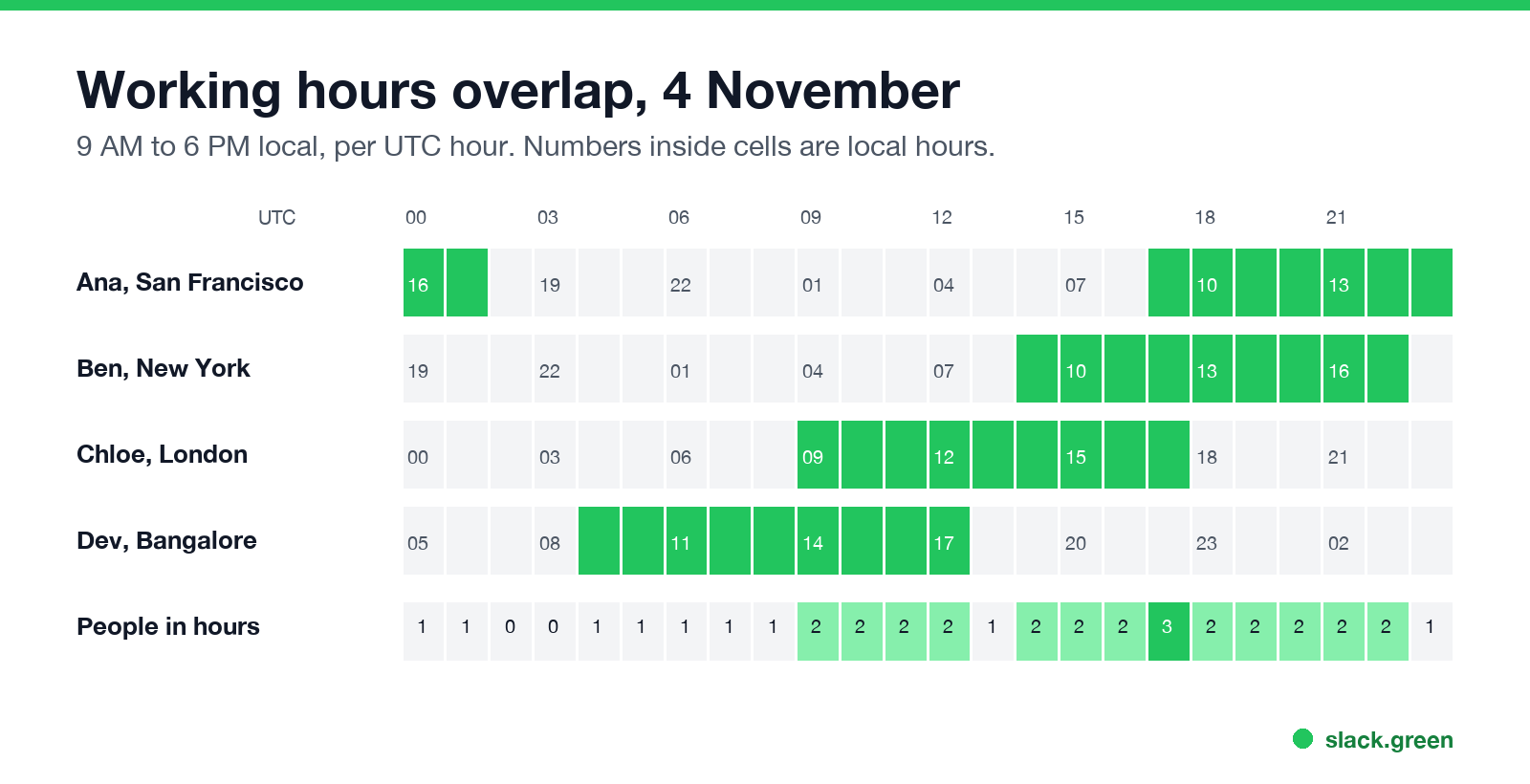
Pick UTC as the reference, because it never changes for daylight saving. For each person, convert the start and end of their working day to UTC. Here is a team of four with 9 AM to 6 PM local hours, on Wednesday 4 November:
| Person | Local hours | Same hours in UTC |
|---|---|---|
| Ana, San Francisco (PST, UTC-8) | 9 AM to 6 PM | 17:00 to 02:00 |
| Ben, New York (EST, UTC-5) | 9 AM to 6 PM | 14:00 to 23:00 |
| Chloe, London (GMT, UTC+0) | 9 AM to 6 PM | 09:00 to 18:00 |
| Dev, Bangalore (IST, UTC+5:30) | 9 AM to 6 PM | 03:30 to 12:30 |
2. Pick the widest overlap
Read the bottom row of the grid. At 17:00 UTC three of the four are inside their day: Ana starts at 9 AM, Ben is at lunch time, Chloe is in her last working hour. Dev would be at 10:30 PM. No hour covers all four, because San Francisco and Bangalore are 13 and a half hours apart.
When no hour fits everyone, you have three honest options:
- • Pick the hour that fits most people, and record the meeting for the one who cannot join.
- • Rotate or split. 09:00 UTC suits London and Bangalore (9 AM and 2:30 PM) but is 1 AM in San Francisco, so rotating between 17:00 and 09:00 UTC only works if each half of the team can skip one of them. Two meetings, one for the Americas and London and one for London and Bangalore, with London as the link, is usually fairer.
- • Go async. A written update in a Slack thread, answered in each person's morning, often replaces the meeting. Scheduled send lets you write it at 11 PM and deliver it at 9 AM their time.
3. Check daylight saving weeks
Never appear "away" on Slack again
Cloud-based. No downloads. Works 24/7 even when your laptop is off.
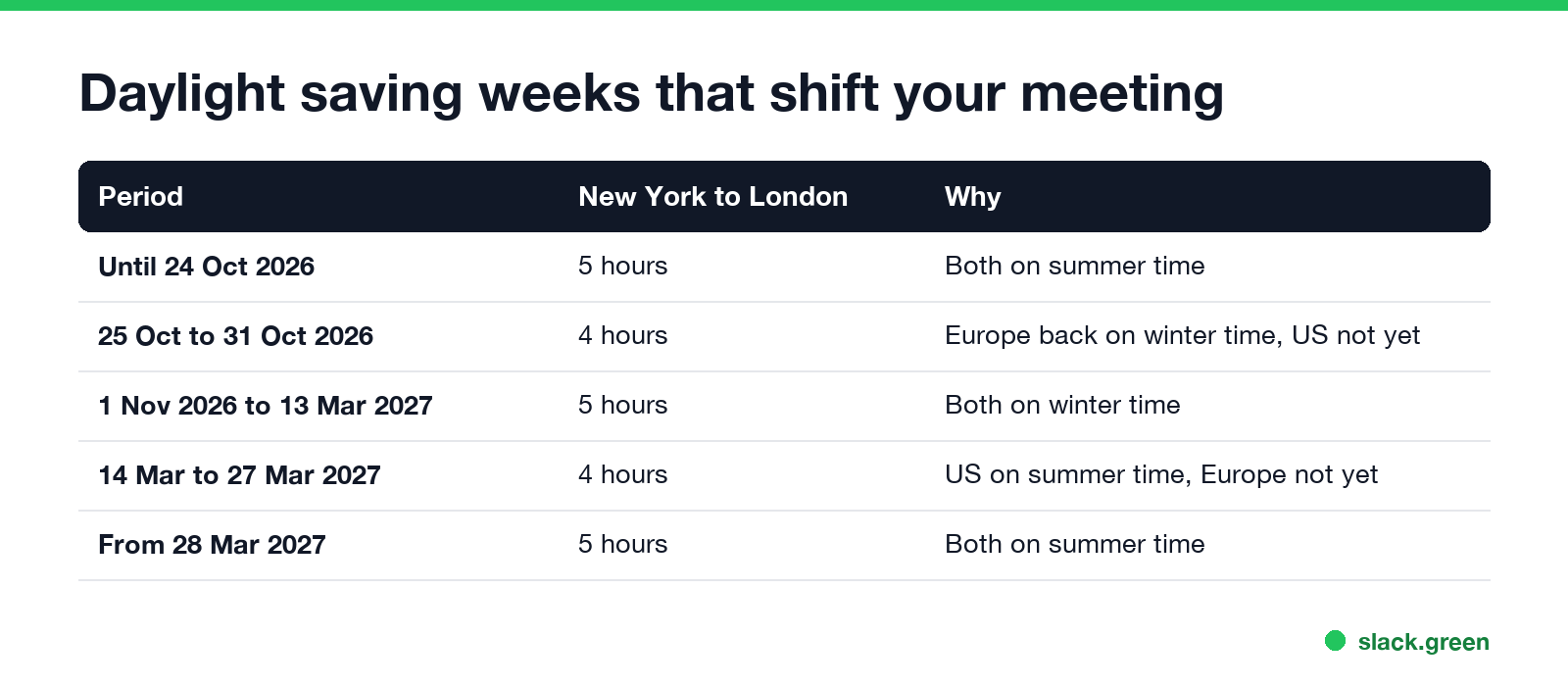
Europe and the US change clocks on different dates. For about three weeks a year the gap between them is one hour shorter:
| Period | New York to London | Why |
|---|---|---|
| Until 24 October 2026 | 5 hours | Both on summer time |
| 25 to 31 October 2026 | 4 hours | Europe on winter time, US not yet |
| 1 November 2026 to 13 March 2027 | 5 hours | Both on winter time |
| 14 to 27 March 2027 | 4 hours | US on summer time, Europe not yet |
| From 28 March 2027 | 5 hours | Both on summer time |
India does not use daylight saving, so its gap to both changes twice a year. Most of Australia moves its clocks in the opposite season. A recurring meeting set in one person's zone stays fixed for them and moves by an hour for everyone else in those weeks. Tell the team, or set the series in UTC if your calendar allows it.
4. Send the invite so everyone sees their own time
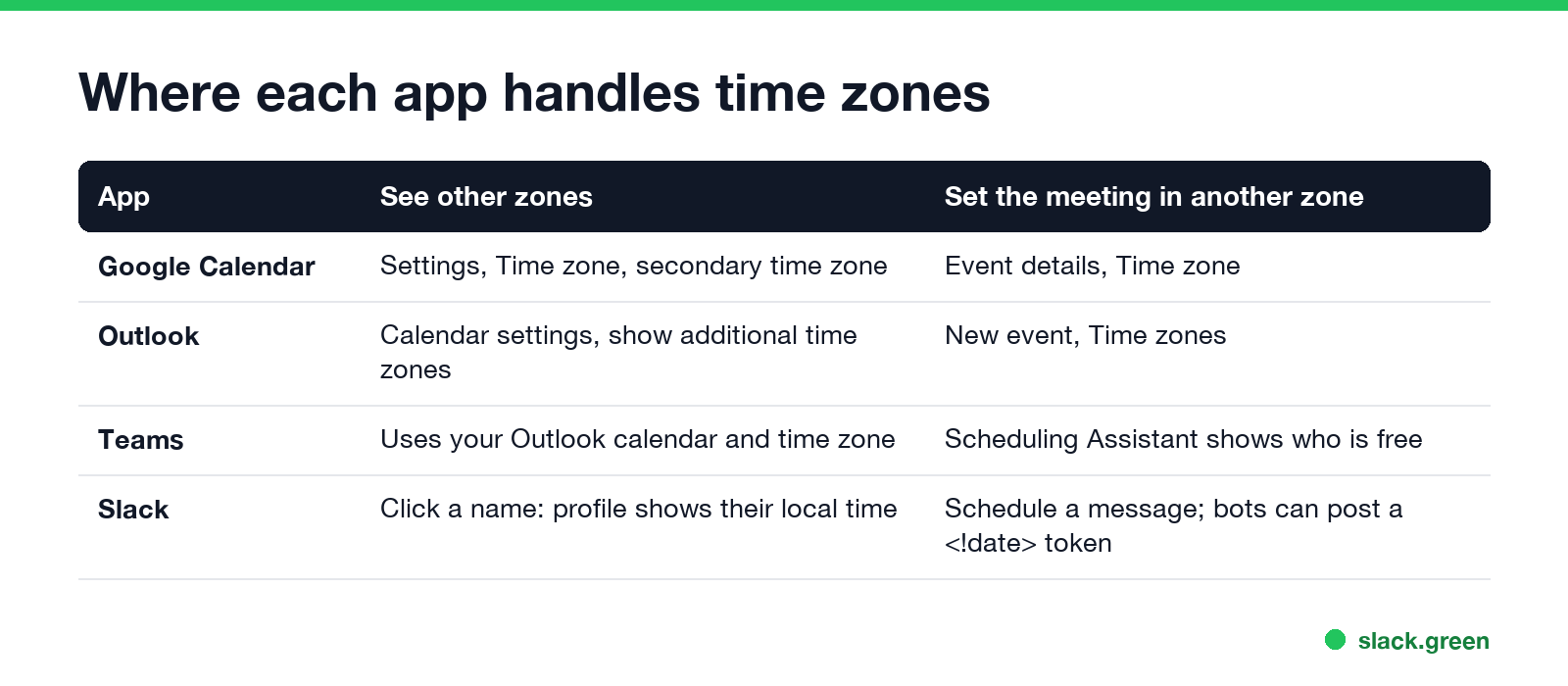
Calendar invites store the meeting as an absolute moment, so each guest sees it in their own zone. The mistakes happen in the text around it. Write times with a zone ("5 PM GMT / 9 AM PT"), never "3 o'clock".
When you post the meeting time in Slack, a bot or workflow can use a date token that Slack shows in each reader's own zone. Our free Slack timestamp generator builds the <!date^...> token for you.
Find the best hour with a script
If you plan meetings for the same group often, this Python script checks a date and lists the three UTC hours where the most people are inside their working day. It uses only the standard library (Python 3.9 or newer for zoneinfo):
from datetime import date, datetime, timezone
from zoneinfo import ZoneInfo

TEAM = {
    "Ana (San Francisco)": "America/Los_Angeles",
    "Ben (New York)": "America/New_York",
    "Chloe (London)": "Europe/London",
    "Dev (Bangalore)": "Asia/Kolkata",
}
WORK_START, WORK_END = 9, 18  # local working hours, 9 AM to 6 PM


def best_slots(day):
    rows = []
    for hour in range(24):
        start = datetime(day.year, day.month, day.day, hour, tzinfo=timezone.utc)
        local = {name: start.astimezone(ZoneInfo(tz)) for name, tz in TEAM.items()}
        inside = [n for n, t in local.items() if WORK_START <= t.hour < WORK_END]
        rows.append((len(inside), start, local, inside))
    rows.sort(key=lambda r: (-r[0], r[1]))
    return rows


day = date(2026, 10, 28)
for count, start, local, inside in best_slots(day)[:3]:
    times = ", ".join(f"{n.split()[0]} {t:%H:%M}" for n, t in local.items())
    print(f"{start:%H:%M} UTC  {count}/{len(TEAM)} in hours  {times}")
For Wednesday 28 October it prints:
16:00 UTC  3/4 in hours  Ana 09:00, Ben 12:00, Chloe 16:00, Dev 21:30
17:00 UTC  3/4 in hours  Ana 10:00, Ben 13:00, Chloe 17:00, Dev 22:30
09:00 UTC  2/4 in hours  Ana 02:00, Ben 05:00, Chloe 09:00, Dev 14:30
Change the date to 4 November and only 17:00 UTC still reaches three people, because London's clocks went back on 25 October and the US clocks follow on 1 November. We ran both dates on 28 September. Edit TEAM with IANA zone names such as Europe/Berlin or Asia/Tokyo, and change WORK_START and WORK_END to your hours.
Rules that keep cross-time-zone meetings fair
Never appear "away" on Slack again
Cloud-based. No downloads. Works 24/7 even when your laptop is off.
More habits for the rest of the day, such as handoff notes and async questions, are in tips for working across time zones.
FAQ
How do I find the best meeting time across time zones?
Convert everyone's working hours to UTC and pick the hour where the most people overlap. Our Slack time zone converter shows the overlap for you.
What is the best meeting time for the US and Europe?
Usually 11 AM to noon Eastern, which is 4 to 5 PM in London and 8 to 9 AM in San Francisco. Check the weeks around daylight saving changes.
What is the best meeting time for the US and India?
There is almost no shared working hour between the US West Coast and India. In winter, 8 to 9 AM in New York is 6:30 to 7:30 PM in India; many teams use that, or go async.
How do I schedule a Teams meeting across time zones?
Create it in Outlook or the Teams calendar as usual. Guests see it in their own zone. Use the Scheduling Assistant to check who is free.
How do I show two time zones in Outlook or Google Calendar?
Outlook: calendar settings, show additional time zones. Google Calendar: Settings, Time zone, display secondary time zone.
Does a calendar invite change for daylight saving?
A recurring meeting stays at the same local time for the organizer's zone, so it moves by an hour for guests in zones that change clocks on other dates.
Stop Jiggling Your Mouse.
Join hundreds of remote workers who never worry about their Slack status. Set it up once, stay green forever.
Related Articles
Slack Emoji for Approved, Perfect and Sounds Good
The Slack emoji for approved is ✅ :white_check_mark:. For perfect, use 💯 :100: or 🤌 :pinched_fingers:; for sounds good or sure, 👍 :+1: or 👌 :ok_hand:. Every code checked in Slack, what each one means to readers, custom LGTM and SGTM emoji, and a pinned legend for approval channels.
Tips for Working Across Time Zones: 10 Habits That Work
Working across time zones works when the team writes things down, keeps a short overlap window for live talk, says the zone with every time, and lets tools deliver messages in each person's working hours. Ten habits, a follow-the-sun handoff note, the Slack settings that help, and a script that shows your team's local times.
Slack Webhook curl Example, Plus Python and Node.js
Send a Slack message with one curl command: POST a JSON body with a text field to your incoming webhook URL, and Slack answers ok. Tested examples for curl, jq, Block Kit, Python with retries and Node.js, how to escape quotes and new lines, and what 400 invalid_payload and 429 mean in code.