
Slack Bot with Ollama: A Local LLM Bot in 34 Lines, Tested
A Slack bot that answers @mentions with a model running in Ollama on your own server, in 34 lines of Bolt for Python over Socket Mode. We ran it on 9 November 2026 with qwen2.5:1.5b on a busy CPU-only box and timed every reply.
To run a Slack bot on a local LLM, put Ollama on a machine you control, connect a Bolt for Python app to Slack over Socket Mode, and have the app send each @mention to Ollama's /api/chat endpoint and write the answer back in the thread. The prompts and answers stay between Slack and your machine, and no model API key is involved. On 9 November 2026 we ran the 34-line app below with Ollama 0.40.15 and qwen2.5:1.5b in Docker on a Linux server with no GPU, and asked it three questions from a test Slack workspace.
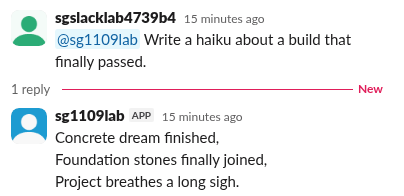
Results
| Question | First token | Full reply | Speed | Answer |
|---|---|---|---|---|
| "In two sentences, what is a Slack incoming webhook?" | 2.05 s | 26.5 s | 1.2 tokens/s | One sentence, half right: it said a webhook lets "your Slack bot" send messages |
| "Write a haiku about a build that finally passed." | 0.75 s | 5.7 s | 3.7 tokens/s | The haiku in the screenshot |
| "What is 17 times 23? Answer with the number only." | 1.19 s | 1.9 s | 7.5 tokens/s | 391 (correct) |
The server was busy with other work: its load average was 208 to 236 on 80 cores during the test, so these speeds are a floor. Expect much faster replies from the same model on an idle machine or a GPU. A 1.5B model is fine for short answers and formatting jobs; for questions about facts, try a larger model, such as a 7B or 8B one, if your hardware has the memory.
Step 1: Run Ollama and pull a model
docker run -d --name ollama -p 127.0.0.1:11434:11434 -v ollama:/root/.ollama ollama/ollama
docker exec ollama ollama pull qwen2.5:1.5b
The model download was 986 MB. Binding the port to 127.0.0.1 keeps Ollama off the network; only the bot on the same machine can reach it. If Ollama runs on another machine, point OLLAMA_URL at it and keep that port behind a firewall or VPN, because Ollama's API has no login.
Step 2: The Slack app
Create a Slack app, turn on Socket Mode and generate an app-level token (xapp-) with connections:write. Add the bot scopes app_mentions:read and chat:write, subscribe to the bot event app_mention, and install the app to get the xoxb- token. The Socket Mode guide walks through those screens, and the bot token guide explains the two tokens. Socket Mode needs no public URL, so the bot can run next to Ollama on a home server or a laptop.
Never appear "away" on Slack again
Cloud-based. No downloads. Works 24/7 even when your laptop is off.
Step 3: The bot
import json, os, re, time
import requests
from slack_bolt import App
from slack_bolt.adapter.socket_mode import SocketModeHandler

OLLAMA = os.environ.get("OLLAMA_URL", "http://localhost:11434")
MODEL = os.environ.get("OLLAMA_MODEL", "qwen2.5:1.5b")
app = App(token=os.environ["SLACK_BOT_TOKEN"])

@app.event("app_mention")
def answer(event, client):
    question = re.sub(r"<@[A-Z0-9]+>", "", event["text"]).strip()
    thread = event.get("thread_ts", event["ts"])
    reply = client.chat_postMessage(channel=event["channel"], thread_ts=thread, text="_thinking..._")
    t0, first, text, last_edit = time.time(), None, "", 0.0
    with requests.post(f"{OLLAMA}/api/chat", stream=True, timeout=300, json={
        "model": MODEL, "stream": True,
        "messages": [{"role": "user", "content": question}],
        "options": {"num_thread": 8},
    }) as r:
        for line in r.iter_lines():
            chunk = json.loads(line)
            text += chunk.get("message", {}).get("content", "")
            first = first or (time.time() - t0)
            if time.time() - last_edit > 1.0 and text:  # one edit a second
                client.chat_update(channel=event["channel"], ts=reply["ts"], text=text + " ...")
                last_edit = time.time()
            if chunk.get("done"):
                tps = chunk["eval_count"] / (chunk["eval_duration"] / 1e9)
    client.chat_update(channel=event["channel"], ts=reply["ts"], text=text)
    print(f"first token {first:.2f} s, total {time.time() - t0:.2f} s, {tps:.1f} tokens/s", flush=True)

if __name__ == "__main__":
    SocketModeHandler(app, os.environ["SLACK_APP_TOKEN"]).start()
Run it:
pip install slack_bolt requests
SLACK_BOT_TOKEN=xoxb-... SLACK_APP_TOKEN=xapp-... \
OLLAMA_URL=http://127.0.0.1:11434 OLLAMA_MODEL=qwen2.5:1.5b python ollama_bot.py
What it does: it strips the mention from the text, posts "_thinking..._" in the thread, streams the answer from Ollama, and edits that message at most once a second with chat.update until the answer is done. Ollama's last stream chunk carries eval_count and eval_duration, which is where the tokens per second in our table come from. Our log for the three questions:
first token 2.05 s, total 26.48 s, 1.2 tokens/s
first token 0.75 s, total 5.74 s, 3.7 tokens/s
first token 1.19 s, total 1.93 s, 7.5 tokens/s
What went wrong first
The model never answered with default threads
Our first run used Ollama's defaults. The model runner started 40 threads, and on our overloaded server it sat in "warming up the model with an empty run" for more than two minutes while three questions waited in Slack with "_thinking..._". We restarted Ollama and added "options": {"num_thread": 8} to the request (the line is in the code above). The next test call answered in 18.5 s including the model load, and the bot replies above followed. On a machine with free cores, the default is fine. On a shared box, set num_thread to the number of cores you can actually spare.
One edit a second, not one per token
Streaming every token into chat.update would mean several edits a second per reply. In our Slack progress bar test, chat.update started to answer ratelimited after about 170 quick edits, so the bot edits at most once a second and once more at the end. A Slack reader cannot tell the difference.
Bolt warned about unhandled message events
Our test app was also subscribed to message.channels, so Bolt logged "Unhandled request" for every channel message. The bot works anyway. Drop that event from the app's subscriptions, or add an empty @app.event("message") handler.
Keep the conversation in the thread
Our bot sends only the latest question. To let it remember the thread, read the earlier messages with conversations.replies (scope channels:history), turn each one into a {"role": "user"} or {"role": "assistant"} message, and send the whole list to /api/chat. Keep the history short with a small model, because a long prompt slows the first token on a CPU.
FAQ
Does a local model keep my Slack messages private?
The question and answer travel between Slack and your machine only. Slack still stores both messages like any other, under your workspace's retention rules, and admins on some plans can export them.
Can I use the OpenAI-compatible API instead?
Yes. Ollama also serves /v1/chat/completions, so code written for the OpenAI client can point its base URL at Ollama. We used the native /api/chat endpoint because its last chunk reports the timings.
Can the bot answer DMs too?
Add the im:history scope and the message.im event, then handle @app.event("message") with a check that event["channel_type"] == "im". Our test covered @mentions in a channel only.
Stop Jiggling Your Mouse.
Join hundreds of remote workers who never worry about their Slack status. Set it up once, stay green forever.
Related Articles
Slack Channel Welcome Message: A Tested Bot and the Free-Plan Catch
Slack has no built-in welcome message per channel, and Workflow Builder is closed to Free workspaces. A 30-line Bolt app that listens for member_joined_channel does the job on any plan. We ran it on 9 November 2026 and timed the welcome.
ngrok for a Slack Bot: What It Needs, and Two Free Alternatives Tested
A Slack bot on localhost needs a public HTTPS URL for events and slash commands, or Socket Mode. We tried ngrok 3.39.13 with no account (ERR_NGROK_4018), a Cloudflare quick tunnel and Socket Mode on 8 November 2026, timed the replies, and broke the tunnel URL on purpose.
Slack Progress Bar: Block Kit, Emoji and chat.update, Tested
Block Kit has no progress bar element, so a Slack progress bar is text you redraw with chat.update. We drew one three ways on 9 November 2026, timed every update, and pushed chat.update until Slack answered ratelimited.