
Leave Multiple Slack Channels at Once: 4 Ways Timed, Plus a Script
Slack has no bulk leave button. We made 12 test channels and left them with the sidebar menu, the channel browser, /leave and a 30-line script, and timed each way.
Slack has no button that leaves several channels at once. In Slack web you leave them one at a time, and the fastest way by hand is the channel browser, where each channel takes one click. For more than a handful, a short script that calls conversations.leave is faster: ours left 4 channels in 2.7 seconds. On 8 October 2026 we created 12 test channels in a free-plan workspace, joined them, and left them with four different methods.
The four ways, timed
Our clicks were made by browser automation, so a person will be slower on every row. The order between the rows is what matters.
| Way | Channels | Time per channel | Confirm step |
|---|---|---|---|
Script with conversations.leave | 4 | 0.7 s (2.7 s total) | None |
| Sidebar: right-click, Leave channel | 3 | 1.3 to 1.4 s | None |
| Channel browser: hover Joined, click Leave | 3 | 2.1 s | None |
Type /leave in the channel, press Enter | 2 | 5.2 to 5.4 s, plus opening the channel | None |
None of the four asked for confirmation on a public channel.
Sidebar right-click
Right-click a channel in the sidebar and pick Leave channel at the bottom of the menu. Slack then opened the channel above it, so the next right-click target moved up under the pointer.
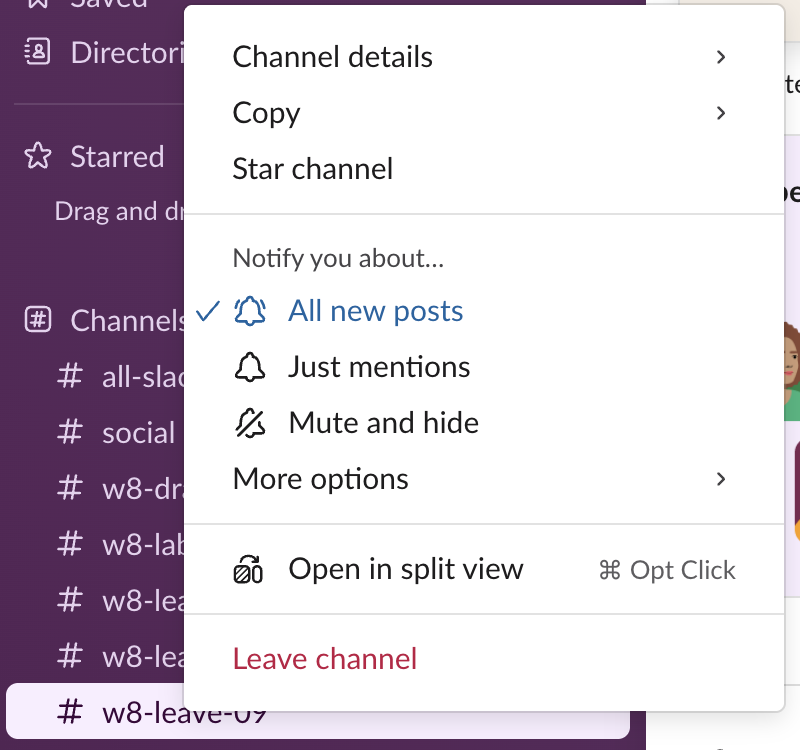
We tried to select several channels first with Cmd+click, as in a file manager. Slack web does not support that: Cmd+click opened the channel instead, and the menu lists Cmd+Option+click for Open in split view. Dragging channels into a custom section does not leave them either; see Slack sidebar sections if the goal is a tidier sidebar.
The channel browser
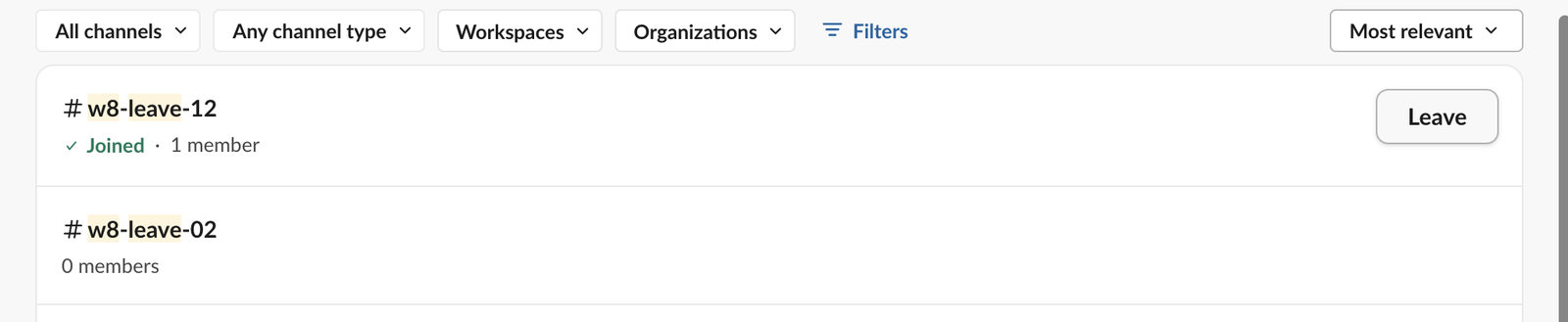
Press Cmd+Shift+L (Ctrl+Shift+L on Windows) or open Directories > Channels, type part of the channel names, and press Enter. Each joined channel shows a green "Joined" under its name. Hover the Joined button at the right and it changes to Leave. This way works best when your channels share a prefix, such as an old project's name, because the search keeps them together.
The member count in the list did not update right away: our three channels still read "1 member" after we left them.
Never appear "away" on Slack again
Cloud-based. No downloads. Works 24/7 even when your laptop is off.
/leave in the channel
Type /leave and Slack offers "Leave this channel"; press Enter. It is the slowest way here because you have to open each channel first. Slack also accepts /close and /part as names for the same command.

A script to leave many channels
The script lists the channels you are in with users.conversations, keeps the ones whose names match a pattern, and leaves each one. It needs a user token (xoxp-) with channels:read and channels:write, plus groups:read and groups:write for private channels. You can get one by creating a Slack app, adding those user scopes and installing it to your workspace. Keep the token in an environment variable, not in the file.
import os, re, sys, time, requests

TOKEN = os.environ["SLACK_USER_TOKEN"]  # xoxp- user token with channels:read, channels:write
PATTERN = re.compile(sys.argv[1])        # e.g. "^w8-leave-0[1-4]$"
API = "https://slack.com/api/"
H = {"Authorization": "Bearer " + TOKEN}

def call(method, **params):
    while True:
        r = requests.post(API + method, headers=H, data=params, timeout=30)
        if r.status_code == 429:
            time.sleep(int(r.headers.get("Retry-After", "1")))
            continue
        return r.json()

channels, cursor = [], ""
while True:
    page = call("users.conversations", types="public_channel,private_channel",
                exclude_archived="true", limit="200", cursor=cursor)
    channels += page["channels"]
    cursor = page.get("response_metadata", {}).get("next_cursor", "")
    if not cursor:
        break

targets = [c for c in channels if PATTERN.search(c["name"])]
print(f"member of {len(channels)} channels, {len(targets)} match")
t0 = time.time()
for c in targets:
    r = call("conversations.leave", channel=c["id"])
    print(f'{c["name"]:<16} ok={r["ok"]} {r.get("error", "")}')
print(f"left {len(targets)} channels in {time.time() - t0:.1f} s")
We ran it with SLACK_USER_TOKEN set and the pattern ^w8-leave-0[1-4]$:
$ uv run --with requests python leave_channels.py "^w8-leave-0[1-4]$"
member of 16 channels, 4 match
w8-leave-01      ok=True
w8-leave-02      ok=True
w8-leave-04      ok=True
w8-leave-03      ok=True
left 4 channels in 2.7 s
To leave every channel, pass . as the pattern. One channel will refuse: Slack returned cant_leave_general for the workspace's general channel, which nobody can leave. A channel you already left returns ok: true with not_in_channel: true, so running the script twice is safe. A bot token gets not_in_channel from a channel its bot never joined. Our add user to channel API test covers the matching join and invite calls.
Does anyone see that you left?
That depends on one workspace setting, Show a message when people join or leave channels, in Admin > Settings & permissions. In our workspace it was off, and none of the four ways posted anything: each channel's history held only the "joined" line from when we created it. We switched the setting on, joined one test channel and left it again with the API. This time Slack posted "has left the channel" in it. Then we switched the setting back off.
Nobody gets a notification either way; our page on whether Slack notifies when you leave a channel has the full list. If you want a channel out of the way without leaving, mute it.
FAQ
Can I leave several channels from the Slack mobile app at once?
We did not test the mobile app. In Slack web there is no multi-select for leaving, so use the channel browser or the script.Will leaving remove my old messages?
No. Leaving takes the channel out of your sidebar and stops its notifications. Your messages stay in the channel, and you can rejoin a public channel from the channel browser at any time.Stop Jiggling Your Mouse.
Join hundreds of remote workers who never worry about their Slack status. Set it up once, stay green forever.
Related Articles
Slack Daily Standup Without a Paid Bot: /remind, Workflow Builder and a Script
We set up a weekday 9:30 standup in a free Slack workspace three ways: a /remind reminder, Workflow Builder, and a short script that posts the questions and collects the thread replies.
Slack Tabs Under a Channel Name: What Each One Is and How to Edit Them
We added, renamed, moved, hid and deleted the tabs under a channel name in Slack web on the Free plan, and compared them with the tabs in a DM.
How to Delete Someone Else's Message in Slack, Tested as Workspace Owner
As the owner of a free-plan workspace we deleted an app's message, a webhook message and two system messages, in Slack web and with the API, and checked which settings exist.