
Slack Not Loading New Messages? What We Saw and How to Fix It
Slack stops loading new messages when its live connection drops. We broke it two ways in a real workspace and timed the fixes.
If Slack is not loading new messages, its live connection to Slack's servers has dropped, so nothing new arrives until it reconnects. Press Cmd + R (Mac) or Ctrl + R (Windows) to reload, or click Load new messages if Slack shows that link at the top of the channel. If messages stop again soon after, a VPN, proxy or firewall is probably blocking Slack's WebSocket connection, which is the channel new messages travel on.
We broke that connection on purpose on 22 November 2026, in Slack's web app with a member account in a Free test workspace, while a test app posted messages into the channel. The two ways it broke look different on screen, so it helps to know which one you have.
What we saw when Slack stopped loading new messages
Test 1: the network goes away. We cut the browser's network, then posted a message from the app. After 30 seconds the message was still not on screen, and a small line under the message box read Slack is trying to connect. That line is easy to miss, because it sits in the gray text under the composer:
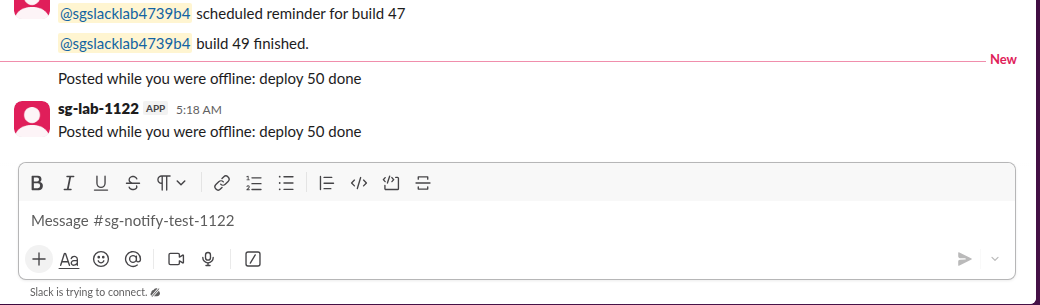
When we turned the network back on, the line went away after 1.2 seconds and the missing message appeared after 4.3 seconds, with no reload. So when the connection is gone, Slack tells you and catches up by itself.
Test 2: the page loads, but the live connection is refused. This is what a strict company proxy, some VPNs and some firewalls do: normal web traffic gets through, but WebSocket connections to Slack do not. We refused only the WebSocket and reloaded Slack. The channel loaded, the old messages were there, and there was no 'trying to connect' line. Slack retried the connection 9 times in about 75 seconds without success. The app posted a new message, and 45 seconds later it still had not appeared. The only sign was a gray bar at the top of the channel:
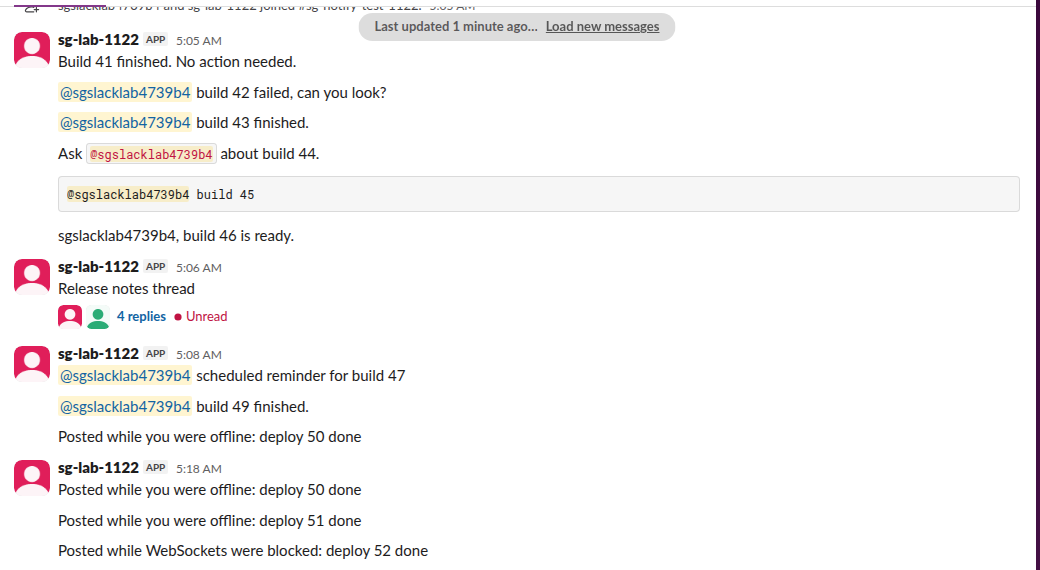
Clicking Load new messages fetched the channel over normal web traffic, and the missing message showed up under the red New line:
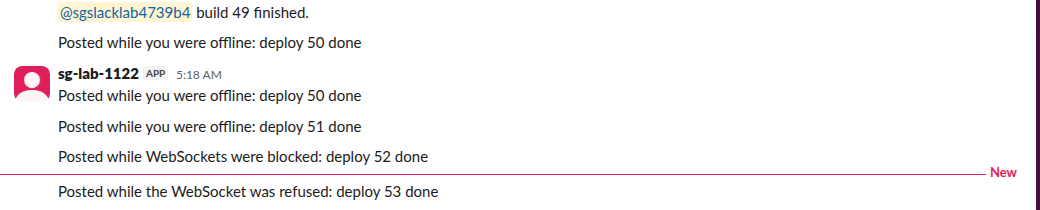
So this second case is the sneaky one: Slack looks connected, the channel looks quiet, and new messages only arrive when you reload or click the link.
| What you see | What it means | First fix |
|---|---|---|
| 'Slack is trying to connect.' under the message box | No connection at all | Check Wi-Fi, VPN, then reload |
| 'Last updated ... Load new messages' bar | Pages load, live updates do not | Click the link, then check the VPN or proxy |
| Everyone shows offline at once | Same lost live connection | Reload; see below |
| Your sent message stays gray | It has not reached Slack yet | Wait for the connection, or copy and resend |
A gray message you sent is the same problem from the other side; our test of that is in why a Slack message turns gray.
Fixes, in the order to try them
- Check Slack's own status. Open status.slack.com. If Slack reports a messaging incident, waiting is the fix.
- Reload Slack. Cmd + R on a Mac, Ctrl + R on Windows and Linux, or reload the browser tab. This reopens the live connection and fetches what you missed. It does not sign you out.
- Click Load new messages when the gray bar shows. It fetches the current channel even when the live connection keeps failing.
- Turn off the VPN or proxy for a minute. If new messages start arriving at once, ask IT to allow WebSocket connections to Slack's
wss-primary.slack.comandwss-backup.slack.comhosts. In Test 2 that was the only thing blocked, and Slack never said so. - Clear the cache. In the desktop app, open Help, then Troubleshooting, then Clear Cache and Restart. Our Slack cache guide shows what that removes and what it keeps.
- Update or reinstall the app if only the desktop app is stuck and Slack in a browser works.
If every coworker suddenly looks offline at the same time, it is the same lost connection; Slack showing everyone offline covers that view of it.
Never appear "away" on Slack again
Cloud-based. No downloads. Works 24/7 even when your laptop is off.
New messages on your phone but not on your computer
A phone notification comes from Apple's or Google's push service, while the desktop app gets messages over its own live connection. So you can get a notification on your phone for a message your computer does not show yet. That points at the computer's connection, not at your account, and the reload in step 2 usually brings the message in. If notifications themselves stop, that is a different problem, covered in Slack notifications not working.
FAQ
Why does one channel not update while others do? In our tests a broken connection affected every channel at once. If only one channel lags, reload and check whether you muted it, because a muted channel does not turn bold for new messages.
Does reloading Slack lose my draft? No. Slack keeps drafts on its servers and in the app, and a reload brings them back in the message box.
How long does Slack take to catch up after the internet comes back? In our test the 'trying to connect' line cleared in 1.2 seconds and the missed message appeared in 4.3 seconds, with no click needed.
Stop Jiggling Your Mouse.
Join hundreds of remote workers who never worry about their Slack status. Set it up once, stay green forever.
Related Articles
How to Resolve or Close a Slack Thread (and Who Can Lock One)
Slack has no Resolve or Close button for threads. We checked every thread menu as a member, found the admin-only lock in Slack's code, and tested the workarounds that do work: a checkmark, a to-do you mark complete, and muting replies.
Slack Canvas Table of Contents: The Built-in Outline and Section Links
Every Slack canvas already has a table of contents: hover the short lines at the left edge and a list of all headings opens. For a contents list inside the canvas, copy a link to each heading and paste them as a list. We tested both on October 28, 2026.
How to Mute Someone on Slack: DMs, Hide Person and What Still Shows
Slack has no mute button for a person across all of Slack. You can mute your DM with them, which stops notifications but still shows a number badge, or use Hide person. We muted a DM and tested what still came through on October 28, 2026.