
Why Is My Slack Message Grey? (Tested)
A grey Slack message has not reached Slack yet. We cut the connection, measured the grey text, and checked the grey lines that are normal.
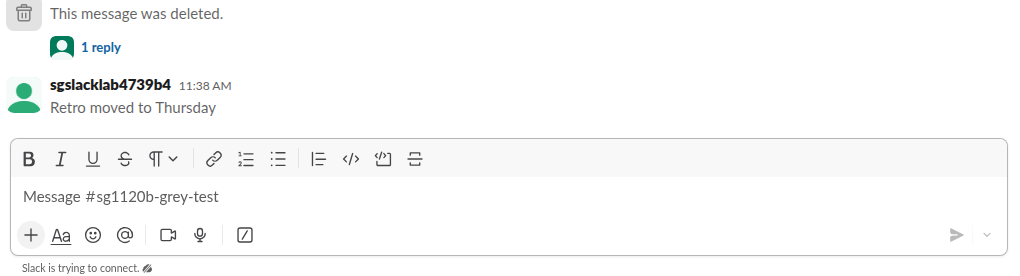
A Slack message turns grey when it has not reached Slack's servers yet, usually because your connection dropped. In our test the text of an unsent message was drawn at 70% opacity, and the line 'Slack is trying to connect.' appeared under the message box. Nobody else could see the message until the connection came back. Grey text is also normal in three other places: system lines such as 'joined the channel', the 'Only visible to you' label and 'This message was deleted.' We reproduced each case on 21 November 2026 in the Slack web app.
The usual cause: the message is not sent yet
We cut the browser's network with the message pane open, typed a message and pressed send. Slack added it to the channel straight away, but in grey, and showed 'Slack is trying to connect.' below the composer:
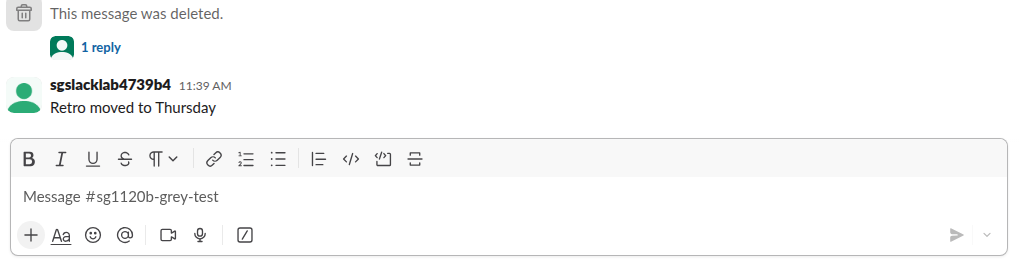
Then we turned the network back on:
What we measured:
| Step | What we saw |
|---|---|
| Offline, right after sending | Text color rgba(29, 28, 29, 0.7) against the normal rgb(29, 28, 29) |
| Offline for 90 seconds | Still grey, no error, no retry button |
| Server side while offline | conversations.history did not have the message |
| Back online | Text turned black and the message reached the server 10.7 seconds later |
| Timestamp | Changed from 11:36 AM to 11:38 AM, the time it was delivered |
The last row is easy to miss. A message written offline gets the time it was delivered, not the time you typed it, so a reply can land after messages that were sent later.
How to fix a grey message
- Look under the message box. If it says 'Slack is trying to connect', the problem is your network, a VPN or a proxy, not the message.
- Wait for the connection to return. In our test the queued message went out by itself, so there was no need to retype it.
- If Slack stays disconnected while other sites load, reload the app (Ctrl+R or Cmd+R). If the app will not load at all, see Slack app not opening.
- Open the channel from another device. If the message is missing there, it was never sent.
Never appear "away" on Slack again
Cloud-based. No downloads. Works 24/7 even when your laptop is off.
Grey text that is normal
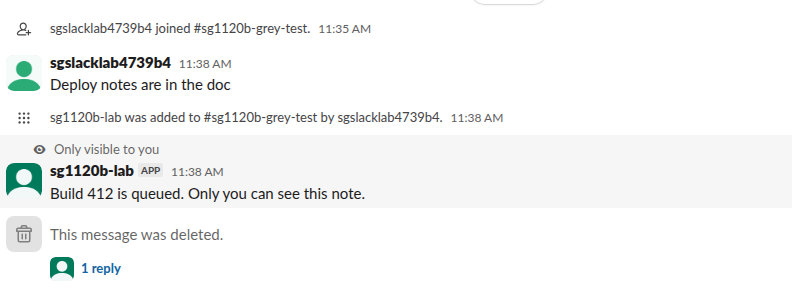
Not every grey line means trouble. We posted each of these in one channel and read the computed colors:
| What you see | Color we measured | What it means |
|---|---|---|
| 'joined #channel', 'was added to #channel by' | rgb(97, 96, 97) | System line; everyone sees it |
| 'Only visible to you' above a message | Label at 0.7 opacity; message text black on a tinted background | An ephemeral app message only you can see |
| 'This message was deleted.' | 0.7 opacity | The original was deleted, and the placeholder stays because the message had a thread reply |
The deleted-message placeholder is a real message: the API returned it as user: USLACKBOT with subtype: tombstone. What admins can still read after a delete is covered in can Slack see deleted messages. Ephemeral messages vanish when you reload, which is the subject of our Slack ephemeral message test.
FAQ
Does the other person see my grey message? No. While it was grey in our test, the server had no copy, so no one else could see it.
Why did my message jump below newer ones? Because it was delivered late. Slack gave our offline message the time it reached the server, two minutes after we typed it.
Is a grey name in the sidebar the same thing? No. A grey or bold channel name is about unread messages, and a grey dot by a person is their status. See Slack status icons.
Stop Jiggling Your Mouse.
Join hundreds of remote workers who never worry about their Slack status. Set it up once, stay green forever.
Related Articles
Slack Forward Multiple Messages: No Multi-Select, 3 Workarounds Tested
Slack forwards one message at a time. We checked the message menu, shift-click and the forward dialog, then tested three ways to move 10 messages at once: a thread, a copied range, and a script that posts links.
How to React to a Message in Slack: Click, Shortcut or +:emoji:
Hover a Slack message and click Add reaction, or send +:emoji: to react to the last one. Plus the limit we measured, 23 different reactions per person per message, and Slack's own reaction meanings.
Slack Custom Emoji Not Showing? What Each Symptom Means
When a Slack custom emoji shows as its :name: code, it was deleted or renamed, it belongs to another workspace, or your emoji display is set to plain text. A blank square means the image did not load. Fixes for each case, plus emoji missing from the picker and emoji that do not move.