
Slack Public File Link: How to Share a File Outside Slack
A normal Slack file link only opens for people signed in to your workspace. A public link needs an admin setting and a user token. Our signed-out tests and API errors.
A Slack file link from Copy link to file opens only for people who are signed in to your workspace and can see the conversation it was posted in. Anyone else lands on Slack's sign-in page. A real public link, one that opens for anybody, exists only if your workspace allows public file sharing; then a member can create it, and an app can create it only with a user token through files.sharedPublicURL.
We tested this on 25 November 2026 with a PDF posted in a private channel of a Free test workspace, as an ordinary member, and opened every link the file has in a browser with no Slack session.
What 'Copy link to file' gives you
Hover a file in a message and open its More actions menu (the three dots on the file card). In our workspace the menu had Copy link to file and Open in new tab, and no item for an external or public link:
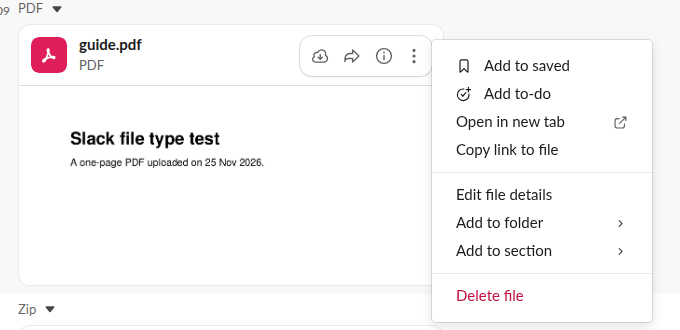
That copied link has the form https://<workspace>.slack.com/files/<user ID>/<file ID>/<name>. Opened in a signed-out browser, it redirected to the workspace's sign-in page:
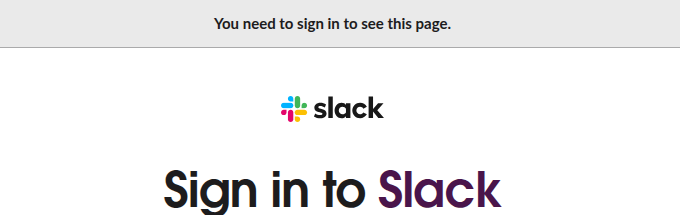
So you can paste this link anywhere inside Slack, and members who can see the channel will open the file. It is useless for a client or anyone without an account.
Every link a file has, opened signed out
files.info lists four URLs for each file. We opened each with no Slack cookies:
| What we tried (25 Nov 2026) | Result |
|---|---|
| Open the file link (from Copy link to file) in a signed-out browser | Redirect to the workspace sign-in page: "You need to sign in to see this page." |
Open url_private or url_private_download signed out | HTTP 403, then the same sign-in page |
Open the permalink_public URL before sharing it | HTTP 404, "The requested file could not be found." |
files.sharedPublicURL with the member's own session, 3 different files | not_allowed each time |
files.sharedPublicURL with a bot token | not_allowed_token_type |
files.revokePublicURL with the member's session | ok: true, and the permalink_public secret changed |
Note the permalink_public URL. Every file has one in its files.info data, even when it was never shared, but it returns 404 until a public link is created. Finding that URL in API output does not mean the file is public; check public_url_shared, which stayed false for our file.
Never appear "away" on Slack again
Cloud-based. No downloads. Works 24/7 even when your laptop is off.
How to make a public link
- An admin must allow it. Public file sharing is a workspace setting that owners and admins control. In our workspace it was not available: the member's file menu had no public-link item, and
files.sharedPublicURLanswerednot_allowed, which is the error Slack returns when public sharing is turned off for the team. - Use a user token in an app.
files.sharedPublicURLrefused our bot token withnot_allowed_token_type, so an app has to act for a person, with a user token (xoxp-) that has thefiles:writescope. - Revoke when done.
files.revokePublicURLworked with the member's session and changed the secret at the end ofpermalink_public, so an old public URL stops working even if the file is shared again later. - • Download and send it. The file's Download button gives you the original, which you can email or put in your usual file storage.
- • Invite the person. A guest or a Slack Connect channel gives an outsider signed-in access to just the conversations you choose; Slack Connect vs guest accounts compares the two.
- • Post a link to the file where it already lives. If the file is in Google Drive, Dropbox or OneDrive, sharing that link keeps the access rules in that service.
Ways to share a file outside Slack without a public link
Removing the message does not remove the file itself; where Slack files are stored explains how long files stay and who can find them.
FAQ
Can someone outside my workspace open a Slack file link? Not a normal one. Our signed-out browser got the sign-in page for the file link and HTTP 403 for the download URL.
Why does files.sharedPublicURL return not_allowed?
Public file sharing is off for the workspace. It returned not_allowed for all three files we tried, as a member of our test workspace.
Can a bot create a public file link?
No. With a bot token the method answered not_allowed_token_type; it needs a user token.
Stop Jiggling Your Mouse.
Join hundreds of remote workers who never worry about their Slack status. Set it up once, stay green forever.
Related Articles
Slack: Download All Files From a Channel (Script and Test)
Slack has no download-all button for a channel. We uploaded 8 files, checked what the Files tab and search show, and ran a files.list script that saved all 8, after it first found only 4.
Slack File Size Limit: 1 GB Is Exactly 1,073,741,824 Bytes, Tested
We uploaded files of 50 MB, exactly 1 GiB and 1 GiB plus one byte to Slack through its upload API. The limit is 1,073,741,824 bytes, and a failed upload can still leave a broken file behind.
Slack files.upload Deprecated: The 3-Step Upload That Replaces It
files.upload now returns method_deprecated. Use files.getUploadURLExternal, POST the bytes, then files.completeUploadExternal, or files_upload_v2 in the SDK. Tested with curl and Python, including two silent failures.