
Slack Reminder Not Working? Six Failures We Reproduced
Most broken Slack reminders are misread commands, or reminders that did fire but went to Activity and Later instead of a Slackbot DM. Each failure below was reproduced in Slack on 29 September 2026.
When a Slack reminder seems not to work, it usually did one of two things. It fired, but into the Activity and Later tabs, because Slackbot no longer sends reminders as a DM. Or /remind read your command differently from what you meant, and set it for another time or not at all. We typed every command on this page into the Slack web app on 29 September 2026 and copied Slackbot's replies word for word.
The reminder fired, but not where you looked
We set a reminder for two minutes ahead and watched. When it came due, nothing arrived in the Slackbot DM. It appeared as a card in Activity, and the Later tab put it at the top of the list with a yellow "Overdue" label.
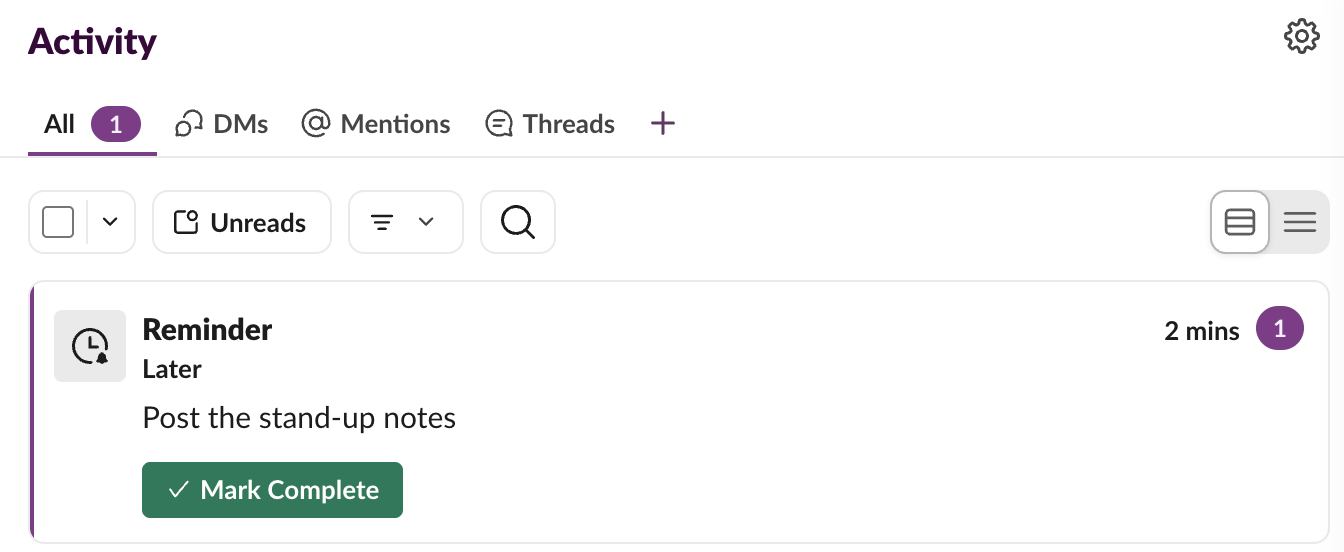
If you are waiting for a Slackbot message, check Activity. If the card is there but no banner or sound came with it, the reminder worked and the notification did not; the checks for that are in Slack notifications not working.
Recurring reminders are harder to find. They do not appear in Later before they fire, and /remind list is the only place they are listed. See how to edit a Slack reminder for where each kind lives.
"Sorry, I didn't quite get that"
This is Slackbot's reply to any /remind it cannot parse, and the reminder is not created. Three commands gave it in our test:
| Command we typed | Why it failed | What worked |
|---|---|---|
/remind me to check the deploy | No time or day | /remind me to check the deploy at 4pm |
/remind me to stretch every hour | Reminders repeat by day, never by hour or minute | One reminder per time, or a workflow with a schedule |
/remind me to plan the trip every weekend | "Weekend" is not a repeat Slack knows | /remind me to plan the trip every Saturday and Sunday at 10am |
A failed command also stays in the message box after Slackbot answers. Clear it before you type the next one, or the two run together.
Never appear "away" on Slack again
Cloud-based. No downloads. Works 24/7 even when your laptop is off.
The reminder was set for the wrong time
These are worse, because Slackbot answers "I will remind you" and you only find out when nothing happens at the time you meant.
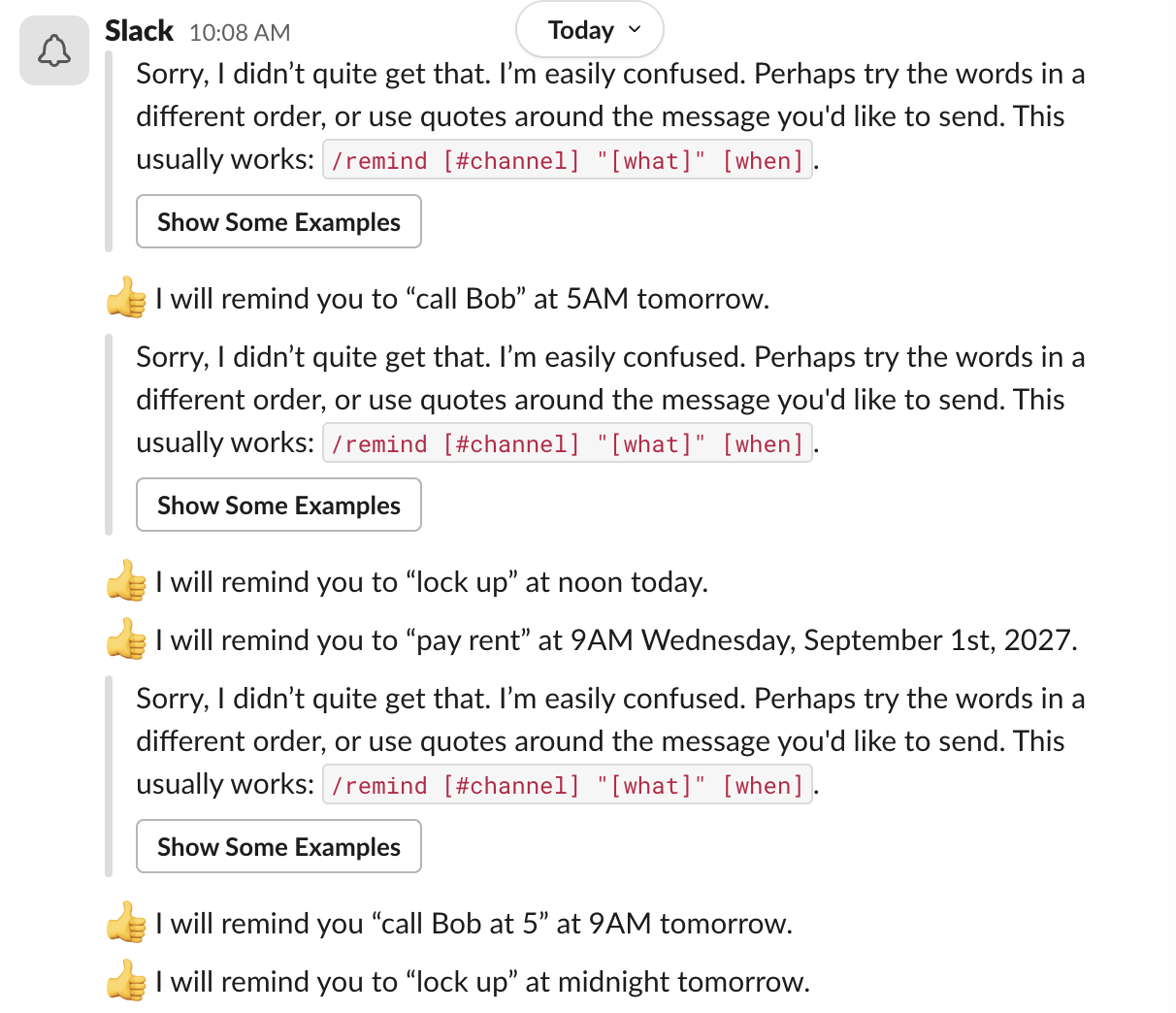
- • A time inside the message wins.
/remind me to call Bob at 5 tomorrow at 9ambecame "call Bob" at 5AM tomorrow. Slack took "at 5" as the time, read it as 5 a.m., and dropped both "at 5" and "at 9am" from the text. Put the message in quotes:/remind me "call Bob at 5" tomorrow at 9amgave "call Bob at 5" at 9AM tomorrow. - • 00:00 means noon.
/remind me to lock up at 00:00was set for noon today.at 12amgave midnight. - • A past date jumps a year. On 29 September,
on September 1 at 9amwas set for Wednesday, September 1st, 2027, with no warning. Always read the date in Slackbot's reply. - • A day without a time fires at 9 a.m.
/remind me to water the fern tomorrowwas set for 9AM tomorrow, the default reminder time. Change the default under Preferences if 9 a.m. is wrong for you.
Slackbot writes the full date and time into every confirmation, so reading that one line catches all four.
Reminders for other people and channels
Slack's help center lists personal, message, list, canvas and channel reminders, and no reminder for another person. To reach one coworker, remind a channel they are in and mention them in the text, or schedule a DM to them.
To check that a channel reminder still exists, run /remind list in that channel. It is listed under In this channel, with a Delete button. When we created one, Slack also posted "set up a reminder ... in this channel at 4PM every Thursday, Korea Standard Time" for the whole channel to see, so the time zone it uses is written there.
The /remind builder writes a command in the order Slack parses, with the message in quotes, if you would rather not trust your own wording.
FAQ
Can I set a reminder without typing /remind?
Yes. Click Later in the sidebar, then the + (New reminder) at the top of the list, and pick a time. Nothing needs parsing, so none of the misreads above can happen.
Can Slack remind me every 30 minutes?
No. /remind rejects "every hour" and "every 15 minutes". The shortest repeat is daily, including every weekday.
Why did my reminder disappear from Later?
If you marked it complete, it moved to the Completed tab at the top of the Later list. We checked this by completing a fired reminder; it left In progress and showed under Completed.
Stop Jiggling Your Mouse.
Join hundreds of remote workers who never worry about their Slack status. Set it up once, stay green forever.
Related Articles
Slack Canvas Formatting: Shortcuts That Work and Ones That Stay as Text
We typed every common markdown shortcut into a Slack canvas. Headings, lists, checklists, quotes and code convert as you type; a single *star* makes bold, not italic; links, dashes for a divider and ==highlight== stay as plain text.
Slack Huddle Background: Blur, Pictures, Uploads and Themes
A Slack huddle has two backgrounds: the one behind you on camera, and the theme behind the whole huddle window. Where each one is, what you can pick, and why many people see no upload button.
Slack "Remind me about this": What Happens When the Time Comes
Set a reminder on a Slack message from its three-dot menu, then watch where it goes. We tested it on 29 September 2026: the message waits in Later and fires as a card in Activity, with no Slackbot DM.