
Can My Employer See What I Watch on YouTube at Work?
On a work laptop or the office network, your employer can see that you used YouTube, when, and for how long. With HTTPS inspection or monitoring software, they can see which videos, because the video address and the browser tab title both name it. On your own phone on mobile data, they see nothing.
On a work laptop or the office network, yes, at least partly. The network logs that you connected to YouTube, when, and how much data you used, and video is a lot of data. If the laptop has HTTPS inspection or monitoring software, your employer can often see which videos you watched: a proxy logs each address, youtube.com/watch?v=..., and a monitoring agent logs the browser tab title, which is the video's name. On your own phone on mobile data, your employer sees nothing.
What your employer usually cannot open is your YouTube watch history itself. That list lives in the Google account you were signed in with. If it is a personal account, it belongs to you. If it is a work Google account, Workspace admins control whether YouTube works for it and how strictly it is filtered, but Google gives them no report of the videos you watched.
We build Slack Green, which keeps your Slack status green from our servers with nothing installed on the work laptop, so we track what employers can see on work devices. All browsing, not only YouTube, is covered in can my employer see my browsing history.
What your employer sees when you watch YouTube
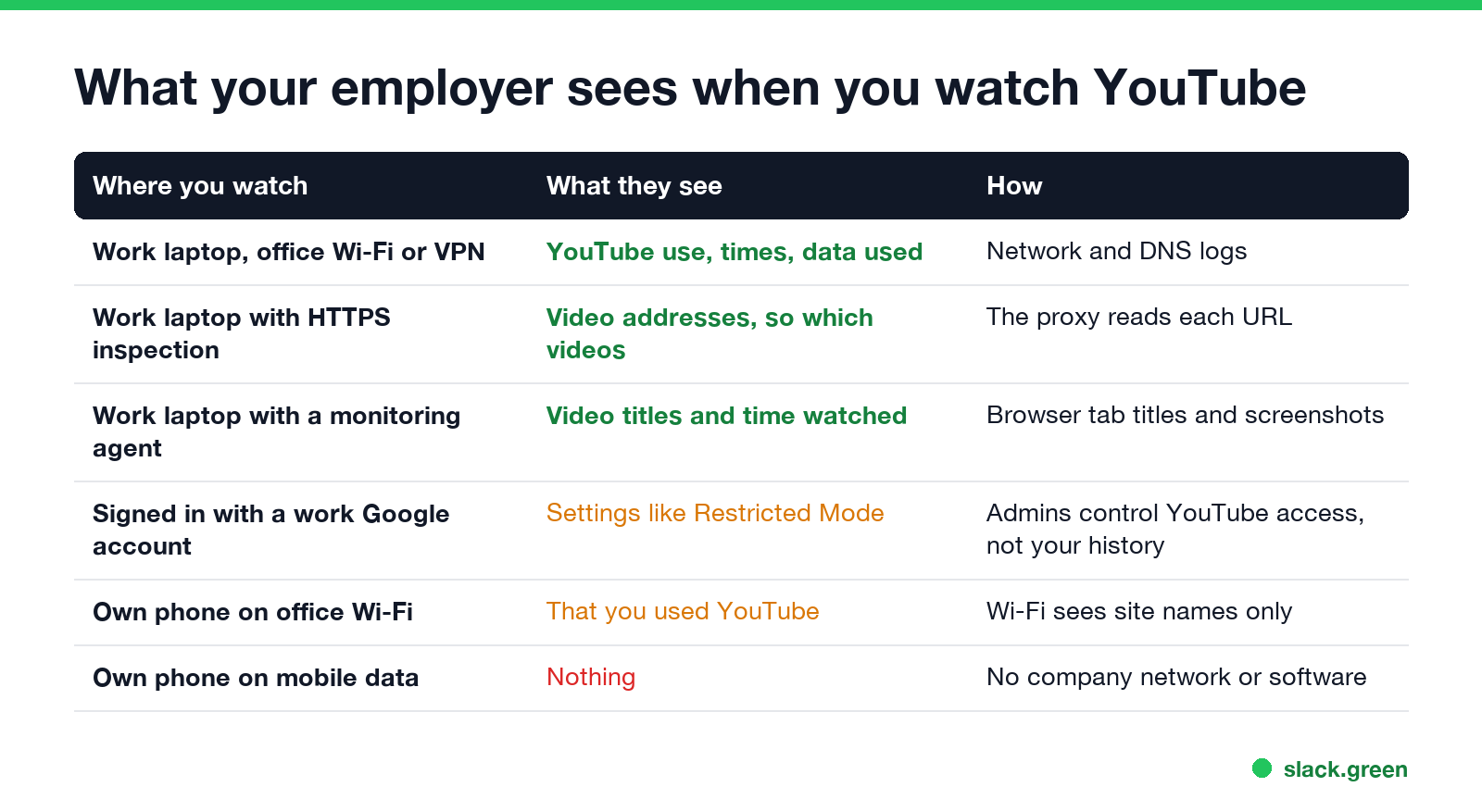
| Where you watch | What your employer sees | How |
|---|---|---|
| Work laptop on office Wi-Fi or the company VPN | That you used YouTube, when, and how much data | Network, DNS and firewall logs |
| Work laptop with HTTPS inspection (Zscaler, Netskope) | The address of each video, so which videos | The proxy decrypts traffic and logs full URLs |
| Work laptop with a monitoring agent | Video titles, time watched, often screenshots | The agent logs the active window title |
| Signed in with a work Google account | Your YouTube settings, not a watch list | Admins set access and Restricted Mode |
| Your own phone on office Wi-Fi | That you used YouTube | Wi-Fi sees site names only |
| Your own phone on mobile data | Nothing | No company network or software |
Incognito changes none of the work-laptop rows. It keeps the video out of the browser's own history and nothing more; see can my employer see my Incognito history.
Why video titles show up in work reports
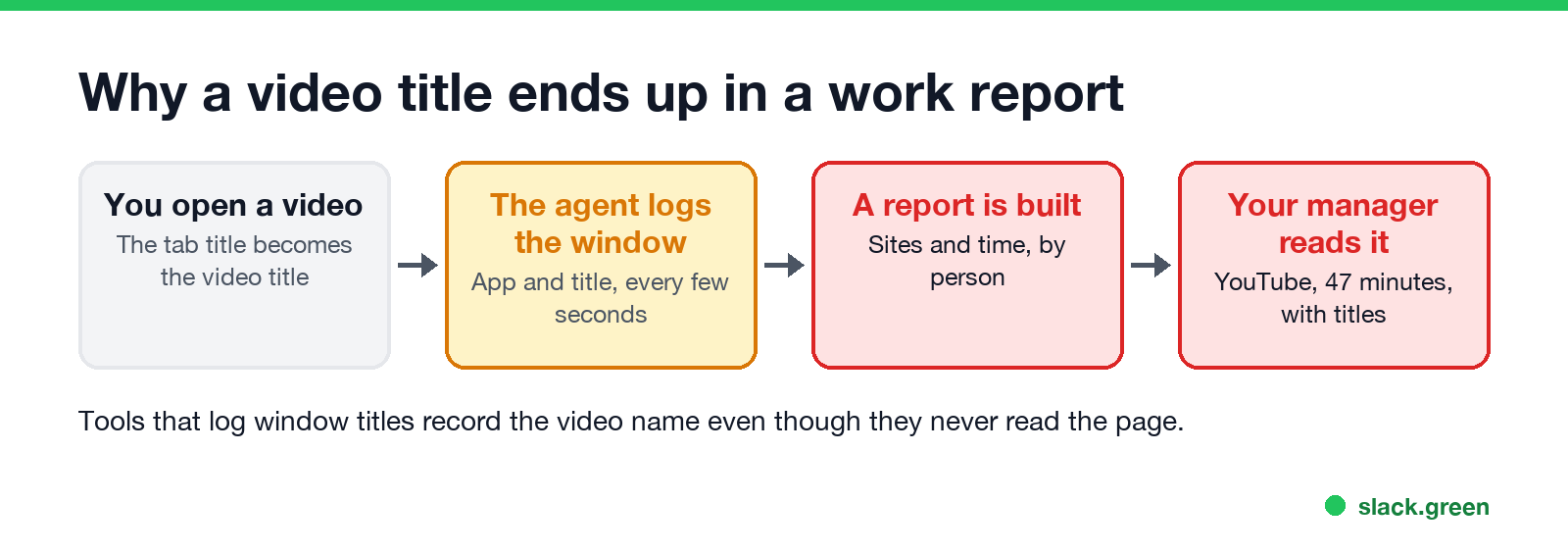
Employee monitoring tools such as ActivTrak, Teramind and Time Doctor record which app and website is in front, and for how long. For a browser, they read the window title, and on YouTube the tab title is the video's name followed by "- YouTube". So a report built from window titles can list "How to fix a leaky tap - YouTube, 12 minutes" without the tool ever reading the page. Screenshots, where turned on, show the video itself.
That also means background play counts. A video playing in a tab you are not looking at may not show in the title log, but it does show in network data, and a proxy logs its address.
Can your employer see your YouTube watch history?
Never appear "away" on Slack again
Cloud-based. No downloads. Works 24/7 even when your laptop is off.
The watch history is stored in the Google account, not on the laptop:
- • Personal Google account. Your employer has no access to it, even if you watched on the work laptop. They still see the network and agent data above.
- • Work Google account. Workspace admins can turn YouTube on or off for the account, and set how strict it is: Restricted Mode, or which videos are approved. Google does not offer admins a report of your watch history, and Google Vault does not cover YouTube.
- • Not signed in. No account history, but the laptop and network data are the same.
- • Watch on your own phone on mobile data. It is the only setup where your employer sees none of it.
- • On your own computer at home, stay off the company VPN while you watch.
- • If you watch on a work laptop, assume the site, the time and the title can end up in a report.
- • For how employers monitor in general, see how do employers monitor remote workers.
Companies can also force YouTube's Restricted Mode for everyone on the network or on managed browsers, which is why some videos say they are unavailable at work.
Does watching YouTube affect your Slack or Teams status?
A video in a browser counts as nothing to Slack, which reads only input inside the Slack window and sets you away after 10 minutes without it. Teams on the desktop reads input across the whole computer, and a video with no clicks or typing is not input either. Details in does YouTube keep Slack active.
Keep your viewing to yourself
FAQ
Never appear "away" on Slack again
Cloud-based. No downloads. Works 24/7 even when your laptop is off.
Can my employer see what I watch on YouTube on the work Wi-Fi? They see that you used YouTube and for how long. With HTTPS inspection on a work laptop, they can see which videos. From your own phone, only the site name.
Can my employer see my YouTube history if I delete it? Deleting YouTube history clears the Google account's list. It does not touch network logs, proxy logs or monitoring reports.
Can my employer see YouTube videos I watch in Incognito? Yes, on a work laptop or network, in the same ways as a normal window.
Can my employer see what I watch on YouTube on my phone? Not on your own phone on mobile data. On the office Wi-Fi, they see only that you used YouTube.
Stop Jiggling Your Mouse.
Join hundreds of remote workers who never worry about their Slack status. Set it up once, stay green forever.
Related Articles
Can My Employer See My iMessages on a Work Mac?
Not through device management or the network: Jamf or Intune cannot read Messages, and iMessage is end-to-end encrypted. But if you sign in to Messages on a work Mac, your texts are stored on that Mac, where monitoring screenshots, backups and admin access can reach them. How to check, and how to take iMessage off the Mac without deleting it from your iPhone.
Can My Boss See My Private Outlook Calendar Events?
Usually not the details. When you mark an Outlook event Private, someone who can read your calendar sees only Private appointment, the time and a lock. The exceptions are delegates you gave Can view private items, the people invited to the event, anyone with full access to your mailbox in new Outlook or the web, and compliance admins. How to check who has which access, and what Private does not hide.
Productivity Theater: Meaning, Numbers and How It Starts
Productivity theater is work done to look busy rather than to get results: extra messages, status updates, meetings to show progress, and keeping a green dot on. Slack's 2023 survey of 18,000 desk workers put it at 32% of the working week. Microsoft ties it to productivity paranoia, where 85% of leaders doubt remote staff are productive.