
How to Copy a Slack Thread: What Survives a Paste, and a Script
Slack has no Copy thread button. We selected a 6-reply thread, pasted it, and compared that with Copy message, Copy link and a short conversations.replies script that writes Markdown.
Slack has no button that copies a whole thread. To copy one, open the thread in the side panel, drag to select from the first message to the last reply, and press Cmd+C (Ctrl+C on Windows). Pasted as plain text, you get every name and every line of text, but times come through as the short label on screen, links lose their address and formatting is gone. On 22 October 2026 we did this with a 6-reply thread and also tried Slack's Copy message, Copy link and a short API script. For an exact copy, use the script further down.
What a select-and-copy keeps
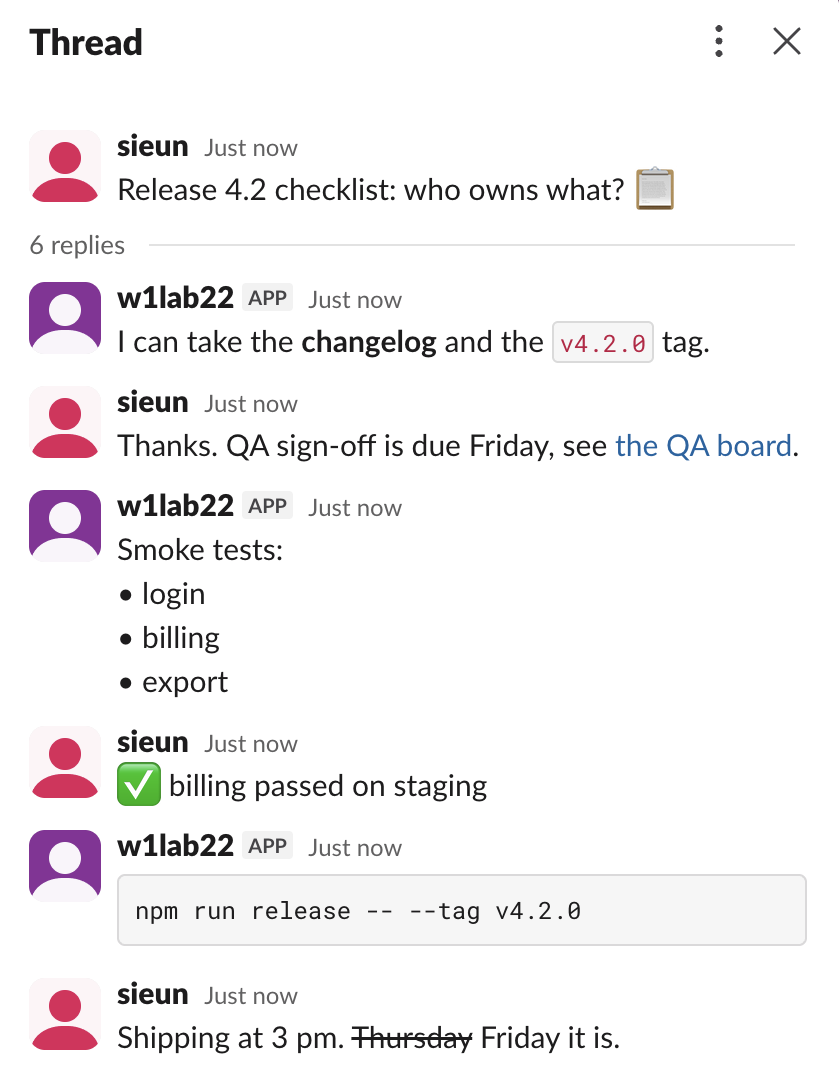
The test thread mixed every kind of formatting: bold, inline code, a link with a label, a bullet list, an emoji, a code block and strikethrough. This is the plain text the clipboard held after we selected the thread panel in the Slack web app and pressed Cmd+C:
sieun
  Just now
Release 4.2 checklist: who owns what? :clipboard:
6 replies
w1lab22
APP  Just now
I can take the changelog and the v4.2.0 tag.
sieun
  Just now
Thanks. QA sign-off is due Friday, see the QA board.
w1lab22
APP  Just now
Smoke tests:
• login
• billing
• export
sieun
  Just now
:white_check_mark: billing passed on staging
w1lab22
APP  Just now
npm run release -- --tag v4.2.0
sieun
  Just now
Shipping at 3 pm. Thursday Friday it is.


Reply…
Also send to w1-1022-thread-copy
What came through, and what did not:
| Part of the thread | In the plain-text paste |
|---|---|
| Names | Kept, one per message |
| Times | The on-screen label, "Just now" here, not a date and time |
| Link "the QA board" | Label kept, URL lost |
| Bold, code, strikethrough | Plain text; "~~Thursday~~ Friday" became "Thursday Friday" |
| Emoji | Written as codes such as :white_check_mark: |
| Reply box | "Reply…" and "Also send to w1-1022-thread-copy" came along |
The clipboard also held an HTML copy of 77,564 characters. That version had the link address, bold tags, the code block and emoji images, so a rich editor such as Google Docs gets more than a plain-text editor does. It also carried the time only as the on-screen label.
Copy message copies one message
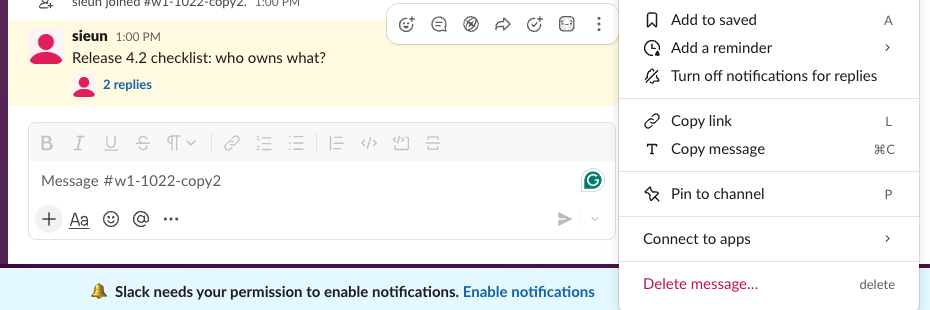
Hover a message, click the three dots, and Slack offers Copy message (Cmd+C) next to Copy link. We used it on the thread's first message. The clipboard got only that message's text, Release 4.2 checklist: who owns what?, with no name, no time and none of the replies.
Never appear "away" on Slack again
Cloud-based. No downloads. Works 24/7 even when your laptop is off.
Copy a link to the thread
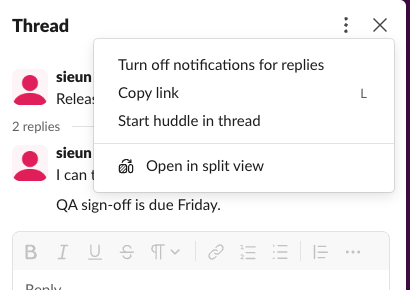
To share a thread with someone in the same workspace, a link is enough. Open the thread, click the three dots at the top of the panel, and pick Copy link.
A thread link has the reply's own timestamp in the path and the thread's timestamp in thread_ts. These two came from chat.getPermalink in our test, the first for the parent and the second for a reply:
https://slack-0yr1948.slack.com/archives/C0CB8FUGR2M/p1792640855611609?thread_ts=1792640855.611609&cid=C0CB8FUGR2M
https://slack-0yr1948.slack.com/archives/C0CB8FUGR2M/p1792640858476989?thread_ts=1792640855.611609&cid=C0CB8FUGR2M
Only people who can see the channel can open it. More on link formats in Slack message permalinks and thread_ts.
Export a thread to Markdown with the API
This script reads the thread with conversations.replies, looks up each author's name with users.info, and prints Markdown with real times. It needs a token with channels:history (groups:history for a private channel) and users:read, from an app that is in the channel. Slack bot token shows how to get one.
import os, re, sys, datetime, json, urllib.request, urllib.parse
TOKEN = os.environ["SLACK_TOKEN"] # bot or user token with channels:history
channel, thread_ts = sys.argv[1], sys.argv[2]
def call(method, **params):
req = urllib.request.Request(
"https://slack.com/api/" + method + "?" + urllib.parse.urlencode(params),
headers={"Authorization": "Bearer " + TOKEN})
return json.load(urllib.request.urlopen(req, timeout=30))
names, msgs, cursor = {}, [], None
while True:
page = call("conversations.replies", channel=channel, ts=thread_ts, limit=200,
**({"cursor": cursor} if cursor else {}))
msgs += page["messages"]
cursor = page.get("response_metadata", {}).get("next_cursor")
if not cursor:
break
def name(uid):
if uid not in names:
names[uid] = call("users.info", user=uid)["user"]["real_name"]
return names[uid]
def md(text):
text = re.sub(r"<(https?://[^|>]+)\|([^>]+)>", r"[\2](\1)", text) # <url|label>
text = re.sub(r"<@(U[A-Z0-9]+)>", lambda m: "@" + name(m.group(1)), text)
text = re.sub(r"(?<![*\w])\*([^*\n]+)\*(?!\w)", r"**\1**", text) # *bold*
text = re.sub(r"(?<!~)~([^~\n]+)~(?!~)", r"~~\1~~", text) # ~strike~
return text.replace("<", "<").replace(">", ">").replace("&", "&")
for m in msgs:
when = datetime.datetime.fromtimestamp(float(m["ts"]), datetime.timezone.utc)
who = name(m["user"]) if "user" in m else m.get("username", "bot")
print(f"**{who}** ({when:%Y-%m-%d %H:%M} UTC)\n\n{md(m['text'])}\n")Run it as python3 thread_to_markdown.py C0CB8FUGR2M 1792640855.611609 with the token in the SLACK_TOKEN environment variable. The channel ID and the parent's timestamp are both in the thread link. Our run printed:
**sieun** (2026-10-22 03:47 UTC)

Release 4.2 checklist: who owns what? :clipboard:

**w1lab22** (2026-10-22 03:47 UTC)

I can take the **changelog** and the `v4.2.0` tag.

**sieun** (2026-10-22 03:47 UTC)

Thanks. QA sign-off is due Friday, see [the QA board](https://example.com/qa).

**w1lab22** (2026-10-22 03:47 UTC)

Smoke tests:
• login
• billing
• export

**sieun** (2026-10-22 03:47 UTC)

:white_check_mark: billing passed on staging

**w1lab22** (2026-10-22 03:47 UTC)

```npm run release -- --tag v4.2.0```

**sieun** (2026-10-22 03:47 UTC)

Shipping at 3 pm. ~~Thursday~~ Friday it is.
Compared with the paste, the export keeps real times, the link address, bold and strikethrough, and leaves out the reply box. Emoji stay as codes. To turn Slack formatting into other targets, our Slack message formatter shows how each mark is written. For whole channels, see get messages from a channel with the API or export Slack messages without admin.
FAQ
Can I forward a whole thread?
Forward message sits in each message's hover bar and works on one message at a time. To pass on the whole conversation, share the thread link or paste an export.
Why does my paste end with "Reply…"?
The selection ran into the reply box under the thread. In our test the paste ended with "Reply…" and "Also send to w1-1022-thread-copy". Stop the selection at the last reply, or delete those lines after pasting.
Stop Jiggling Your Mouse.
Join hundreds of remote workers who never worry about their Slack status. Set it up once, stay green forever.
Related Articles
Slack: Download All Files From a Channel (Script and Test)
Slack has no download-all button for a channel. We uploaded 8 files, checked what the Files tab and search show, and ran a files.list script that saved all 8, after it first found only 4.
How to Remove Someone From a Slack Channel (3 Ways, Tested)
Use /remove @name in the channel, the channel details window, or conversations.kick. We tried all three, checked what the removed member could still do, and what the channel saw.
How to Remove an App From Slack, and What Stays Behind
Remove an app from one channel with /remove or channel details, or uninstall it from the workspace in Manage apps. We did both with a test app and checked its tokens, messages and files afterwards.