
Slack API Tester: api.test and auth.test, With Real Responses
To test a Slack API connection, call api.test for the network and auth.test for the token. We ran both with no token, a bot token, a user token, an app-level token and a revoked token, and found that api.test echoes your token back.
The quickest Slack API test is two calls. api.test checks that your code can reach Slack and parse a reply; it needs no token. auth.test checks a token and tells you whose it is. We ran both on 4 October 2026 against a free-plan workspace with a throwaway app, using no token, a bot token, a user token, an app-level token and a token we had just revoked. One result matters before anything else: if you send a valid token to api.test, it is printed back in the response.
api.test: three runs and their responses
api.test returns whatever arguments you send, and fails on purpose if you pass error:
curl -s https://slack.com/api/api.test
# {"ok":true,"args":{}}

curl -s https://slack.com/api/api.test -d foo=bar
# {"ok":true,"args":{"foo":"bar"}}

curl -s https://slack.com/api/api.test -d error=my_error
# {"ok":false,"error":"my_error","args":{"error":"my_error"}}
The forced error still came back with HTTP status 200, like every other error on this page. If your client only treats non-2xx statuses as failures, error=my_error is a cheap way to prove it also reads ok. A GET with ?foo=bar answered the same way as the POST.
Sending a token changed the reply in two ways:
- • With a valid bot token in the
Authorizationheader, the response added"token": "xoxb-..."toargs, the full token in plain text. Do not logapi.testresponses from a client that adds a token to every call. - • With a made-up token (
xoxb-not-a-real-token) the call failed withinvalid_auth, and with a revoked user token it failed withtoken_revoked. Soapi.testis not token-free once you send one.
auth.test: which token is this?
auth.test takes only a token. These are the bodies we got, with the long fields cut:
| Token | Result |
|---|---|
Bot (xoxb-) | ok, user: "sglab1004pm", user_id, bot_id, team_id, workspace url |
User (xoxp-) | ok, the person's user and user_id, no bot_id |
App-level (xapp-) | ok, only app_name and app_id |
| Revoked user token | token_revoked |
| Made-up token | invalid_auth |
| No token | not_authed |
A bot token is the only one with bot_id, so that key is a quick way to tell bot from user tokens in code. Our Slack bot user ID page explains the U, B and A IDs it returns.
The HTTP headers carry the token's scopes. x-oauth-scopes on our bot token's auth.test listed all 16 bot scopes, and on the user token it listed identify plus the 5 user scopes we had granted. Reading that header is the fastest way to find out why a call returns missing_scope, without opening the app settings.
A revoked token, step by step
We called auth.revoke on the user token twice. With test=true it answered {"ok":true,"revoked":false} and the token kept working. Without it, it answered "revoked":true, and 3 seconds later auth.test returned token_revoked. Revoking a bot token gives a different error, account_inactive; that case and the Revoke button are on our Slack revoke token page. A token that was never valid, or was pasted with a stray character, gives invalid_auth, covered on Slack invalid_auth.
Never appear "away" on Slack again
Cloud-based. No downloads. Works 24/7 even when your laptop is off.
Checking if a channel exists
After the token, the next check is usually "can this bot see that channel". Use conversations.info with the channel ID. In our tests it returned ok for public channels even when the bot was not a member, and channel_not_found for a private channel the bot was not in, for a made-up ID and for a channel name sent instead of an ID. The full field list is on our conversations.info test.
What each check proves:
| Check | Proves | Does not prove |
|---|---|---|
api.test with no token | Network, TLS and JSON parsing work | Anything about your token |
api.test with error=my_error | Your code reads ok: false on HTTP 200 | |
auth.test | The token is live; which workspace, user or bot it belongs to | That it has the scope a method needs |
x-oauth-scopes header | The exact scopes on the token | That the bot is in a channel |
conversations.info | The token can see that channel | That the bot can post there |
The docs page does not send calls
The method pages on docs.slack.dev now have a "Call generator" tab where the old live tester was. We typed my_error into it and pressed Update generated request. It built the request and sent nothing:
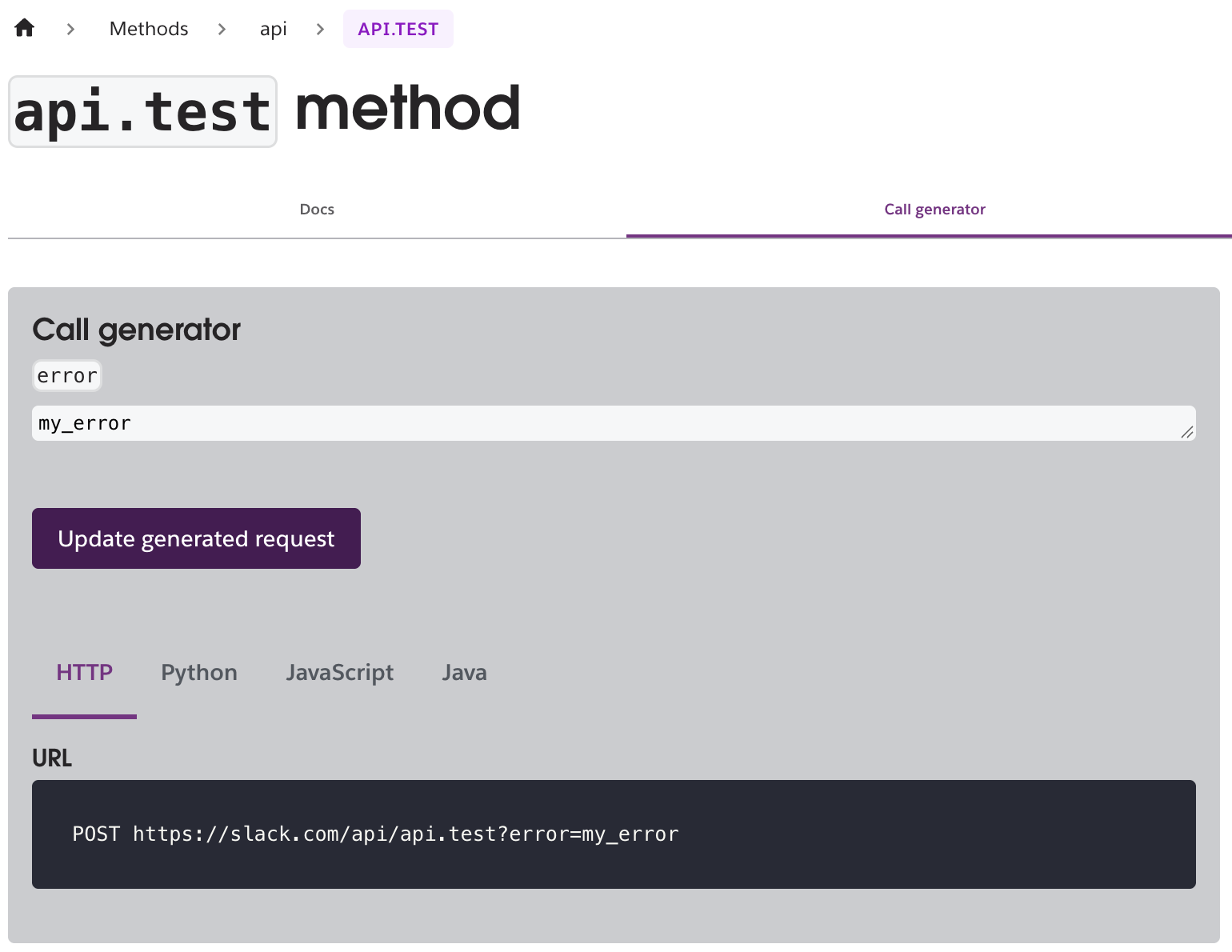
So the docs site writes the request for you, and you still run it yourself. From this Mac, 10 runs of api.test took 0.28 to 0.96 seconds each, and 10 runs of auth.test took 0.30 to 0.50 seconds.
FAQ
Does api.test count against rate limits?
It sits in Tier 4, 100+ calls a minute, per the docs page. We ran 10 in a row and got no ratelimited error. Our Slack API rate limits test shows what the error looks like when you do hit a limit.
Which token should a health check use?
Use the token the app uses for its real work, and call auth.test. A green api.test only proves Slack is reachable; a revoked token would still pass it if you leave the token off.
Stop Jiggling Your Mouse.
Join hundreds of remote workers who never worry about their Slack status. Set it up once, stay green forever.
Related Articles
Slack App Shortcuts: Where Global and Message Shortcuts Appear, Tested
Slack apps can add two kinds of shortcut: global ones in the composer's shortcut list and message ones in a message's menu. We added one of each, found where Slack puts them, logged both payloads and recorded what users see when the app does not answer.
Slack Datepicker, Timepicker and Datetimepicker: Payloads and Time Zones
We posted Slack's datepicker, timepicker and datetimepicker in a message and a modal, picked values and logged every payload. The datetimepicker returns a Unix timestamp; the timepicker returns a bare HH:mm with no zone unless you set one.
Slack Button Style: Primary, Danger, URL Buttons and Their Limits
A Slack Block Kit button has three looks: no style, primary (green) and danger (red). We posted every kind, clicked each one, logged the block_actions payloads and recorded the errors for colors, disabled buttons and long labels.