
Slack Bot Not Responding to @Mentions? 9 Causes We Reproduced
We broke a Slack bot nine ways on 1 October 2026, in Socket Mode and over HTTP, and wrote down what the person in Slack saw and what the app received each time. The table of causes, symptoms and fixes comes from those runs.
A Slack bot that does not answer an @mention is, most often, missing one of three things: it is not a member of the channel, the app is not subscribed to the app_mention event, or the app was not reinstalled after app_mentions:read was added. We reproduced each of those and six more causes on 1 October 2026 with two throwaway apps, one in Socket Mode with Bolt for Python and one on an HTTP request URL behind a cloudflared tunnel. For each one we recorded what the person typing saw in Slack and what reached the app.
Causes, symptoms and fixes from our runs
| Cause | What the person saw | What the app received | Fix |
|---|---|---|---|
| Bot is not in the channel | Slackbot: "You mentioned @sglabw2, but it's not in this channel." with Add Them / Dismiss | nothing | invite the bot; Add Them also delivered the missed mention |
app_mention not in bot events | no reply | only a message event, if subscribed | add app_mention to bot events |
app_mentions:read missing | cannot happen on a saved app: Slack refuses the manifest | n/a | add the scope with the event |
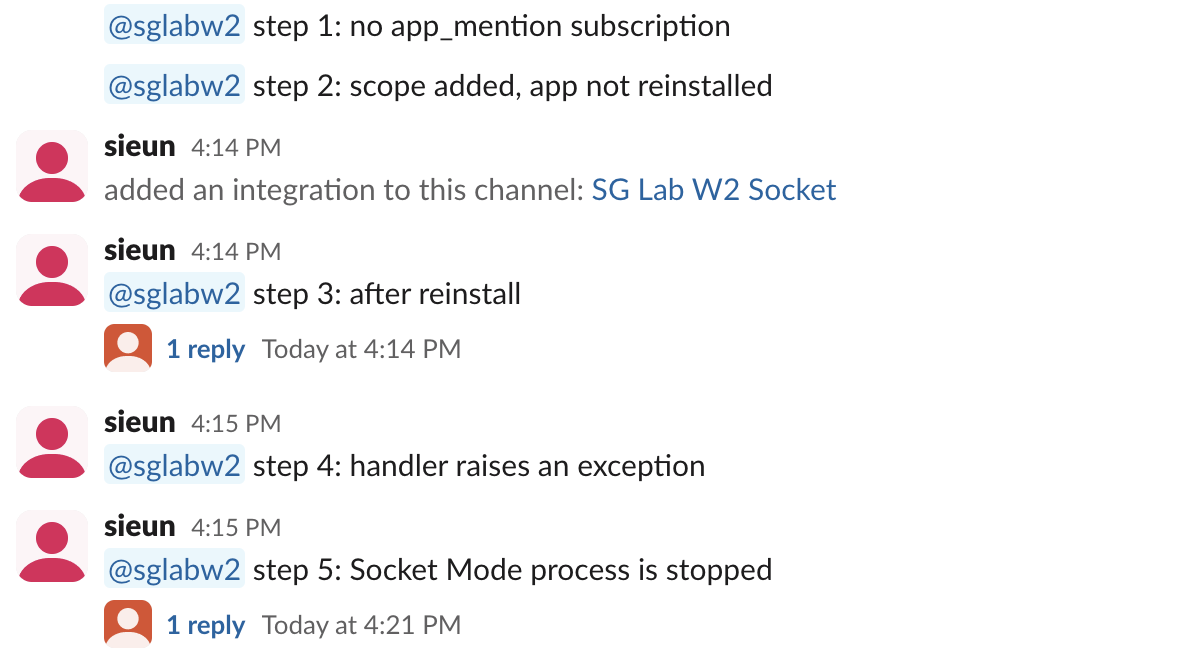
| Scope and event added, app not reinstalled | no reply; yellow "reinstall your app" banner on the app's pages | only message; the token still lacked the scope | reinstall the app |
| Handler raised an exception | no reply | the event, once; Bolt logged the error | catch errors, reply with a fallback |
| Socket Mode process stopped | no reply, then a late reply | the event, 6 minutes later, after we restarted | keep the process running, or turn on Delayed Events |
| HTTP handler took 5 s to answer | duplicate replies, if your handler replies each time | the event 4 times: retries at 3 s, 66 s, 369 s, http_timeout | answer within 3 seconds, do the work after |
| HTTP handler returned 500 | no reply | the event again with X-Slack-Retry-Reason: http_error | fix the error; skip retries you already handled |
| Request URL unreachable | no reply | nothing until the URL worked again | fix the URL; check Event Subscriptions |
The first three: channel, event, scope
Not in the channel. When we typed @sglabw2 in a channel the bot had not joined, the mention menu already marked it "Not in channel". After sending, Slackbot posted this, visible only to us:

No event reached the app. When we clicked Add Them, Slack added the bot and then delivered the original mention, 18 seconds after it was sent, and the bot replied in the thread. The same membership rule makes chat.postMessage fail with not_in_channel.
Not subscribed to app_mention. Our first app subscribed only to message.channels. A mention arrived as a plain message event with <@U0C5QDUGPV1> in the text and no app_mention event, so an @app.event("app_mention") handler never ran.
Scope missing. We tried to add the event without the scope through apps.manifest.update. Slack refused the change:
{"ok": false, "error": "invalid_manifest", "errors": [{"code": "app_mention_event_missing_scope", "message": "app_mention event is missing scope(s): app_mentions:read", "pointer": "/settings/event_subscriptions", "related_component": "oauth"}]}So a saved app cannot subscribe to app_mention without app_mentions:read. The same error blocks the manifest editor in the UI. Writing manifests by hand is covered in Slack app manifest, tested.
Added the scope but did not reinstall
With both the scope and the event in the manifest, the update returned "permissions_updated": true and the app's settings pages showed this banner:

We mentioned the bot before reinstalling. The app received only the message event, and auth.test on the bot token returned an x-oauth-scopes header without app_mentions:read. After we reinstalled, the next mention delivered app_mention and the bot replied. The bot token string did not change. Scope errors on API calls look different; they are covered in Slack missing_scope.
Never appear "away" on Slack again
Cloud-based. No downloads. Works 24/7 even when your laptop is off.
Crashes and a stopped Socket Mode process
This is the handler we ran in Bolt for Python, with a switch to make it raise:
@app.event("app_mention")
def on_mention(event, say):
    if flags().get("crash"):
        raise RuntimeError("handler crashed on purpose")
    say(text=f"Got your mention: {event.get('text', '')[:60]}", thread_ts=event["ts"])
With the switch on, the event arrived once and the log showed:
ERROR:slack_bolt.App:Failed to run listener function (error: handler crashed on purpose)Slack did not send it again. Bolt acknowledges an event before your function runs, so from Slack's side the delivery succeeded. Nobody in the channel sees an error.
We then stopped the Socket Mode process, mentioned the bot, and started the process again 150 seconds later. The event did not arrive on reconnect. It arrived 360 seconds after the message, 210 seconds after the restart, and the bot replied then, so the person got an answer 6 minutes late. Slack Socket Mode in Python has more on connections.
HTTP request URLs: slow answers and dead URLs
An HTTP app must answer each event within 3 seconds. Our endpoint waited 5 seconds before answering. Slack sent the same app_mention four times:
| Delivery | Seconds after the first | X-Slack-Retry-Num | X-Slack-Retry-Reason |
|---|---|---|---|
| 1 | 0 | none | none |
| 2 | 3.0 | 1 | http_timeout |
| 3 | 66.4 | 2 | http_timeout |
| 4 | 369.3 | 3 | http_timeout |
A bot that posts a reply each time it handles the event posts four replies. Answer with HTTP 200 first and do the slow work after, or skip requests that carry X-Slack-Retry-Num once you have handled the first one. The retry schedule and headers are measured in more detail in Slack Events API retries. When we made the endpoint return 500 instead, the retries came with X-Slack-Retry-Reason: http_error, starting after 0.3 seconds.
apps.manifest.update accepted a request URL on a host that does not exist and returned ok: true, without sending a challenge. Mentions made while that URL was set reached nothing. The Event Subscriptions page showed the problem, plus a Delayed Events switch that retries missed events over 24 hours:
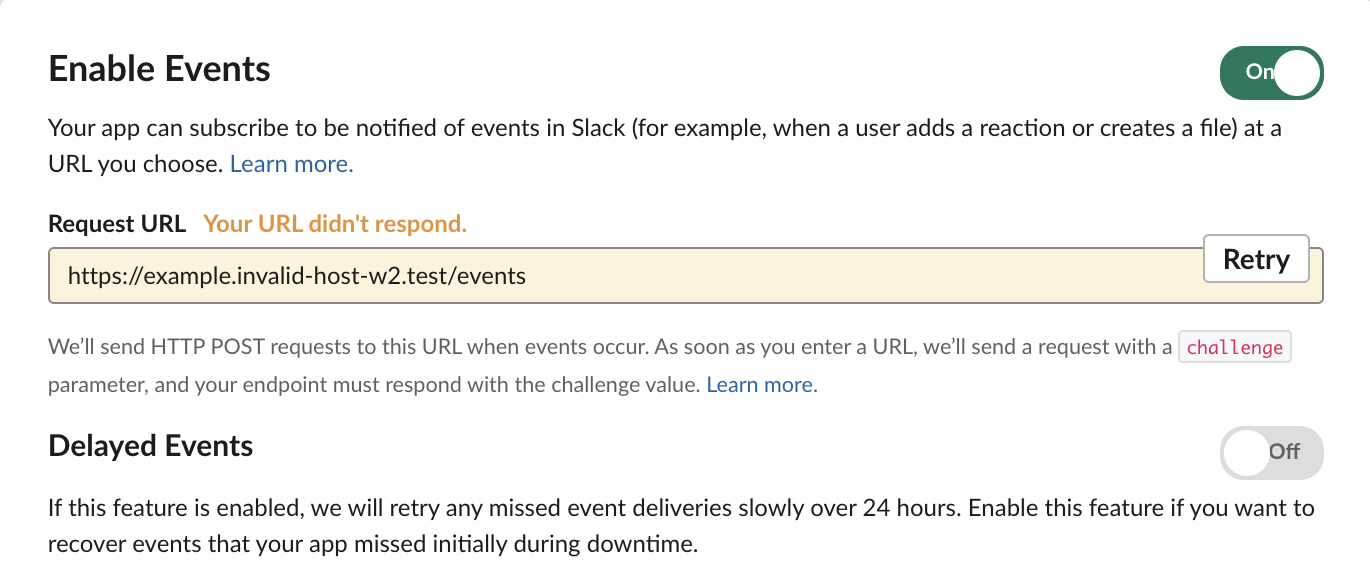
After we put the working URL back, the mention made in between arrived within a minute, as retry 2. Checking the signature on these HTTP requests is covered in verify Slack request signatures.
FAQ
Why does my bot answer its own messages?
In our Bolt app, the bot's own chat.postMessage posts never reached a handler: Bolt drops them by default. Posts from the same app's incoming webhook did come back, as 292 message events with bot_id B0C5UMRDJJJ, which is not the bot's own B0C5WFWMXT4. If your handler answers message events, skip any event that carries bot_id, as shown in Slack thread_ts, tested.
Stop Jiggling Your Mouse.
Join hundreds of remote workers who never worry about their Slack status. Set it up once, stay green forever.
Related Articles
Slack Interactivity Payload: Real block_actions JSON and response_url Limits
We clicked a button, a static_select and a datepicker in Slack on 1 October 2026 and logged the block_actions payloads our app received. Then we measured response_url: 5 posts, then used_url; it worked at 29:50 and was dead at 30:10.
Slack unfurl_links and unfurl_media: What Each Flag Does, Tested
We posted a web page, a YouTube video and an image with every combination of unfurl_links and unfurl_media on 1 October 2026, then built a custom preview with link_shared and chat.unfurl. The flags do not split the way the names suggest.
Slack Scheduled Message Didn't Send? 5 Cases We Tested
We scheduled five messages for 4:40 PM on 1 October 2026, then archived, left and deleted their channels and deleted a thread parent before the send time. Two sent, three never did, and Slack gave no notice about the three.