
Why Slack Says LEGACY Next to Slackbot and Huddle Notices
The grey LEGACY tag marks messages from the old, automated Slackbot in your Slackbot DM. Slack shows it on Free and Pro workspaces to tell those notices apart from the new AI Slackbot. We read the code that draws it.
Slack shows a small grey LEGACY tag next to the name of Slackbot on its automated notices in your Slackbot DM, such as a notice that a huddle happened. It does not mean the huddle, the channel or your account is old or about to stop working. The tag marks messages from the classic, rule-based Slackbot, so they are not confused with Slack's new AI Slackbot, and Slack shows it only on Free and Pro workspaces where you do not have the AI Slackbot. Hovering over the tag shows the words "Slack notification". We found the component that draws it in Slack's web client code on 5 November 2026 and checked what our own Free workspace shows.
What the LEGACY tag means
Slack has made Slackbot an AI assistant on some paid plans; in our Free workspace its profile says the AI abilities need an upgrade. The old Slackbot still exists everywhere: it sends reminders, notices about channels, huddles and files, and the canned replies you get when you type in its DM. On workspaces without the AI Slackbot, Slack now labels those automated messages LEGACY and gives Slackbot the profile line "Automated notifications and system messages".
Reddit users first reported the tag in February 2026, next to a system notice that a huddle had happened. Nothing about the huddle changed; the notice came from Slackbot, and the tag describes the sender.
The code that draws it
Slack's web client has a component named SlackbotLegacyBadge. Here it is from the client bundle we downloaded on 5 November 2026, with the minified names left as they are:
function SlackbotLegacyBadge() {
  return (0,n.jsx)(f.Ay, {
    tip: F.t("Slack notification"), position: "top",
    children: (0,n.jsx)("span", { className: "margin_left_25",
      children: (0,n.jsx)(D.v, { style: "gray", isMicro: !0,
        children: F.t("LEGACY") }) }) })
}
The message header renders it only when a selector named Cq returns true and the message is not one of a list of special types. Following that selector through the bundle gives these conditions, all of which must hold:
| Condition in the code | Plain meaning |
|---|---|
isSlackbotNotification | The message was written by Slackbot (USLACKBOT) and its subtype is not ai |
isSlackbotDmMessage | It sits in your direct message with Slackbot |
!isSlackbotAiNextEnabled | You do not have the permission to use the AI Slackbot |
isOnFreePlan or isOnStandardPlan | The workspace is on Free or Pro (plan empty or std) |
!slackbot_legacy_fallback | A server-side switch with that name is off for your workspace |
The same check skips messages Slack marks as huddle messages, huddle notes, canvas updates, channel emails, custom Slackbot responses and AI huddle summaries, so the huddle's own post in a channel does not get the tag. On Business+ and Enterprise Grid workspaces the plan check fails, so the tag never appears there.
Never appear "away" on Slack again
Cloud-based. No downloads. Works 24/7 even when your laptop is off.
What our Free workspace showed
We opened Slackbot's profile from a member account in our Free test workspace. It showed the legacy wording: "Automated notifications and system messages", and a note that Slackbot's AI abilities are only on some paid plans. That is the profile text the code picks when the legacy rule is on.
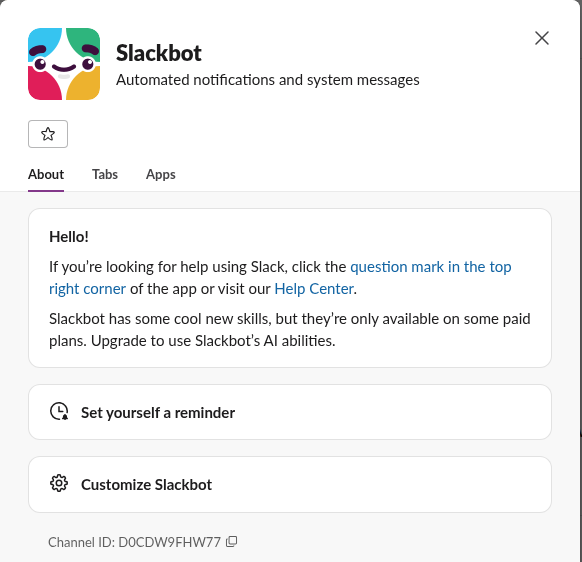
We then typed help in the Slackbot DM. Slackbot answered with its canned "If you're looking for help, visit the Help Center" reply, written by USLACKBOT with no ai subtype, and the answer carried no LEGACY tag. So in our workspace on 5 November the last switch in the table, slackbot_legacy_fallback, was likely on. Slack rolls such switches out workspace by workspace, which explains why one team sees the tag and another on the same plan does not.

Can you remove the LEGACY tag?
No setting hides it. It goes away only when one of the conditions above stops holding: your workspace moves to a plan where you get the AI Slackbot, or Slack turns the legacy switch on for your workspace. The tag does not change what Slackbot does: reminders, huddle notices and channel notices keep arriving as before. If huddles themselves misbehave, that is a separate problem; see Slack huddle not working, and how to turn off huddles if you want fewer huddle notices.
FAQ
Is my huddle or channel being retired?
No. The tag sits on the sender, Slackbot, not on the huddle. The huddle post in the channel is excluded from the tag in Slack's code.
Why do some coworkers see LEGACY and others do not?
Two of the conditions are per person or per workspace: whether you have the AI Slackbot, and the server switch. In a workspace where some people have Slack AI seats, those people would not see the tag.
Does the tag appear on custom Slackbot responses?
No. Custom responses that an admin sets up are on the list of message types the code skips. Our guide to Slackbot custom responses shows how those work.
Stop Jiggling Your Mouse.
Join hundreds of remote workers who never worry about their Slack status. Set it up once, stay green forever.
Related Articles
Slack SDK for Rust: slack-morphism Tested (Post, History, Socket Mode)
Slack has no official Rust SDK. The community crate that works today is slack-morphism: on 5 November 2026 we used version 2.31.1 to post a message, page through history with a cursor and answer a mention over Socket Mode. Code and output below.
Slack Deep Links: Every slack:// Command in the Current App
A Slack deep link is a slack:// URL such as slack://channel?team=T123&id=C123 that opens the desktop or mobile app on a channel, person, file or setting. We read the handler in Slack's current code, listed the commands it accepts, and tested the https fallbacks.
How to Show Unread Channels on Top in Slack (What Works Now)
Slack has no sort that lifts unread channels to the top. The closest is Filter and sort > Unreads, which hides every read channel. We tried each sort and filter in the sidebar with one unread channel and screenshot the order.