
Slack App Shortcuts: Where Global and Message Shortcuts Appear, Tested
Slack apps can add two kinds of shortcut: global ones in the composer's shortcut list and message ones in a message's menu. We added one of each, found where Slack puts them, logged both payloads and recorded what users see when the app does not answer.
A Slack app can add two kinds of shortcut. A global shortcut sits in the composer's shortcut list and works from anywhere. A message shortcut sits in a message's menu, under More actions > Connect to apps, and sends your app that message. We added one of each to a throwaway app on 4 October 2026, in a free-plan workspace, and used them in Slack's web app with a Socket Mode listener logging every payload. This page is about shortcuts that apps add; for Slack's own keyboard shortcuts, see our Slack keyboard shortcuts cheat sheet.
Adding the shortcuts in the manifest
Shortcuts need interactivity turned on and the commands bot scope. This is the part of our app manifest that created them:
"features": {
  "shortcuts": [
    {"name": "sglab global", "type": "global", "callback_id": "sglab_global", "description": "test global shortcut"},
    {"name": "sglab message", "type": "message", "callback_id": "sglab_message", "description": "test message shortcut"}
  ]
},
"oauth_config": {"scopes": {"bot": ["commands", "chat:write"]}},
"settings": {"interactivity": {"is_enabled": true}, "socket_mode_enabled": true}
callback_id is the value your code matches on; name and description are what people see.
Where a global shortcut appears
In Slack's web app, the composer has a Run shortcut button (the slash icon in its bottom row). Clicking it types / into the message box and opens one list that mixes Slack's own actions, slash commands and app shortcuts:
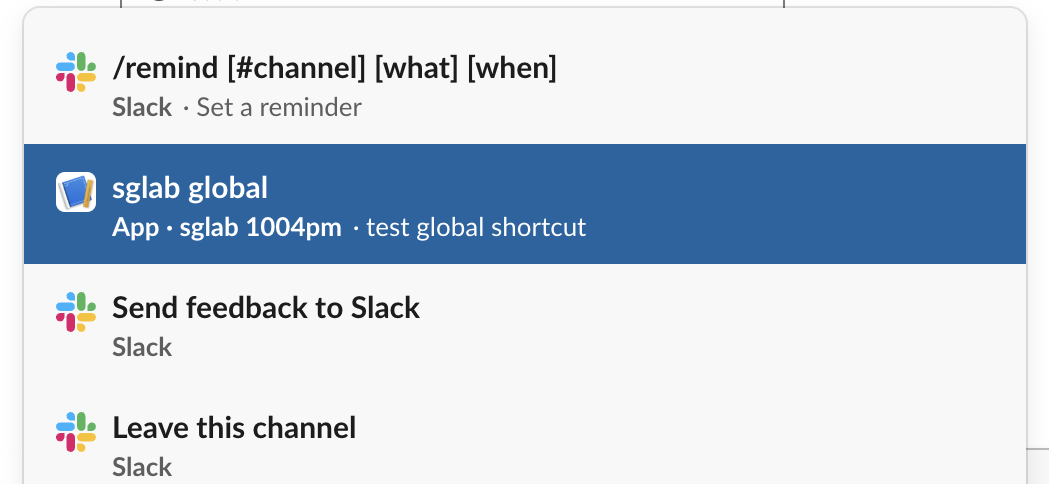
Our shortcut first appeared fifth, after four of Slack's own items. After we used it once, it moved up to second place, under /remind. App shortcuts are labelled "App" and the app's name, which is the easiest way to tell them apart from slash commands such as those on our Slack slash commands page.
Where a message shortcut appears
A message shortcut does not get its own button. Hover a message, click More actions (the three dots), then Connect to apps:
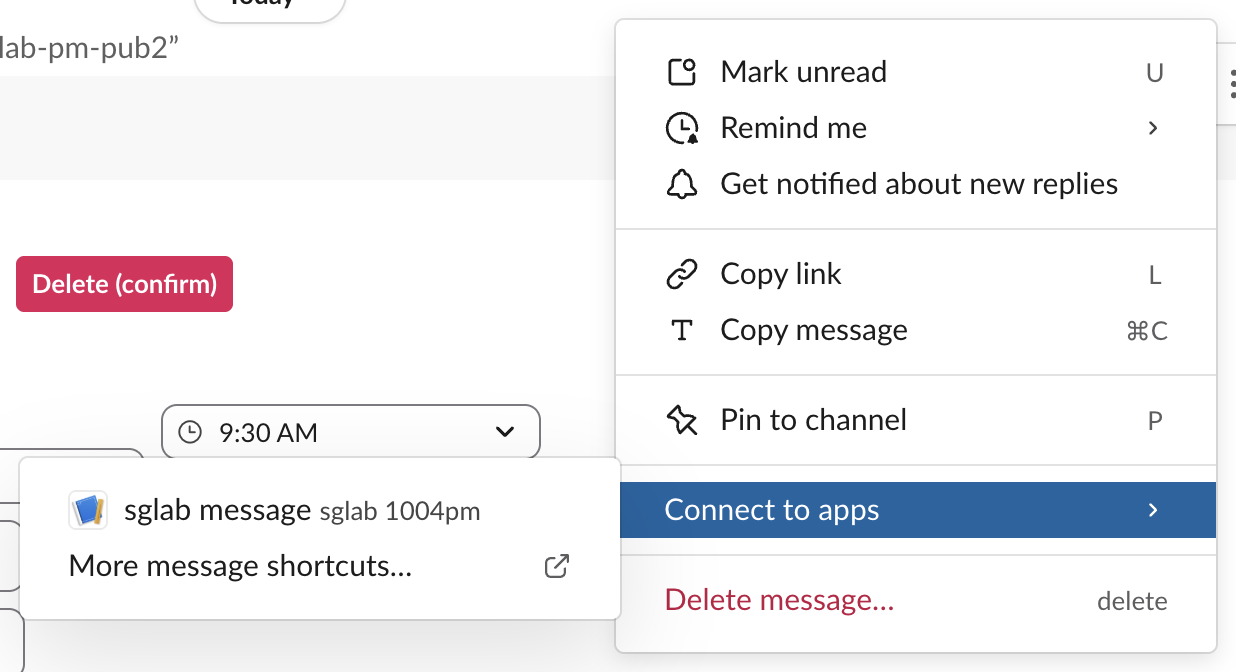
The submenu shows app message shortcuts, plus a "More message shortcuts..." item. If no one finds your shortcut, this two-level path is likely why; name it after the action ("Create ticket"), since the name is all the menu shows.
Never appear "away" on Slack again
Cloud-based. No downloads. Works 24/7 even when your laptop is off.
What each shortcut sends
Clicking the global shortcut sent a payload of type shortcut 0.39 seconds later. Clicking the message shortcut sent type message_action 0.55 seconds later. The keys differ:
| Key | shortcut (global) | message_action (message) |
|---|---|---|
callback_id, trigger_id, user, team, action_ts | yes | yes |
channel | no | yes, id and name |
message, message_ts | no | yes, the whole message |
response_url | no | yes |
A global shortcut does not say which channel the person was in. If you need one, ask for it in the modal with a conversations select. The message in a message_action is the full message object: text, blocks, bot_profile, the edit record and, when the message had any, its full message metadata with the payload, which conversations.history only returns with an extra flag.
Our listener answered each shortcut by calling views.open with the trigger_id. The modal opened 0.74 seconds after the global click and 1.05 seconds after the message click. A modal with date pickers opened that way is on our Slack datepicker test.
What users see when the app does not answer
We set the listener to receive the shortcut and not acknowledge it. At 1.5 seconds nothing had changed on screen. By 5 seconds Slack showed this in the corner of the composer:

We then called views.open with that payload's trigger_id 6.9 seconds after it arrived, and Slack answered expired_trigger_id. So a shortcut handler must acknowledge within 3 seconds and open its modal quickly; the error and its fixes are on our expired trigger ID page. Buttons fail in a different way, with a warning triangle next to the button, which we showed on our Slack button style test.
FAQ
Can a global shortcut post into the current channel?
Not from the payload alone, because it carries no channel ID. Ask for the channel in the modal, or use a message shortcut, whose payload includes channel and a response_url.
Do app shortcuts work on Slack's free plan?
Yes. Our test workspace was on the free plan, and both shortcuts appeared and sent payloads with no upgrade prompt.
Stop Jiggling Your Mouse.
Join hundreds of remote workers who never worry about their Slack status. Set it up once, stay green forever.
Related Articles
Slack Datepicker, Timepicker and Datetimepicker: Payloads and Time Zones
We posted Slack's datepicker, timepicker and datetimepicker in a message and a modal, picked values and logged every payload. The datetimepicker returns a Unix timestamp; the timepicker returns a bare HH:mm with no zone unless you set one.
Slack Button Style: Primary, Danger, URL Buttons and Their Limits
A Slack Block Kit button has three looks: no style, primary (green) and danger (red). We posted every kind, clicked each one, logged the block_actions payloads and recorded the errors for colors, disabled buttons and long labels.
Slack API Tester: api.test and auth.test, With Real Responses
To test a Slack API connection, call api.test for the network and auth.test for the token. We ran both with no token, a bot token, a user token, an app-level token and a revoked token, and found that api.test echoes your token back.