
Slack Events API Event Types: 46 Actions and the Events They Sent
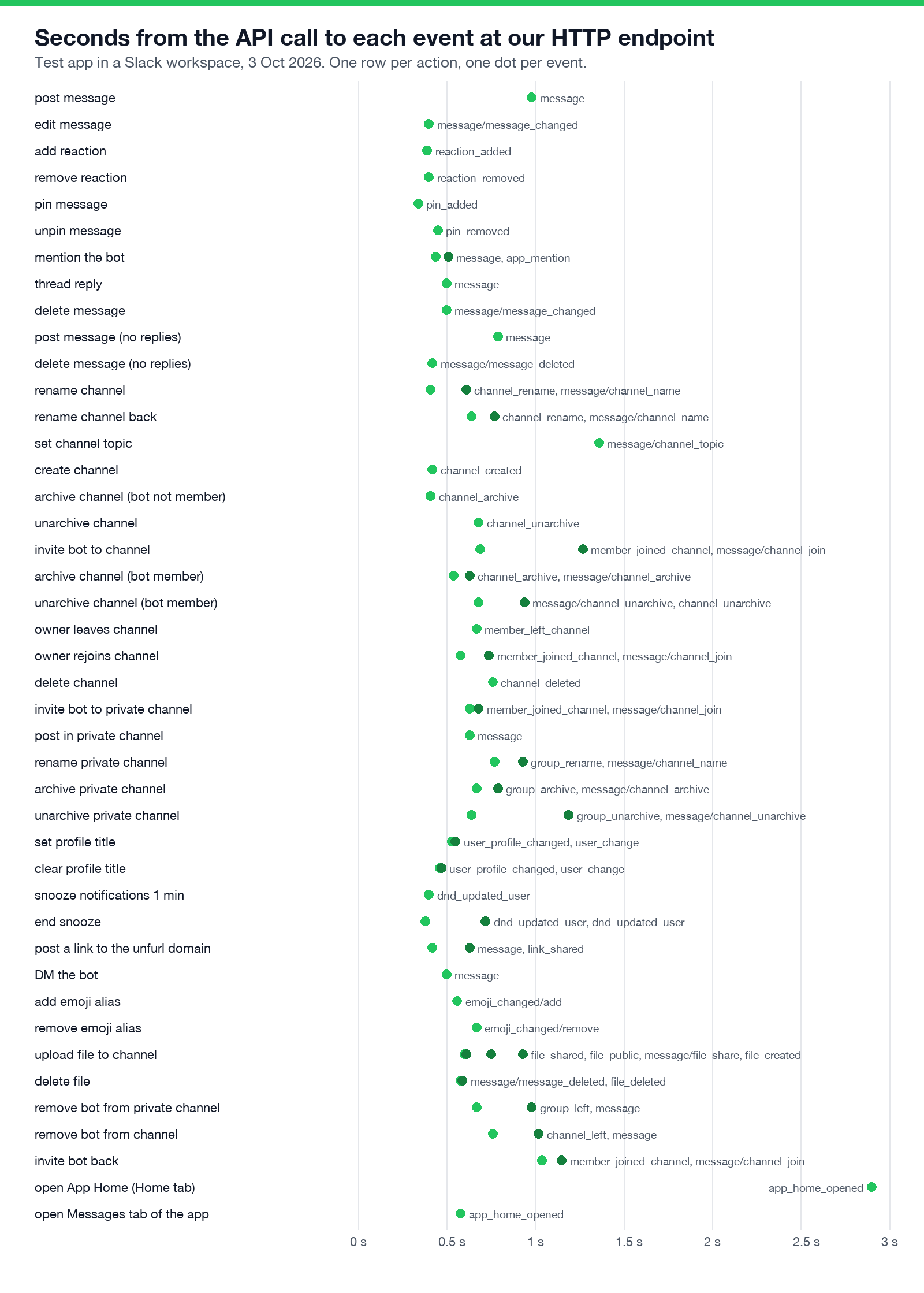
We subscribed a test app to 37 bot events, did 46 things in Slack, and logged every event that reached our HTTP endpoint: which event each action sends, which actions send two or four, which send none, and how long each took.
Slack's event reference lists more than 100 event types, but it does not tell you which one a given action sends, or that many actions send two. So we tested it. On 3 October 2026 we subscribed a test bot to 37 bot events in a one-person test workspace, pointed the Events API at a Bolt for Python app on a tunnel, and did 46 things in Slack, mostly through the Web API with a user session and a few in the Slack web app. The app logged every request. 65 events came back, of 37 distinct type and subtype pairs, all within 1.4 seconds of the action except one App Home open.
Which event each action sent
"message/x" means a message event with subtype: "x". A message event needs the matching history scope (channels:history for public channels, groups:history for private, im:history for DMs) and the matching message.* subscription.
| What we did | Events the bot received |
|---|---|
| Post a message in a channel the bot is in | message |
| Edit it | message/message_changed |
| Add, then remove a reaction | reaction_added, then reaction_removed |
| Pin, then unpin | pin_added, then pin_removed |
| Mention the bot | message and app_mention (two events) |
| Reply in a thread | message with thread_ts |
| Delete a message that has a reply | message/message_changed (a tombstone, not a delete) |
| Delete a message with no replies | message/message_deleted |
| Rename a public channel | channel_rename and message/channel_name |
| Set the channel topic | message/channel_topic only |
| Create a public channel (bot not in it) | channel_created |
| Archive and unarchive it (bot not in it) | channel_archive, channel_unarchive |
| Invite the bot | member_joined_channel and message/channel_join |
| Archive with the bot inside | channel_archive and message/channel_archive |
| A user leaves, then rejoins | member_left_channel; member_joined_channel and message/channel_join |
| Delete a public channel | channel_deleted |
| Create a private channel (bot not in it) | nothing |
| Rename, archive, unarchive a private channel | group_rename, group_archive, group_unarchive, each with its message/ subtype |
| Delete a private channel the bot had left | nothing |
| Change a profile field (title) | user_profile_changed and user_change |
| Snooze notifications | dnd_updated_user |
| Post a link on the app's unfurl domain | message and link_shared |
| DM the bot | message with channel_type: "im" |
| Add, then remove an emoji alias | emoji_changed with subtype: "add", then "remove" |
| Upload a file to a channel | file_shared, file_public, message/file_share, file_created (four events) |
| Delete that file | message/message_deleted and file_deleted |
| Remove the bot from a channel | channel_left (group_left for private), plus a Slackbot DM |
| Open the app's Home tab | app_home_opened with tab: "home" |
| Open the app's Messages tab | app_home_opened with tab: "messages" |
| Create a user group | the API call failed with paid_teams_only on our free workspace |
The surprises worth coding for:
- • Deleting a message is two different events. With no replies it is
message_deleted. With a thread under it, Slack keeps a placeholder and sendsmessage_changedwhosemessage.subtypeistombstoneand whose text is "This message was deleted." A listener formessage_deletedalone misses every deleted thread parent. More on edits on Slack message_changed event. - • Removing the bot sends it a DM. After
channel_left, amessageevent arrived in the bot's DM fromUSLACKBOT: "You have been removed from #sglab-1003pm by @sieun". If your bot answers every DM, it answers Slackbot. - •
channel_created,channel_archiveandchannel_deletedcame without the bot being a member. For private channels, nothing came until the bot was invited. - • One upload, four events. If you process files, pick one (
file_sharedcarries the channel) and ignore the rest. - •
app_home_openedfires on every tab switch, including the Messages tab, so checkevent.tabbefore callingviews.publish. The Home tab version arrived 2.9 seconds after we clicked, the slowest of the run, because it included the page load. Slack App Home tab covers publishing the view.
Three payloads as they arrived
The outer envelope was the same for every event: type: "event_callback", event_id, event_time, team_id, api_app_id, authorizations and event_context. The event objects:
{"type": "reaction_added", "user": "U0B7L4YK420", "reaction": "eyes",
 "item": {"type": "message", "channel": "C0C6HQAM8JV", "ts": "1791011222.583429", "channel_type": "channel"},
 "item_user": "U0B7L4YK420", "event_ts": "1791011229.000600"}
{"type": "app_home_opened", "user": "U0B7L4YK420", "channel": "D0C6DTA6WLE",
"tab": "home", "event_ts": "1791011445.185011"}{"type": "link_shared", "user": "U0B7L4YK420", "channel": "C0C6HQAM8JV",
"message_ts": "1791011365.330599",
"links": [{"url": "https://dvd-instantly-graphics-guild.trycloudflare.com/doc/123",
"domain": "dvd-instantly-graphics-guild.trycloudflare.com"}],
"user_locale": "en-US", "source": "conversations_history",
"unfurl_id": "C0C6HQAM8JV.1791011365.330599.f54da264...",
"is_bot_user_member": true, "event_ts": "1791011365.690510"}The reaction_added event has no message text. Fetch it with conversations.history if you need it; Slack reactions API shows the call. app_home_opened had no view field because our app had never published a Home view. link_shared is what you answer with chat.unfurl, covered on Slack unfurl links.
Never appear "away" on Slack again
Cloud-based. No downloads. Works 24/7 even when your laptop is off.
Subscribed events that never arrived
We subscribed to team_join, user_huddle_changed, file_change, subteam_created, app_uninstalled and tokens_revoked and did not trigger them: the workspace has one human member, huddles need a microphone our browser did not have, and user groups need a paid plan. user_status_changed arrived once, but not from any of our 46 actions, so it is not in the table.
Setting it up and the events that come back
Subscribe under Event Subscriptions > Subscribe to bot events, or in the manifest under settings.event_subscriptions.bot_events. Each event needs its scope; the manifest editor refuses to save an event whose scope is missing, so add both together. Our app was created through apps.manifest.create with the request URL already set, and Slack never sent the url_verification challenge. The settings page still said the URL had not answered while 65 events were being delivered to it:
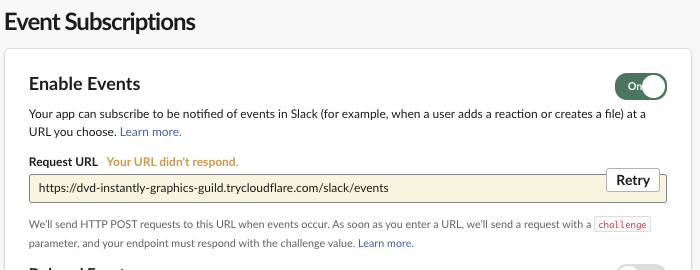
Clicking Retry sends the challenge. The details are on Slack url_verification.
Answer every event with HTTP 200 even if you ignore it. Our first app had no listener for channel_created, Bolt answered 404, and Slack sent the same event three more times, the last one 6 minutes later. The full test of that is on Slack Events API retries, and the app itself is on Slack Bolt for Python example.
Questions
What is the difference between bot events and user events? Bot events are delivered for conversations the bot can see and use the bot token's scopes. Events "on behalf of users" use the installing user's token scopes and cover what that user can see, such as their own DMs. We tested bot events only.
Does Socket Mode change which events arrive? No. Socket Mode changes how events reach you, over a WebSocket instead of a POST, not which ones are sent. See Slack Socket Mode in Python.
How fast do events arrive? In our run, 64 of 65 events reached a laptop through a tunnel within 1.4 seconds of the API call that caused them. The median was 0.63 seconds, measured from the start of the call.
Stop Jiggling Your Mouse.
Join hundreds of remote workers who never worry about their Slack status. Set it up once, stay green forever.
Related Articles
Slack All Unreads: Turn It On, Shortcuts, and Clear Everything
Slack's Unreads view collects every unread message on one page. We turned it on, opened it with Cmd+Shift+A, cleared one channel with Esc and the whole workspace with Shift+Esc, and read Slack's own unread counts before and after each step.
Slack Mute a Channel Without Hiding It: The Setting, Tested
In current Slack, muting a channel also hides it from the sidebar until you turn off one checkbox in Preferences. We muted a test channel, had a bot post and then @mention us in it, and recorded what the sidebar, the badge and Activity showed each time.
Slack Bookmarks: Where They Are Now, and Why They Disappear
Slack channel bookmarks now live in folder tabs above the messages, not in a bookmarks bar. We added, moved and deleted them in a test channel and through the bookmarks API, and found the delete that hides bookmarks the API still lists.