
Slack IP Ranges for Webhooks and Events: 80 Requests Logged
Slack publishes no fixed IP range for the requests it sends to your app. We logged 80 real requests from Slack over 73 minutes: 58 different addresses, all in AWS us-east-1. What that means for a firewall allowlist, and what to check instead.
Slack does not use a fixed set of IP addresses for the requests it sends to your app, so you cannot allowlist Slack by IP. On 5 October 2026 we logged every request Slack sent to a test app's endpoint for 73 minutes: 80 requests (events, slash commands and a button click) came from 58 different IP addresses. All 58 belong to Amazon EC2 in the us-east-1 region, spread over 21 different AWS address blocks. To know a request came from Slack, check its signature.
There are two directions, and they work differently:
- • Slack to you: Events API deliveries, slash commands, buttons and other interactivity, OAuth redirects. Slack is the client, and its source address changes.
- • You to Slack: Web API calls and incoming webhooks to
hooks.slack.com. You connect to Slack's hostnames, which resolve to Slack's current addresses.
Where Slack's requests came from
Our test app had one endpoint behind a Cloudflare quick tunnel, which passes the caller's address in the CF-Connecting-IP header. A script posted a message into a channel every 150 seconds, 30 times, and the app also got the slash commands, the button click and the @mention we sent while testing Bolt on FastAPI. Four lines of the log:
{"recv": "07:12:17Z", "kind": "interactive", "cf_ip": "44.210.20.104", "ua": "Slackbot 1.0 (+https://api.slack.com/robots)", "status": 200}
{"recv": "07:12:27Z", "kind": "event_callback:message", "cf_ip": "100.48.104.103", "ua": "Slackbot 1.0 (+https://api.slack.com/robots)", "status": 200}
{"recv": "07:12:27Z", "kind": "event_callback:app_mention", "cf_ip": "54.158.124.72", "ua": "Slackbot 1.0 (+https://api.slack.com/robots)", "status": 200}
{"recv": "07:12:28Z", "kind": "event_callback:message", "cf_ip": "3.93.37.97", "ua": "Slackbot 1.0 (+https://api.slack.com/robots)", "status": 200}
The last three lines are one @mention. Slack sent its message event and its app_mention event from three different addresses within one second.
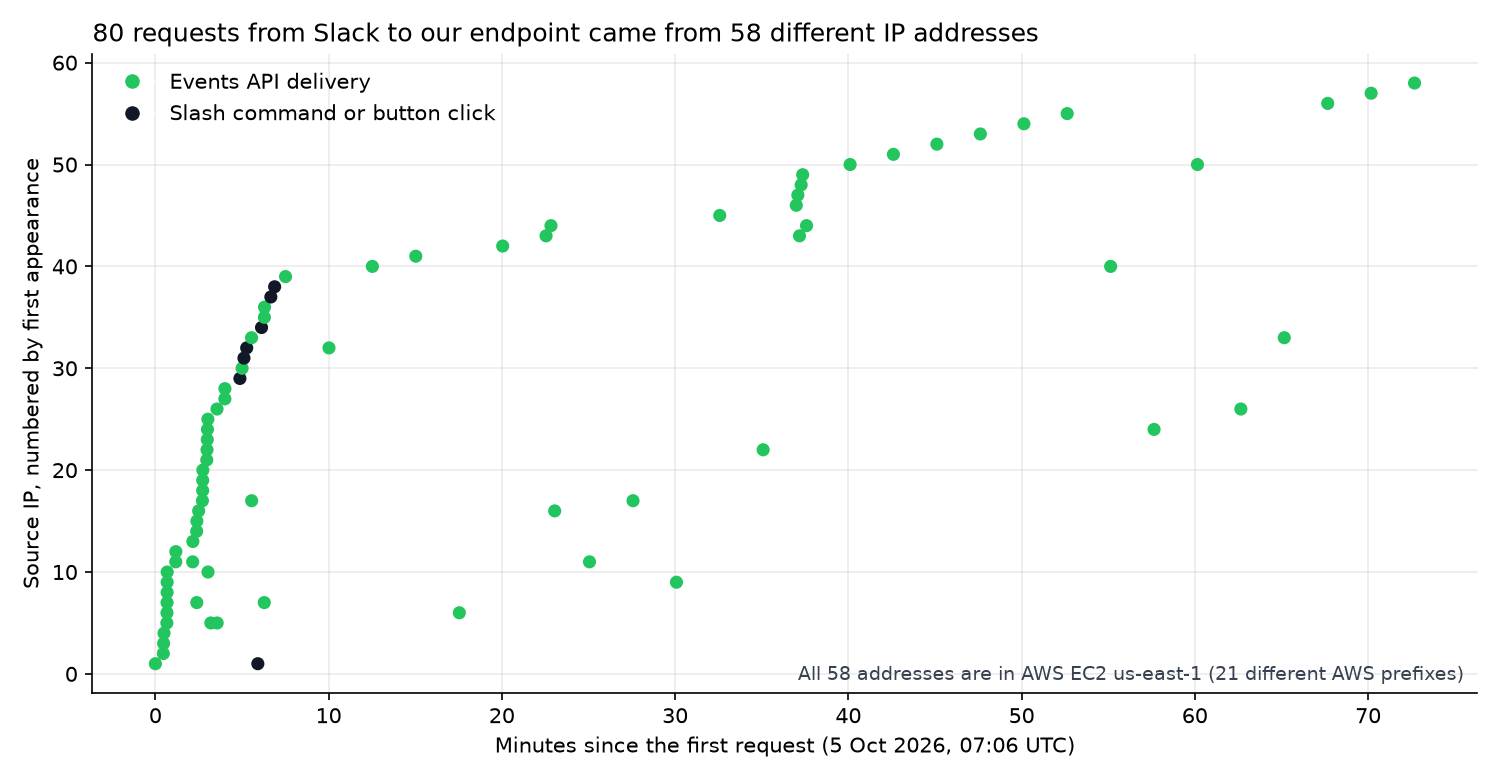
What the 80 requests showed:
| Measure | Result |
|---|---|
| Requests from Slack | 80 (72 message events, 6 slash commands, 1 button click, 1 app_mention) |
| Different source IPs | 58 |
| Most requests from one IP | 3 |
| AWS region of every IP | us-east-1, service EC2 |
| Different AWS prefixes | 21, from 3.80.0.0/12 to 100.48.0.0/12 |
| User-Agent | Slackbot 1.0 (+https://api.slack.com/robots) on all 80 |
We matched each address against Amazon's published ip-ranges.json (version of 5 October 2026). That file lists 299 EC2 prefixes for us-east-1, about 21.5 million addresses. An allowlist wide enough to catch Slack's next request would also let in anything else running on EC2 in that region, so it does not prove the caller is Slack. We tested one free-plan workspace; we did not test a workspace with data residency in another country.
Verify the signature instead
Every request from Slack carries X-Slack-Signature and X-Slack-Request-Timestamp. Your app recomputes an HMAC-SHA256 of v0:<timestamp>:<raw body> with your app's signing secret and compares. Bolt does this for you. We sent the same body to our Bolt app four ways:
| Request | Status |
|---|---|
| No signature headers | 401 |
| Signed with a wrong secret | 401 |
| Right secret, timestamp 400 seconds old | 401 |
| Right secret, current timestamp | 200 |
Without Bolt, the check is a few lines:
import hashlib, hmac, time

def is_from_slack(signing_secret: str, timestamp: str, body: str, signature: str) -> bool:
    if abs(time.time() - int(timestamp)) > 300:  # reject replays older than 5 minutes
        return False
    base = f"v0:{timestamp}:{body}".encode()
    expected = "v0=" + hmac.new(signing_secret.encode(), base, hashlib.sha256).hexdigest()
    return hmac.compare_digest(expected, signature)
We ran it on our own signed test bodies: it returned True for the valid one and False for a wrong secret, a 400-second-old timestamp, and the same JSON with its spaces removed. Use the raw request body exactly as received; parsing and re-serialising JSON changes the bytes. If your endpoint must stay private, put it behind a tunnel or a reverse proxy that only forwards /slack/events, or use Socket Mode, where your app opens the connection to Slack and needs no public URL at all.
Never appear "away" on Slack again
Cloud-based. No downloads. Works 24/7 even when your laptop is off.
Calling Slack from behind a firewall
For traffic from your network to Slack, allow the hostnames, not addresses. From Seoul, we resolved Slack's hostnames through three public resolvers (1.1.1.1, 8.8.8.8, 9.9.9.9) once a minute for 30 minutes:
| Hostname | Addresses seen | AWS region |
|---|---|---|
hooks.slack.com | 4, the same 4 every minute | ap-northeast-1 (Tokyo) |
slack.com | the same 4 as hooks.slack.com | ap-northeast-1 |
wss-primary.slack.com (real-time connection) | 8 | ap-northeast-1 |
The records had TTLs of 6 to 19 seconds, and the answers pointed to Tokyo because we asked from Korea. A machine in another country will get other addresses, so a list copied from our table or from a forum will not hold for you. An egress proxy that allows slack.com, *.slack.com and hooks.slack.com by name keeps working when the addresses change.
Slack's app settings also have the reverse feature: OAuth & Permissions > Restrict API Token Usage limits which IP addresses may use your app's tokens. Slack's documentation says it does not cover incoming webhooks. In our test, the range we added was gone after a page reload in both of our two tries, and token calls kept working, so we could not measure it.
FAQ
Is there an official list of Slack IP addresses?
Not for the requests Slack sends to apps. The addresses we logged changed with almost every request.
Does the incoming webhook URL need an IP allowlist?
No. The webhook URL itself is the credential: anyone who has it can post. Keep it out of code repositories and logs, and remove it in the app settings if it leaks.
Stop Jiggling Your Mouse.
Join hundreds of remote workers who never worry about their Slack status. Set it up once, stay green forever.
Related Articles
Slack Bolt With FastAPI: A Working App, the 3-Second Rule and 401s, Tested
A complete Slack app on FastAPI with Bolt for Python's adapter: a slash command, a button and an app mention, run behind a tunnel in a real workspace. We timed the acks, pushed one past 3 seconds and broke the signature on purpose.
Set Your Slack Status From Apple Shortcuts: A Working Shortcut, Tested
Apple Shortcuts has no Slack status action, but its Get Contents of URL action can call Slack's API. We built a shortcut that sets a 60-minute status, ran it on macOS 26.5.2, and added a second one that posts a message through a webhook.
Automatic Slack Status Updates: 3 Triggers We Built and Timed on a Mac
Slack's own automatic statuses cover huddles, focus mode and working hours. For anything else you need users.profile.set and a trigger. We built a schedule, a file and an app-launch trigger on macOS and timed each one.