
Set Your Slack Status From Apple Shortcuts: A Working Shortcut, Tested
Apple Shortcuts has no Slack status action, but its Get Contents of URL action can call Slack's API. We built a shortcut that sets a 60-minute status, ran it on macOS 26.5.2, and added a second one that posts a message through a webhook.
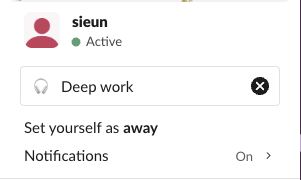
Apple Shortcuts has no "set Slack status" action on the Mac: Slack's desktop app 4.52.171 ships no App Intents, the files that give an app Shortcuts actions. What works is the Get Contents of URL action, which can send a POST request to Slack's users.profile.set method with your user token. We built that shortcut on 5 October 2026 on macOS 26.5.2, ran it against our free-plan test workspace, and it set ":headphones: Deep work" for exactly 60 minutes. The whole run took 4.5 seconds from Terminal.
What you need first
- • A Slack app in your workspace with the user scope
users.profile:write, installed to your account. Installing gives you a user token that starts withxoxp-. A bot token (xoxb-) is refused:users.profile.setanswered our bot token with{"ok": false, "error": "not_allowed_token_type"}. - • The Shortcuts app on a Mac, iPhone or iPad. We built and ran the shortcut on a Mac only.
- Date: set it to Specified Date and type
1970-01-01T00:00:00Z. - Get Time Between Dates: unit Seconds, between Date and Current Date.
- Calculate: Time Between Dates +
3600(60 minutes; use 1800 for 30). - Get Contents of URL: URL
https://slack.com/api/users.profile.set, Method POST.
- Headers: key
The token goes into the shortcut as plain text. Anyone you share the shortcut file with gets your token, so do not share it, and revoke the token if you do by mistake. Creating the app and the token is covered in our Slack bot token guide.
The shortcut, action by action
Slack wants the expiry as a Unix time in seconds. Shortcuts has no "Unix time" format, so the first three actions build one: the number of seconds since 1 January 1970, plus 3,600.
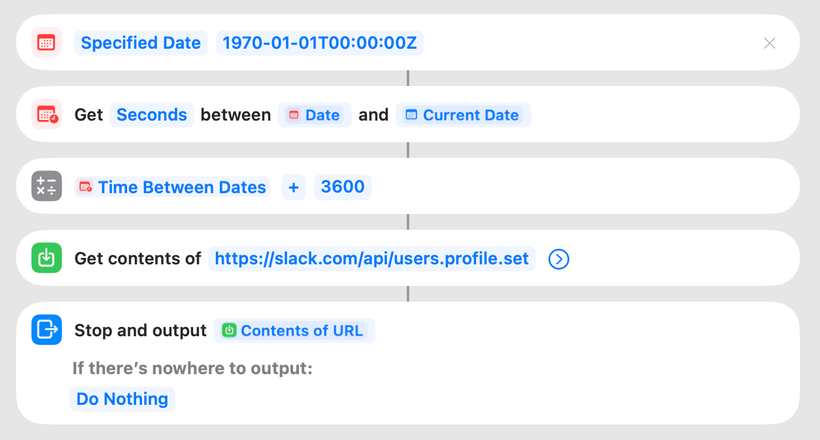
Authorization, value Bearer xoxp-your-token.
- Request Body: JSON, with one key profile of type Dictionary holding:
- status_text (Text): Deep work
- status_emoji (Text): :headphones:
- status_expiration (Number): the Calculation Result variable
Shortcuts added the last action, Stop and output, on its own when we opened the shortcut. The JSON body the shortcut sent is the same one a script would send:
{"profile": {"status_text": "Deep work", "status_emoji": ":headphones:", "status_expiration": 1791188855}}What happened when we ran it
From Terminal, shortcuts run "SG Deep work" finished in 4.51 seconds, and our watcher saw the new status through users.profile.get 0.46 seconds after the command started. Slack's web app showed it in the profile menu:
Slack's reply to the shortcut was {"ok": true, "warning": "missing_charset", ...} followed by the whole profile. The warning is harmless: Shortcuts sends Content-Type: application/json without charset=utf-8, and Slack set the status anyway. The reply also contains your profile fields, so do not show it in a notification you might screenshot.
The expiry came out right. The status we set at Unix time 1791185255 had status_expiration 1791188855, exactly 3,600 seconds later, and Slack clears a status at its expiration time on its own. Clicking the shortcut's tile in the Shortcuts app ran it the same way.
Not every Terminal run was clean. In 7 runs of our two shortcuts with shortcuts run, 3 did not return within 40 to 60 seconds. Two of those three had already done their job (the status was set, the message was posted) and the third had sent nothing. If you call shortcuts from a script, add a timeout and check the result in Slack.
Never appear "away" on Slack again
Cloud-based. No downloads. Works 24/7 even when your laptop is off.
A second shortcut that posts a message
To post a message instead of setting a status, use an incoming webhook. It needs no token header: the webhook URL is the secret, and it posts to one channel.
https://hooks.slack.com/services/... webhook, Method POST, Request Body JSON with one Text key text.Our first run took 9.9 seconds and returned the plain text ok. The message arrived in the channel as the app:

Treat the webhook URL like the token. Anyone who has the shortcut can post to that channel.
Running it automatically
Shortcuts on macOS 26 and iOS can run a shortcut from a personal automation, such as when a Focus turns on. We did not set one up, because toggling Focus would have changed the state of the Mac we were testing on. If you want your status tied to Focus, Slack's own automatic statuses can follow focus mode in Slack, and our automatic Slack status guide has three macOS triggers we timed. A status does not change your green or away dot; Slack Green handles the dot, separately from any status.
FAQ
Can I clear my Slack status with a shortcut?
Yes. Send the same request with status_text and status_emoji set to empty text and status_expiration set to 0. That is the call our test scripts used to clear the status after each run.
Does this work on the Slack free plan?
Yes. Our test workspace is on the Free plan.
Stop Jiggling Your Mouse.
Join hundreds of remote workers who never worry about their Slack status. Set it up once, stay green forever.
Related Articles
Slack IP Ranges for Webhooks and Events: 80 Requests Logged
Slack publishes no fixed IP range for the requests it sends to your app. We logged 80 real requests from Slack over 73 minutes: 58 different addresses, all in AWS us-east-1. What that means for a firewall allowlist, and what to check instead.
Slack Bolt With FastAPI: A Working App, the 3-Second Rule and 401s, Tested
A complete Slack app on FastAPI with Bolt for Python's adapter: a slash command, a button and an app mention, run behind a tunnel in a real workspace. We timed the acks, pushed one past 3 seconds and broke the signature on purpose.
Automatic Slack Status Updates: 3 Triggers We Built and Timed on a Mac
Slack's own automatic statuses cover huddles, focus mode and working hours. For anything else you need users.profile.set and a trigger. We built a schedule, a file and an app-launch trigger on macOS and timed each one.