
Does Slack Collapse Long Messages? When Show More Appears
Slack shows a normal message in full, however long it is: a 40-line message and a 3,900-character message both showed with no Show more link in our October 28, 2026 test. Show more appears only on legacy attachments from apps, at 6 lines or about 700 characters.
Slack does not collapse long messages that people type. In the Slack web app on October 28, 2026, we posted messages of 5 to 40 lines and of 1,000 to 3,900 characters, and every one showed in full, with no Show more link. The only messages that collapsed were legacy attachments sent by an app: Slack cut those at 5 lines, or at about 700 characters, and added Show more. You cannot make a collapsible section in a normal message, and none of the Block Kit messages we sent folded.
What we tested
We posted each message into a test channel in a Free workspace and then checked every message in the page for a Show more or Show less link. Messages from a person were posted through the web app's own session; app messages came from a test bot.
| Message | Size | Collapsed? |
|---|---|---|
| Person, plain text | 5, 8, 10, 12, 15, 20, 30 and 40 lines | No, all shown in full |
| Person, one paragraph | 1,000, 2,000, 3,000 and 3,900 characters | No |
| App, plain text | 40 lines | No |
| App, Block Kit section | 40 lines; 2,900 characters | No |
| App, markdown block | 40 lines | No |
| App, legacy attachment | 4 or 5 lines | No |
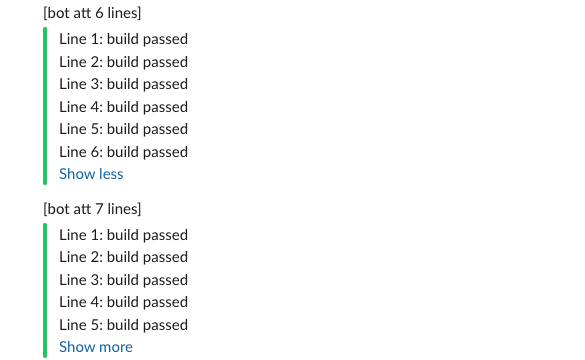
| App, legacy attachment | 6, 7, 8 and 10 lines | Yes, Show more after line 5 |
| App, legacy attachment | 600 to 680 characters | No |
| App, legacy attachment | 700, 800, 900 and 1,500 characters | Yes, Show more |
The 40-line message from a person took about 890 pixels of height in the channel. The Block Kit section with the same 40 lines took about 910. Slack let both run the full height.
Where Show more does appear
Legacy attachments are the older way apps format messages: a colored bar on the left with text next to it. Many alert and CI integrations still use them. This is what our 5-, 6- and 7-line attachments looked like:
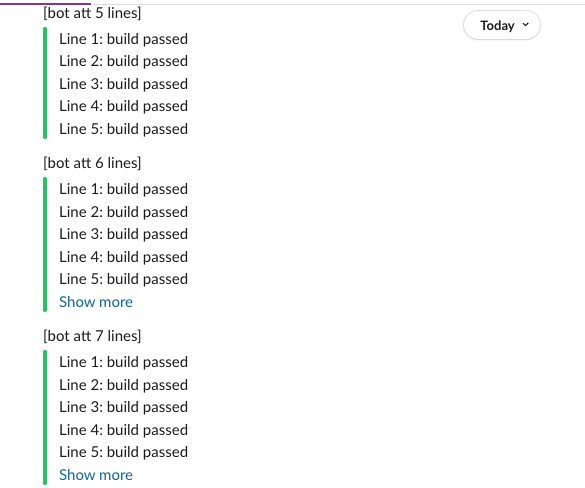
Clicking Show more opened the rest, and the link turned into Show less:
For text length, an attachment of 680 characters still showed in full, and 700 collapsed, so the cut sits between those two. Slack's docs do not give the number; this is what we measured.
Never appear "away" on Slack again
Cloud-based. No downloads. Works 24/7 even when your laptop is off.
How to make a collapsible message
There is no collapse option in the message box, and no markdown for a folded section. What you can do:
- • Put the long part in a thread. Post a short summary, then the details as the first reply. The channel shows one line, "1 reply", and people open it if they want.
- • From an app, use a legacy attachment. If you build an integration and want Slack to fold long output, send it as an attachment with
textlonger than 5 lines. Slack's docs call attachments a legacy feature and recommend Block Kit, which did not fold in our test.
{
  "channel": "C0123456789",
  "text": "Nightly build report",
  "attachments": [
    {
      "color": "#22c55e",
      "text": "Line 1: build passed\nLine 2: build passed\nLine 3: build passed\nLine 4: build passed\nLine 5: build passed\nLine 6: build passed"
    }
  ]
}
This payload, sent with chat.postMessage, produced the 6-line attachment above with its Show more link.
A message that is too long to post at all is a different limit. Slack splits text over about 4,000 characters into several messages; the Slack message character limit has those numbers. To see how a Block Kit payload will look before you send it, paste it into the Block Kit checker.
Can you collapse a thread or a channel message you received?
You can collapse images and files: each has a small arrow next to its name that hides the preview for you. Text has no such arrow. A Reddit thread in r/Slack asks for a way to fold a long thread parent, and in our test there was none.
FAQ
Why do I see Show more on some messages and not others?
The ones with Show more are app messages built as legacy attachments, with a colored bar on the left. Messages from people and Block Kit messages from apps show in full.
Does the mobile app collapse long messages?
We tested the web app only, so we cannot say how the phone app folds attachments.
Stop Jiggling Your Mouse.
Join hundreds of remote workers who never worry about their Slack status. Set it up once, stay green forever.
Related Articles
Slack Canvas Shortcuts: Keyboard Keys, the / Menu and Dates
Slack canvases have their own keyboard shortcuts: Cmd + Option + 1 to 3 for headings, Cmd + Shift + 7, 8 and 9 for lists and checklists, and / for an insert menu that adds dates and reminders. We pressed every formatting shortcut in a real canvas on October 28, 2026.
How to Copy or Duplicate a Slack Canvas
Slack canvases have no Duplicate button. To copy one, select all, copy, and paste into a new canvas, or copy it by API. We tested both on October 28, 2026: headings and lists came through, but links to sections still pointed at the old canvas.
Slack Canvas Table of Contents: The Built-in Outline and Section Links
Every Slack canvas already has a table of contents: hover the short lines at the left edge and a list of all headings opens. For a contents list inside the canvas, copy a link to each heading and paste them as a list. We tested both on October 28, 2026.