
Can You See Teams Status History? What Teams Keeps and Admins See
No. Microsoft Teams keeps no status history you can open: people see your current status and a Last seen time, and that is all. Admins get a last activity date per day from usage reports, and a history only exists if someone logs presence through Microsoft Graph. Where each of those lives and how to read it.
No, Microsoft Teams does not keep a status history that anyone can open. Coworkers see your current status and, when you are Away or Offline, a "Last seen" time. Your manager sees the same thing. Admins can see a last activity date for each user in the Teams usage reports, plus daily counts of messages, calls and meetings, but not when you were green, yellow or red during the day. A minute-by-minute status history exists only if your company, or a tool it bought, logs presence through Microsoft Graph as it happens.
Slack works the same way: it shows the current dot and keeps no history of it. Slack marks you away after 10 minutes without input in the Slack window. Slack Green keeps your Slack status green from a server during the hours you set.
What each person can see about your Teams status
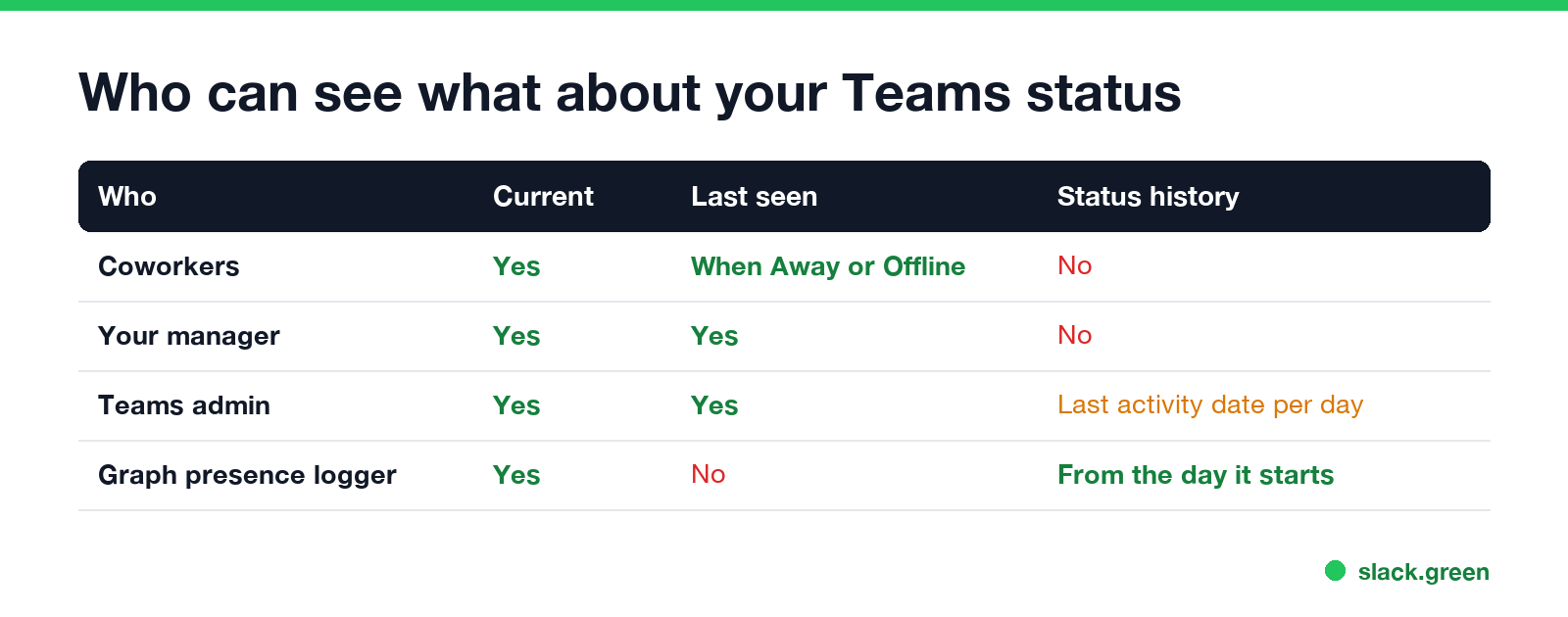
| Who | Current status | Last seen time | Last activity date | Status history over the day |
|---|---|---|---|---|
| Coworkers | Yes | Yes, when you are Away or Offline | No | No |
| Your manager (no admin role) | Yes | Yes | No | No |
| Teams or Microsoft 365 admin | Yes | Yes | Yes, per day, in usage reports | No |
| An app logging presence through Graph | Yes | No | No | Yes, from the day it starts logging |
So "can my boss see my Teams status history?" has a plain answer: not in Teams. They see what everyone sees. A report from IT can show which days you used Teams and how much, and a presence logger can show the rest, if your company runs one.
Last seen: the only history in the Teams app
When you are Away or Offline, coworkers see "Last seen" with a time, for example "Away, Last seen 12m ago", in a chat header and on your profile card. It is the most recent time any of your devices was active, and it goes away when you turn Available. Teams has no setting that hides it. What does Last seen mean on Teams covers the details.
Your own status changes are not listed anywhere in the app either. Teams does not show you a log of when you went Away.
Teams last active date: the admin reports
Never appear "away" on Slack again
Cloud-based. No downloads. Works 24/7 even when your laptop is off.
Admins find a last activity date in two places:
- Teams admin center > Analytics & reports > Usage reports > Teams user activity.
- Microsoft 365 admin center > Reports > Usage > Microsoft Teams > User activity.
For each user they show the last activity date and counts for the chosen period (7, 30, 90 or 180 days): chat messages, channel messages, calls, meetings joined and time in audio, video and screen sharing. The date is a day, not a time, and the reports run a day or two behind. They do not show status changes, Away periods or when you signed in.
Sign-in times are a separate log. Microsoft Entra ID sign-in logs record each time a Teams client signs in, with time, device and location. That shows when a device started a session, not how long you stayed Available. What else IT can see is in does Microsoft Teams track your activity.
How a Teams presence report is built
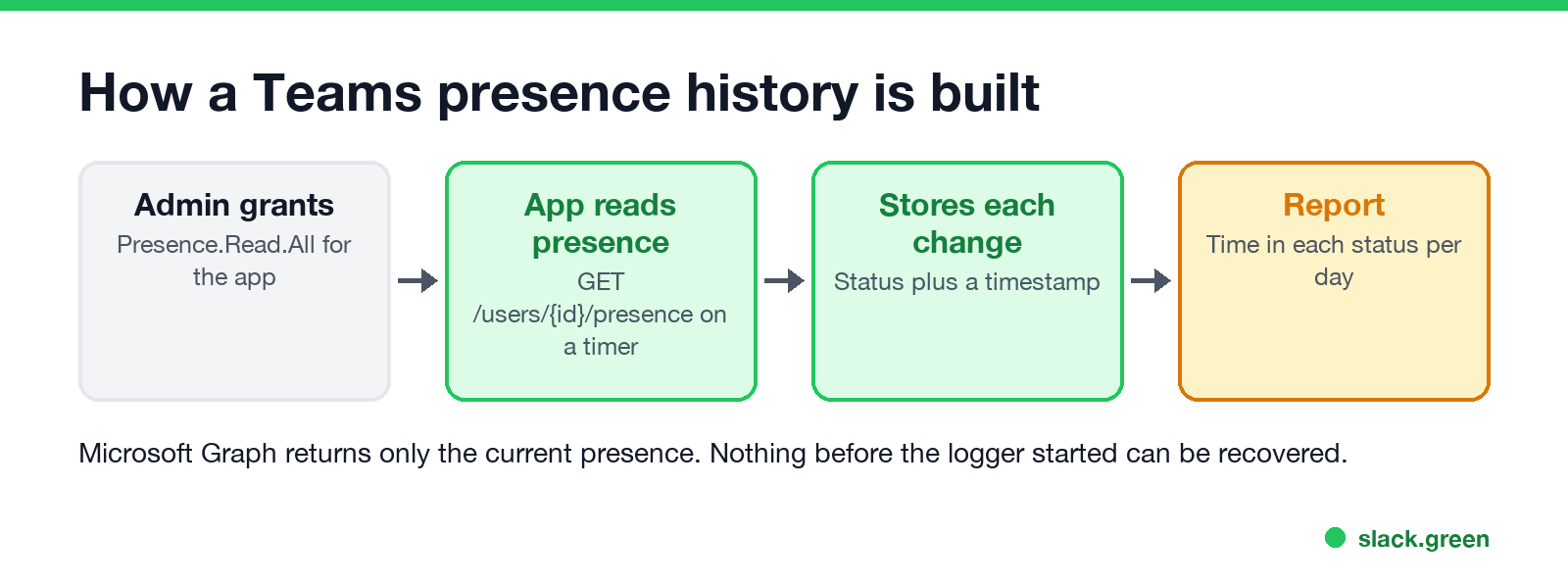
Microsoft Graph gives the current presence of a user, never the past:
GET https://graph.microsoft.com/v1.0/users/{user-id}/presence

{ "availability": "Away", "activity": "Away" }
To get a history, an app reads that value on a timer, or subscribes to presence change notifications, and stores each change with a timestamp. It needs the Presence.Read.All permission, which an admin grants. Commercial tools that sell Teams presence reports and "time in status" dashboards work this way. An admin can build a rough version in PowerShell:
# log one user's Teams presence every 5 minutes to a CSV
Connect-MgGraph -Scopes "Presence.Read.All"
$userId = "<user object id>"
while ($true) {
  $p = Invoke-MgGraphRequest -Method GET -Uri "https://graph.microsoft.com/v1.0/users/$userId/presence"
  "{0},{1},{2}" -f (Get-Date -Format s), $p.availability, $p.activity | Add-Content presence-log.csv
  Start-Sleep -Seconds 300
}
Two limits follow from how it works. A logger sees only the time after it starts, so there is no way to recover last week's statuses. And it records presence, not work: Away means no input for about 5 minutes, which covers reading, a call on your phone and thinking at a whiteboard.
How to check if your company logs Teams presence
If your concern is looking away while you work, remember what feeds the status. Teams on a computer goes Away after about 5 minutes without input and immediately on lock. With several devices signed in, the most available one wins, as shown in Teams status on multiple devices.
FAQ
Never appear "away" on Slack again
Cloud-based. No downloads. Works 24/7 even when your laptop is off.
Can I see my own Teams status history? No. Teams shows only your current status. There is no personal log.
Can my manager see how long I was Away on Teams? Not in Teams. They see the current status and a Last seen time. A presence log through Graph could show it, if the company runs one.
What is the Teams last active date? The last day a user did anything in Teams, shown in the admin usage reports. It is a date, not a time.
Stop Jiggling Your Mouse.
Join hundreds of remote workers who never worry about their Slack status. Set it up once, stay green forever.
Related Articles
KeepingYouAwake vs Amphetamine: Which Mac Keep-Awake App to Use
KeepingYouAwake is a free, open-source menu bar switch that runs Apple's caffeinate for you. Amphetamine is a free App Store app with triggers, schedules and a closed-lid mode. Pick KeepingYouAwake for one click and Homebrew, Amphetamine for automation. Neither keeps Slack or Teams active.
Computer Locks After 15 Minutes? How to Tell If Group Policy Set It
A work laptop that locks after exactly 15 minutes, with screen settings greyed out, is almost always following a policy from IT: the Windows machine inactivity limit, a forced screen saver, or an Intune device lock. Security baselines and PCI DSS ask for 15 minutes. How to see which policy it is, and what you can and cannot change.
How to Keep a Citrix Session Active: Find Which Timeout Logs You Out
A Citrix session can end from four different timers: Windows locking inside the virtual desktop, the Citrix session idle timer, the Citrix Gateway session time-out, and the StoreFront web page timeout. Only input from your own device into the Citrix window resets them. How to tell which one hit you and what keeps each one quiet.