
What Does Focusing Mean in Teams? It Comes From Focus Time
Focusing in Microsoft Teams means the person has a Viva Insights focus time block on their calendar right now. Their notifications are muted until it ends. You cannot pick Focusing from the status menu yourself.
Focusing in Microsoft Teams means the person has a focus time block on their Outlook calendar right now, booked through Microsoft Viva Insights. While the block runs, Teams shows their status as Focusing with the same red icon and white bar as Do not disturb, and mutes their Teams notifications, except from priority contacts. When the block ends, the status goes back to Available or whatever their activity says. Microsoft lists Focusing as a status that an app sets, so you will not find it in the Teams status menu.
If you see Focusing on a coworker, your message is delivered and they will read it after the block. If you see it on yourself and did not expect it, a Viva Insights focus plan is booking the time for you, and the steps to stop it are below. Slack has a similar feature called focus mode. If your problem in Slack is the opposite, going grey while you work, Slack Green keeps your Slack status active from a server during the hours you set.
Where the Focusing status comes from
Focusing is one of the few Teams statuses that no person picks by hand. Microsoft's presence documentation lists it in the app-configured column, with the note that it "occurs when users schedule focus time in MyAnalytics/Insights in their calendars." MyAnalytics is the old name of Viva Insights.
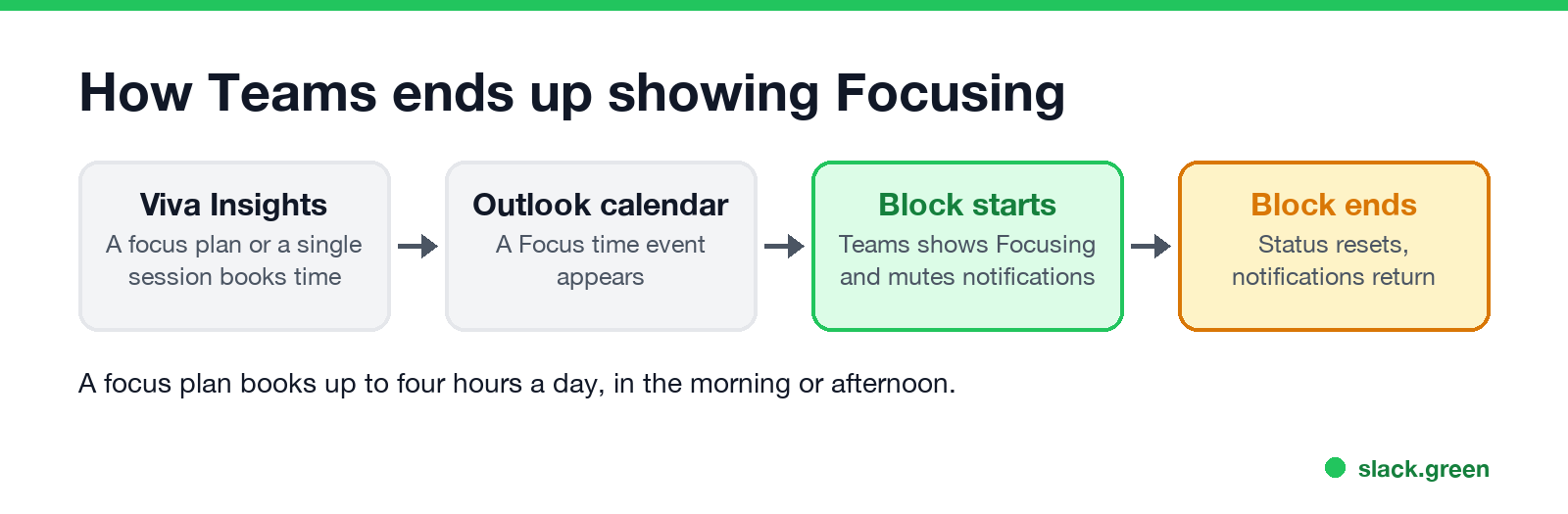
The chain runs like this:
- Viva Insights books focus time on your Outlook calendar. It does this every day if you joined a focus plan, or once if you booked a single session.
- The block starts. Teams sends a reminder you can use to open focus mode, a timer with breaks.
- Teams shows Focusing. Microsoft's focus page says that even if you ignore the reminder, "your Teams status will update to Focusing, and you won't get Teams notifications unless they're from priority contacts."
- The block ends. The status stops showing Focusing, and muted notifications come back.
- • They are working, on purpose, without interruptions. It is a calendar block they or their plan chose.
- • Your chat message arrives. It waits in their chat list, with no banner or sound on their side.
- • They will likely reply when the block ends. A focus plan books at most four hours a day.
- • A call may not reach them. If you need them now and they added you to priority access, your message and call get through.
A focus plan can book up to four hours a day, in the morning or the afternoon, according to Microsoft's focus plan page.
What Focusing means when you see it on someone else
It does not mean they are away from the computer. A person who is Focusing is usually at their desk.
Focusing vs Do not disturb vs Busy
Never appear "away" on Slack again
Cloud-based. No downloads. Works 24/7 even when your laptop is off.
The icons for Focusing and Do not disturb look the same, a red circle with a white bar. The difference is who sets them and when they end.
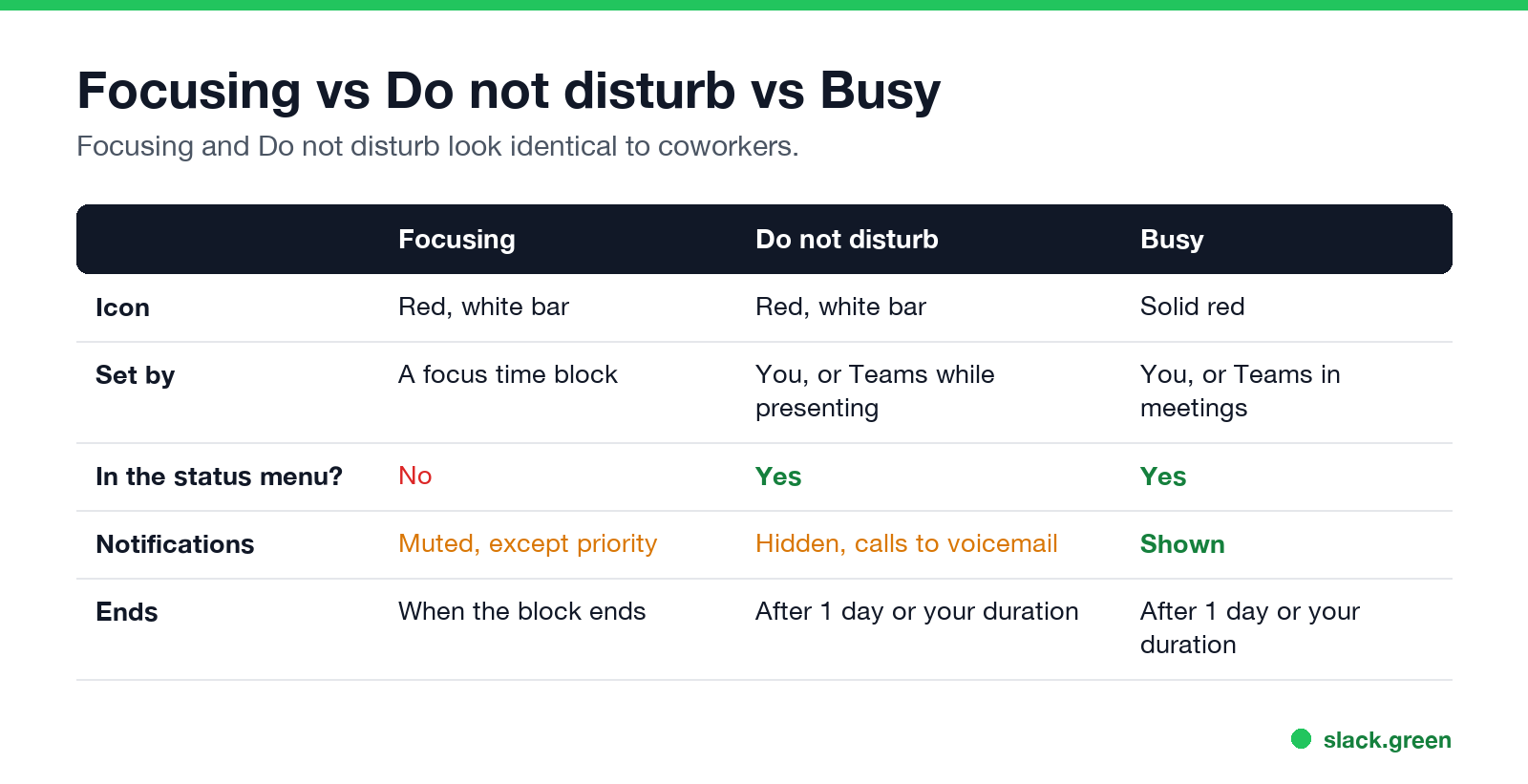
| Focusing | Do not disturb | Busy | |
|---|---|---|---|
| Icon | Red, white bar | Red, white bar | Solid red |
| Set by | A Viva Insights focus time block | You, or Teams while you present | You, or Teams in meetings and calls |
| Can you pick it from the status menu? | No | Yes | Yes |
| Notifications | Muted, except priority contacts | Banners hidden, calls to voicemail, except priority access | Shown |
| Ends | When the calendar block ends | After 1 day, or the duration you set | After 1 day, or the duration you set |
What Do not disturb blocks, call by call, is in Teams Do not disturb. Every other colour and symbol is in Microsoft Teams status icons meaning.
How to show Focusing in Teams yourself
Because it comes from Viva Insights, you set it up there, not in the status menu. Viva Insights has to be available in your organization; most Microsoft 365 business plans include the personal version.
Book one focus session
Book focus time every day with a focus plan
Viva Insights then fills your calendar with focus blocks for the next two weeks and keeps booking them.
If you only want one quiet hour and no Viva Insights, use Do not disturb with a duration instead. It looks the same to your coworkers.
How to turn off Focusing in Teams
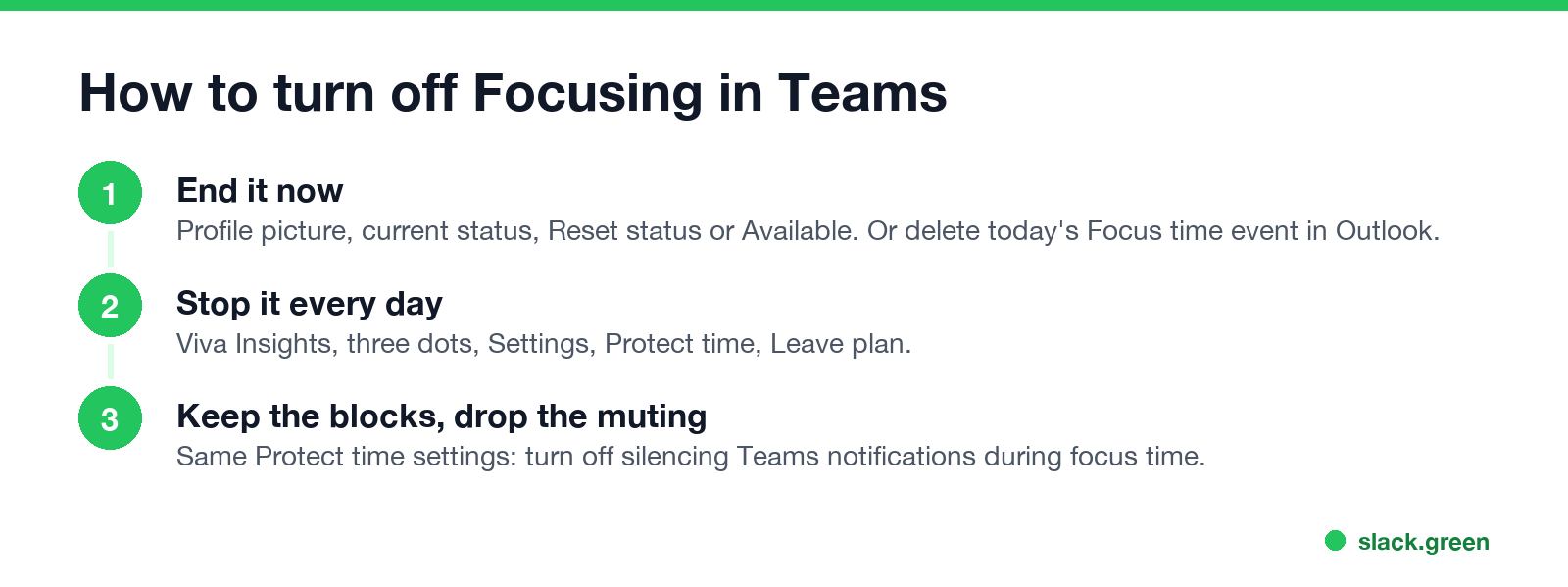
End it for now. Select your profile picture, select your current status, then Reset status or pick Available. Deleting or shortening today's Focus time event in Outlook also ends it, because the status follows the event.
Stop it coming back every day. A daily Focusing status at the same time is a focus plan.
Focus blocks already on your calendar stay there until you delete them.
Keep the blocks but not the muting. In the same Protect time settings, turn off the option that silences Teams notifications during focus time. You keep the calendar blocks as protected time.
Focusing shows but notifications still come through
Never appear "away" on Slack again
Cloud-based. No downloads. Works 24/7 even when your laptop is off.
Muting in a focus plan is an option. If notifications still pop up during a Focusing block, the plan was set up without it. Turn it on under Settings, Protect time. Messages from priority contacts break through on purpose; that list lives under Settings, Privacy, Manage priority access in Teams.
Focus in a Teams meeting is a different thing
"Focus" also appears inside meetings. Focus on content is a view you pick from View during a meeting when someone shares their screen. It hides the video tiles so you see only the shared content. It changes your screen only and has nothing to do with the Focusing status.
The Slack version: focus mode
Slack has a focus mode on desktop. It turns the sidebar grayscale, pauses sounds except from people you mark, and sets your status to In focus mode. Unlike Teams, you turn it on from Slack itself with no calendar needed. The details are in Slack focus mode, and Slack's notification pause is in Slack Do Not Disturb.
Neither feature stops Slack from setting you away. Slack counts only input inside its own window and goes grey after 10 minutes without it, focus mode or not. Slack Green keeps your Slack presence active from a server during the hours you set, so a long reading session does not turn you grey.
FAQ
Never appear "away" on Slack again
Cloud-based. No downloads. Works 24/7 even when your laptop is off.
What does Focusing mean on Teams? The person has a Viva Insights focus time block running on their calendar. Their Teams notifications are muted until it ends.
Can I set my Teams status to Focusing manually? No. Focusing comes from focus time booked in Viva Insights. For the same look on demand, use Do not disturb with a duration.
Does Focusing mean the person is away? No. They are usually at their desk and have chosen not to be interrupted.
How do I turn off Focusing in Teams? Pick another status or Reset status to end it now. To stop it every day, leave the focus plan in Viva Insights, Settings, Protect time.
Will someone see my message while they are Focusing? It is delivered but not announced. They see it when they open Teams or when the block ends. Priority contacts get through.
Is Focusing the same as Do not disturb? It looks the same and mutes notifications the same way. It is set by a calendar block instead of by you.
Stop Jiggling Your Mouse.
Join hundreds of remote workers who never worry about their Slack status. Set it up once, stay green forever.
Related Articles
Can My Employer See My Browsing If I Use a VPN? It Depends Whose
A personal VPN hides the sites you visit from the office network, but not from monitoring software, a managed browser or IT on a work laptop. The company VPN shows your employer every site it carries. What each setup hides.
Teams Status on Multiple Devices: The Last Device You Used Wins
Signed in to Teams on a computer and a phone? Your status comes from the device you used most recently. That is why a quick look at your phone can turn you Away, and why a phone in your pocket shows Away instead of Offline at night.
Zoom Do Not Disturb: How to Turn It On, Schedule It, and What It Blocks
To turn on Do not disturb in Zoom, click your profile picture, point at your status and choose Do not disturb, then a time from 20 minutes to 24 hours, or Custom for a daily schedule. It blocks pop-up notifications for Zoom Team Chat and Zoom Phone calls. Busy, by contrast, mutes nothing. How the two differ, and how to keep a Zoom meeting free of pop-ups.