
How to Delete Someone Else's Message in Slack, Tested as Workspace Owner
As the owner of a free-plan workspace we deleted an app's message, a webhook message and two system messages, in Slack web and with the API, and checked which settings exist.
To delete someone else's message in Slack, hover it, open the three-dot More actions menu and pick Delete message, then confirm. The option is there only if your role allows it, which in our test meant the workspace owner. On 8 October 2026 we tried it as the Primary Owner of a free-plan test workspace on three kinds of message that were not ours: a message from our test app, a message from an incoming webhook, and Slack's own system lines. We also tried the same deletes through the API with the owner's user token.
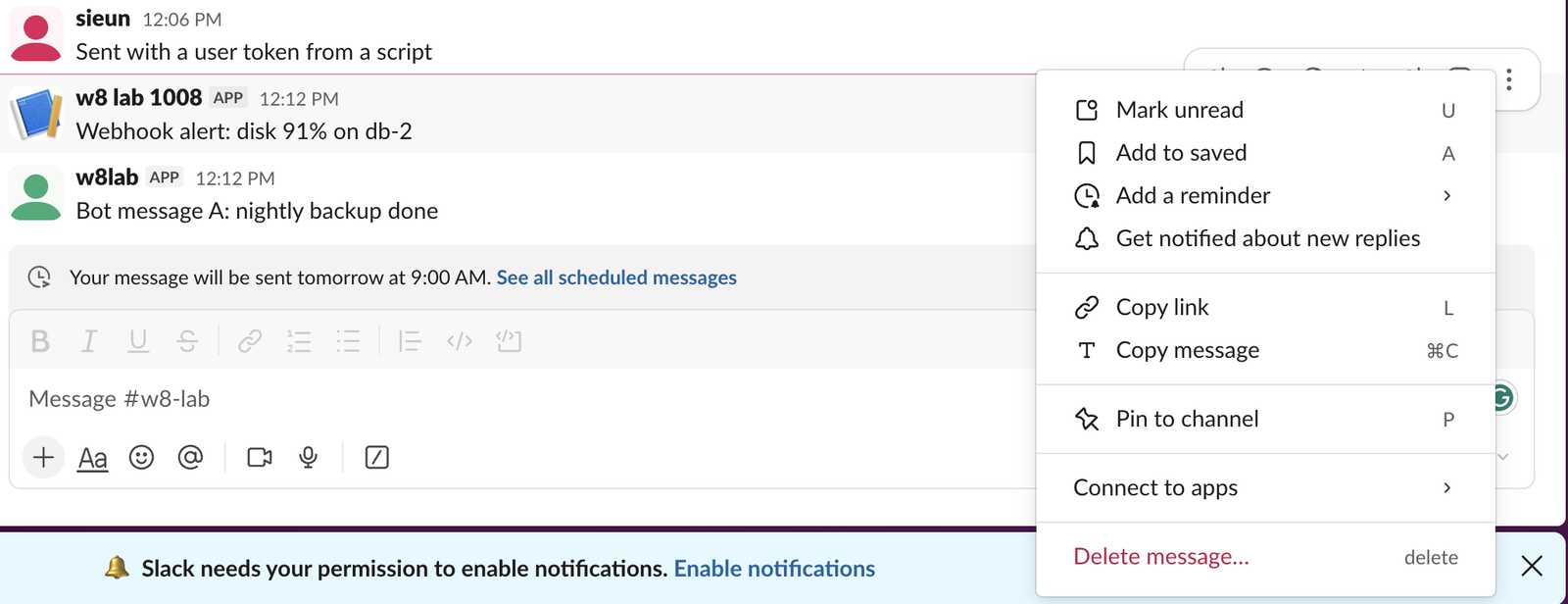
What the owner could delete
| Message | Delete in the menu | chat.delete with the owner's user token |
|---|---|---|
| Posted by our app's bot | Yes, Delete message… | ok: true |
| Posted by an incoming webhook | Yes, Delete message… | not tried; deleted in the app |
| "added an integration to this channel" line | No, only Copy link and Pin to channel | ok: true |
| "joined #w8-lab" line | No | ok: true |
The menu on other people's messages had no Edit message item. An owner can remove someone else's message but cannot change its text.
Deleting a message from the menu
- Hover the message and click the three dots at the right.
- Click Delete message… at the bottom.
- Slack shows the message and asks "Are you sure you want to delete this message? This cannot be undone." Click Delete.
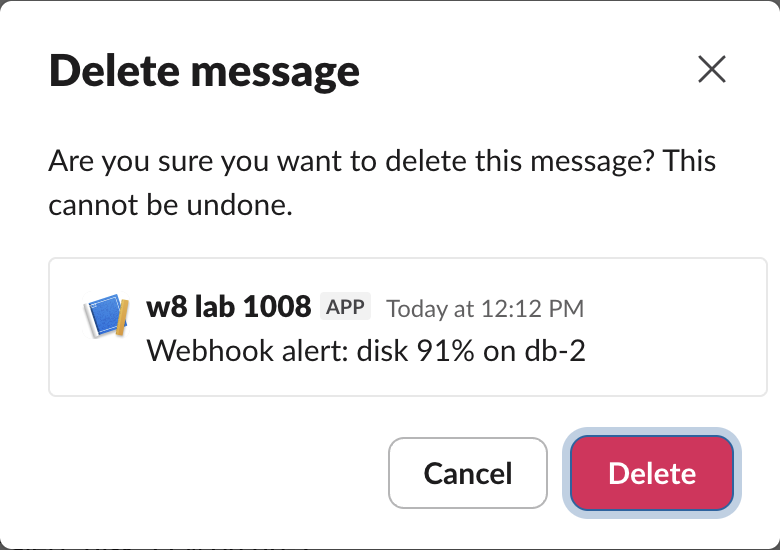
The webhook message disappeared at once, and nothing took its place in the channel. conversations.history no longer returned it. Whether a deleted message can still be recovered from an export depends on your plan and retention settings; see can Slack see deleted messages.
System messages: no menu item, but the API removes them
Slack's own lines, such as "sieun joined #w8-lab" and "added an integration to this channel", got a short menu with only Copy link and Pin to channel.

The API did not have that limit. chat.delete with the owner's user token (an xoxp- token with chat:write) returned ok: true for both lines, and they were gone from the channel. Trying again returned message_not_found.
curl -s https://slack.com/api/chat.delete \
  -H "Authorization: Bearer $SLACK_USER_TOKEN" \
  -d channel=C0C7P7DEE4R -d ts=1791424531.540909
# {"ok":true,"channel":"C0C7P7DEE4R","ts":"1791424531.540909"}
A bot token is stricter: it can delete only what its own bot posted, and it gets cant_delete_message for anyone else's message. Our chat.delete test has every token and message combination.
Never appear "away" on Slack again
Cloud-based. No downloads. Works 24/7 even when your laptop is off.
Which settings exist on the Free plan
In Admin > Settings & permissions > Permissions, the Free plan has two related settings, and neither is a list of who may delete other people's messages.

Owners and admins are different roles with different rights; our page on workspace owner vs admin compares them.
What we could not test
Our test workspace has one person, so we could not check what a regular member sees on a colleague's message, or test a channel manager's menu. If you are a member and see no Delete item on someone else's message, ask a workspace owner or admin to remove it.
FAQ
Does Slack tell the author their message was deleted?
In our test nothing was posted in its place. We had no second person, so we could not check whether the author sees a notice in their own client.Can I delete a message an app posted that keeps coming back?
Deleting removes that one message. If a webhook keeps posting, remove the webhook itself; our webhook test shows which errors a removed webhook returns.Stop Jiggling Your Mouse.
Join hundreds of remote workers who never worry about their Slack status. Set it up once, stay green forever.
Related Articles
Slack Daily Standup Without a Paid Bot: /remind, Workflow Builder and a Script
We set up a weekday 9:30 standup in a free Slack workspace three ways: a /remind reminder, Workflow Builder, and a short script that posts the questions and collects the thread replies.
Slack Tabs Under a Channel Name: What Each One Is and How to Edit Them
We added, renamed, moved, hid and deleted the tabs under a channel name in Slack web on the Free plan, and compared them with the tabs in a DM.
Leave Multiple Slack Channels at Once: 4 Ways Timed, Plus a Script
Slack has no bulk leave button. We made 12 test channels and left them with the sidebar menu, the channel browser, /leave and a 30-line script, and timed each way.