
Slack Bolt With FastAPI: A Working App, the 3-Second Rule and 401s, Tested
A complete Slack app on FastAPI with Bolt for Python's adapter: a slash command, a button and an app mention, run behind a tunnel in a real workspace. We timed the acks, pushed one past 3 seconds and broke the signature on purpose.
Bolt for Python runs inside FastAPI through its adapter: create a Bolt App, wrap it in slack_bolt.adapter.fastapi.SlackRequestHandler, and pass every POST on /slack/events to handler.handle(req). On 5 October 2026 we ran the app below with slack_bolt 1.30.0, FastAPI 0.142.2, uvicorn 0.54.0 and Python 3.14 behind a cloudflared tunnel, connected to a throwaway app in our free-plan test workspace. A slash command, a button click and an @mention all worked, and Bolt answered each request in 0.2 to 15 ms.
The app
This is the whole file we ran as main.py:
import os
from fastapi import FastAPI, Request
from slack_bolt import App
from slack_bolt.adapter.fastapi import SlackRequestHandler

app = App(
    token=os.environ["SLACK_BOT_TOKEN"],
    signing_secret=os.environ["SLACK_SIGNING_SECRET"],
)

@app.command("/sglab")
def hello_command(ack, command):
    ack(
        text=f"Hi <@{command['user_id']}>",
        blocks=[
            {"type": "section", "text": {"type": "mrkdwn", "text": f"Hi <@{command['user_id']}>, you sent `{command['text']}`"}},
            {"type": "actions", "elements": [
                {"type": "button", "action_id": "approve", "text": {"type": "plain_text", "text": "Approve"}, "style": "primary"}
            ]},
        ],
    )

@app.action("approve")
def approve(ack, body, respond):
    ack()
    respond(replace_original=True, text=f"Approved by <@{body['user']['id']}>")

@app.event("app_mention")
def mention(event, say):
    say(text=f"You said: {event['text']}", thread_ts=event["ts"])

@app.event("message")
def any_message(event, logger):
    pass  # acked by Bolt; logged by run.py

api = FastAPI()
handler = SlackRequestHandler(app)

@api.post("/slack/events")
async def slack_events(req: Request):
    return await handler.handle(req)
Start it with uvicorn main:api --port 3000; we ran the same api object through uvicorn.run with a logging wrapper. Bolt checks every request's signature with SLACK_SIGNING_SECRET (Basic Information page of your app) and calls Slack with SLACK_BOT_TOKEN. In the app settings, the slash command URL, the Interactivity request URL and the Event Subscriptions request URL all point to https://<your-host>/slack/events. The bot scopes were commands, chat:write and app_mentions:read, and the bot events app_mention and message.channels.
Slack needs a public HTTPS URL. For local testing we ran cloudflared tunnel --url http://localhost:3000, which prints a trycloudflare.com address. If you already have a ~/.cloudflared/config.yml for another tunnel, pass --config with an empty file, or the quick tunnel answers 404 on every path; that happened to us on an earlier test.
What Slack showed
Typing /sglab hello from fastapi in a channel returned the ephemeral reply with a button:

Clicking Approve replaced that message through respond(replace_original=True, ...):

A message with @sglab1005pm ping from the FastAPI test got the reply You said: <@U0C6N8EJXNJ> ping from the FastAPI test in a thread. Our request log, written by a small ASGI middleware in front of the app:
| Request | kind from the body | HTTP status | Time to answer |
|---|---|---|---|
| Slash command | command | 200 | 15.0 ms |
| Button click | interactive | 200 | 13.0 ms |
@mention, as message | event_callback:message | 200 | 2.1 ms |
@mention, as app_mention | event_callback:app_mention | 200 | 0.3 ms |
One @mention arrived twice, once as app_mention and once as message, because the app subscribed to both. The @app.event("message") listener gives Bolt a handler for that second copy and for every other channel message the bot can see.
The 3-second ack rule, measured
Slack gives a slash command 3 seconds. We added a second command whose handler slept before calling ack():
- • Slept 2.5 s: Bolt answered after 2,511.6 ms and the reply
acked after 2.5 sshowed up. - • Slept 3.5 s: Bolt stopped waiting at 3,010.6 ms, answered
404and loggedalert_modal didn't call ack()andUnhandled request. Slack showed this to the user:
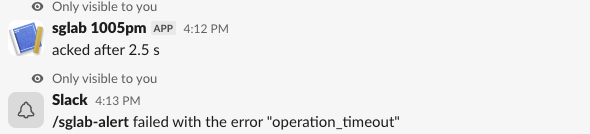
So call ack() first and do slow work after it. With the sync App, Bolt runs listeners in a thread pool, so say() and respond() after ack() still work, as our mention reply did. For long jobs on a serverless host, Bolt's process_before_response=True plus lazy listeners is the documented pattern; we did not test that.
Never appear "away" on Slack again
Cloud-based. No downloads. Works 24/7 even when your laptop is off.
Signature checks: the 401s
Bolt rejects anything Slack did not sign. We sent a url_verification body to the tunnel four ways:
| Request | Status | Body |
|---|---|---|
| No signature headers (curl) | 401 | {"error": "invalid request"} |
| Signed with the wrong secret | 401 | {"error": "invalid request"} |
| Right secret, timestamp 400 s old | 401 | {"error": "invalid request"} |
| Right secret, current timestamp | 200 | {"challenge": "abc123"} |
If a real Slack request gets a 401, check that SLACK_SIGNING_SECRET holds the signing secret and not the client secret or the old verification token, and that the server clock is right. The same checks apply to the Flask version of this app.
FastAPI or Socket Mode
FastAPI needs a public HTTPS URL and answers each request directly. Socket Mode opens a WebSocket from your machine to Slack and needs no public URL, but it needs an app-level token and keeps a process connected. Use the FastAPI adapter when the app already lives in a FastAPI service; use Socket Mode for a bot on a laptop or behind a firewall. Events that your FastAPI endpoint fails to answer are retried; the Events API retry timings are on a separate page.
FAQ
Should I use App or AsyncApp with FastAPI?
We ran the sync App above, and FastAPI served it fine. Bolt also has AsyncApp with slack_bolt.adapter.fastapi.async_handler.AsyncSlackRequestHandler; we did not test it.
Where do the requests come from?
Every request to our endpoint carried the user agent Slackbot 1.0 (+https://api.slack.com/robots), from Amazon AWS addresses that changed between requests. Do not allowlist IPs; verify the signature, as Bolt does. Our Slack IP ranges test logged 58 different addresses in 80 requests.
Stop Jiggling Your Mouse.
Join hundreds of remote workers who never worry about their Slack status. Set it up once, stay green forever.
Related Articles
Slack IP Ranges for Webhooks and Events: 80 Requests Logged
Slack publishes no fixed IP range for the requests it sends to your app. We logged 80 real requests from Slack over 73 minutes: 58 different addresses, all in AWS us-east-1. What that means for a firewall allowlist, and what to check instead.
Set Your Slack Status From Apple Shortcuts: A Working Shortcut, Tested
Apple Shortcuts has no Slack status action, but its Get Contents of URL action can call Slack's API. We built a shortcut that sets a 60-minute status, ran it on macOS 26.5.2, and added a second one that posts a message through a webhook.
Automatic Slack Status Updates: 3 Triggers We Built and Timed on a Mac
Slack's own automatic statuses cover huddles, focus mode and working hours. For anything else you need users.profile.set and a trigger. We built a schedule, a file and an app-launch trigger on macOS and timed each one.