
Where Are Slack Files Stored? Servers, Files Tab and Downloads
Files you share in Slack are stored on Slack's servers under files.slack.com, not on your computer. Inside Slack you find them in Files and in each channel's Files tab, and downloads go wherever your app or browser saves them. We tested where each one shows up.
Slack stores every file you share on its own servers, not on your computer. Each file gets a private address on files.slack.com that only signed-in members of the workspace can open. Inside the app, you find files in Files in the left rail and in the Files & links tab of the channel or DM. A file only lands on your computer when you download it, and then it goes to your download folder. We uploaded test files to our Free workspace on October 27, 2026 and checked each of these places.
On Slack's servers: the files.slack.com address
We uploaded a CSV, a text file and a PNG to a test channel, then asked Slack's API for the channel's files with a test app's token. The script is short:
import os, json, urllib.parse, urllib.request

token = os.environ["SLACK_BOT_TOKEN"]
channel = os.environ["CHANNEL_ID"]
req = urllib.request.Request(
    "https://slack.com/api/files.list?" + urllib.parse.urlencode({"channel": channel, "count": 20}),
    headers={"Authorization": "Bearer " + token},
)
data = json.load(urllib.request.urlopen(req, timeout=30))
for f in data["files"]:
    print(f["name"], f["size"], f["url_private"])
The output, with the canvas we had made in the same channel listed too:
Lab_release_checklist 110 https://files.slack.com/files-pri/T0B7JBCDKC1-F0CCGGVCW2D/canvas
q3-budget-draft.csv 39 https://files.slack.com/files-pri/T0B7JBCDKC1-F0CCGHLM34H/q3-budget-draft.csv
meeting-notes.txt 64 https://files.slack.com/files-pri/T0B7JBCDKC1-F0CBZ9HBM63/meeting-notes.txt
logo-draft.png 1847 https://files.slack.com/files-pri/T0B7JBCDKC1-F0CCCMTSHRC/logo-draft.png
old-export-1.txt 14 https://files.slack.com/files-pri/T0B7JBCDKC1-F0CC9C0SVNH/old-export-1.txt
old-export-2.txt 14 https://files.slack.com/files-pri/T0B7JBCDKC1-F0CCGHKR68H/old-export-2.txt
Every file, a canvas included, has a url_private address on files.slack.com with the workspace ID and the file ID in the path. The third app upload, sent a moment earlier, was not in the list yet.
Then we requested the CSV's address twice:
| Request | Result |
|---|---|
| No sign-in or token | 302 redirect to the workspace sign-in page |
| With the app's token | 200, the file's contents (item,amount ...) |
So the link is not public. Anyone who is not signed in to the workspace gets sent to the sign-in page. Which country those servers are in depends on your plan and your company's data residency settings; Slack's help article on data residency explains the choices.
Inside Slack: Files and the channel tab
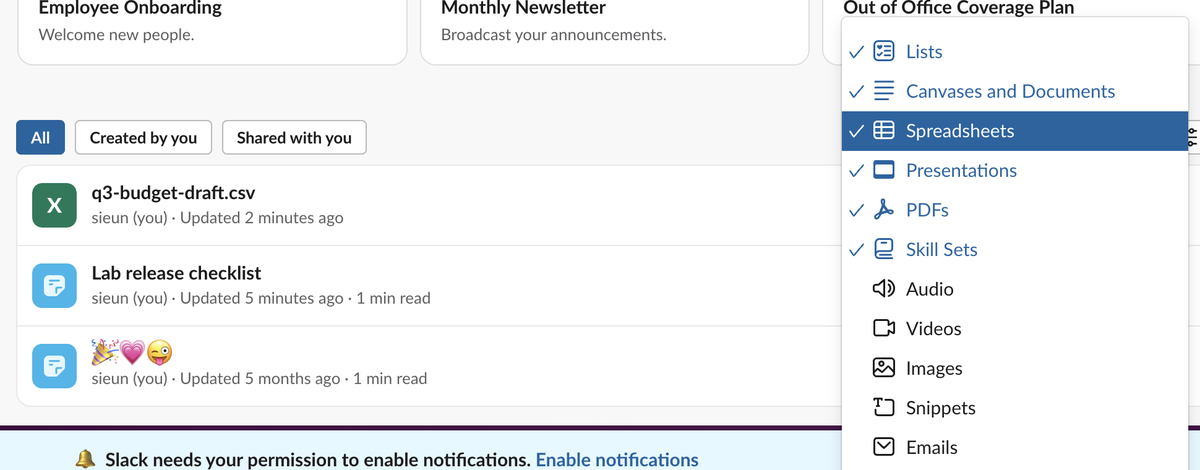
Click Files in the left rail, then All files. The first thing we noticed: the list did not show our PNG. The list starts with a 6 Types filter, and images are not one of the six:
After we checked Images and Snippets, the PNG appeared at the top:
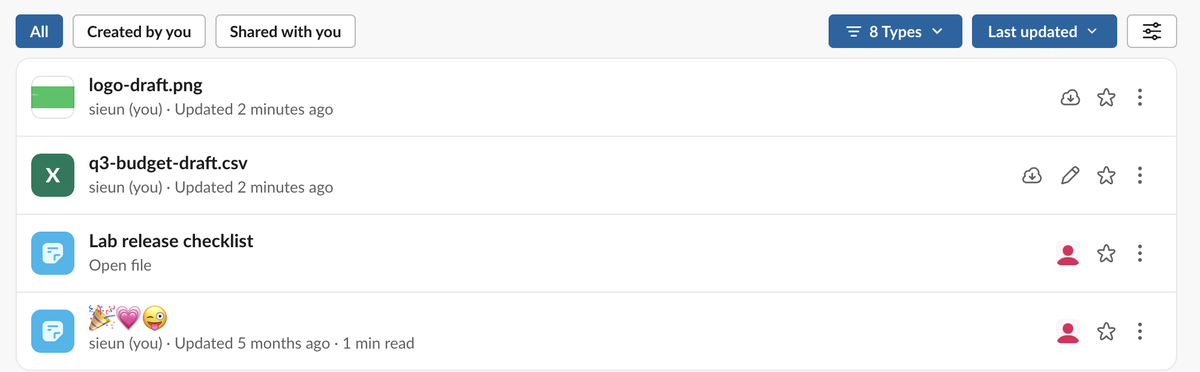
Our plain .txt file still did not show in that list, even with Snippets checked. Slack had turned it into a snippet with a preview in the channel. So if a file is missing from Files, open the 6 Types filter first, then look in the channel itself.
The channel route is more complete. After we posted files, our test channel got a Files & links tab next to Messages. That tab, and scrolling the channel, showed every file that was posted there. To pull all of a channel's files at once, download all files from a Slack channel has a script we ran.
The Files list sorts by Recently viewed by default, with Last updated as the other choice. A file you have never opened can sit low on the list under Recently viewed, so switch the sort if you are looking for something new.
Never appear "away" on Slack again
Cloud-based. No downloads. Works 24/7 even when your laptop is off.
On your computer: downloads only
A shared file stays on Slack's servers until you download it. Where the download goes depends on how you use Slack:
- • In a browser, the file goes wherever your browser saves downloads.
- • In the desktop app, Slack's help says you can change the folder in Preferences > Advanced > Download location, and that this option is only there if you got the app from Slack's downloads page. We did not test the desktop app for this page.
How much you can store
Each upload can be up to 1 GB; Slack's file size limit shows the exact byte count we tested. On the Free plan, files and messages older than 90 days are hidden, as Slack's free plan limits explains.
FAQ
Can my admin see the files I upload?
Files posted in a channel are visible to everyone in it. Can Slack see deleted messages covers what exports and retention settings keep.
Do deleted Slack files stay on the server?
Not in our test. After we deleted a file, its files.slack.com address returned 404 with "The requested file could not be found." How to delete files in Slack has the full test.
Stop Jiggling Your Mouse.
Join hundreds of remote workers who never worry about their Slack status. Set it up once, stay green forever.
Related Articles
How to Mark a Message Urgent in Slack (There Is No Flag)
Slack has no urgent or priority flag on messages. On October 27, 2026 we checked every menu in the Free plan's message box and message menu and found none. What works instead: a DM, @here or @channel, a reminder on the message, and the reader's VIP and keyword settings.
How to Delete a Thread in Slack (Parent and Replies)
Slack has no delete-thread button. Deleting the first message leaves 'This message was deleted.' with the replies still attached; the thread only disappears once every reply is deleted too. We tested both in the app and through the API on October 27, 2026.
How to Delete Files in Slack (Deleting the Message Is Not Enough)
Delete a Slack file from Files or from the file's own menu with Delete file. In our October 27, 2026 test, Delete message on a file post removed the post but left the file on Slack's servers. We also deleted files in bulk with a short script.