
Airflow Slack Alerts: Webhook and Bot Token Setups, Tested on Airflow 3
Airflow sends Slack alerts through the Slack provider: send_slack_webhook_notification or send_slack_notification as an on_failure_callback, or SlackWebhookOperator and SlackAPIPostOperator as tasks. We ran all four on Airflow 3.4.0 with provider 9.11.1 on 7 November 2026, plus the two mistakes that silently cost you alerts.
To get Airflow failure alerts in Slack, install the Slack provider (apache-airflow-providers-slack), add a Slack connection, and attach a notifier to the task's on_failure_callback: send_slack_webhook_notification for an incoming webhook, or send_slack_notification for a bot token. On 7 November 2026 we ran a DAG with both notifiers and both Slack operators on Airflow 3.4.0 (the official apache/airflow image, which already ships provider 9.11.1 and slack_sdk 3.46.0) and posted into a test workspace. This is the DAG, the connection setup, what arrived in Slack, and the two errors that leave you with no alert at all.
Webhook or bot token?
| Incoming webhook | Bot token | |
|---|---|---|
| Connection type | slackwebhook | slack |
| Secret | The https://hooks.slack.com/services/... URL | An xoxb- token |
| Channel | Fixed when the webhook is made | Any channel the bot is in, per message |
| Airflow pieces | send_slack_webhook_notification, SlackWebhookOperator | send_slack_notification, SlackAPIPostOperator |
| Sender shown in Slack | Your app's name and icon | "Airflow" with the Airflow logo by default |
A webhook is the quickest start: our guide to creating a Slack webhook takes about a minute. A bot token lets one connection post to many channels; see Slack bot tokens for the scopes. Our bot had chat:write and chat:write.customize.
The connections
We set both connections as environment variables, which Airflow reads as JSON:
AIRFLOW_CONN_SLACK_WEBHOOK='{"conn_type": "slackwebhook", "password": "https://hooks.slack.com/services/T000/B000/XXXX"}'
AIRFLOW_CONN_SLACK_API='{"conn_type": "slack", "password": "xoxb-your-bot-token"}'
The connection IDs are the lower-case part after AIRFLOW_CONN_, here slack_webhook and slack_api. In the UI, the same thing is Admin > Connections, type Slack Incoming Webhook or Slack API, with the URL or token in the password field.
The DAG we ran
from datetime import datetime
from airflow.sdk import DAG, task
from airflow.providers.slack.notifications.slack import send_slack_notification
from airflow.providers.slack.notifications.slack_webhook import send_slack_webhook_notification
from airflow.providers.slack.operators.slack import SlackAPIPostOperator
from airflow.providers.slack.operators.slack_webhook import SlackWebhookOperator

webhook_alert = send_slack_webhook_notification(
    slack_webhook_conn_id="slack_webhook",
    text=":red_circle: Task failed: {{ ti.dag_id }}.{{ ti.task_id }} (try {{ ti.try_number }}) {{ ti.log_url }}",
)

bot_alert = send_slack_notification(
    slack_conn_id="slack_api",
    channel="#data-alerts",
    text=":red_circle: {{ ti.task_id }} failed in {{ ti.dag_id }}, run {{ run_id }}",
)

with DAG(
    dag_id="slack_alerts_demo",
    start_date=datetime(2026, 1, 1),
    schedule=None,
    catchup=False,
) as dag:

    @task(on_failure_callback=[webhook_alert])
    def load_orders():
        raise ValueError("orders.csv has 0 rows")

    @task(on_failure_callback=[bot_alert])
    def build_report():
        raise RuntimeError("report query timed out")

    announce = SlackWebhookOperator(
        task_id="announce_start",
        slack_webhook_conn_id="slack_webhook",
        message="Pipeline slack_alerts_demo started",
    )

    post_summary = SlackAPIPostOperator(
        task_id="post_summary",
        slack_conn_id="slack_api",
        channel="#data-alerts",
        text="Summary from SlackAPIPostOperator",
    )

    announce >> [load_orders(), build_report()]
    announce >> post_summary
airflow dags test slack_alerts_demo ran the whole DAG in 9.3 seconds. Both failing tasks failed as written, and four messages arrived in the channel:
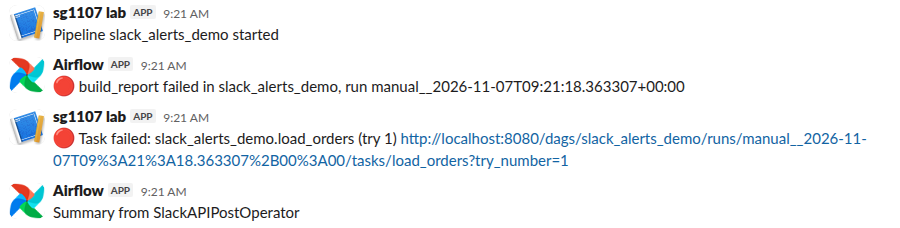
Notice the two senders. Everything sent through the webhook shows under the Slack app that owns the webhook. Everything sent with the bot token shows as "Airflow" with the Airflow logo, because both SlackAPIPostOperator and send_slack_notification default to username="Airflow" and an Airflow icon_url in the provider's source. The Jinja fields ({{ ti.task_id }}, {{ run_id }}, {{ ti.log_url }}) were filled in before sending.
The log link pointed to http://localhost:8080/.... The task runner builds it from the [api] base_url setting, which falls back to http://localhost:8080/ in the provider code we read, so set AIRFLOW__API__BASE_URL to the address your team opens.
Never appear "away" on Slack again
Cloud-based. No downloads. Works 24/7 even when your laptop is off.
Mistake 1: a typo in the connection ID
We gave a notifier slack_webhook_conn_id="slack_webhok". The task failed, the callback ran, and the task log said:
[error] Failed to send notification (sync): The conn_id `slack_webhok` isn't defined
[error] Failed to run task callback  kind=on_failure_callback
airflow.sdk.exceptions.AirflowNotFoundException: The conn_id `slack_webhok` isn't defined
Nothing reached Slack, and nothing else in the run changed: the task was failed either way, so the broken alert only shows in that task's log. Test every alert path once on purpose, as we did with the raise tasks above, before you rely on it.
Mistake 2: the bot is not in the channel
With a bot token, the bot has to be a member of the channel. SlackAPIPostOperator posting to a channel the bot had not joined failed the task with:
slack_sdk.errors.SlackApiError: The request to the Slack API failed. (url: https://slack.com/api/chat.postMessage)
The server responded with: {'ok': False, 'error': 'not_in_channel'}
Invite the bot with /invite @your-app in the channel. A webhook has no such problem, since it is tied to its channel when you create it.
Task callbacks or DAG callbacks
Airflow also takes on_failure_callback on the DAG(...) itself, for one alert per failed run. We tested task-level callbacks only, because each alert then names the task that broke.
For alerts outside Airflow, the same webhook works from a monitor such as Uptime Kuma or a CI job like GitHub Actions.
FAQ
Is SlackWebhookOperator the same as the webhook notifier?
They post the same way, but the operator is a task that runs in the DAG's order, while the notifier runs only when its callback fires. Use the operator for "pipeline started" or summary messages, and the notifier for failures.
Do I need to install anything on the official Docker image?
No. apache/airflow:latest (3.4.0 on 7 November 2026) already had apache-airflow-providers-slack 9.11.1. On a pip install of Airflow, add apache-airflow-providers-slack.
Why does my alert show "Airflow" instead of my app name?
That is the bot-token path, which sends username="Airflow" unless you pass your own username and icon_url. Our app had the chat:write.customize scope, which Slack's docs require for a custom name. Webhook posts kept the app's name.
Stop Jiggling Your Mouse.
Join hundreds of remote workers who never worry about their Slack status. Set it up once, stay green forever.
Related Articles
Node-RED to Slack: Webhook, Bot Token and Socket Mode Flows, Tested
Node-RED can post to Slack with a plain http request node and an incoming webhook, call any Slack API method with node-red-contrib-slack, and receive mentions over Socket Mode with node-red-contrib-slack-modern. We ran all three on Node-RED 5.0.9 on 8 November 2026.
Python Logging to Slack: A Tested Handler (and Which Packages Still Work)
A 36-line logging module posts ERROR records to a Slack incoming webhook with only the standard library. We ran it on Python 3.12 on 7 November 2026, sent 50 errors in a burst with and without a queue, and tried four PyPI Slack logger packages; one of them failed with invalid_auth.
Winston to Slack: winston-slack-webhook-transport Tested (Plus Pino)
winston-slack-webhook-transport sends winston logs to a Slack incoming webhook: add it as a transport with webhookUrl and level error. We ran version 2.3.7 with winston 3.19 on Node 22 on 7 November 2026, sent 50 errors at once, and found two things the README does not say: the burst arrived out of order, and Error stacks need format.errors.