
Alertmanager Slack Config: slack_configs Example and Templates, Tested
A tested alertmanager.yml for Slack, the messages Prometheus alerts produced, a custom title and text template, and what send_resolved, group_by and color changed. Plus a typo amtool did not catch.
Alertmanager sends Prometheus alerts to Slack through a slack_configs block in a receiver. It needs one thing from Slack: an incoming webhook URL. On 6 October 2026 we ran Prometheus 3.15.0 and Alertmanager 0.34.1 in Docker with an always-true alert rule, pointed them at a webhook in our free-plan test workspace, and changed one setting at a time. This is the config that worked, the messages Slack showed, and four surprises.
The config
route:
  receiver: slack
  group_by: [alertname]
  group_wait: 5s
  group_interval: 10s
  repeat_interval: 1h
receivers:
  - name: slack
    slack_configs:
      - api_url_file: /etc/alertmanager/slack_webhook
        channel: '#sglab-1006'
        send_resolved: true
api_url_file reads the webhook URL from a file, so the URL stays out of the config and out of version control. api_url with the URL inline also works. Make the webhook in your Slack app first; our webhook guide shows each screen. The short group_wait and group_interval are for testing. The defaults are 30 seconds and 5 minutes.
The Prometheus rule fired on every evaluation:
groups:
  - name: sglab
    rules:
      - alert: DiskAlmostFull
        expr: vector(1)
        labels:
          severity: warning
          team: web
        annotations:
          summary: Disk on web-1 is 91% full
amtool check-config alertmanager.yml printed SUCCESS, and the first message reached Slack 11 seconds after Prometheus started.
What the default message looks like
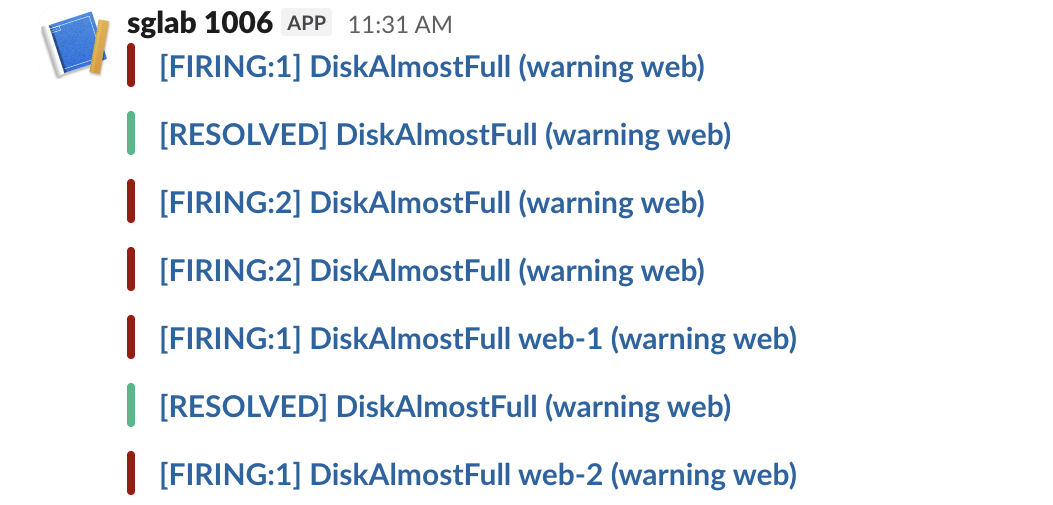
The default message is only a title. It reads [FIRING:1] DiskAlmostFull (warning web): the status, the number of alerts, the alert name and the other label values. It has a red bar, and the title links to the Alertmanager UI. The annotations (our summary) do not appear at all, because the default text is empty:
Two defaults need a fix in most setups:
- • The title link. It pointed to
http://eee8f93d90ae:9093/#/alerts?receiver=slack, the container's hostname, which nobody can open. Start Alertmanager with--web.external-url=https://alertmanager.example.comto fix it. - • The channel.
channel: '#sglab-1006'did nothing. We changed it to'#social'and the next message still went to the webhook's own channel. Slack ignores the channel, username and icon fields for webhooks made in a Slack app, so make one webhook per channel. The webhook troubleshooting page has the details.
What send_resolved, group_by and color changed
| Setting | What we saw |
|---|---|
send_resolved: true | A [RESOLVED] message with a green bar after the rule stopped matching |
send_resolved: false | Nothing after the alert cleared; the last message in Slack stayed [FIRING:1] |
group_by: [alertname] with 2 alerts | One message, [FIRING:2] DiskAlmostFull (warning web) |
group_by: [alertname, instance] | One message per instance: [FIRING:1] DiskAlmostFull web-1 (warning web) and the same for web-2 |
color: template | The bar color we chose, as a hex value |
Changing group_by and reloading had a side effect. Alertmanager posted a [RESOLVED] DiskAlmostFull for the old group while both alerts were still firing, next to the two new per-instance messages. If people react to resolved messages, change grouping when nothing is firing.
With send_resolved: false nothing tells the channel that the problem is over. Keep it true unless another tool closes incidents.
Never appear "away" on Slack again
Cloud-based. No downloads. Works 24/7 even when your laptop is off.
A custom title and text
We added a template file and pointed the receiver at it:
templates: ['/etc/alertmanager/slack.tmpl']
receivers:
  - name: slack
    slack_configs:
      - api_url_file: /etc/alertmanager/slack_webhook
        send_resolved: true
        color: '{{ if eq .Status "firing" }}#d97706{{ else }}#22c55e{{ end }}'
        title: '{{ template "sglab.title" . }}'
        text: '{{ template "sglab.text" . }}'
{{ define "sglab.title" }}[{{ .Status | toUpper }}{{ if eq .Status "firing" }}:{{ .Alerts.Firing | len }}{{ end }}] {{ .CommonLabels.alertname }}{{ end }}
{{ define "sglab.text" }}{{ range .Alerts.Firing }}*{{ .Annotations.summary }}*
`{{ .Labels.instance }}` severity {{ .Labels.severity }}, since {{ .StartsAt.Format "15:04:05 MST" }}
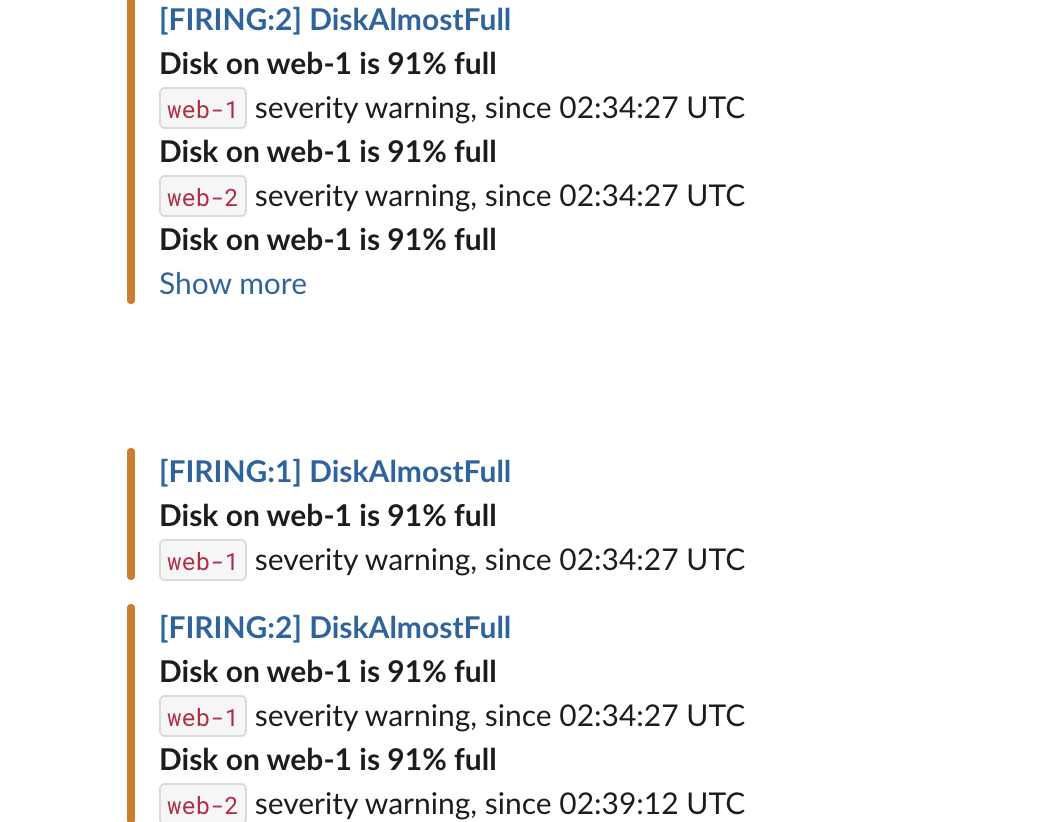
{{ end }}{{ end }}Our first version used range .Alerts. The title said [FIRING:2], but the text listed three alerts, one with an empty instance. .Alerts also holds alerts that have just resolved in the same group; .Alerts.Firing holds only the firing ones. With .Alerts.Firing, the resolved message has no text at all, so add a range .Alerts.Resolved block if you want details there.
The typo amtool did not catch
amtool catches syntax errors in a template file. With toupper instead of toUpper it printed:
amtool: error: failed to validate 1 file(s)

  FAILED: template: broken.tmpl:1: function "toupper" not defined
A wrong template name is a different story. We changed the title to {{ template "sglab.titel" . }}. amtool printed SUCCESS, the reload worked, and the next alert posted an empty message to Slack: no title, no text, no color. That is the blank gap in the screenshot above. Alertmanager logged no error. After any template change, fire a test alert and look at the message in Slack.
FAQ
Why does my Alertmanager Slack message have no description?
The default text is empty, so annotations are not shown. Add a text: template that prints .Annotations.summary or .Annotations.description, as above.
How do I send different alerts to different Slack channels?
Make one incoming webhook per channel, one receiver per webhook, and use routes with matchers (for example team="web") to pick the receiver. The channel field will not move a webhook's messages.
Stop Jiggling Your Mouse.
Join hundreds of remote workers who never worry about their Slack status. Set it up once, stay green forever.
Related Articles
Grafana Slack Alerts: Webhook vs Bot Token, Templates, Tested
We sent Grafana alerts to Slack through both kinds of contact point, then replaced the default message with a notification template. The messages Slack showed, the delays, the template we used and the errors Grafana logged.
Jenkins Slack Notification: slackSend Pipeline Tested with a Bot Token
We ran the Jenkins Slack Notification plugin against a real Slack app: the pipeline that worked, the botUser setting that makes slackSend fail with a 404, threads, Block Kit, and the errors for channels the bot cannot see.
n8n Slack Credentials: Bot Token, User Token or OAuth2, Tested
We ran 8 Slack node operations in n8n with a bot token, a user token and the OAuth2 credential. What each one can do, the errors you get, and two traps: the OAuth2 callback and the status expiration time zone.