
Alertmanager Slack Config: slack_configs Example and Templates, Tested
A tested alertmanager.yml for Slack, the messages Prometheus alerts produced, a custom title and text template, and what send_resolved, group_by and color changed. Plus a typo amtool did not catch.
Alertmanager sends Prometheus alerts to Slack through a slack_configs block in a receiver. It needs one thing from Slack: an incoming webhook URL. On 6 October 2026 we ran Prometheus 3.15.0 and Alertmanager 0.34.1 in Docker with an always-true alert rule, pointed them at a webhook in our free-plan test workspace, and changed one setting at a time. This is the config that worked, the messages Slack showed, and four surprises.
The config
route:
  receiver: slack
  group_by: [alertname]
  group_wait: 5s
  group_interval: 10s
  repeat_interval: 1h
receivers:
  - name: slack
    slack_configs:
      - api_url_file: /etc/alertmanager/slack_webhook
        channel: '#sglab-1006'
        send_resolved: true
api_url_file reads the webhook URL from a file, so the URL stays out of the config and out of version control. api_url with the URL inline also works. Make the webhook in your Slack app first; our webhook guide shows each screen. The short group_wait and group_interval are for testing. The defaults are 30 seconds and 5 minutes.
The Prometheus rule fired on every evaluation:
groups:
  - name: sglab
    rules:
      - alert: DiskAlmostFull
        expr: vector(1)
        labels:
          severity: warning
          team: web
        annotations:
          summary: Disk on web-1 is 91% full
amtool check-config alertmanager.yml printed SUCCESS, and the first message reached Slack 11 seconds after Prometheus started.
What the default message looks like
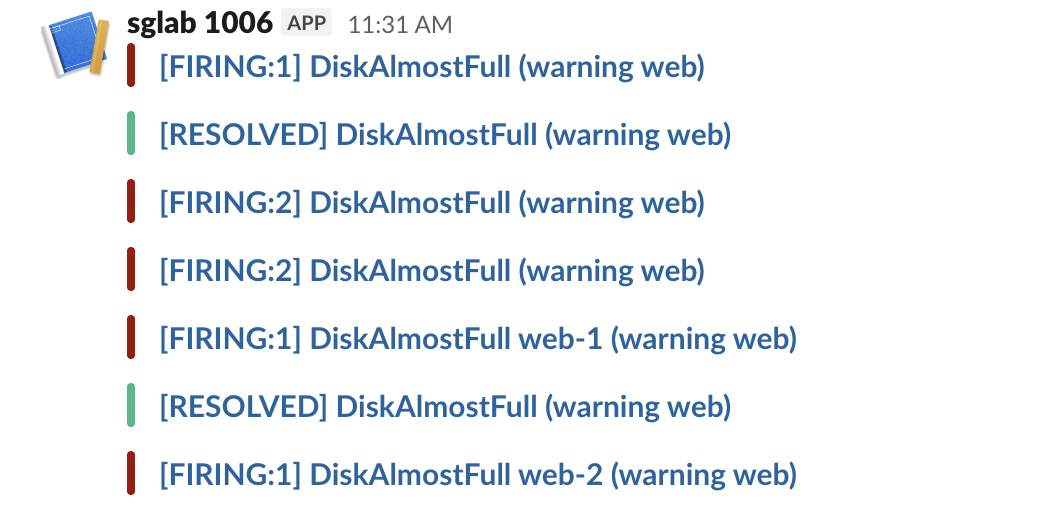
The default message is only a title. It reads [FIRING:1] DiskAlmostFull (warning web): the status, the number of alerts, the alert name and the other label values. It has a red bar, and the title links to the Alertmanager UI. The annotations (our summary) do not appear at all, because the default text is empty:
Two defaults need a fix in most setups:
- • The title link. It pointed to
http://eee8f93d90ae:9093/#/alerts?receiver=slack, the container's hostname, which nobody can open. Start Alertmanager with--web.external-url=https://alertmanager.example.comto fix it. - • The channel.
channel: '#sglab-1006'did nothing. We changed it to'#social'and the next message still went to the webhook's own channel. Slack ignores the channel, username and icon fields for webhooks made in a Slack app, so make one webhook per channel. The webhook troubleshooting page has the details.
What send_resolved, group_by and color changed
| Setting | What we saw |
|---|---|
send_resolved: true | A [RESOLVED] message with a green bar after the rule stopped matching |
send_resolved: false | Nothing after the alert cleared; the last message in Slack stayed [FIRING:1] |
group_by: [alertname] with 2 alerts | One message, [FIRING:2] DiskAlmostFull (warning web) |
group_by: [alertname, instance] | One message per instance: [FIRING:1] DiskAlmostFull web-1 (warning web) and the same for web-2 |
color: template | The bar color we chose, as a hex value |
Changing group_by and reloading had a side effect. Alertmanager posted a [RESOLVED] DiskAlmostFull for the old group while both alerts were still firing, next to the two new per-instance messages. If people react to resolved messages, change grouping when nothing is firing.
With send_resolved: false nothing tells the channel that the problem is over. Keep it true unless another tool closes incidents.
Never appear "away" on Slack again
Cloud-based. No downloads. Works 24/7 even when your laptop is off.
A custom title and text
We added a template file and pointed the receiver at it:
templates: ['/etc/alertmanager/slack.tmpl']
receivers:
  - name: slack
    slack_configs:
      - api_url_file: /etc/alertmanager/slack_webhook
        send_resolved: true
        color: '{{ if eq .Status "firing" }}#d97706{{ else }}#22c55e{{ end }}'
        title: '{{ template "sglab.title" . }}'
        text: '{{ template "sglab.text" . }}'
{{ define "sglab.title" }}[{{ .Status | toUpper }}{{ if eq .Status "firing" }}:{{ .Alerts.Firing | len }}{{ end }}] {{ .CommonLabels.alertname }}{{ end }}
{{ define "sglab.text" }}{{ range .Alerts.Firing }}*{{ .Annotations.summary }}*
`{{ .Labels.instance }}` severity {{ .Labels.severity }}, since {{ .StartsAt.Format "15:04:05 MST" }}
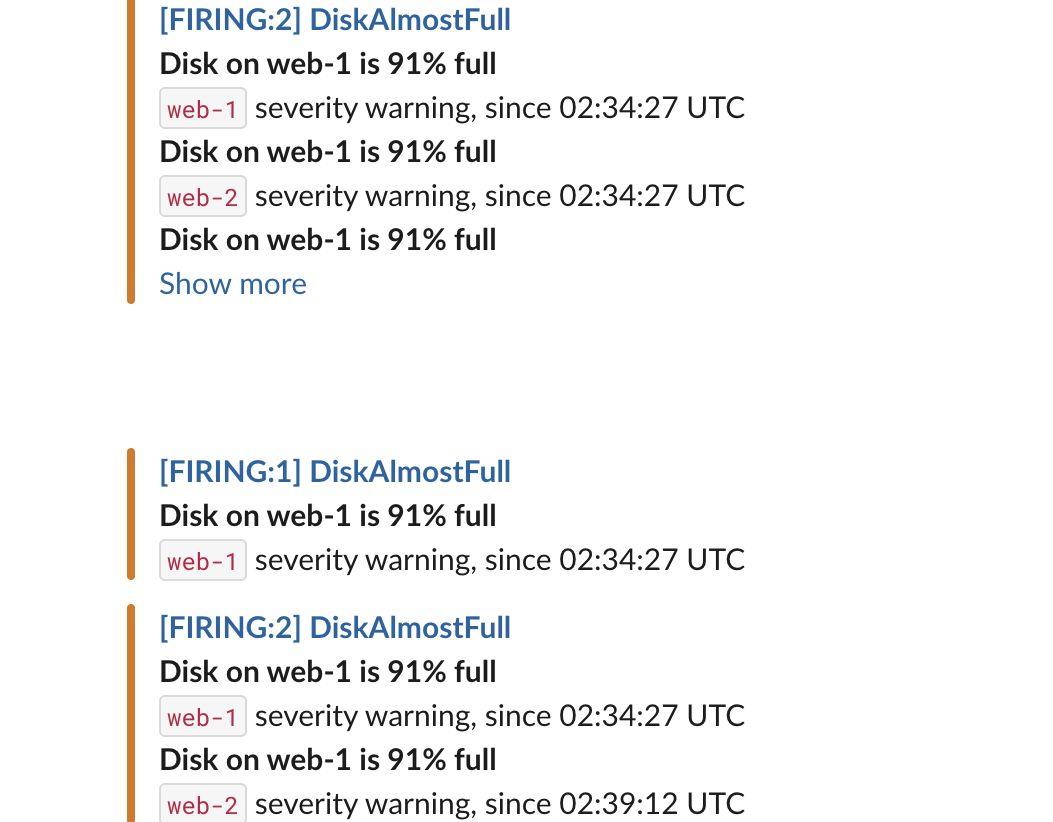
{{ end }}{{ end }}Our first version used range .Alerts. The title said [FIRING:2], but the text listed three alerts, one with an empty instance. .Alerts also holds alerts that have just resolved in the same group; .Alerts.Firing holds only the firing ones. With .Alerts.Firing, the resolved message has no text at all, so add a range .Alerts.Resolved block if you want details there.
The typo amtool did not catch
amtool catches syntax errors in a template file. With toupper instead of toUpper it printed:
amtool: error: failed to validate 1 file(s)

  FAILED: template: broken.tmpl:1: function "toupper" not defined
A wrong template name is a different story. We changed the title to {{ template "sglab.titel" . }}. amtool printed SUCCESS, the reload worked, and the next alert posted an empty message to Slack: no title, no text, no color. That is the blank gap in the screenshot above. Alertmanager logged no error. After any template change, fire a test alert and look at the message in Slack.
FAQ
Why does my Alertmanager Slack message have no description?
The default text is empty, so annotations are not shown. Add a text: template that prints .Annotations.summary or .Annotations.description, as above.
How do I send different alerts to different Slack channels?
Make one incoming webhook per channel, one receiver per webhook, and use routes with matchers (for example team="web") to pick the receiver. The channel field will not move a webhook's messages.
Stop Jiggling Your Mouse.
Join hundreds of remote workers who never worry about their Slack status. Set it up once, stay green forever.
Related Articles
How to Bulk Delete Slack Messages (Tested Script)
The Slack app deletes one message at a time. We ran a script that deleted 120 of our messages in 108 seconds and handled the rate limits.
Slack App Configuration Token: Generate, Rotate and Revoke
An app configuration token lets a script create Slack apps from manifests. We generated one, rotated it five times and tested it again 28 hours later.
Slack App Collaborators: Add, Remove and Transfer Ownership
Collaborators are the people who can edit a Slack app. We added and removed one on 20 November 2026 as a regular member of a test workspace, recorded who can be added and what Slack asks you to do after a removal, and wrote down the hand-over path Slack documents.