
Can My Employer See My Personal Email on My Work Computer?
Your employer cannot sign in to your Gmail, and doing so without permission can break the Stored Communications Act. But on a work computer, screenshot and keystroke monitoring, browser history, HTTPS inspection and Outlook's local cache can all expose personal email. Work email is fully visible, deleted messages included. Case by case, with what to do.
Your employer cannot open your personal Gmail or Outlook.com account, and in the US signing in to it without your permission can break the Stored Communications Act. On a work computer, though, they often do not need to. Monitoring software can take screenshots and log keystrokes, the browser records every visit, a company network with HTTPS inspection can read web traffic, and a personal account added to Outlook on a company PC leaves copies of the mail on the company's disk. Your work email is a different case: the company owns the mailbox and can read all of it, deleted messages included while its retention rules keep them.
The short rule: treat anything you do on a work computer as visible to the employer. Read personal email on your own phone, on mobile data. The same goes for chat apps. Slack shows a green or grey dot to every coworker and turns grey after 10 minutes without input in the Slack window. Slack Green keeps your Slack status active during the hours you set, from the cloud, with nothing installed on the work computer.
What your employer can see, case by case
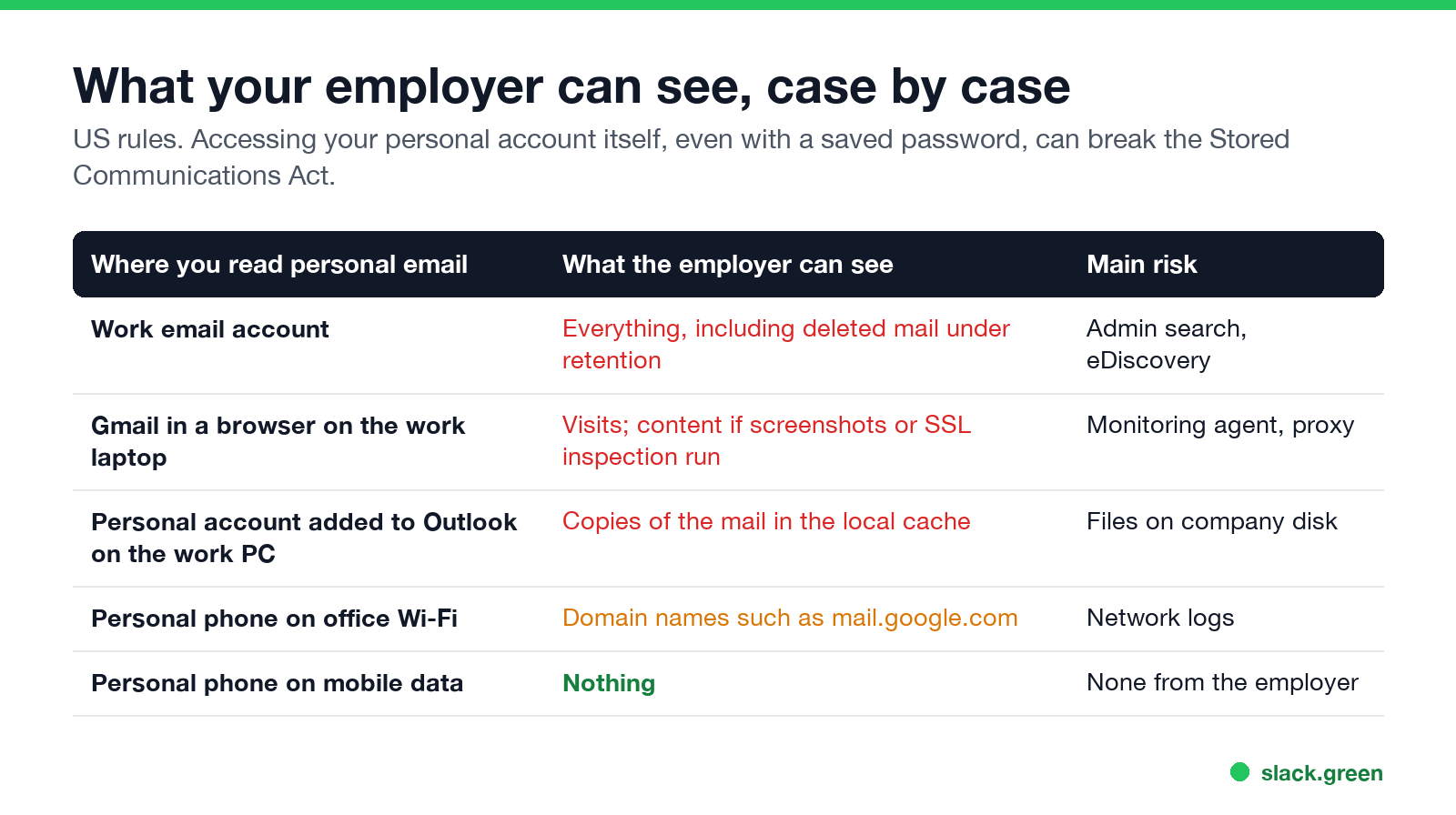
| Where you read personal email | What the employer can see | How |
|---|---|---|
| Your work email account | Everything, including deleted mail under retention | Admin access, Microsoft Purview or Google Vault search |
| Gmail in a browser on the work laptop | That you visited it; content if screenshots or HTTPS inspection run | Monitoring agent, web proxy, browser history |
| A personal account added to Outlook on the work PC | Copies of your personal mail | Outlook's local data file on the company disk |
| Your personal phone on office Wi-Fi | Domain names such as mail.google.com, not content | Network and DNS logs |
| Your personal phone on mobile data | Nothing | The employer is not in the path |
Can my employer read my work emails?
Yes, all of them. A company Microsoft 365 or Google Workspace mailbox belongs to the company. Admins can search it with Microsoft Purview eDiscovery or Google Vault, export it, and set retention rules that keep messages after you delete them. In Microsoft 365, deleted items move to a hidden Recoverable Items folder, and a litigation hold or retention policy keeps them for as long as the policy says. So the answer to "can my employer see my deleted emails" is yes for work email, for as long as retention keeps them.
US law allows this for company systems. The Electronic Communications Privacy Act has a business-use exception and a consent exception, and most employers get consent through the IT policy you signed. New York, Connecticut and Delaware also require employers to give written notice of electronic monitoring.
The same holds for other work tools. What admins see in chat is in can Slack be used to monitor employees and can my employer see deleted Teams messages.
Personal email on a work computer: four ways it leaks
Never appear "away" on Slack again
Cloud-based. No downloads. Works 24/7 even when your laptop is off.
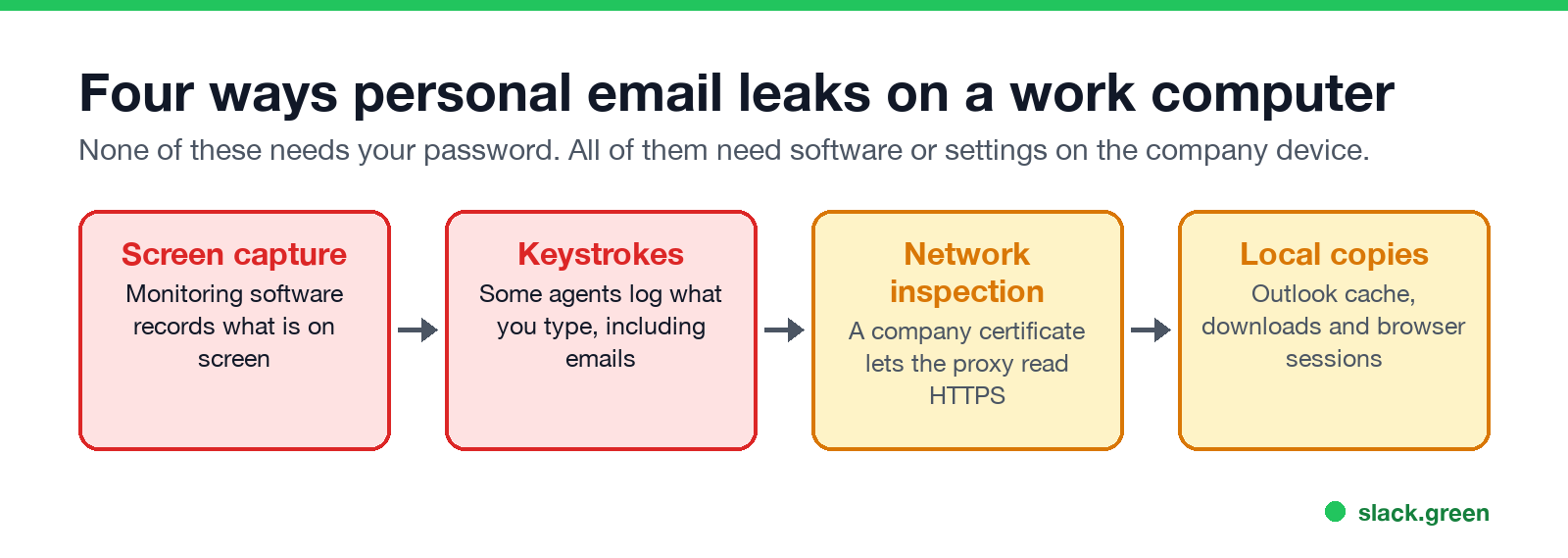
- Screen capture. Employee monitoring tools such as Teramind or ActivTrak can take screenshots or record the screen. If Gmail is open, it is in the recording.
- Keystroke logging. Some agents log what you type. An email you write in a personal account is typed on the company keyboard.
- HTTPS inspection. On a managed laptop, the company can install its own root certificate and route web traffic through a proxy that decrypts it. Then the proxy can see page content, including webmail. Without it, the network sees only domain names. How to check for it is in how to tell if you are being monitored at work.
- Local copies. Adding your personal account to Outlook on a work PC stores the mail in Outlook's data file on the company's disk. Attachments you download stay in the Downloads folder. A browser that stays signed in to Gmail leaves the account open to anyone who uses that laptop.
- • Pure Power Boot Camp v. Warrior Fitness Boot Camp (S.D.N.Y. 2008). The employer found a former employee's Hotmail password saved on a company computer and read his email. The court held that this broke the Stored Communications Act, even though the password was on company equipment.
- • Stengart v. Loving Care Agency (N.J. 2010). An employee emailed her lawyer from a personal, password-protected Yahoo account on a company laptop. The employer recovered the messages from the browser cache. New Jersey's Supreme Court held that she could expect privacy in those emails, despite the company's policy.
- • Use your own phone on mobile data for personal email, banking and job searching.
- • Do not add personal accounts to Outlook, Mail or any client on the work computer.
- • Sign out of personal accounts in the work browser, and do not let it save passwords.
- • Do not forward work email to your personal address. That is the one move that turns a privacy question into a data-leak policy breach.
- • Read the IT policy. It says what is monitored. The full picture of what companies run is in how employers monitor remote workers.
Browser history alone shows that you visited mail.google.com and when, not what you read. More on that in can my employer see my browsing history.
Can my employer log in to my personal email?
Not legally, in most cases. Two US cases set the line:
What the employer may use is what it collected lawfully on its own systems: screenshots, logs and files on the company device. Rules differ by state and country; in the EU and UK, monitoring must be necessary, proportionate and disclosed under data protection law.
How to keep personal email private at work
FAQ
Never appear "away" on Slack again
Cloud-based. No downloads. Works 24/7 even when your laptop is off.
Can my boss see my emails in Gmail?
Not by logging in. If you read Gmail on a work computer with monitoring software, screenshots or HTTPS inspection can capture it.
Can my employer see my deleted emails?
Work emails, yes, while the company's retention rules keep them. Personal emails, no, unless copies sit on the work computer or in monitoring records.
Can my employer read my Outlook emails?
Your work Outlook mailbox, yes. A personal Outlook.com account, no, but mail from it that you open on the work PC can be captured locally.
Can my employer see my personal email on my phone?
Not on a personal phone on mobile data. On office Wi-Fi they see domain names only. On a phone with a company profile installed, check what the profile controls.
Does incognito mode hide personal email on a work computer?
No. Incognito skips local history, but monitoring software, screenshots and the network still see the traffic.
Stop Jiggling Your Mouse.
Join hundreds of remote workers who never worry about their Slack status. Set it up once, stay green forever.
Related Articles
How to Keep Skype Status Active: Skype for Business Idle Timers
To keep your Skype for Business status active, open Options, Status, and raise both idle timers, Inactive and then Away, from 5 minutes to as much as 360 minutes each. Consumer Skype shut down on May 5, 2025 and Skype for Business Online in 2021, so for most people the real question is now Teams. What still works, status icons, Outlook, and status not updating.
Is It Legal for My Employer to Monitor Me? US, EU and UK Rules
In the US it is mostly legal for an employer to monitor company devices, accounts and premises, often without asking. The limits are state notice laws in New York, Connecticut and Delaware, consent rules for audio recording and biometrics, bans on cameras in restrooms, and your personal devices. The EU, UK and parts of Canada and Australia add notice and proportionality rules.
Best Calendar App for Slack: Official Apps and Add-Ons Compared
Slack has no calendar of its own. The best calendar app for most teams is Slack's free Google Calendar or Outlook Calendar app, whichever matches your email: reminders, invites, a daily agenda and automatic In a meeting status. Add Calendly, Reclaim, a leave tracker or a birthday bot only for the job those miss.