
Slack API Rate Limits: What We Hit, and the 429 You Get Back
Slack answers too many calls with HTTP 429 and a Retry-After header. We burst chat.postMessage, conversations.history and an incoming webhook from an internal app and logged every response: where the 429s started, the bodies, and a retry loop that never hit one.
When you call the Slack API too fast, Slack answers with HTTP 429 and a Retry-After header that says how many seconds to wait. Slack's docs set the limits per method in tiers, from Tier 1 (about 1 call a minute) to Tier 4 (100+ a minute), and give chat.postMessage and incoming webhooks about one message per second per channel, with short bursts allowed. Since 29 May 2025, commercially distributed apps outside the Slack Marketplace also get a much lower limit on conversations.history and conversations.replies: 1 request a minute and at most 15 messages per call. Internal apps built for your own workspace keep the normal tiers. To see what "short bursts" means in practice, we sent 1,210 calls from an internal app on 29 September 2026 and logged every status code.
What we measured
The app was a new internal app in a one-person test workspace, with a bot token. Each burst ran from one machine in Seoul with 10 or 20 parallel threads.
| What we called | Burst | Before the first 429 | 429 body | Retry-After |
|---|---|---|---|---|
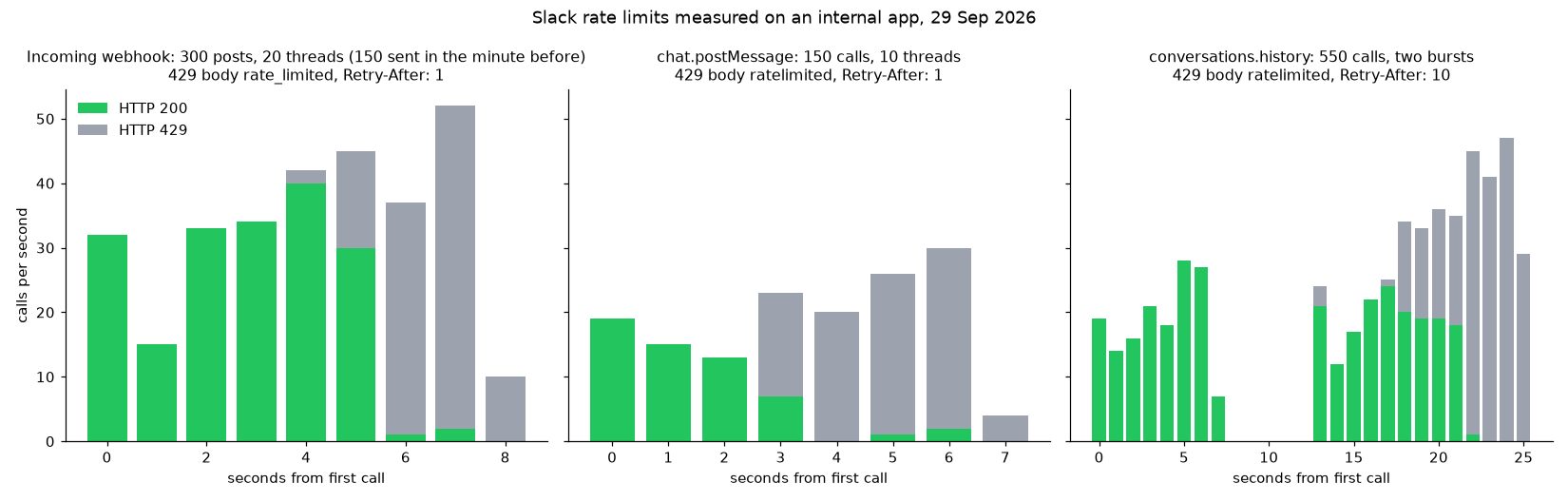
| Incoming webhook, one channel | 30 one at a time, 120 with 10 threads, 300 with 20 threads | 302 accepted, the last 152 in 5 s | {"retry_after": 1, "ok": false, "error": "rate_limited"} | 1 |
chat.postMessage, one channel | 150 with 10 threads | 53 accepted in 3.3 s | {"ok": false, "error": "ratelimited"} | 1 |
conversations.history, one channel | 150 with 10 threads, then 400 with 20 | 150 accepted in 13 s | {"ok": false, "error": "ratelimited"} | 10 |
Three things stood out. The burst allowance is far above one per second: the webhook accepted 302 posts in 34 seconds before refusing one. The error strings differ: webhooks say rate_limited with an underscore, the Web API says ratelimited without one, so match on the 429 status, not the text. And Retry-After differed by method: 1 second for posting, 10 seconds for conversations.history.
The limit also recovered quickly. After the chat.postMessage burst we waited 15 seconds and sent 60 more posts one at a time. All 60 succeeded, in 20.1 seconds, with no 429.
A retry loop that respects Retry-After
This is the loop we ran for that last test. It sleeps for the number of seconds Slack asks for, then tries the same call again:
import time, requests, sys
TOKEN = open(".bot_token").read().strip()
CHANNEL = sys.argv[1]

def call(method, **params):
    while True:
        r = requests.post(f"https://slack.com/api/{method}",
                          headers={"Authorization": f"Bearer {TOKEN}"},
                          data=params, timeout=30)
        if r.status_code == 429:
            wait = int(r.headers.get("Retry-After", "1"))
            call.retries += 1
            time.sleep(wait)
            continue
        return r.json()
call.retries = 0

start = time.time()
ok = sum(call("chat.postMessage", channel=CHANNEL, text=f"retry loop {i}")["ok"]
         for i in range(60))
print(f"{ok}/60 ok, {call.retries} retries, {time.time() - start:.1f} s")
Output:
60/60 ok, 0 retries, 20.1 sThe official SDKs do this for you if you turn it on. In Python, slack_sdk has a RateLimitErrorRetryHandler you add to WebClient; the Node WebClient retries 429s by default. Sending one call at a time, as above, stayed at about three posts a second and never reached the limit.
Never appear "away" on Slack again
Cloud-based. No downloads. Works 24/7 even when your laptop is off.
Which limit applies to your app
- • An app built for your own workspace and never distributed (our test app) uses the normal tiers.
conversations.historyis Tier 3, 50+ calls a minute, with up to 999 messages per call. - • A Marketplace app uses the same normal tiers.
- • A commercially distributed app outside the Marketplace, created on or after 29 May 2025, gets 1
conversations.historyorconversations.repliescall a minute, withlimitcapped at 15. Slack's changelog applied the same limit to existing installs of such apps from 3 March 2026. - • Keep to about one post per second per channel for steady traffic. Bursts pass, as the table shows, but a loop that never pauses will hit 429 within seconds.
- • Spread load across channels rather than threads of one channel; the posting limit is per channel.
- • For alerts from CI or cron, one webhook per channel is enough. How to build the webhook request is in Slack webhook curl example.
- • A 429 is not the only error that looks like a failed post. If the body says
not_in_channelormissing_scope, waiting will not help; see not_in_channel and missing_scope.
If an export script that worked last year now crawls at one page a minute, check which of these your app is. Our internal app read 150 pages of history in 13 seconds on the same day.
Posting many messages without 429s
FAQ
Does a 429 count against me or block the app?
Not in our test. After each burst the next calls went through once we waited the Retry-After seconds.
Is the limit per token, per app or per workspace? Slack's docs say limits apply per app per workspace, and posting limits per channel. Our test used one token in one workspace, so it does not separate these.
Do incoming webhooks and chat.postMessage share a limit? We did not test them at the same moment. Run separately, both started returning 429 after a few seconds of parallel sending to one channel.
Stop Jiggling Your Mouse.
Join hundreds of remote workers who never worry about their Slack status. Set it up once, stay green forever.
Related Articles
Slack Member ID: Where to Copy It, and What the U Means
A Slack member ID is the U... code that identifies a person. Copy it from their profile under the three-dot menu, or look it up with users.info and users.list. Tested in two workspaces, with the ID formats we found.
Slack files.upload Deprecated: The 3-Step Upload That Replaces It
files.upload now returns method_deprecated. Use files.getUploadURLExternal, POST the bytes, then files.completeUploadExternal, or files_upload_v2 in the SDK. Tested with curl and Python, including two silent failures.
Slack channel_not_found: 7 Causes We Reproduced, With Fixes
channel_not_found means Slack cannot see the channel with the token you used: a wrong ID, a name that does not exist, a private channel the bot is not in, or a channel in another workspace. Each case tested on a real bot.