
Slack DND API: dnd.setSnooze, dnd.info and endSnooze, Tested
Slack's Do Not Disturb API is five methods: dnd.setSnooze, dnd.endSnooze, dnd.endDnd, dnd.info and dnd.teamInfo. Setting DND needs a user token. We ran each one on October 31 and found that dnd.endSnooze inside a scheduled DND window also ends the schedule.
Slack's Do Not Disturb API has five methods: dnd.setSnooze pauses notifications for a number of minutes, dnd.endSnooze and dnd.endDnd end a pause, and dnd.info and dnd.teamInfo read the state. Only a user token (xoxp-) with the dnd:write scope can change DND, and only for the person who installed the app. A bot token can read anyone's DND with dnd:read but gets not_allowed_token_type when it tries to set it. We ran every method against a real workspace on October 31, 2026, and one result is worth knowing before you ship: calling dnd.endSnooze while the user's scheduled DND hours are running ends the scheduled session too.
The five methods at a glance
| Method | Token | Scope | What it did in our test |
|---|---|---|---|
dnd.setSnooze | user only | dnd:write | Paused notifications; returned snooze_endtime |
dnd.endSnooze | user only | dnd:write | Ended the snooze, and inside a schedule window ended that too |
dnd.endDnd | user only | dnd:write | Returned only {"ok": true} and ended the running scheduled session |
dnd.info | user or bot | dnd:read | Read DND state; a bot reading another user gets no snooze fields |
dnd.teamInfo | user or bot | dnd:read | Same as dnd.info for a comma-separated users list |
Our setup: a test app with user scopes dnd:read and dnd:write and bot scope dnd:read, installed through OAuth into a one-person Free workspace, with Events API delivery to a local server through a tunnel. The account had a notification schedule of 17:00 to 09:00 Seoul time on weekdays, and because the test ran on a Saturday, scheduled DND was active for the whole weekend (next_dnd_end_ts was Monday 00:00 UTC).
dnd.setSnooze: pause notifications
num_minutes is required. The response gives the end time directly:
{"ok": true, "snooze_enabled": true, "snooze_endtime": 1793430597,
 "snooze_remaining": 60, "snooze_is_indefinite": false}
Edge cases we hit:
- • Leaving out
num_minutesreturnedinvalid_argumentswith the message[ERROR] missing required field: num_minutes. - •
num_minutes=0returned{"ok": true, "snooze_enabled": false}, so it does nothing and does not raise an error. - • Calling it with the bot token returned
not_allowed_token_type. A bot cannot pause anyone, not even withdnd:writeon the bot side.
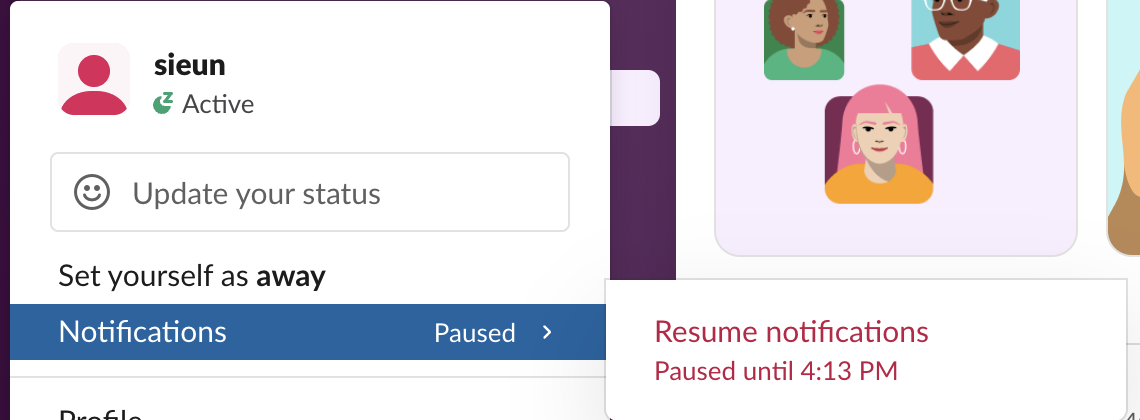
The Slack client shows the snooze end, not the schedule end. With a 2-minute snooze running inside a weekend-long scheduled DND, the profile menu said "Paused until 4:13 PM", which was the snooze end time:
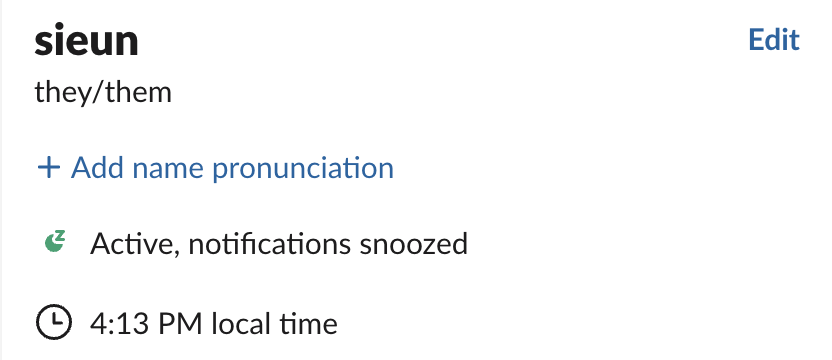
The profile pane showed "Active, notifications snoozed". Presence stays active during a snooze, so DND and presence are separate; the Slack presence API is the method for the green dot, and the small "z" beside it is what our green dot with a Z page explains.
dnd.info: what it returns, and to whom
With the user token, dnd.info returned the full state:
{"ok": true, "dnd_enabled": true, "next_dnd_start_ts": 1793372400,
 "next_dnd_end_ts": 1793577600, "snooze_enabled": true,
 "snooze_endtime": 1793430597, "snooze_remaining": 60}
With the bot token and user=U..., the same call at the same moment returned only dnd_enabled, next_dnd_start_ts and next_dnd_end_ts. There was no snooze_enabled field at all, so a bot cannot tell whether someone has snoozed. With the bot token and no user, dnd.info described the bot itself: "dnd_enabled": false, "next_dnd_start_ts": 1, "next_dnd_end_ts": 1. If your bot reads DND and gets those 1s, it forgot the user argument.
dnd_enabled: true means a notification schedule exists, not that notifications are paused right now. To know whether a person is in DND at this moment, check next_dnd_start_ts <= now < next_dnd_end_ts, or snooze_enabled when you have their user token.
Never appear "away" on Slack again
Cloud-based. No downloads. Works 24/7 even when your laptop is off.
The endSnooze trap inside scheduled DND
We set a 30-minute snooze inside the active weekend schedule and called dnd.endSnooze 3 seconds later. The response moved the schedule:
| Moment (UTC, Oct 31) | next_dnd_start_ts | next_dnd_end_ts |
|---|---|---|
| Before the snooze, 07:07 | Oct 30 15:00 | Nov 2 00:00 |
After dnd.endSnooze, 07:10 | Nov 2 08:00 | Nov 3 00:00 |
The weekend DND was over. Slack treated "end the snooze" like the Resume notifications button, which also ends the scheduled session that is running. dnd.endDnd did the same thing when we called it inside the window, and it returned nothing but {"ok": true}.
Two things restored the schedule in our test. Letting a snooze expire on its own left the schedule untouched: after a 1-minute snooze ran out, dnd.info showed the original Oct 30 to Nov 2 window. And typing /dnd off turned it back on, with the reply "I've turned scheduled Do Not Disturb back on for you." The human side of this, including what the schedule looks like in Preferences, is in our Slack Do Not Disturb and notification schedule pages.
So if your app pauses someone for a deploy or a focus block and then resumes them, do not call dnd.endSnooze blindly. This is the script we ran; it checks the schedule first and lets the snooze expire when ending it would cost the user their evening DND:
import os, time, requests

TOKEN = os.environ["SLACK_USER_TOKEN"]  # xoxp- token with dnd:read and dnd:write

def slack(method, **params):
    r = requests.post(f"https://slack.com/api/{method}",
                      headers={"Authorization": f"Bearer {TOKEN}"},
                      data=params, timeout=30).json()
    if not r["ok"]:
        raise RuntimeError(f"{method}: {r['error']}")
    return r

def in_schedule(info, now=None):
    now = now or time.time()
    return info["dnd_enabled"] and info["next_dnd_start_ts"] <= now < info["next_dnd_end_ts"]

def pause(minutes):
    return slack("dnd.setSnooze", num_minutes=minutes)["snooze_endtime"]

def resume():
    info = slack("dnd.info")
    if in_schedule(info):
        # endSnooze here would also end tonight's scheduled DND
        print("inside scheduled DND, letting the snooze run out")
        return info
    return slack("dnd.endSnooze")

if __name__ == "__main__":
    before = slack("dnd.info")
    end = pause(1)
    print("snoozed until", time.strftime("%H:%M:%S", time.gmtime(end)), "UTC")
    print("in schedule:", in_schedule(before))
    resume()
    after = slack("dnd.info")
    print("schedule kept:", (after["next_dnd_start_ts"], after["next_dnd_end_ts"]) ==
          (before["next_dnd_start_ts"], before["next_dnd_end_ts"]))
Output on October 31, inside the weekend schedule:
snoozed until 07:18:10 UTC
in schedule: True
inside scheduled DND, letting the snooze run out
schedule kept: True
The dnd_updated and dnd_updated_user events
The app subscribed to the user event dnd_updated (needs dnd:read as a user scope) and the bot event dnd_updated_user (needs dnd:read on the bot). Both arrived about 0.25 seconds after dnd.setSnooze returned. They differ the same way dnd.info does: dnd_updated carried snooze_enabled, snooze_endtime and snooze_remaining, while dnd_updated_user carried only the schedule fields.
Three behaviors to code for:
snooze_endtime yourself.dnd.endSnooze call produced four events within 0.3 seconds, and the third one showed the old weekend window that the call had just ended. Re-read dnd.info after a burst instead of trusting the last event./dnd off fired the same event pair as our API calls, and neither payload names who made the change, so an app cannot tell from the event whether a person or an app changed DND.Slack also showed "Your URL didn't respond" on the app's Event Subscriptions page because our manifest set the request URL before the tunnel answered the challenge, yet events still arrived. If the page shows that warning but your server logs show POSTs, the events are flowing. The other event types and their scopes are listed in our Events API event types page.
FAQ
Can a bot put a user into Do Not Disturb?
No. In our test the bot token got not_allowed_token_type from dnd.setSnooze. Each user has to install the app with the dnd:write user scope, and the app then uses that person's xoxp- token. How user and bot tokens differ is covered in Slack bot token.
Can I change someone's DND schedule (the hours) through the API?
Not with the dnd.* methods. None of them accepts a start or end hour; the schedule is set in Preferences, or by an admin as a workspace default.
Is there a rate limit on dnd.setSnooze?
Slack's reference puts dnd.setSnooze and dnd.endSnooze in Tier 2 (20+ calls a minute) and dnd.info in Tier 3 (50+). We sent 7 DND calls in 6 seconds and got no ratelimited error; the tiers are explained in Slack API rate limits.
Stop Jiggling Your Mouse.
Join hundreds of remote workers who never worry about their Slack status. Set it up once, stay green forever.
Related Articles
Send a Slack Message From a Cron Job: 4 Failures We Hit and the Fix
A Slack webhook call that works in your terminal often fails from cron. We ran six crontab entries and a launchd agent on a Mac for 10 minutes, logged each failure (empty env var, % in crontab, JSON quoting, macOS privacy block) and the script that posted every minute.
Slack Outgoing Webhooks: Payload, Trigger Words and Timeout, Tested
Slack's legacy Outgoing WebHooks still install on a Free workspace in November 2026. We set one up, sent 15 trigger messages through a tunnel, and logged the exact payload, how trigger words match, which replies Slack posts and when it gives up.
Slack API link_names: What It Still Links, Tested on 20 Messages
Slack's docs say link_names now links only user groups. On November 2, 2026 a bot token with link_names=true still turned @name, #channel and @here into real mentions, in plain text, section blocks and incoming webhooks.