
Slack Public vs Private Channels: What a Non-Member Can See
A public channel can be found, read and searched by every full member of the workspace, even before they join. A private channel is invisible to anyone who is not in it. We tested both from a member account.
In Slack, a public channel is open to every full member of the workspace: they can find it in Browse channels, read its whole history and find its messages in search without joining. A private channel is invisible to anyone who has not been added: it does not show in the channel list, search skips it, and to Slack's API it looks like a channel that does not exist. On 5 November 2026 we checked both from a member account in a Free plan workspace, as a member and then as a non-member, and the table below is what we got.
The difference in one table
| What we tried | Public channel, not a member | Private channel, not a member |
|---|---|---|
| Listed in Browse channels | Yes, with "0 members" | No |
| Open it and read old messages | Yes, the whole history with a Join Channel bar | No |
| Search finds its messages | Yes | No |
| Post a message | Refused until you join (not_in_channel) | Not possible |
| Join on your own | Yes, one click | No, a member must add you |
API conversations.info | ok: true, is_private: false | channel_not_found |
For the public channel, we created #sg-1105-public-test, posted one message, then left it. For the private side we used a private channel the workspace owner made earlier, which our test account has never been in. As a member of both of our own test channels, search found the messages of each, and the private one carried is_private: true.
What a non-member sees in a public channel
Opening a public channel you are not in shows the full conversation, the same as a member sees it, with a Join Channel bar where the message box would be. Slack calls this a preview. You can scroll back through everything; joining only adds the channel to your sidebar and lets you post.
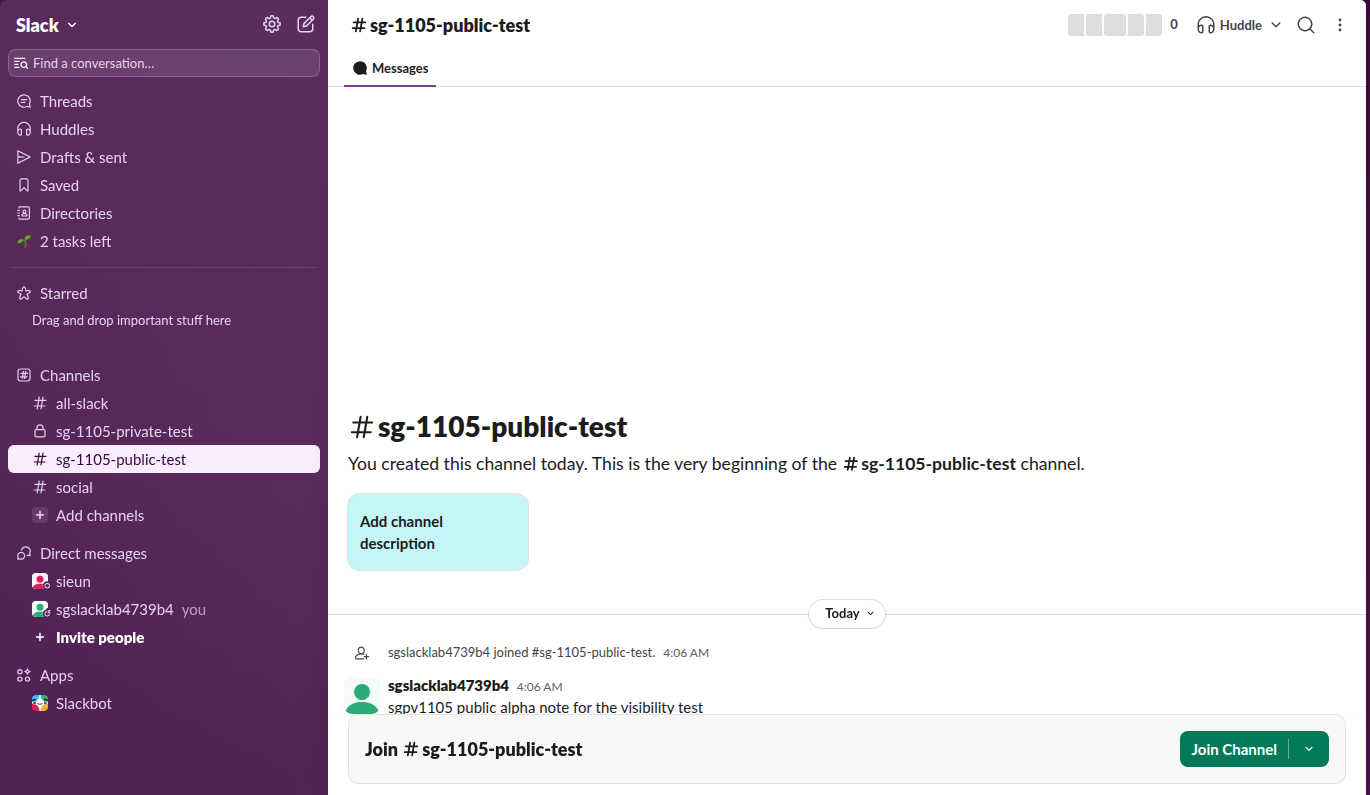
The same was true through the API. After we left the channel, conversations.history still returned its messages with ok: true, and a search for a word from our test message returned the public channel as a match. Only chat.postMessage refused, with the error not_in_channel.
So treat a public channel as readable by everyone in the workspace, including people who never joined it and people who join the company later. Guests are the exception: Slack's help says single-channel and multi-channel guests see only the channels they were added to. We did not test a guest account.
What a non-member sees of a private channel
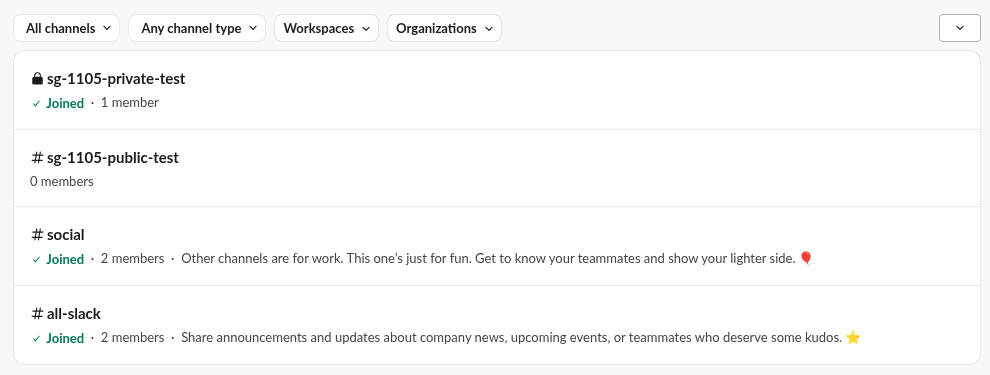
Nothing. Browse channels lists every public channel and only the private channels you are already in. Our own private test channel showed there as "Joined, 1 member", while the owner's private channel was not in the list at all.
We also asked the API for the owner's private channel by its ID. conversations.info, conversations.history and conversations.join all returned the same error:
{"ok": false, "error": "channel_not_found"}Slack gives no hint that the channel exists, which is the point of a private channel: its name, members and messages stay hidden. A non-member can only get in when a member adds them. Admins have more reach on some plans through exports; see can Slack admins see your DMs for what an owner can and cannot read.
Never appear "away" on Slack again
Cloud-based. No downloads. Works 24/7 even when your laptop is off.
How to tell if a Slack channel is public or private
Look at the icon in front of the name. In the sidebar, the channel header and Browse channels, a public channel has a # and a private channel has a lock. The screenshot above shows both in one sidebar: #all-slack and #social are public, the channel with the lock is private. Our guide to Slack channel icons covers the other symbols you may see.
From the API, conversations.info returns is_private: true for a private channel. In our test it also returned is_channel: true and is_group: false for both types, so check is_private rather than is_group, which only old private groups set.
Changing a channel from one type to the other
You can turn a public channel into a private one, and a private channel into a public one, from the channel settings, but who may do it depends on the workspace settings. In our test workspace on 2 November, a regular member saw the option Change to a private channel, and clicking it returned "Something went wrong" because the workspace limits that action to admins. Making a channel private hides its history from everyone outside it from then on. Step-by-step guides: make a Slack channel private and make a private Slack channel public.
FAQ
Can people see a public channel's messages without joining it?
Yes. In our test, a member who had left a public channel still read its full history in the app and through the API, and search found its messages. Only posting needs a join.
Can admins see private channels I am not in?
What an owner or admin can read depends on the plan and on exports, which our guide to what Slack admins can see covers. For a regular member on Free, a private channel they are not in does not appear anywhere in the app.
Is a private channel the same as a group DM?
No. A group DM is a conversation with up to 9 people and no name, and nobody can browse to it. A private channel has a name, can hold any number of members, and members can add more people.
Stop Jiggling Your Mouse.
Join hundreds of remote workers who never worry about their Slack status. Set it up once, stay green forever.
Related Articles
Lock Icon Next to a Slack Channel? What the Lock and Grey Text Mean
A padlock next to a Slack channel means it is private. Grey text with a crossed-out bell means you muted it. We made a private, muted, archived and unread channel and screenshot each one in the sidebar.
How to Make a Slack Channel Private, and Why It Can Fail for Members
Open the channel, click its name, go to Settings and choose Change to a private channel. We tried it as a regular member on a free workspace: Slack showed the option and then failed with Something went wrong.
How to Make a Private Slack Channel Public, and Who Can
Open the channel, click its name, go to Settings, and choose Change to a public channel. By default only Workspace Owners, Org Owners and Org Admins can do it. The whole history and every file become visible to the workspace.