
Can My Employer Listen to My Teams Calls?
Not live, on ordinary Teams calls and meetings: Teams has no silent listen-in for admins. Your employer can record calls with a notice, record every call under a compliance policy, keep transcripts, and see who you called and for how long. The one live exception is call-queue monitoring.
No, your employer cannot listen live to your ordinary Teams calls and meetings. Teams has no feature that lets an admin or a manager join a call unseen. What your employer can do is record: a meeting recording shows a banner to everyone, and a compliance recording policy can capture every call you make, with a notice Microsoft enforces. Admins can also see your call history (who, when and how long), search transcripts and recordings, and read chat messages kept by retention. The one live exception is customer calls through a Teams call queue, where a supervisor with Teams Premium can listen in.
Teams also shows your presence to coworkers all day: Available when you use the computer, Away after about 5 minutes without input anywhere on it. Slack works differently and counts only input in its own window. For Slack, Slack Green keeps your status green during the hours you set.
What your employer can get from a Teams call
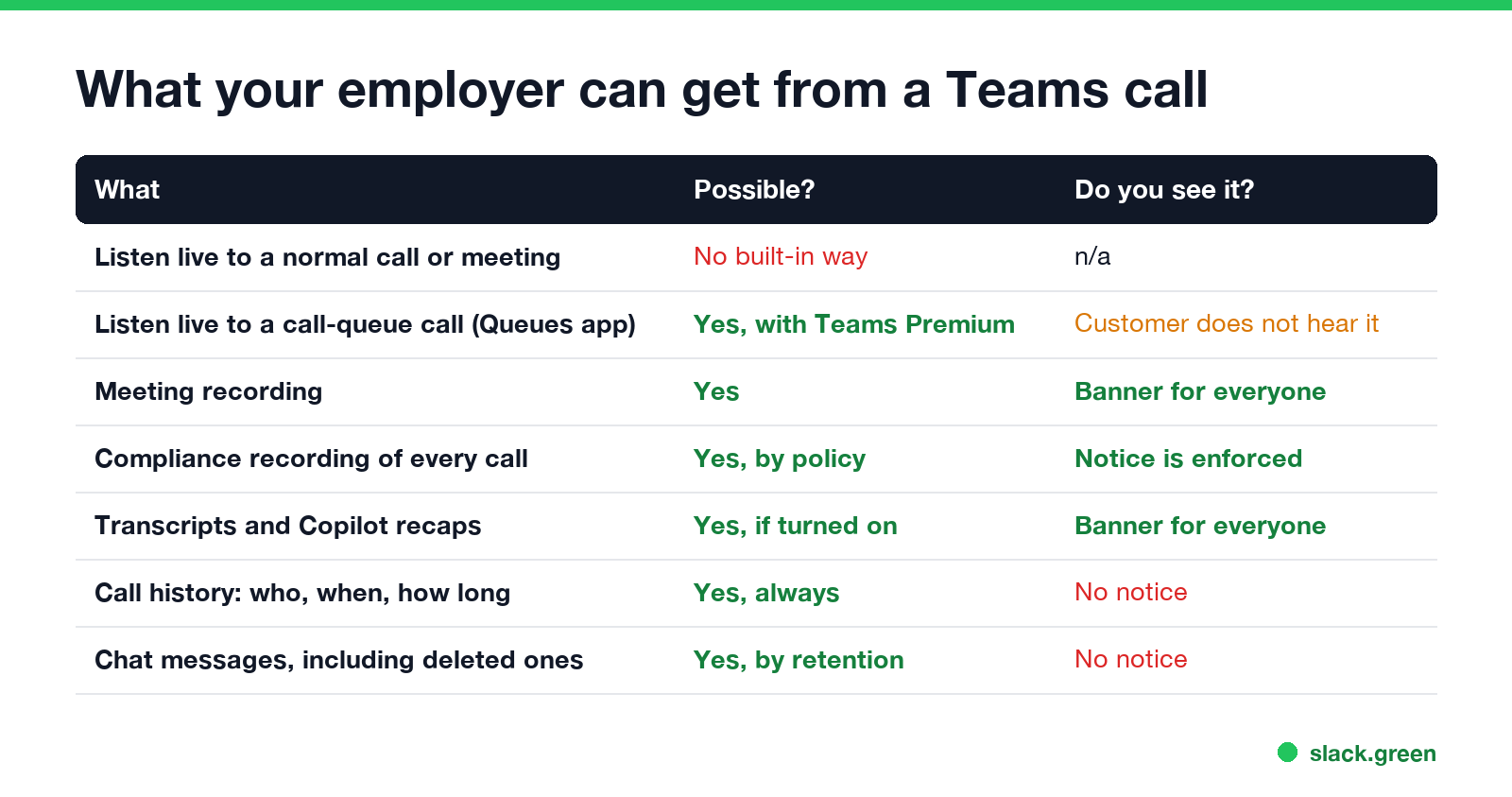
| What | Possible? | Are you told? |
|---|---|---|
| Listen live to a normal call or meeting | No built-in way | n/a |
| Listen live to a call-queue call (Queues app) | Yes, with Teams Phone and Teams Premium | The customer does not hear it |
| Meeting or call recording | Yes | A banner for everyone |
| Compliance recording of every call | Yes, by admin policy | Notice is enforced |
| Transcripts | Yes, if turned on | A banner for everyone |
| Call history: who, when, how long, call quality | Yes, always | No |
| Chat messages, including deleted ones | Yes, by retention policy | No |
Can my boss listen to my Teams calls live?
No, on normal calls. A manager who wants to hear a meeting has to join it, and then they appear in the participant list like anyone else. An admin cannot add themselves to a call silently.
The exception is the Queues app, for teams that answer customer calls through a Teams call queue, such as a help desk or a sales line. Microsoft's admin docs say authorized users "can listen to customer calls, whisper to agents with private messages, even barge into or takeover the calls". It needs a Teams Phone and a Teams Premium license, and it covers calls that come in through the queue, not your calls with coworkers. If you answer a support line in Teams, assume a lead can monitor those calls.
Can my employer record my Teams calls?
Never appear "away" on Slack again
Cloud-based. No downloads. Works 24/7 even when your laptop is off.
Yes, in two ways, and you are told about both.
- • Convenience recording. Anyone allowed by the meeting policy can press Record. Teams shows every participant a banner that recording has started, and the file goes to OneDrive or SharePoint, where the organizer and IT can reach it. Transcription works the same way.
- • Compliance recording. Banks, brokers and other regulated firms must keep calls. An admin assigns a recording policy and a certified recorder from a partner such as NICE or Verint joins your calls and meetings automatically. Microsoft's comparison table lists participant notification as "enforced" for this type, so you see that the call is being recorded.
Recordings and transcripts can be searched later with Microsoft Purview eDiscovery, along with chats and files. That search leaves no trace on your side.
What admins see without recording anything
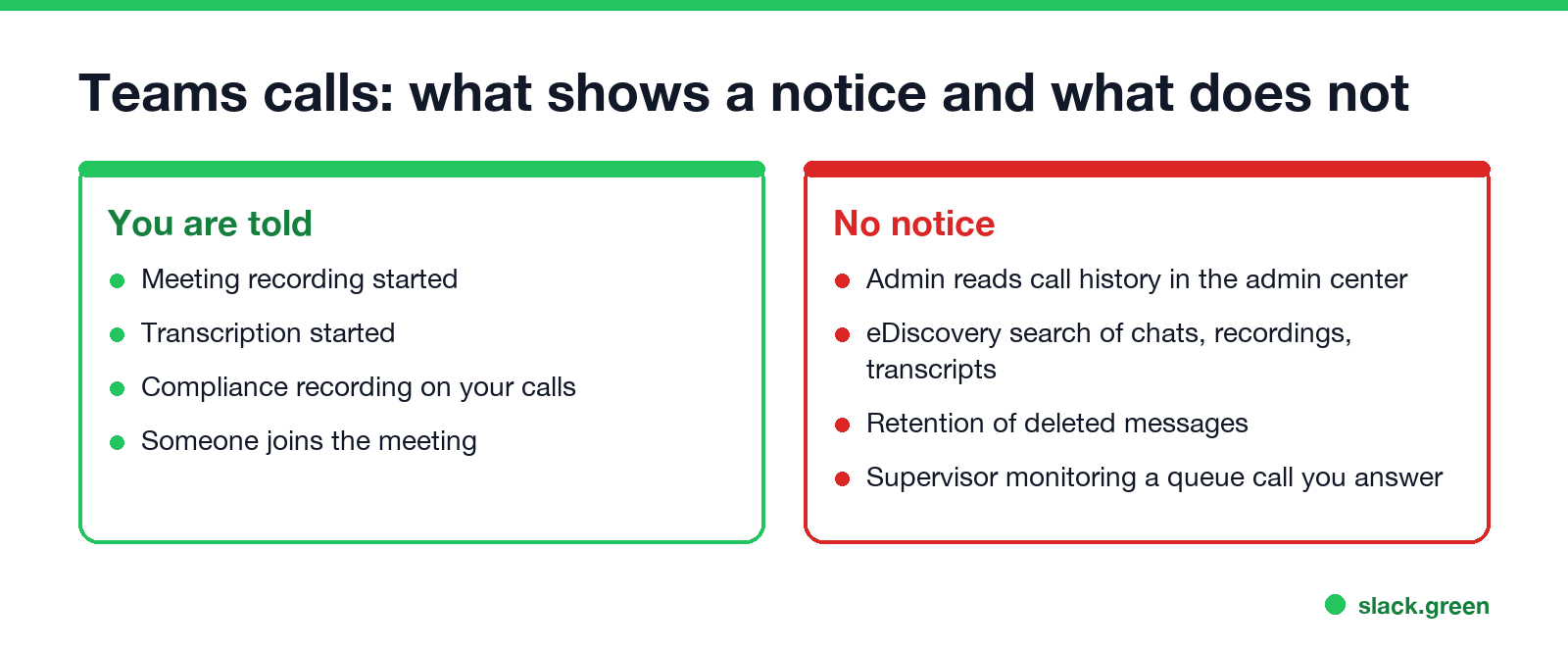
The Teams admin center keeps a call history for every user: the people on each call, start time, length, device, network and audio quality. It holds no audio. IT uses it to fix bad calls, but it also shows how many calls you took and when. Chat messages are kept by retention policy even after you delete them, which is covered in can my employer see deleted Teams messages. Activity counts per user, such as calls and meetings joined, are in does Teams track activity.
Your presence is visible too. Coworkers see Available, Busy, In a call or Presenting; what each dot means is in Microsoft Teams status icons.
Can my employer hear me through the laptop outside a call?
Not through Teams. Teams uses the microphone only during a call or meeting, and your computer shows it: on a Mac an orange dot appears in the menu bar, and on Windows a microphone icon appears in the taskbar. If you see one with no call running, find out which app holds the microphone. The camera side is in can my employer see me through my laptop camera, and how to find monitoring software is in how to tell if you are being monitored at work.
Is it legal for my employer to record Teams calls?
Never appear "away" on Slack again
Cloud-based. No downloads. Works 24/7 even when your laptop is off.
In the US, recording a call needs the consent of one party in most states and of all parties in about a dozen, including California, Florida, Illinois, Pennsylvania and Washington. The Teams banner and a company policy you signed usually count as notice. In the EU and UK, recording must have a lawful reason, and staff must be told. More on the rules is in is it legal for my employer to monitor me.
FAQ
Can my employer listen to my Teams calls without me knowing? Not live on normal calls. They can read call history and search saved recordings and transcripts without telling you.
Can my boss join my Teams meeting secretly? No. Everyone who joins appears in the participant list.
Does Teams tell you when a call is recorded? Yes. A banner tells every participant, and compliance recording also enforces a notice.
Can my employer see who I called on Teams? Yes. The admin center keeps call history with participants, time and length, but no audio.
Can supervisors listen to Teams calls in a call center? Yes, for call-queue calls through the Queues app, which needs Teams Phone and Teams Premium.
Stop Jiggling Your Mouse.
Join hundreds of remote workers who never worry about their Slack status. Set it up once, stay green forever.
Related Articles
How to Send a Slack Message From GitHub Actions
Add slackapi/slack-github-action@v4.0.0 as a step, give it a bot token or an incoming webhook URL from repository secrets, and write the message as YAML. Working workflows for failure alerts, threads and message updates, plus a curl version with no third-party action.
Slack Audit Logs: What They Record, Who Sees Them, and the API
Slack audit logs record actions across an Enterprise organization, such as sign-ins with IP address, file downloads, channel joins and app installs, not message text. Where admins view and export them, what the 785 action types cover, and how to pull them with the Audit Logs API.
LinkedIn Active Status: What the Green Dot Means and How to Hide It
On LinkedIn, a solid green dot on someone's photo means they are active on LinkedIn now. A hollow green circle means they are not, but the mobile app will notify them at once. Turn yours off under Settings & Privacy, Visibility, Manage active status; with No one, you also stop seeing other people's status.