
Can My Employer See What I Do on My Phone? What Each Setup Shows
What your employer can see on your phone depends on who owns it and how it is enrolled. A company phone shows much more than a personal phone with a work profile, and work Wi-Fi sees the sites you visit. How to check which setup you have.
Your employer can see much less on your phone than most people fear, and the answer depends on two things: who owns the phone, and how it is enrolled. On a personal phone enrolled with a work profile, device management shows IT your phone model, operating system, serial number and the work apps they installed. It does not show your texts, photos, call history, contacts or browsing history. On a company-owned phone IT sees every installed app and can locate a lost phone. And any network you use, including work Wi-Fi, sees which websites you visit.
The apps you sign in to for work are a separate channel. Slack, Teams and Outlook send your activity to your employer's workspace no matter which phone you use. Slack shows you active while its app is open, and your admins can export workspace messages on some plans. More on that below, and in can Slack admins see your DMs. If you only put Slack on your phone to look online, Slack Green keeps your Slack status active from its own servers during your working hours, with nothing installed on the phone.
What your employer can see, by phone setup
Four setups cover almost every work phone. Find yours in the table, then read the section for it.
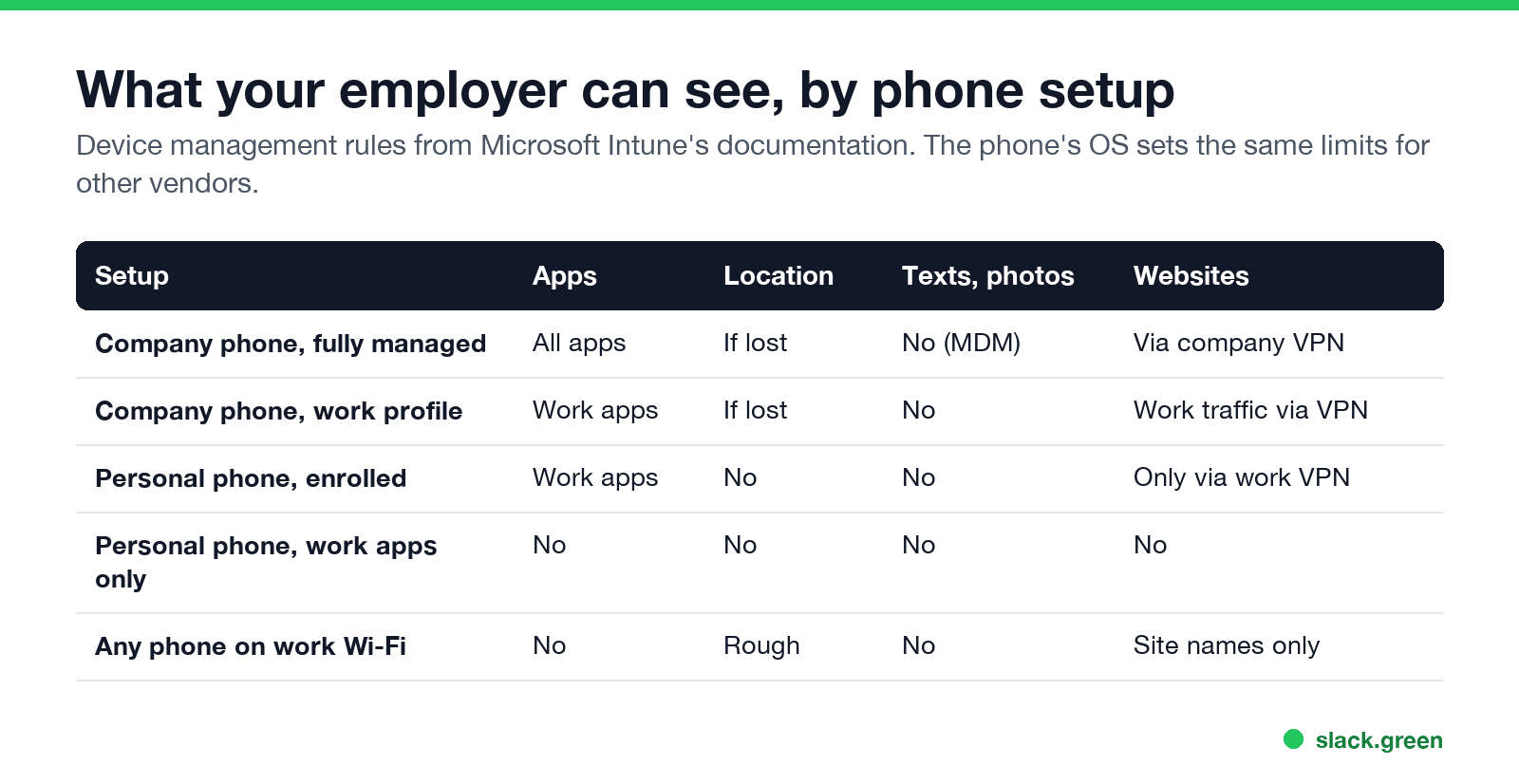
| Your setup | Installed apps | Location | Texts, photos, calls | Websites |
|---|---|---|---|---|
| Company phone, fully managed | All apps | Can locate it if lost | Not through device management | If traffic goes through a company VPN or filter |
| Company phone with a work profile | Work profile apps only | Can locate it if lost | No | Work profile traffic, if sent through a VPN |
| Personal phone, enrolled (BYOD) | Work apps only | No | No | No, unless you use a work VPN |
| Personal phone, work apps only | No | No | No | No |
| Any phone on work Wi-Fi | No | Roughly, by which access point | No | Site names, not page content |
The "what IT can see" lists in this article come from Microsoft's Intune documentation, the most common device management system for Teams and Outlook phones. Jamf, Google and VMware Workspace ONE follow the same Apple and Android rules, because the phone's operating system sets the limits, not the vendor.
A personal phone with a work profile or BYOD enrollment
This is the most common setup. You installed the Intune Company Portal, or a similar app, to get work email and Teams on your own phone. On iPhone, Apple calls this User Enrollment; on Android, it creates a work profile with a briefcase icon on its apps.
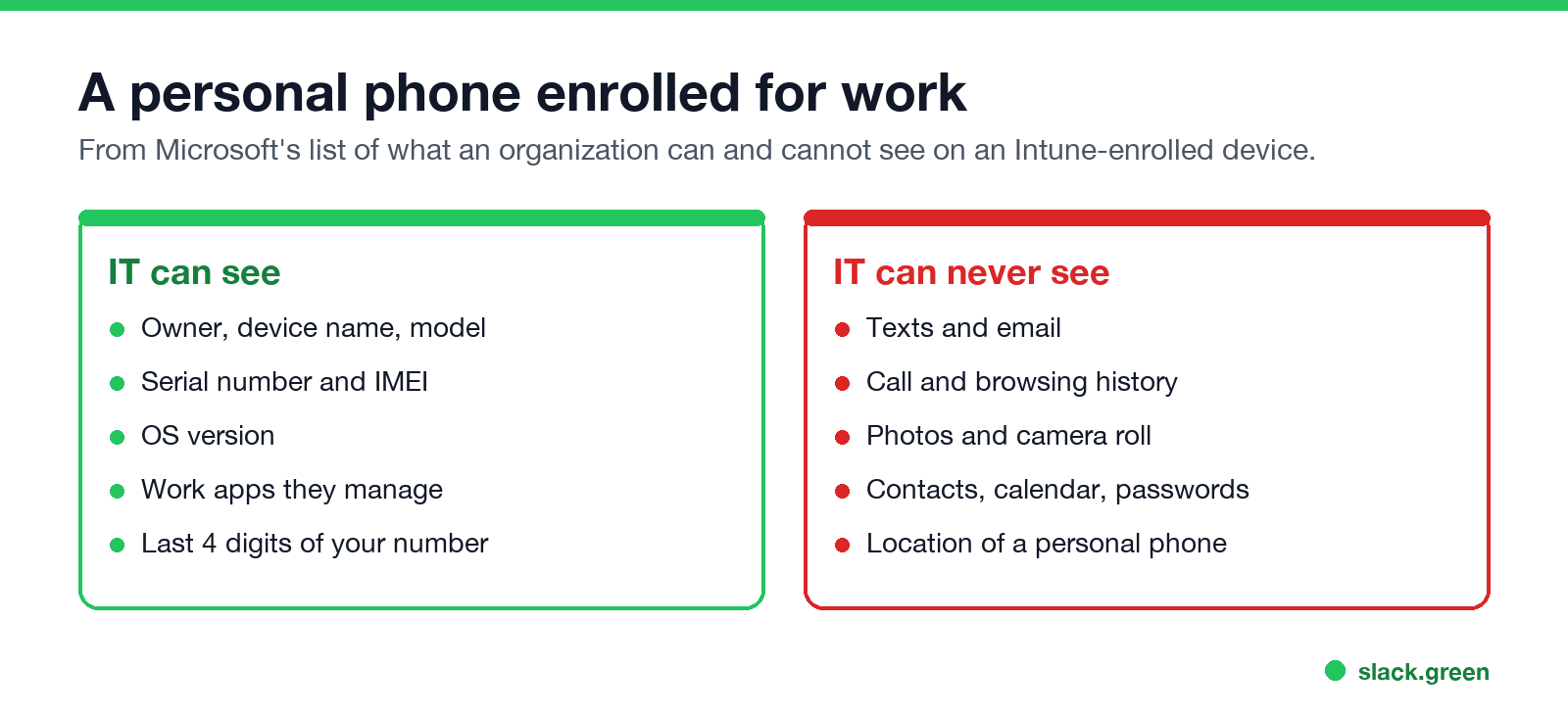
Microsoft lists what the organization can never see on an enrolled device:
- • Calling and web browsing history
- • Email and text messages
- • Contacts and calendar
- • Passwords
- • Pictures, including the camera roll
- • Content of documents you created
What IT can always see: the device owner, name, model, manufacturer, serial number, operating system version and IMEI. On a personal device they also see the last four digits of your phone number and the list of managed apps, meaning the work apps they pushed or you installed from Company Portal. They cannot see the location of a personal device.
IT can also wipe the work data from a personal phone. On a work profile or User Enrollment that removes only the work apps and their data, not your photos or personal apps.
A company-owned phone
Never appear "away" on Slack again
Cloud-based. No downloads. Works 24/7 even when your laptop is off.
A phone your employer bought and enrolled as corporate is a different case. IT can see every installed app, the full phone number, and on a lost iPhone or iPad can turn on Managed Lost Mode, which locks the phone, shows a message and reports its location. On corporate Android phones that use a work profile, IT sees only the apps inside the work profile.
Device management still does not read your texts or look through your photos. But on a company phone your employer can install more than device management. Firms that must keep business messages, such as broker-dealers under US record-keeping rules, add archiving apps that capture texts and calls on the work number. Some companies route all traffic through a company VPN or web filter, which logs the sites you visit. Treat a company phone as work property that your employer can inspect, and keep personal life on your own device.
Work Wi-Fi and a personal phone
Connecting your own phone to the office Wi-Fi does not enroll it in anything. The network can still see:
reddit.com or netflix.comIt cannot see what you read or type on those sites, because almost all traffic uses HTTPS. Incognito or private browsing hides history on the phone itself. It does not hide the site names from the network. To keep personal browsing off the work network, switch to mobile data. The laptop side of the same question is in can my employer see my browsing history.
Work apps on your phone: Slack, Teams, Outlook
Whatever the phone setup, the work apps you sign in to report to your employer's accounts, not to IT's device console:
Slack does not share GPS location with your employer; details in does Slack track location.
How to check if your phone is managed
Never appear "away" on Slack again
Cloud-based. No downloads. Works 24/7 even when your laptop is off.
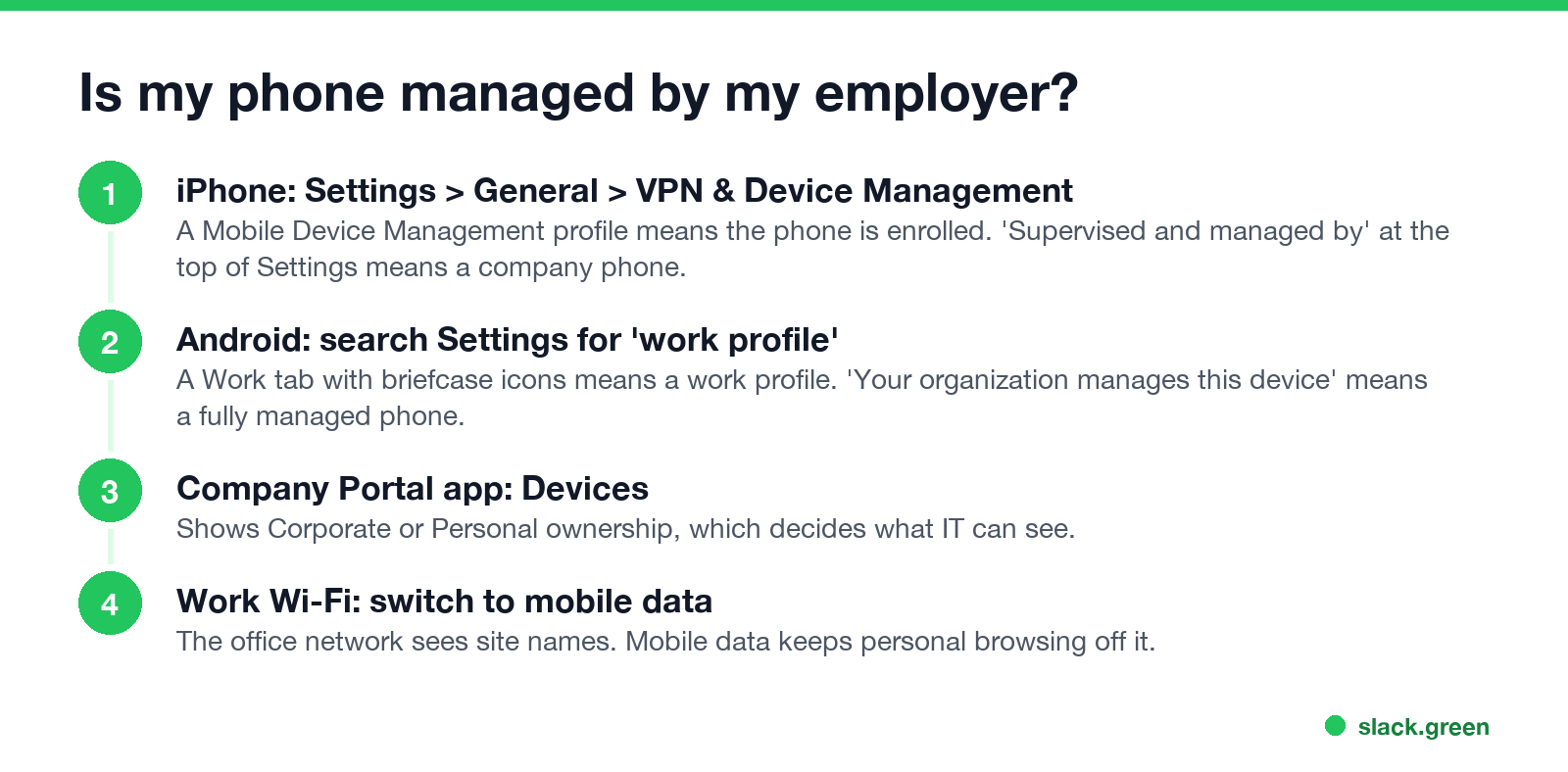
iPhone. Open Settings, General, VPN & Device Management. A profile listed under Mobile Device Management means your phone is enrolled, and tapping it shows what the organization can do. A line at the top of Settings that says "This iPhone is supervised and managed by" your company means a company-owned, supervised phone.
Android. Open Settings and search for "work profile" or "device admin apps". A Work tab in the app drawer means a work profile. A note on the lock screen or in quick settings that says your organization manages this device means a fully managed phone.
Company Portal. Open the Intune Company Portal app and go to Devices. It shows whether the phone is Corporate or Personal, which decides what IT can see from the table above.
Can my employer demand to see my personal phone?
In the US, an employer generally cannot search your personal phone without your consent. They can make access a condition of using the phone for work, which is what a BYOD policy you signed often does, and a phone can be pulled into a lawsuit through discovery. Some states, including New York, Connecticut and Delaware, require employers to tell employees in writing about electronic monitoring. In the EU and UK, data protection law limits monitoring to what is necessary and proportionate. This is general information, not legal advice; your contract, BYOD policy and local law decide the details.
For the wider picture of work monitoring, including screen capture and keystroke logging on laptops, see how do employers monitor remote workers. For the laptop camera in particular, see can my employer see me through my laptop camera.
FAQ
Can my employer see my browsing history on my phone? Not through device management on a personal phone. A company VPN, a web filter on a company phone, or work Wi-Fi can log the names of sites you visit.
Can my employer see my text messages? Device management cannot read texts on a personal or company phone. Archiving software on a company phone can capture texts sent from the work number.
Can my employer see my location? Not on a personal phone. On a company phone IT can request the location of a lost device, and sign-in logs show the rough location of each work sign-in.
Does deleting the work profile remove everything? Removing the work profile or unenrolling removes work apps and their data and ends IT's view of the phone. You lose access to work email and Teams on that phone until you enroll again.
Stop Jiggling Your Mouse.
Join hundreds of remote workers who never worry about their Slack status. Set it up once, stay green forever.
Related Articles
How to Keep Skype Status Active: Skype for Business Idle Timers
To keep your Skype for Business status active, open Options, Status, and raise both idle timers, Inactive and then Away, from 5 minutes to as much as 360 minutes each. Consumer Skype shut down on May 5, 2025 and Skype for Business Online in 2021, so for most people the real question is now Teams. What still works, status icons, Outlook, and status not updating.
Is It Legal for My Employer to Monitor Me? US, EU and UK Rules
In the US it is mostly legal for an employer to monitor company devices, accounts and premises, often without asking. The limits are state notice laws in New York, Connecticut and Delaware, consent rules for audio recording and biometrics, bans on cameras in restrooms, and your personal devices. The EU, UK and parts of Canada and Australia add notice and proportionality rules.
Can My Employer See My Personal Email on My Work Computer?
Your employer cannot sign in to your Gmail, and doing so without permission can break the Stored Communications Act. But on a work computer, screenshot and keystroke monitoring, browser history, HTTPS inspection and Outlook's local cache can all expose personal email. Work email is fully visible, deleted messages included. Case by case, with what to do.