
Can Time Doctor Detect a Mouse Jiggler? Yes, With One Report
Yes, if your company has Time Doctor's Unusual Activity Report. It checks keyboard and mouse activity in 30-minute blocks and flags mouse movement without clicks and input that is unusually regular, which is what app and USB jigglers produce. It does not look at app names. What the report flags, who sees it, and what else Time Doctor records.
Yes. Time Doctor can detect a mouse jiggler if your company uses its Unusual Activity Report. The report reads your mouse clicks, mouse movements and keystrokes in 30-minute blocks of tracked time and flags patterns that do not look like a person working. Two of its flags fit a jiggler: mouse moves without clicks, and inconsistent mouse moves or keyboard strokes, which Time Doctor describes as "unusually consistent mouse movements or keyboard strokes, which may indicate automated activity." Time Doctor's own feature page says the report "is specifically built to identify the kind of automated activity that mouse jigglers, auto-clickers, and similar tools produce."
The report looks at behavior, not at which programs run, so a USB jiggler with no software is caught the same way as a jiggler app. Time Doctor's help center also says the report "cannot be used as proof of user cheating" on its own; managers are told to check it against other data.
We build Slack Green, which keeps your Slack status active from our servers during the hours you set. It creates no mouse or keyboard input on your computer and nothing in Time Doctor. The same question for other trackers is in can a mouse jiggler be detected.
How Time Doctor detects a mouse jiggler
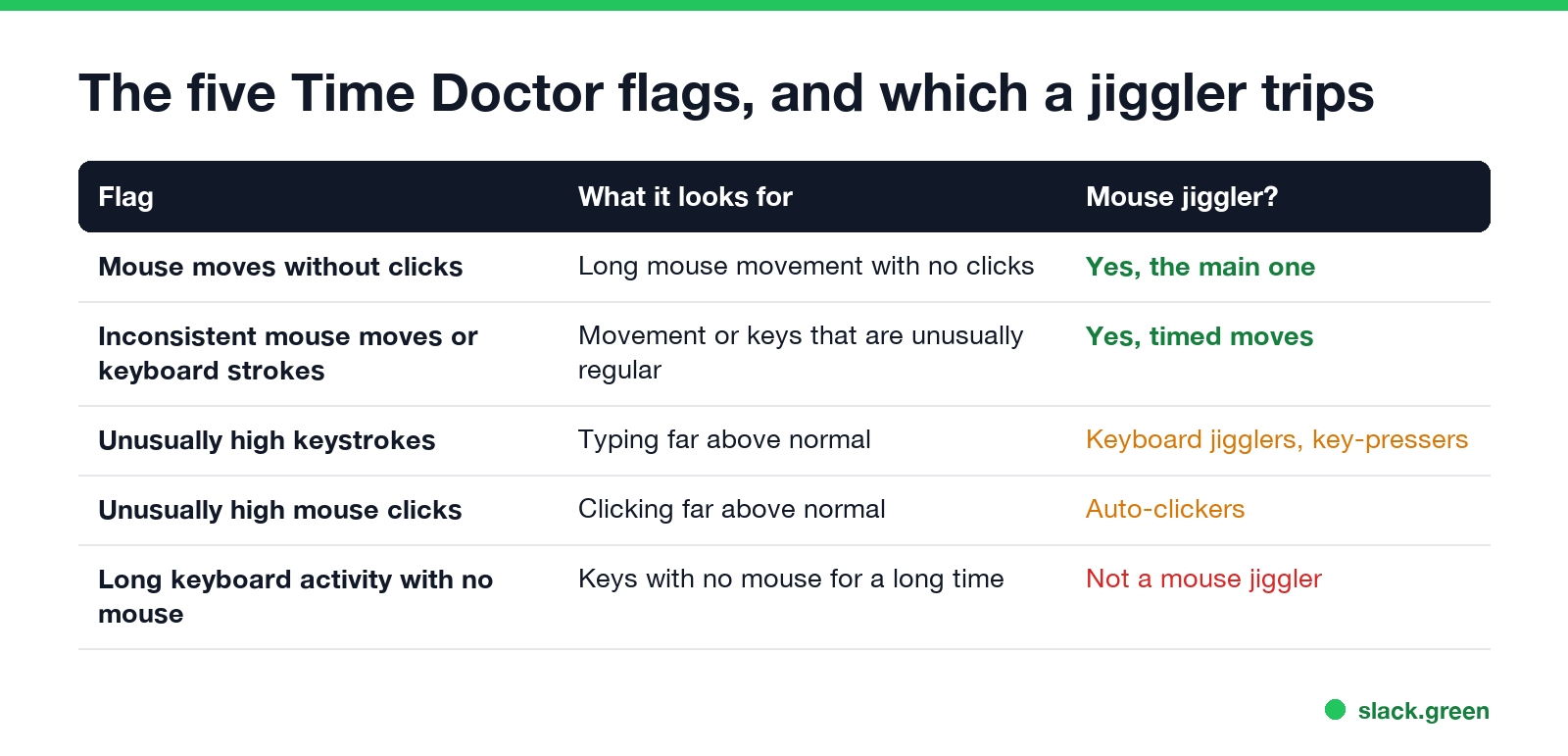
The Unusual Activity Report has five flags. Time Doctor's help center lists them as:
| Flag | What it looks for | Does a mouse jiggler trip it? |
|---|---|---|
| Mouse moves without clicks | "Prolonged periods of mouse movement without any associated clicking" | Yes, this is the main one |
| Inconsistent mouse moves or keyboard strokes | Movement or keys that are unusually regular | Yes, a jiggler moves on a timer |
| Unusually high keystrokes | Typing far above normal | Keyboard jigglers and key-press scripts |
| Unusually high mouse clicks | Clicking far above normal | Auto-clickers |
| Long keyboard activity with no mouse | Long typing with no mouse at all | Not a mouse jiggler |
A jiggler moves the pointer every few seconds and never clicks. Over a 30-minute block that looks like hundreds of movements and zero clicks, at even spacing. That is the pattern the first two flags describe. Models with "random" intervals change the timing, but they still do not click or type.
Time Doctor explains why it ignores app names: "it is possible to manipulate time tracking by physical devices or run an auto-clicker script in the background." So renaming or hiding a jiggler app changes nothing, and a USB dongle that shows up as a plain mouse is no safer.
Who sees the report, and when
- • Plans. The Unusual Activity Report is included with the Premium plan and sold as an add-on for Basic and Standard. Buying the add-on also unlocks past data already recorded.
- • Roles. Owners and Admins can open it at any company size. Managers can open it in companies with more than 10 users.
- • Where. Reports, Unusual Activity, filtered by person and date range, with CSV and XLS export.
- • Alerts. Owners, Admins and Managers can set notifications for new flags.
The report does not flag very low activity. That shows up in Time Doctor's other reports, such as the activity summary.
What else Time Doctor records
Never appear "away" on Slack again
Cloud-based. No downloads. Works 24/7 even when your laptop is off.
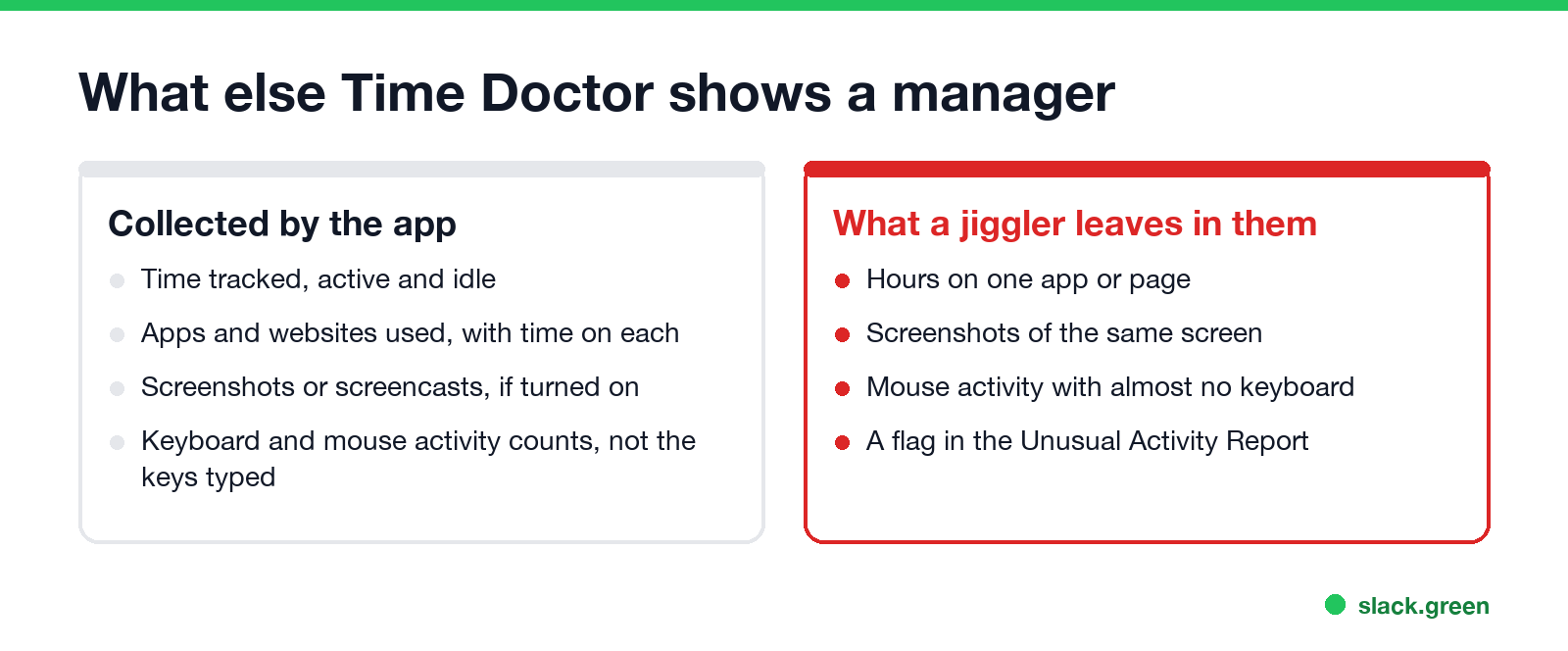
Even without the Unusual Activity Report, a jiggler leaves traces in Time Doctor's standard data:
Does a mouse jiggler keep Slack or Teams active?
It depends on the app. Microsoft Teams reads input anywhere on the computer, so a jiggler keeps Teams green while the screen is unlocked. Slack counts only input inside its own window and sets you away after 10 minutes without it, so a jiggler keeps Slack green only while the pointer sits over the Slack window. Details in does a mouse jiggler work for Teams and does Slack track mouse movement.
If your goal is only the Slack dot, it does not need input on your computer at all, and it leaves nothing for Time Doctor to flag.
FAQ
Can Time Doctor detect a USB mouse jiggler? Yes, through the same flags. The report reads the input pattern, not the device or app, so a USB dongle is flagged like an app.
Does Time Doctor detect a mechanical mouse mover? A mover that turns your real mouse still produces movement with no clicks, so the mouse moves without clicks flag still applies.
Does Time Doctor record keystrokes? It counts keyboard activity. It does not record the keys you type.
Can I get fired for a Time Doctor unusual activity flag? Time Doctor says the report alone is not proof and should be read with other data. What your employer does with it depends on your contract and local law; see are mouse jigglers legal.
Can Hubstaff or ActivTrak detect a mouse jiggler too? Yes, each in its own way. See can Hubstaff detect a mouse jiggler and can ActivTrak detect a mouse jiggler.
Stop Jiggling Your Mouse.
Join hundreds of remote workers who never worry about their Slack status. Set it up once, stay green forever.
Related Articles
Can My Employer See What I Watch on YouTube at Work?
On a work laptop or the office network, your employer can see that you used YouTube, when, and for how long. With HTTPS inspection or monitoring software, they can see which videos, because the video address and the browser tab title both name it. On your own phone on mobile data, they see nothing.
Can My Employer See My iMessages on a Work Mac?
Not through device management or the network: Jamf or Intune cannot read Messages, and iMessage is end-to-end encrypted. But if you sign in to Messages on a work Mac, your texts are stored on that Mac, where monitoring screenshots, backups and admin access can reach them. How to check, and how to take iMessage off the Mac without deleting it from your iPhone.
Can My Boss See My Private Outlook Calendar Events?
Usually not the details. When you mark an Outlook event Private, someone who can read your calendar sees only Private appointment, the time and a lock. The exceptions are delegates you gave Can view private items, the people invited to the event, anyone with full access to your mailbox in new Outlook or the web, and compliance admins. How to check who has which access, and what Private does not hide.