
Does Sapience Track Mouse Movement? What It Records and Flags
Sapience records that you used the mouse and keyboard, with a timestamp, and which app, website and window title were in front. It does not record keystrokes, clicks or screenshots. What that means for idle time, meetings, private time and mouse jigglers, from Sapience's own help center.
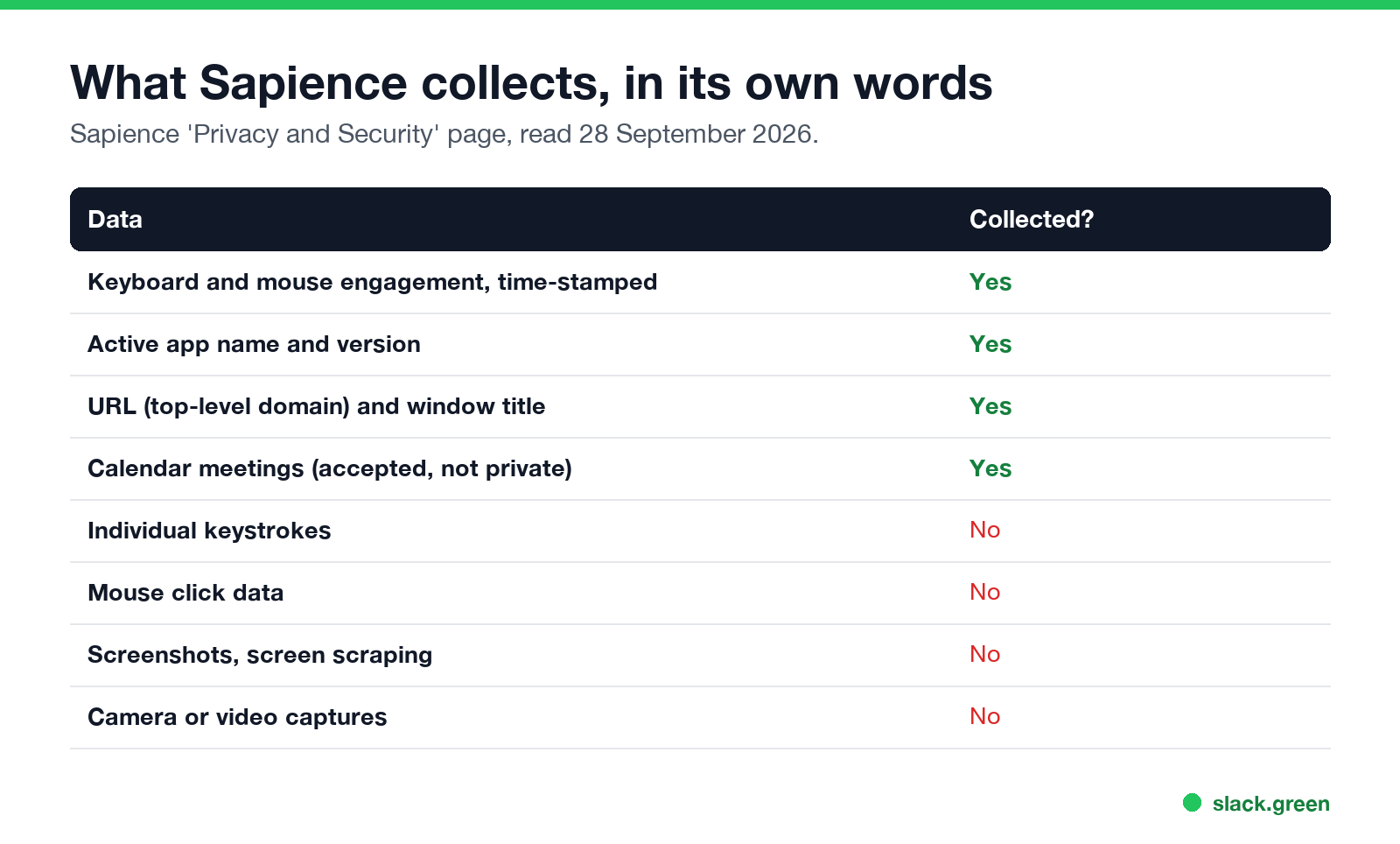
Yes, Sapience tracks mouse movement, but only as activity. Its privacy page says the desktop collector records "time-stamped physical device interactions (including keyboard and mouse engagement)" along with the active app's name, the website's top-level domain and the window title. It says it does not collect individual keystrokes, mouse click data, screenshots, screen scraping, or camera and video captures. So Sapience knows when you used the mouse and what was in front, but not what you typed or what was on screen.
Sapience does not document a mouse jiggler detector. A jiggler still does not hide much, because the app and window title stay the same for hours while the keyboard is silent, and that shows up in the daily timeline your manager can open.
For this page we read Sapience's privacy page and its employee help center on 28 September 2026 and quote them below.
What Sapience collects and what it does not
| Data | Sapience collects it? |
|---|---|
| Keyboard and mouse engagement, time-stamped | Yes |
| Active app name and version | Yes |
| URL (top-level domain) and window title | Yes |
| Accepted calendar meetings | Yes |
| Individual keystrokes | No |
| Mouse click data | No |
| Screenshots or screen scraping | No |
| Camera or video captures | No |
The window title can say a lot on its own: a document name, an email subject, a ticket number. Sapience keeps the domain of a website, not the full address, but the tab title usually names the page.
Employees on Reddit and Fishbowl often call the desktop agent "Sapience Buddy". Companies that run it include large IT services firms, and the complaints are the same: hours count only while the computer sees input.
How Sapience decides idle, work and private time
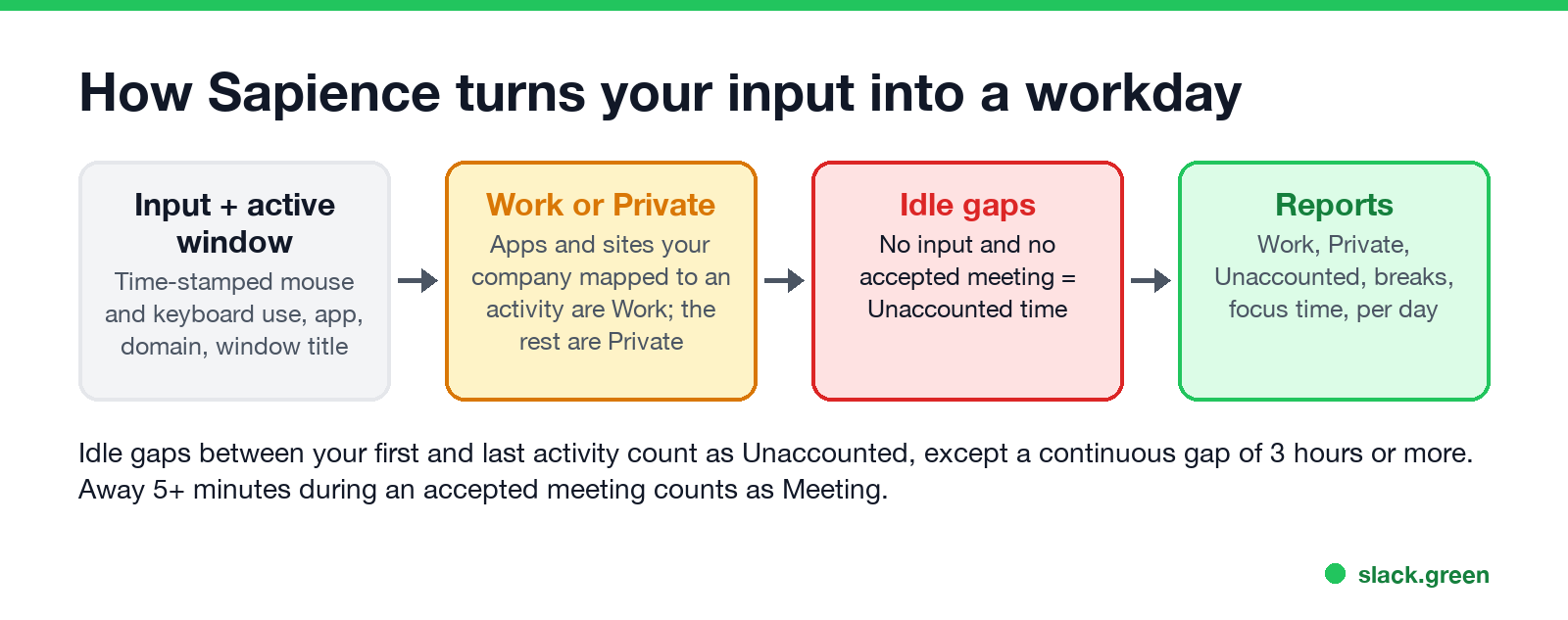
Sapience's employee help center defines the terms its reports use:
- • Start Time is your first activity of the day, on the computer or a scheduled meeting. End Time is your last.
- • Work Time is time on apps and websites your company mapped to a work activity. "All other applications and websites accessed by the user on the device are marked to 'Private' by default."
- • Unaccounted Time is idle time between Start and End that is not a meeting. A continuous idle stretch of 3 hours or more is left out.
- • Meetings: "If Sapience detects that a user is away from the system for 5 continuous minutes and if there is an accepted or scheduled meeting at that time", it counts that time as a meeting. Tentative, declined, private, all-day and "Free" events do not count.
- • Focus Time is more than 20 minutes in a row on activities your company marked as core.
- • The window stays the same. An hour of activity on one app and one window title, with no switches, stands out in the day view.
- • Private stays Private. If the window in front is not a work app, the jiggled hour counts as Private time, not Work.
- • The keyboard is silent. Sapience records keyboard and mouse engagement separately from the window data. Hours of mouse with no keyboard is the pattern every tracker looks for; see how to detect a mouse jiggler.
- • The output does not match. Tickets, commits and emails are what a manager compares the hours with.
Managers get these as reports: a Daily Timeline with first and last time on the PC and total work, meeting and private hours, a Break and Unaccounted Time analysis, and a detailed view of one person's day that lists each app and URL in time order. If you edit an unaccounted slot, a separate Modified Unaccounted Time report shows the edits.
Can Sapience detect a mouse jiggler?
Not by name, as far as its public documents go. Neither the privacy page nor the employee help center mentions jigglers, automated input or a list of jiggler apps, unlike Hubstaff and ActivTrak, which document such checks.
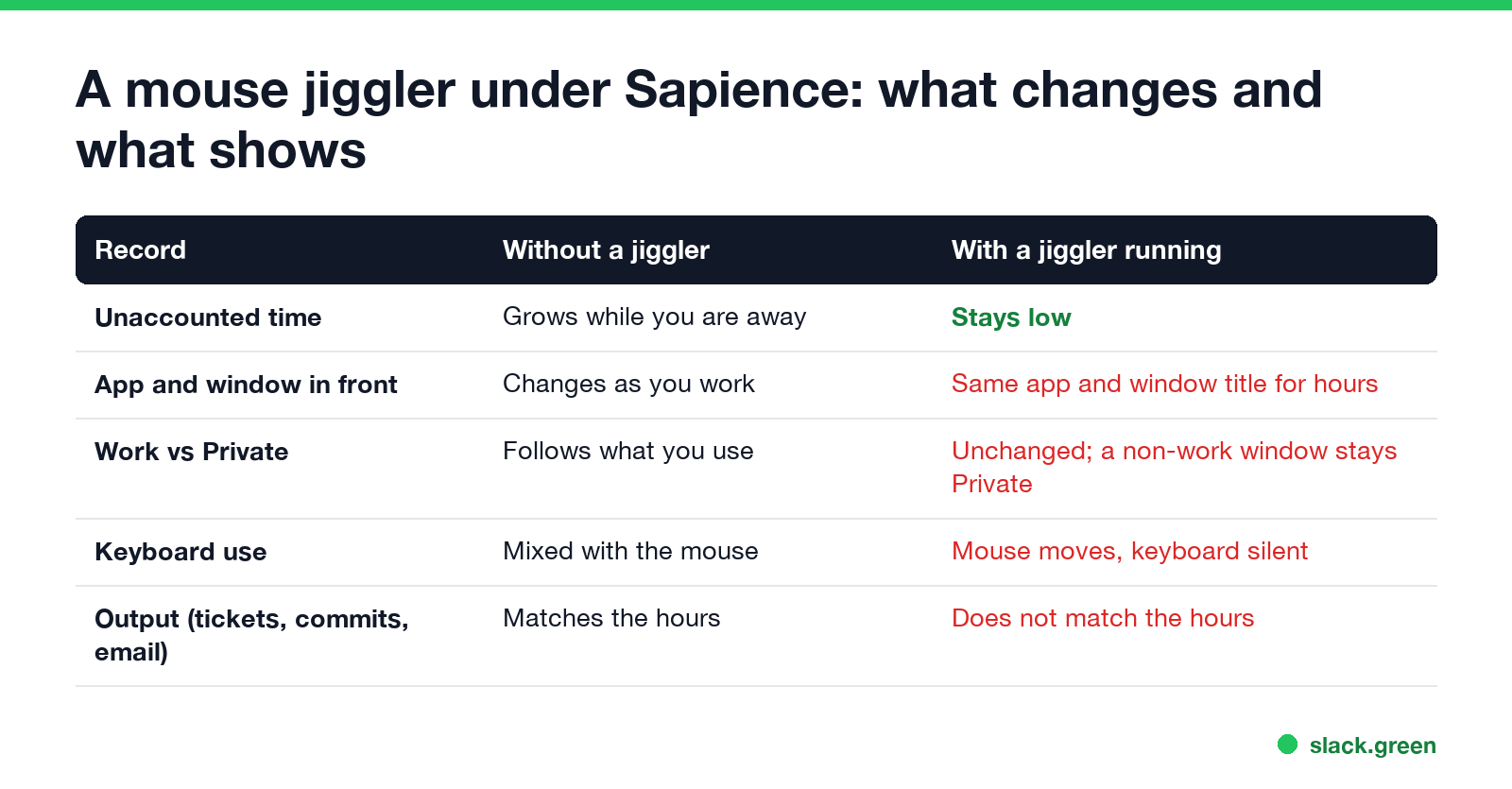
What a jiggler changes is the idle gap: with the pointer moving, Sapience sees engagement and does not count the time as Unaccounted. What it does not change:
A USB jiggler leaves the same pattern as an app, plus a second mouse in the device list. Can a mouse jiggler be detected goes through each type. Companies fire people for this: are mouse jigglers legal covers the Wells Fargo case.
Never appear "away" on Slack again
Cloud-based. No downloads. Works 24/7 even when your laptop is off.
Sapience compared with other monitoring tools
| Tool | Screenshots | Keystroke content | Documented jiggler check |
|---|---|---|---|
| Sapience | No | No | No |
| Insightful | Optional | No | Yes, irregular behavior alerts |
| Hubstaff | Optional | No | Yes, with Insights |
| Time Doctor | Optional | No | Yes, Unusual Activity Report |
| DeskTime | Optional | No | No |
Details for each: can Insightful detect a mouse jiggler, can Hubstaff detect a mouse jiggler, can Time Doctor detect a mouse jiggler and can DeskTime detect a mouse jiggler. A plain timesheet tool records far less; see does Harvest track mouse movement.
Sapience, Teams and Slack
Sapience is separate from your chat status. Microsoft Teams sets you Away after about 5 minutes without input on the computer. Slack sets you away 10 minutes after your last input in the Slack window. A mouse jiggler can keep Teams green, but Slack only while the pointer sits over Slack.
Nothing Sapience records turns your Slack dot green, and nothing Slack does changes your Sapience hours. To see what else may be running on your laptop, use how to tell if you are being monitored at work.
FAQ
Does Sapience track keystrokes?
No. Sapience says it does not collect individual keystrokes. It records that the keyboard was used, with a timestamp, not what you typed.
Does Sapience take screenshots?
No. Its privacy page lists screenshots, screen scraping, camera captures and video captures as data it does not collect.
Can Sapience see which websites I visit?
It sees the top-level domain and the window title of the page in front, and marks sites your company did not map to work as Private time.
Why does Sapience show unaccounted time when I was working?
The computer saw no input and you had no accepted meeting. Reading, thinking and phone calls look idle to it. Tentative and declined meetings do not count, so accept the invite.
Can Sapience detect a mouse jiggler?
It has no documented jiggler check. A jiggler does not change the app, the window title or the keyboard silence, and those show in the day view.
Stop Jiggling Your Mouse.
Join hundreds of remote workers who never worry about their Slack status. Set it up once, stay green forever.
Related Articles
Webex Status Ideas: 35 Custom Statuses Under 75 Characters
35 Webex status ideas you can paste into Set a status: funny ones, meetings, focus time, lunch, out of office and time zones, each under Webex's 75-character limit. How to set a custom status, save five for reuse, and make it clear on its own.
How to Make an Emoji From a Video (Slack and Discord)
To make an emoji from a video, cut 1 to 2 seconds, crop it to a square, scale it to 128 x 128 and save it as a GIF under 128 KB for Slack or 256 KB for Discord. One tested ffmpeg command, the frame rate and color settings that decide the file size, and a free browser tool that shrinks the GIF for you.
How to Make a Custom Emoji for Discord (From Any Image)
To make a custom Discord emoji, crop an image to a square, keep it under 256 KB, name it with letters, numbers and underscores, and upload it with Add Emoji in the emoji picker or Server Settings, Emoji. How to make one from a photo, a GIF or text for free, add animation, and use it in other servers.