
Node-RED to Slack: Webhook, Bot Token and Socket Mode Flows, Tested
Node-RED can post to Slack with a plain http request node and an incoming webhook, call any Slack API method with node-red-contrib-slack, and receive mentions over Socket Mode with node-red-contrib-slack-modern. We ran all three on Node-RED 5.0.9 on 8 November 2026.
The simplest way to send a Slack message from Node-RED needs no extra package: point an http request node at a Slack incoming webhook URL and pass it msg.payload = { text: "..." }. For more than one channel, use a bot token with node-red-contrib-slack (any Web API method), and to receive messages in Node-RED, use a Socket Mode package such as node-red-contrib-slack-modern. On 8 November 2026 we ran all three on Node-RED 5.0.9 (Node.js 24.22.2, the official Docker image) against a test Slack workspace. This page has the flows, what reached Slack, and the parts that no longer work.
Which method to use
| What you need | Use | Install | Token |
|---|---|---|---|
| Post alerts to one channel | http request node + incoming webhook | Nothing | Webhook URL |
| Post to any channel, upload, call other API methods | node-red-contrib-slack (slack-web-out) | Palette | Bot token xoxb- |
| Receive mentions or messages and reply | node-red-contrib-slack-modern (slack-modern-in) | Palette | Bot token + app token xapp- |
If you only need alerts, stop at the first row. A webhook is tied to the channel you pick when you make it; our guide to creating a Slack webhook covers that part.
Method 1: http request node to an incoming webhook
This is the flow we ran, minus the real webhook URL. In Node-RED, open the menu, choose Import, paste it, and replace the url:
[
  {
    "id": "a1",
    "type": "inject",
    "name": "Door opened",
    "props": [
      {
        "p": "payload"
      }
    ],
    "repeat": "",
    "crontab": "",
    "once": false,
    "onceDelay": 0.1,
    "topic": "",
    "payload": "Front door opened",
    "payloadType": "str",
    "x": 140,
    "y": 80,
    "wires": [
      [
        "a2"
      ]
    ]
  },
  {
    "id": "a2",
    "type": "function",
    "name": "Build Slack message",
    "func": "msg.headers = {'Content-Type': 'application/json'};\nmsg.payload = { text: ':door: ' + msg.payload + ' at ' + new Date().toISOString().slice(11,19) + ' UTC' };\nreturn msg;",
    "outputs": 1,
    "noerr": 0,
    "initialize": "",
    "finalize": "",
    "libs": [],
    "x": 360,
    "y": 80,
    "wires": [
      [
        "a3"
      ]
    ]
  },
  {
    "id": "a3",
    "type": "http request",
    "name": "POST to webhook",
    "method": "POST",
    "ret": "txt",
    "paytoqs": "ignore",
    "url": "https://hooks.slack.com/services/T000/B000/XXXX",
    "tls": "",
    "persist": false,
    "proxy": "",
    "insecureHTTPParser": false,
    "authType": "",
    "senderr": false,
    "headers": [],
    "x": 580,
    "y": 80,
    "wires": [
      [
        "a4"
      ]
    ]
  },
  {
    "id": "a4",
    "type": "debug",
    "name": "webhook reply",
    "active": true,
    "tosidebar": true,
    "console": false,
    "tostatus": false,
    "complete": "statusCode",
    "targetType": "msg",
    "statusVal": "",
    "statusType": "auto",
    "x": 790,
    "y": 80,
    "wires": []
  }
]
The function node builds the message. Slack wants a JSON body with at least a text field:
msg.headers = {'Content-Type': 'application/json'};
msg.payload = { text: ':door: ' + msg.payload + ' at ' + new Date().toISOString().slice(11,19) + ' UTC' };
return msg;
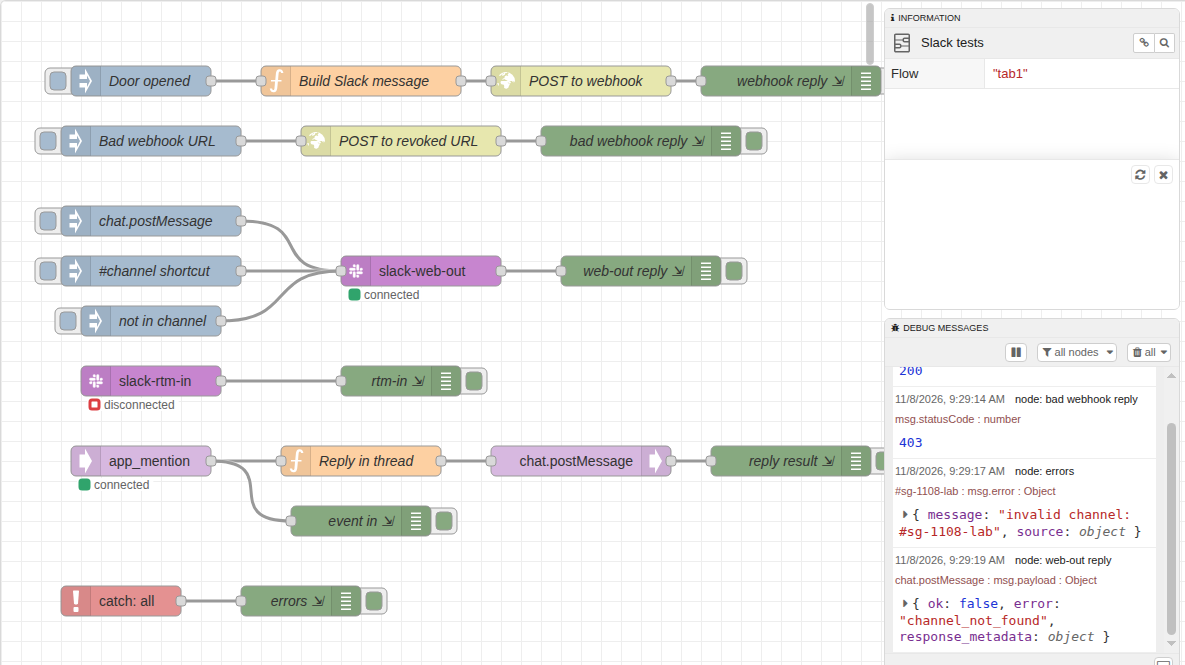
Clicking the inject button posted the message in under a second. The http request node returned msg.statusCode 200 and the body ok, which is all a webhook ever answers on success. We then pointed a second http request node at the same URL with the last six characters changed. Slack answered:
msg.statusCode: 403
msg.payload: "invalid_token"
Node-RED does not treat a 403 as an error by default, so a catch node never sees it. If an alert must not fail quietly, add a switch node after the http request that routes any msg.statusCode other than 200 to your own warning path.
Method 2: node-red-contrib-slack with a bot token
We installed node-red-contrib-slack 2.1.0 from Manage palette. Its slack-web-out node calls any Slack Web API method: put the method name in msg.topic and the arguments in msg.payload. This inject node posted a message:
msg.topic   = "chat.postMessage"
msg.payload = { "channel": "C0123456789", "text": "Hello from node-red-contrib-slack (slack-web-out)" }
The node returned Slack's full reply (ok: true, the message ts and the bot profile), and the post showed under the bot's name. Three things did not go as the package README suggests.
The RTM nodes are dead for new apps
The config node also opens a Real Time Messaging connection, and with a bot token from a current Slack app the container log said:
[INFO] rtm-api:RTMClient:1 unable to RTM start: An API error occurred: not_allowed_token_typeThe slack-rtm-in node stayed on "disconnected", so it receives nothing. Slack only allows RTM for classic apps.
The #channel shortcut fails
The README says you can set msg.topic to #channel-name and msg.payload to the text. Ours threw invalid channel: #sg-1108-lab. In the package source, the channel list it searches is filled only after RTM connects, which never happens with a modern token. Use the channel ID instead; see how to find a Slack channel ID.
API errors come out of the normal output
A post to a channel ID that does not exist sent { ok: false, error: "channel_not_found" } out of the node as a regular message, not to a catch node. Check msg.payload.ok before you assume it worked.
Our bot had the chat:write scope, and the bot must be in the channel for chat.postMessage to work. Slack bot tokens explains the scopes.
Never appear "away" on Slack again
Cloud-based. No downloads. Works 24/7 even when your laptop is off.
Method 3: receive mentions with Socket Mode
To get messages into Node-RED, you need Slack to send events to your flow. Socket Mode does that over an outbound WebSocket, so Node-RED needs no public URL. We used node-red-contrib-slack-modern 0.2.1, which takes a bot token and an app-level token with the connections:write scope. In the Slack app settings we turned on Socket Mode and subscribed to the app_mention bot event.
The flow is three nodes: slack-modern-in filtered to app_mention, a function node, and slack-modern-api:
const e = msg.payload;
msg.topic = 'chat.postMessage';
msg.payload = { channel: e.channel, thread_ts: e.ts, text: 'Node-RED got your mention: ' + e.text.replace(/<@[A-Z0-9]+>\s*/,'') };
return msg;
We mentioned the bot from a member account. The event reached Node-RED with the channel, user and ts, and the threaded reply was in Slack 0.4 seconds after the mention:
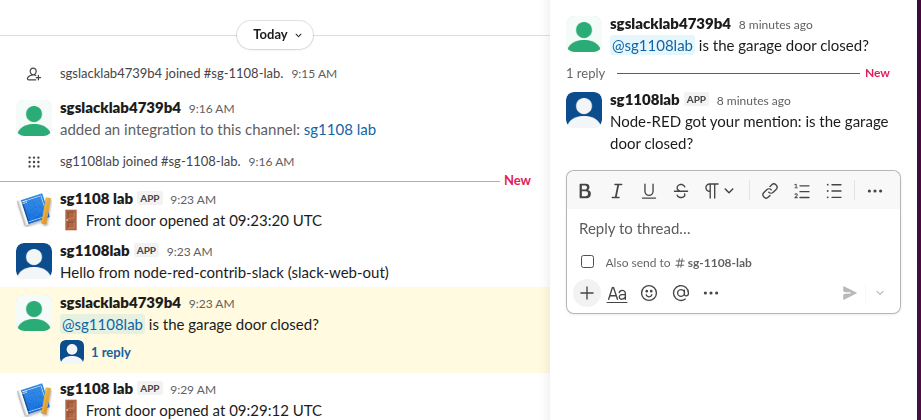
Note the two senders in the screenshot. The webhook posts show the app's name with its default icon, and the bot-token posts show the bot user. The Python Socket Mode guide has the same setup with code, if you want to compare.
Slack packages for Node-RED
We read these from npm on 8 November 2026:
| Package | Version (published) | Weekly downloads | Our result |
|---|---|---|---|
node-red-contrib-slack | 2.1.0 (April 2025) | 239 | Web API works; RTM in fails with not_allowed_token_type |
node-red-contrib-slack-modern | 0.2.1 (October 2026) | 56 | Socket Mode in and Web API out both worked |
@headless-architecture/node-red-contrib-slack-bolt | 1.1.5 (December 2023) | 16 | Not tested |
node-red-contrib-slack-files | 0.1.2 (March 2017) | 11 | Not tested |
Both packages we tested installed from the palette without errors on Node-RED 5.0.9.
FAQ
Do I need a Slack app for the webhook method?
Yes. An incoming webhook belongs to a Slack app, but the app can be one you make in a minute with only the webhook feature turned on. Node-RED itself needs no Slack package for it.
Can I format the message?
Yes. The text field takes Slack's mrkdwn (*bold*, _italic_, <url|label>), and you can send blocks for layouts. Our Markdown to Slack converter shows how normal Markdown maps to it.
Why does my flow say "disconnected" next to slack-rtm-in?
Your token cannot open an RTM connection. New Slack apps get not_allowed_token_type, as in our test. Use Socket Mode or the Events API instead.
Stop Jiggling Your Mouse.
Join hundreds of remote workers who never worry about their Slack status. Set it up once, stay green forever.
Related Articles
Python Logging to Slack: A Tested Handler (and Which Packages Still Work)
A 36-line logging module posts ERROR records to a Slack incoming webhook with only the standard library. We ran it on Python 3.12 on 7 November 2026, sent 50 errors in a burst with and without a queue, and tried four PyPI Slack logger packages; one of them failed with invalid_auth.
Winston to Slack: winston-slack-webhook-transport Tested (Plus Pino)
winston-slack-webhook-transport sends winston logs to a Slack incoming webhook: add it as a transport with webhookUrl and level error. We ran version 2.3.7 with winston 3.19 on Node 22 on 7 November 2026, sent 50 errors at once, and found two things the README does not say: the burst arrived out of order, and Error stacks need format.errors.
Airflow Slack Alerts: Webhook and Bot Token Setups, Tested on Airflow 3
Airflow sends Slack alerts through the Slack provider: send_slack_webhook_notification or send_slack_notification as an on_failure_callback, or SlackWebhookOperator and SlackAPIPostOperator as tasks. We ran all four on Airflow 3.4.0 with provider 9.11.1 on 7 November 2026, plus the two mistakes that silently cost you alerts.