
Slack CLI on Homebrew: brew install --cask slack-cli, and What It Does
brew install --cask slack-cli installs Slack's official slack command on macOS and Linux. The install, the first commands, the common errors, and the other Slack CLIs in Homebrew for sending messages, exporting and status.
To install the Slack CLI with Homebrew, run brew install --cask slack-cli. It is a cask, not a formula, and it puts Slack's official slack command in your path on macOS and on 64-bit Intel or AMD Linux. On 2026-09-24 the cask shipped version 4.8.0, and Homebrew counted 425 installs in the last 30 days.
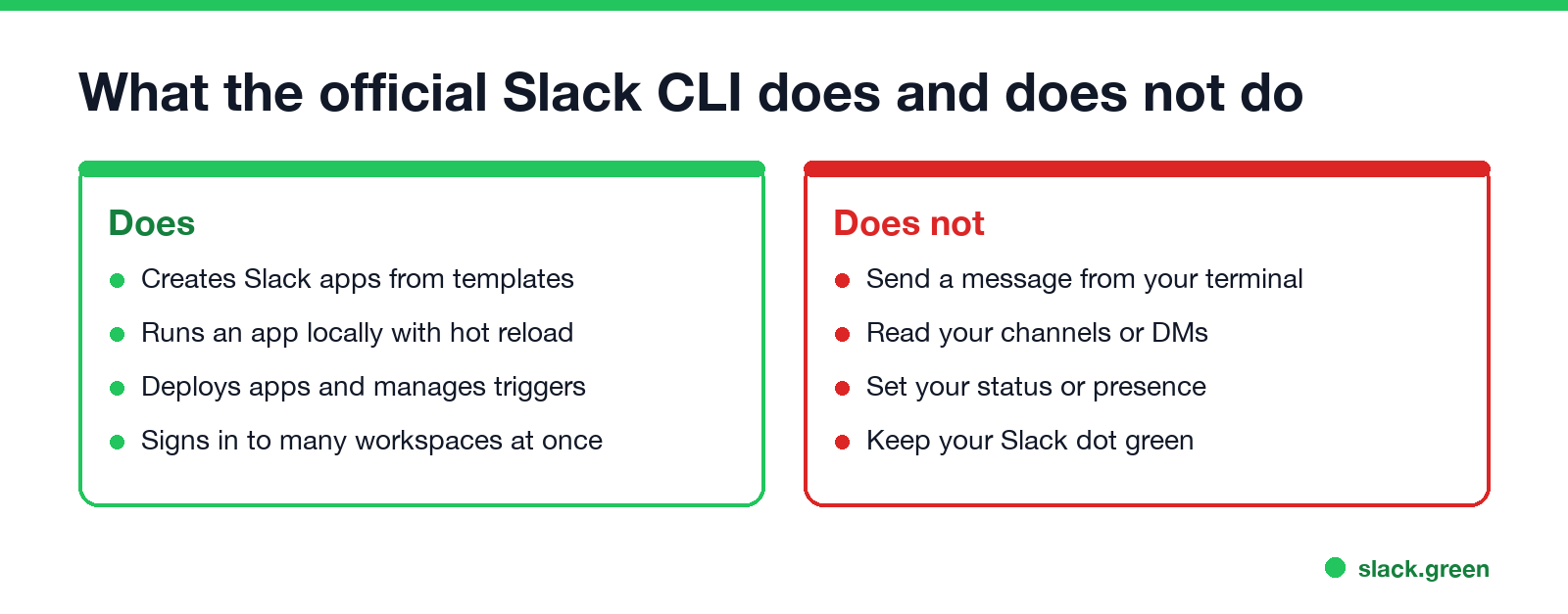
One thing trips up many people who search for this. The official Slack CLI builds Slack apps. It does not send messages as you, read your channels or set your status. If that is what you want, the tools for it are further down, including our own Slack Green CLI, sg-cli, which keeps your Slack status active from a terminal or a small server.
Install the Slack CLI with Homebrew
brew install --cask slack-cli
slack version
The cask downloads Slack's own build from downloads.slack-edge.com and links it as $HOMEBREW_PREFIX/bin/slack. That is /opt/homebrew/bin/slack on Apple silicon and /usr/local/bin/slack on Intel Macs. Here is what brew info reports:
$ brew info --cask slack-cli
==> slack-cli (Slack CLI): 4.8.0
CLI to create, run, and deploy Slack apps
https://docs.slack.dev/tools/slack-cli/
==> Artifacts
bin/slack (Binary)
==> Analytics
install: 425 (30 days), 1,716 (90 days), 6,372 (365 days)
Update and remove it the Homebrew way:
brew upgrade --cask slack-cli              # move to the newest version
brew uninstall --cask slack-cli            # remove the binary
brew uninstall --zap --cask slack-cli      # also delete ~/.slack (saved logins)
Slack's docs also offer a script install, curl -fsSL https://downloads.slack-edge.com/slack-cli/install.sh | bash. It installs the same binary. Pick one. With both, you get two slack commands, and the one earlier in your PATH wins.
The Slack tools in Homebrew, and which one you want
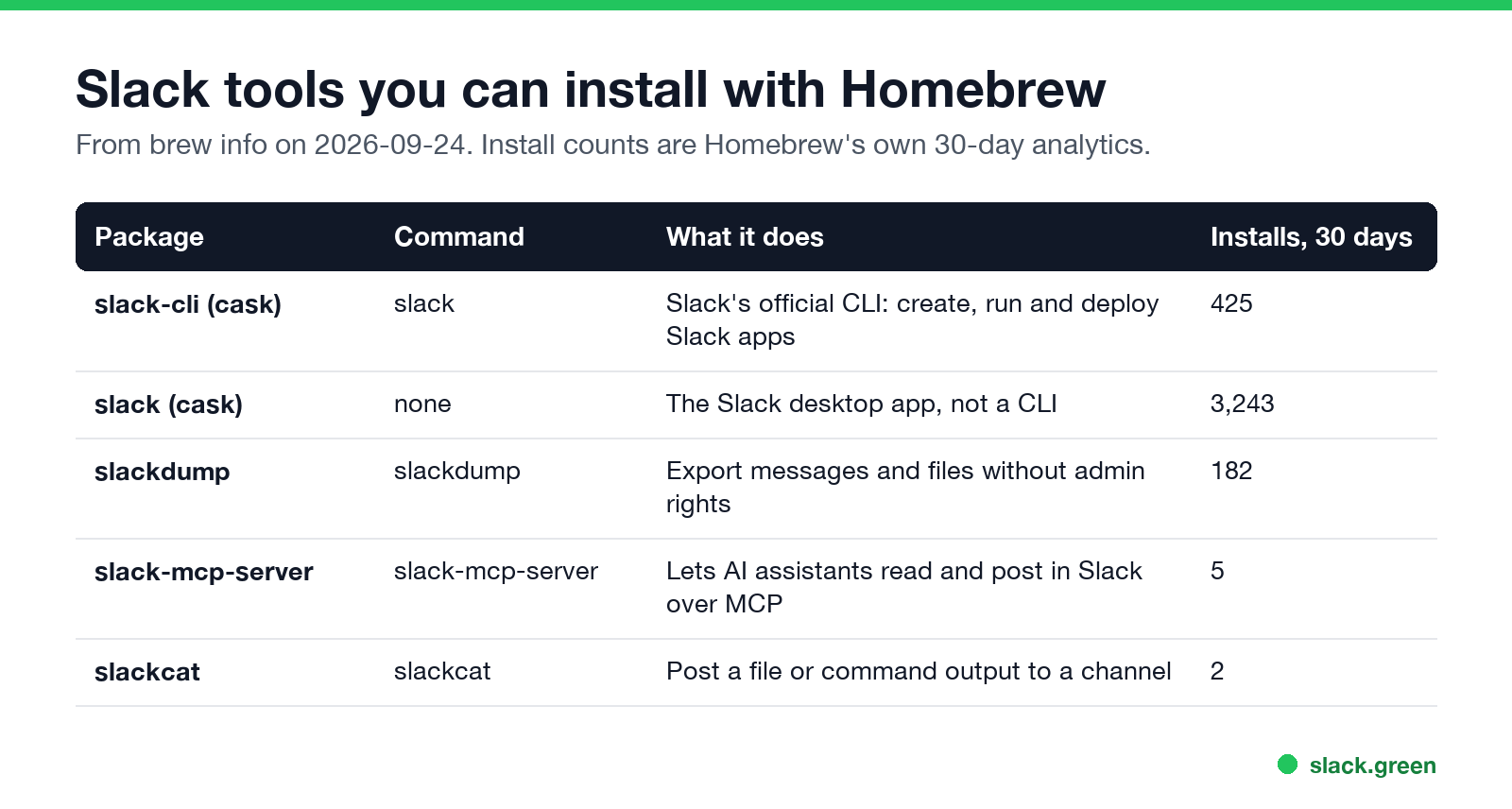
brew search slack returns several packages that sound alike. They do different jobs.
| Package | Command | What it does | Installs, 30 days |
|---|---|---|---|
slack-cli (cask) | slack | Slack's official CLI: create, run and deploy Slack apps | 425 |
slack (cask) | none | The Slack desktop app, not a CLI | 3,243 |
slackdump | slackdump | Export messages and files without admin rights | 182 |
slack-mcp-server | slack-mcp-server | Lets AI assistants read and post in Slack over MCP | 5 |
slackcat | slackcat | Post a file or command output to a channel | 2 |
Counts are from brew info on 2026-09-24. brew install --cask slack installs the desktop app, the same one you would download from slack.com. It adds no terminal command.
First commands after the install
Never appear "away" on Slack again
Cloud-based. No downloads. Works 24/7 even when your laptop is off.
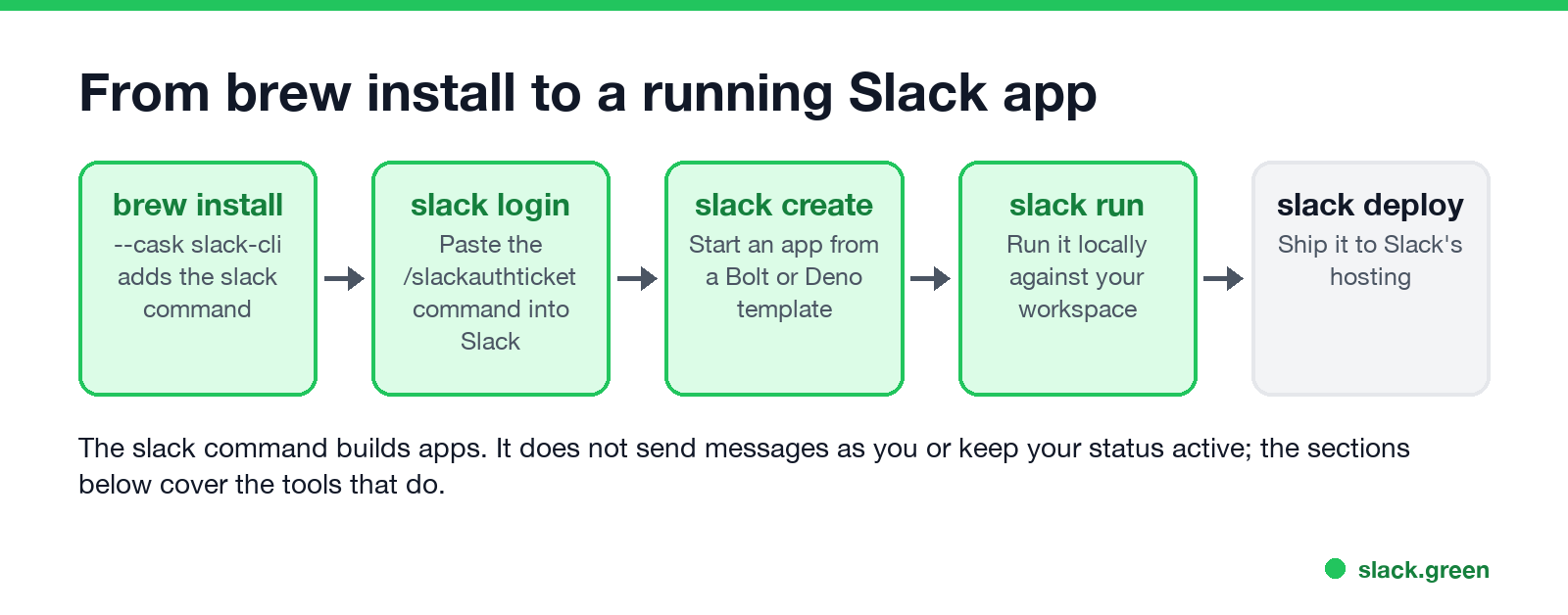
slack login          # prints a /slackauthticket command to paste into Slack
slack create my-app  # start a new app from a template
cd my-app
slack run            # run the app locally against your workspace
slack deploy         # deploy to Slack's hosting
slack login does not ask for a password. It prints a /slackauthticket command. You paste that into any Slack message box, Slack shows a challenge code, and you paste the code back into the terminal. Repeat it for each workspace. slack auth list shows the workspaces you are signed in to.
slack create asks you to pick a template. Bolt for JavaScript and Bolt for Python apps run on your own machine or server. Deno Slack SDK apps can run on Slack's own hosting through slack deploy. slack doctor prints your CLI version, your runtimes and your login state, which is the first thing to check when something fails.
Fix common Slack CLI install errors
zsh: command not found: slack. Homebrew's bin folder is not on your PATH. Check with brew --prefix, then add it:
echo 'eval "$(/opt/homebrew/bin/brew shellenv)"' >> ~/.zprofile
source ~/.zprofile
which slack
On Intel Macs the path is /usr/local/bin/brew. On Linux it is usually /home/linuxbrew/.linuxbrew/bin/brew.
slack opens the wrong program. Another tool also installed a command named slack. Run which -a slack to see every copy in order. With the curl installer you can pick a different name for Slack's binary, as Slack's install guide shows. The cask always installs it as slack.
brew install slack-cli says no formula found. You left out --cask on an old Homebrew. Homebrew 6 resolves slack-cli to the cask on its own; older versions need the flag, or brew update first.
Linux on ARM. The cask ships a 64-bit Intel and AMD build for Linux only. On an ARM board or an ARM cloud server, use Slack's curl installer.
Send a Slack message from the command line
The official CLI has no "send message" command. For that you call Slack's Web API or a webhook, which needs no install beyond curl.
With an incoming webhook, which you create in a Slack app under Incoming Webhooks, one channel is fixed per URL:
curl -X POST -H 'Content-type: application/json' \
  --data '{"text":"Build finished on main"}' \
  "$SLACK_WEBHOOK_URL"
With a bot token and chat.postMessage, you can post to any channel the bot is in:
curl -X POST https://slack.com/api/chat.postMessage \
  -H "Authorization: Bearer $SLACK_BOT_TOKEN" \
  -H "Content-type: application/json; charset=utf-8" \
  --data '{"channel":"C0123456789","text":"Deploy done"}'
The bot posts as the app, not as you. Which token to use for what is in Slack bot tokens. If you want to pipe output into a channel, brew install slackcat gives you a small tool for that. To pull messages out instead, slackdump exports channels and DMs, and the steps are in how to export Slack messages without admin.
Set your Slack status from the terminal
Never appear "away" on Slack again
Cloud-based. No downloads. Works 24/7 even when your laptop is off.
Your status text and emoji go through users.profile.set with a user token (xoxp), not a bot token:
curl -X POST https://slack.com/api/users.profile.set \
  -H "Authorization: Bearer $SLACK_USER_TOKEN" \
  -H "Content-type: application/json; charset=utf-8" \
  --data '{"profile":{"status_text":"Deep work","status_emoji":":headphones:","status_expiration":0}}'
Scopes, expiry times and errors are in set Slack status with the API. The green dot is a separate thing. The API's users.setPresence accepts only auto and away, so no API call can force you active. The reasons are in the Slack presence API.
Keep your Slack status active from a terminal: sg-cli
sg-cli is the Slack Green CLI. It runs a small background process on your Mac, your Linux machine or a $5 server, and keeps your Slack presence active on the schedule you set. Your session tokens stay encrypted in ~/.sg-cli/ on that machine. Our server only checks the license. It is a one-time $79.
There is no Homebrew formula for sg-cli yet. The install is one command on macOS or Linux, and it needs Python 3.11 or newer:
curl -fsSL https://slack.green/install.sh | bash
sg-cli               # opens the terminal dashboard: add a workspace, set hours
The script installs sg-cli into its own Python environment in ~/.sg-cli/venv. Run it again to update. Native Windows is not supported; use WSL. The full setup is in the CLI setup guide, and how it compares with the hosted version is in the self-hosted Slack Green CLI. Why a home-made script cannot do the same job is in scripts that keep Slack active.
Frequently asked questions
Is there a Homebrew formula for the Slack CLI?
It is a cask: brew install --cask slack-cli. brew install slack-cli without --cask also works on current Homebrew, which finds the cask by name.
What is the difference between brew install slack and brew install slack-cli?
slack is the desktop chat app. slack-cli is the developer command line tool, and its command is also called slack.
Can the Slack CLI send messages?
No. It creates, runs and deploys apps. Send messages with a webhook or chat.postMessage through curl, as shown above, or with slackcat.
Does the Slack CLI work on Linux? Yes. The Homebrew cask supports 64-bit Intel and AMD Linux. For ARM Linux, use Slack's curl installer.
How do I update the Slack CLI?
brew upgrade --cask slack-cli. If you used the curl installer, run it again.
Is there a Homebrew install for the Slack Green CLI?
Not yet. curl -fsSL https://slack.green/install.sh | bash installs sg-cli on macOS and Linux.
Summary
Never appear "away" on Slack again
Cloud-based. No downloads. Works 24/7 even when your laptop is off.
brew install --cask slack-cli installs Slack's official slack command, which builds, runs and deploys Slack apps. brew install --cask slack is the desktop app. To send a message from a terminal, use a webhook or chat.postMessage with curl. To set your status, use users.profile.set. To keep your status active on a schedule from a terminal or a server, use Slack Green's sg-cli.
Stop Jiggling Your Mouse.
Join hundreds of remote workers who never worry about their Slack status. Set it up once, stay green forever.
Related Articles
How to Stop Your Computer From Sleeping: Windows and Mac
To stop a Windows 11 computer from sleeping, open Settings, System, Power & battery, Screen, sleep & hibernate timeouts and set the sleep timers to Never. On a Mac, turn on Prevent automatic sleeping in Energy or Battery settings, or run caffeinate. Steps for Windows 11, Windows 10 and macOS, one command for each, why a PC sleeps too fast, and what to do on a locked-down work laptop.
How to Stop Ubuntu From Locking the Screen (GNOME, KDE, Mint)
To stop Ubuntu from locking the screen, open Settings, Privacy & Security, Screen Lock, turn off Automatic Screen Lock and set Blank Screen Delay to Never. The same fix as gsettings commands, how to stop suspend too, how to pause the lock for one task, and the equivalents for KDE Plasma and Linux Mint.
Does Playing a Video Keep Your Computer Awake? Yes, With Limits
Yes. A video playing in Chrome, Edge, Safari or a player app keeps the screen on and stops the computer from sleeping, because the player asks the system for a wake lock. It stops working when the video is paused, muted in a hidden tab, or is only a GIF, and it never counts as activity for Slack or Teams.