
Caffeine vs KeepingYouAwake: Which Mac Keep-Awake Cup to Use
Caffeine and KeepingYouAwake are both free, open-source coffee cups for the Mac menu bar. KeepingYouAwake runs on macOS 10.13 and newer, wraps Apple's caffeinate, and can let the display sleep or stop on low battery. Caffeine needs macOS 14.6 and adds an optional cursor nudge that keeps Teams green. Which to pick.
Caffeine and KeepingYouAwake look almost the same: a free, open-source coffee cup in the Mac menu bar that keeps the Mac awake when you click it. The differences are in the details. KeepingYouAwake runs on macOS 10.13 and newer, installs with Homebrew, and has more options: let the display sleep while the Mac stays awake, stop on low battery, and turn on when an external display connects. Caffeine needs macOS 14.6 and has fewer settings, but it has one KeepingYouAwake lacks: Keep apps active, a cursor nudge that keeps Microsoft Teams green. Pick KeepingYouAwake for control, Caffeine for the Teams nudge.
Neither keeps Slack green, because Slack counts input only inside the Slack window. Slack Green keeps your Slack status active from the cloud during the hours you set, with the Mac asleep or shut.
Caffeine vs KeepingYouAwake at a glance
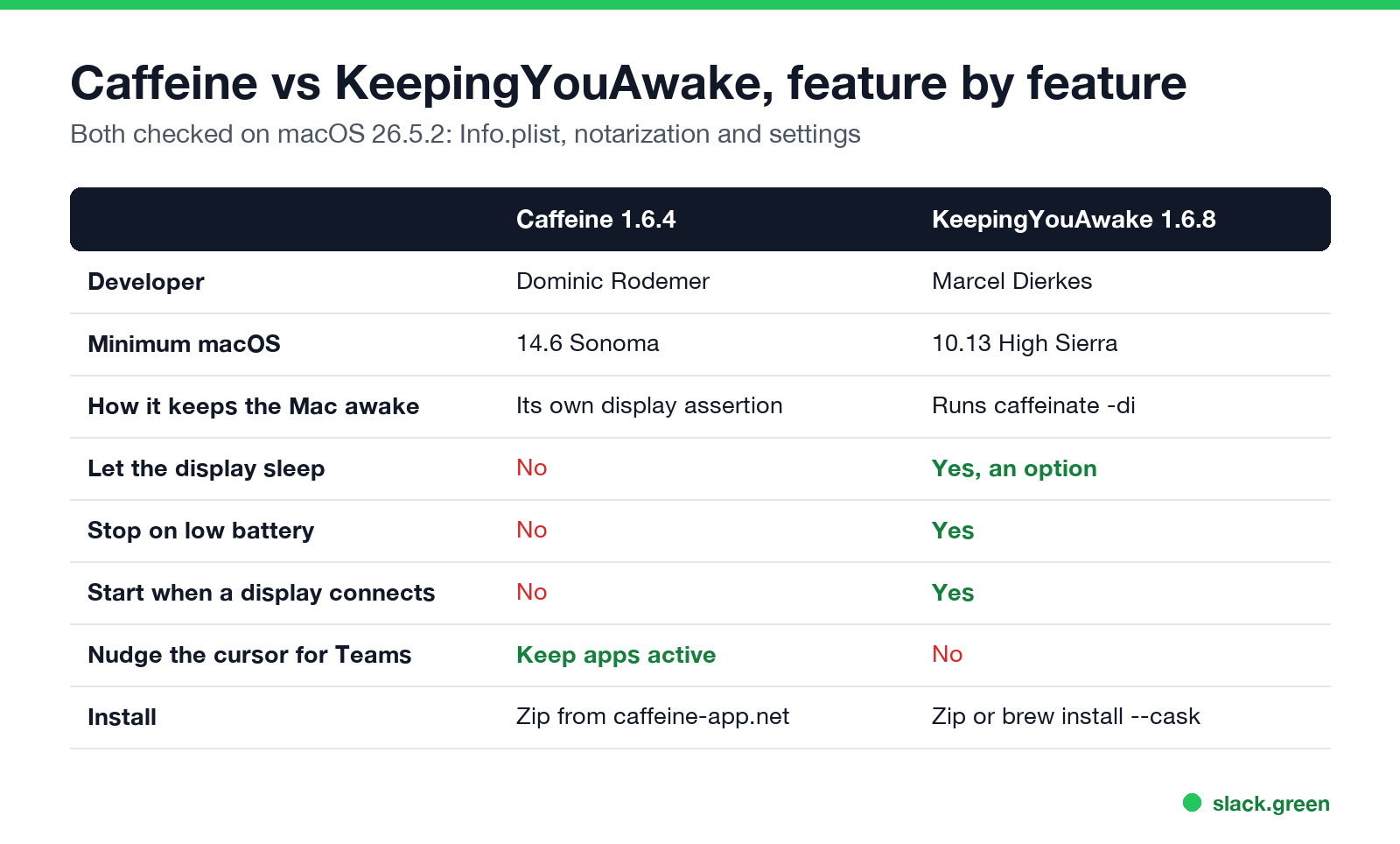
| Caffeine 1.6.4 | KeepingYouAwake 1.6.8 | |
|---|---|---|
| Price and license | Free, MIT | Free, MIT |
| Developer | Dominic Rodemer (original by Tomas Franzén, 2006) | Marcel Dierkes |
| Minimum macOS | 14.6 Sonoma | 10.13 High Sierra |
| How it keeps the Mac awake | Its own display-sleep assertion, renewed every 10 seconds | Runs Apple's caffeinate -di |
| Timers | 5 minutes to 5 hours, or indefinite | Preset durations, or indefinite |
| Let the display sleep | No | Yes, an option |
| Stop on low battery | No | Yes |
| Turn on when an external display connects | No | Yes |
| Cursor nudge for Teams | Yes, Keep apps active | No |
| Install | Zip from caffeine-app.net or GitHub | Zip from GitHub, or brew install --cask keepingyouawake |
| Scripting | None | keepingyouawake:/// URL scheme |
| GitHub stars (27 Sep 2026) | about 740 | about 6,900 |
We downloaded both releases on macOS 26.5.2. Each is signed with a Developer ID and notarized by Apple (spctl reported "accepted, source=Notarized Developer ID"), and the minimum versions above come from each app's Info.plist. One catch: brew install --cask caffeine installs an older 1.1.4 build from IntelliScape, not 1.6.4.
How each one keeps the Mac awake
KeepingYouAwake does not have its own sleep blocker. It starts /usr/bin/caffeinate -di with a timer and ties it to the app, so quitting the app ends it. With "Allow display sleep" on, it passes only -i, which keeps the Mac awake with the screen off, useful for long downloads on battery. The full breakdown, with the exact command, is in KeepingYouAwake vs Amphetamine.
Caffeine creates its own PreventUserIdleDisplaySleep assertion. Five seconds after launch on our Mac, pmset -g assertions listed it as "Caffeine prevents sleep". Because it holds the display on, it also stops the screen saver and the lock that follows it. Setup and every setting are in Caffeine app for Mac.
In daily use both do the same job. Neither survives closing the lid on a MacBook with no display attached; for that, see pmset disablesleep.
The one feature that separates them for Teams
Never appear "away" on Slack again
Cloud-based. No downloads. Works 24/7 even when your laptop is off.
Microsoft Teams sets you Away after about 5 minutes without keyboard or mouse input, and a Mac that is merely awake gives it none. Caffeine's Keep apps active setting, off by default, posts a mouse-move event after 90 seconds of idle time, which resets the idle timer Teams reads. It needs Accessibility permission. KeepingYouAwake has no such option by design: it only runs caffeinate. If Teams is the reason you want a keep-awake app, see mouse jiggler vs Caffeine.
Which one to install
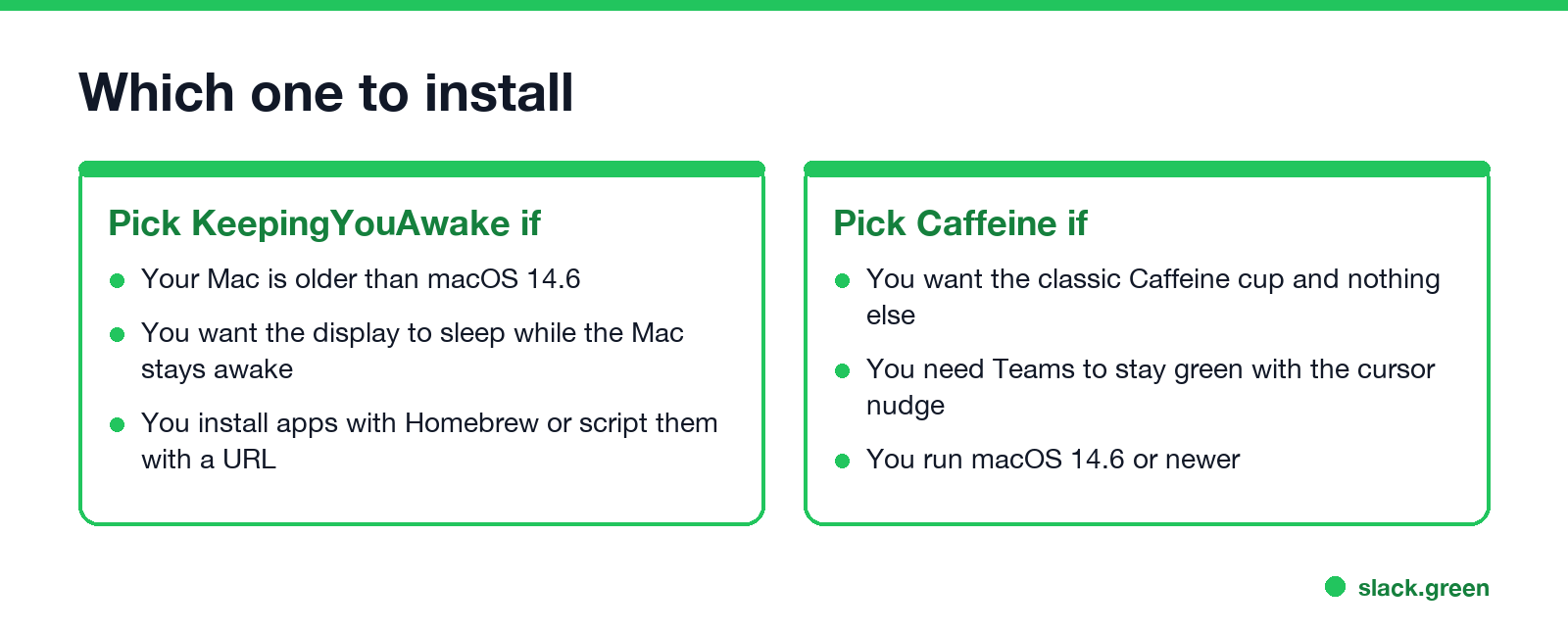
- • Mac older than macOS 14.6: KeepingYouAwake.
- • Screen off, Mac awake, for downloads on battery: KeepingYouAwake with Allow display sleep.
- • Homebrew, scripts or Shortcuts: KeepingYouAwake and its URL scheme.
- • Teams must stay green: Caffeine with Keep apps active.
- • Triggers, schedules or a closed lid: neither; use Amphetamine, compared in Amphetamine vs Caffeine.
The wider list is in best app to keep a Mac awake, and the no-install option is caffeinate on Mac.
FAQ
Is KeepingYouAwake better than Caffeine? For options and older Macs, yes. Caffeine is simpler and adds a cursor nudge for Teams.
Are Caffeine and KeepingYouAwake safe? Both are open source under the MIT license, and both downloads are notarized by Apple.
Does KeepingYouAwake use caffeinate?
Yes. It runs Apple's /usr/bin/caffeinate in the background while the cup is on.
Do Caffeine or KeepingYouAwake keep Slack active? No. Slack counts input only in the Slack window and goes grey after 10 minutes without it.
Can I run both? Yes, but there is no reason to. They do the same basic job.
Stop Jiggling Your Mouse.
Join hundreds of remote workers who never worry about their Slack status. Set it up once, stay green forever.
Related Articles
Can My Employer See My Google Chat Messages? Yes, in Vault
On a work Google account, yes. Workspace admins can search, export and keep your Google Chat DMs, group chats and spaces with Google Vault, often including messages you deleted. Messages sent with history off are not covered: they disappear after 24 hours. A personal Google account is out of your employer's reach.
Does Slack Notify When You View Someone's Profile? No
No. Opening someone's Slack profile, hovering over their name or checking their status sends them nothing, and Slack has no list of who viewed your profile. Admins cannot see profile views either. What does get noticed: typing in a DM, messages, reactions, mentions and huddles. What a profile shows, and what Slack admins can see instead.
Quiet Vacationing: What It Means and Why Workers Do It
Quiet vacationing, also called a hushed vacation, means taking time off without telling your manager while you keep looking online. In a Harris Poll of 1,170 US workers, 37% of millennials said they had done it and 38% had moved their mouse to look active. What it looks like, why people do it, how it gets noticed, and the working-vacation alternative.