
Amphetamine vs Caffeine on Mac: Which Keep-Awake App to Use
Caffeine is a free, open-source menu bar cup that keeps a Mac awake with one click. Amphetamine is a free App Store app with triggers, schedules and a closed-lid mode. We checked both on macOS 26.5.2: versions, settings, and what each holds in pmset. Which to pick, and what neither one does.
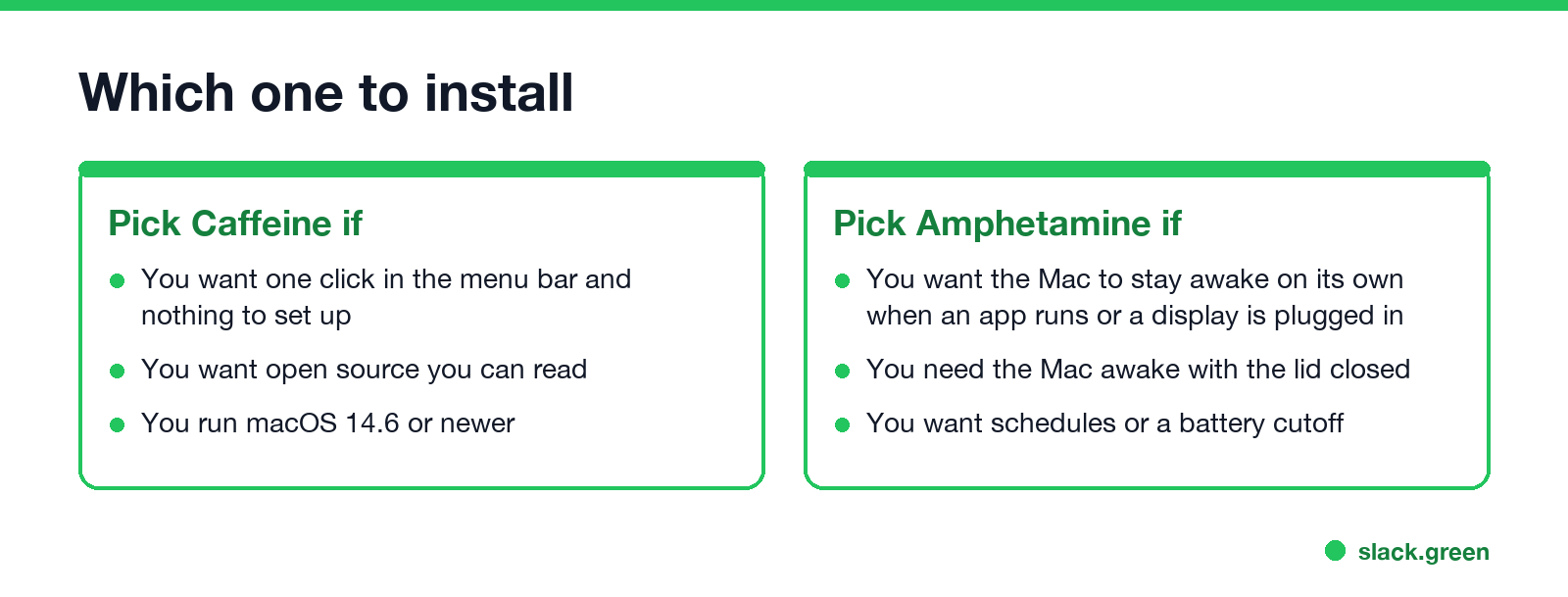
Caffeine and Amphetamine both keep a Mac from sleeping, both are free, and both sit in the menu bar. (Setup and every setting of Caffeine alone are in Caffeine app for Mac.) Caffeine is the simple one: click the cup and the Mac stays awake until you click again or a preset timer runs out. It is open source and needs macOS 14.6 or newer. Amphetamine is the full one: it can start by itself when an app runs, a display is plugged in or you join a certain Wi-Fi, run on a schedule, stop at a battery level, and keep a MacBook awake with the lid closed. Pick Caffeine for one click, Amphetamine for rules or a closed lid.
Neither app keeps Slack green. They stop sleep, and Slack sets you to away after 10 minutes without input in the Slack window, awake Mac or not. Slack Green keeps your Slack status active during the hours you set, from the cloud, with the Mac asleep or shut.
Amphetamine vs Caffeine at a glance
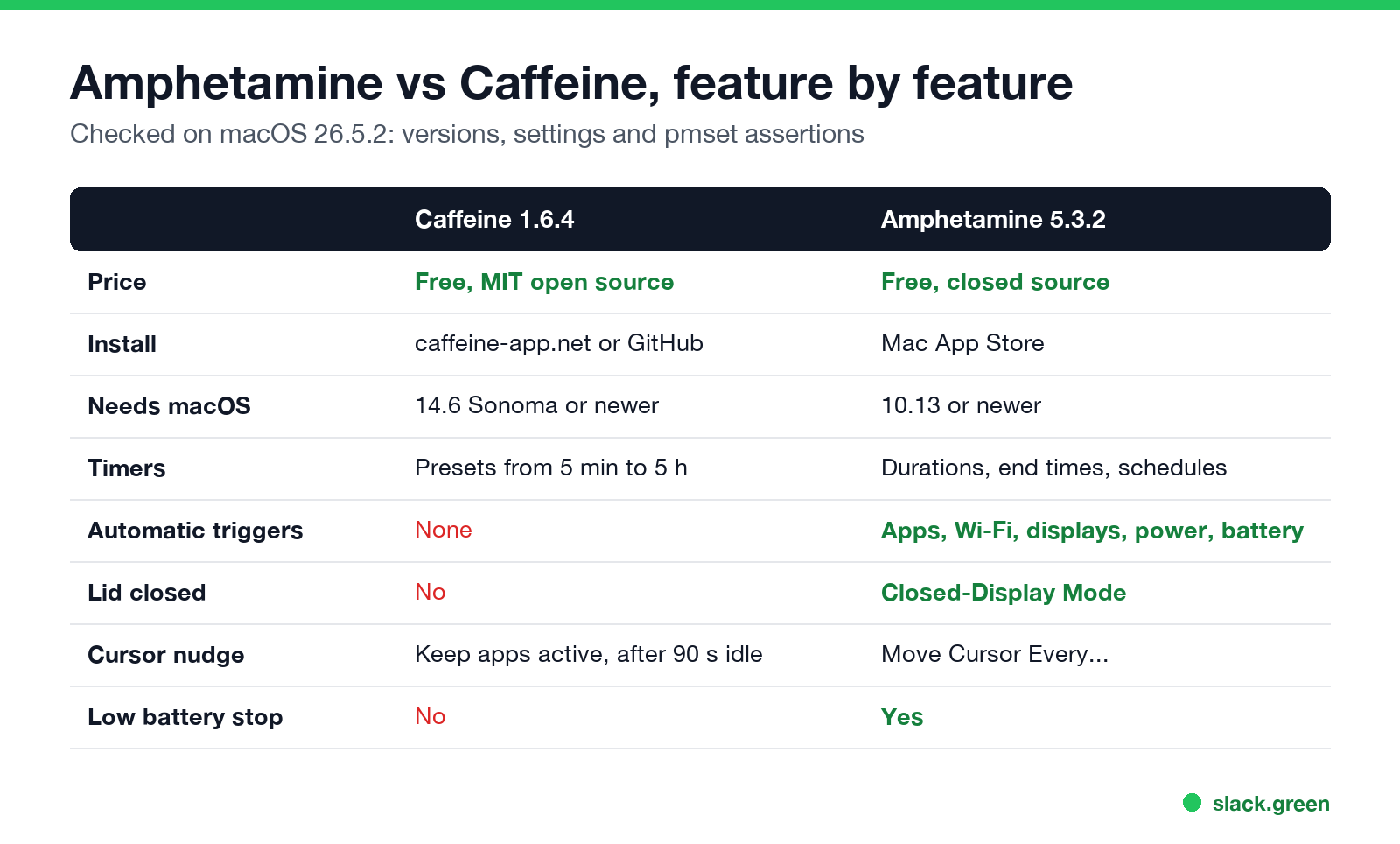
| Caffeine 1.6.4 | Amphetamine 5.3.2 | |
|---|---|---|
| Price | Free | Free, no ads or in-app purchases |
| Source | Open source, MIT license | Closed source |
| Developer | Dominic Rodemer (original by Tomas Franzén, 2006) | William Gustafson |
| Install | Download from caffeine-app.net or GitHub | Mac App Store |
| Minimum macOS | 14.6 Sonoma | 10.13 High Sierra |
| Timers | Presets from 5 minutes to 5 hours, or indefinite | Durations, end times, schedules |
| Automatic triggers | None | Apps, Wi-Fi, DNS, displays, power, battery, USB and more |
| Lid closed | No | Yes, Closed-Display Mode |
| Moves the cursor | Optional, "Keep apps active" | Optional, "Move Cursor Every..." |
| Stops on low battery | No | Yes |
| Automation | None | AppleScript |
We read both versions from the installed apps on macOS 26.5.2. One detail the Caffeine website gets wrong: its FAQ says the current version needs macOS 11, but the 1.6.4 download's Info.plist sets the minimum to 14.6. On an older Mac, the site links an older build from IntelliScape, and brew install --cask caffeine also installs that older 1.1.4 build.
How each one keeps the Mac awake
Both apps ask macOS for a power assertion, the same thing Apple's caffeinate command does. You can see them with pmset -g assertions. On our Mac with both running:
pid 56767(Caffeine): PreventUserIdleDisplaySleep named: "Caffeine prevents sleep"
pid 847(Amphetamine): PreventUserIdleSystemSleep named: "Amphetamine (Single-Use - System)"
pid 847(Amphetamine): PreventUserIdleDisplaySleep named: "Amphetamine (Single-Use - Display)"- • Caffeine holds one assertion that keeps the display on, which also keeps the Mac awake. Its source code renews it every 10 seconds with an 8-second timeout, so if Caffeine crashes the Mac goes back to normal within seconds. There is no setting to let the display sleep while the Mac stays awake.
- • Amphetamine holds separate system and display assertions, so it can keep the Mac awake and still let the screen turn off, which saves power on long downloads.
Neither is heavier than the other in practice. Both use almost no CPU, because the work is done by macOS once the assertion exists.
What Amphetamine adds
Never appear "away" on Slack again
Cloud-based. No downloads. Works 24/7 even when your laptop is off.
Amphetamine is built around triggers: rules that start a session on their own. Examples from its settings:
It can also keep a MacBook awake with the lid closed and no display attached. On many Macs that needs Amphetamine Enhancer, a free companion app from the same developer. The Enhancer is the usual fix when Closed-Display Mode "does not work". It also has Drive Alive, which keeps external drives from spinning down, and a battery cutoff that ends sessions below a set charge.
The cost is more settings to learn. For "stay awake while this file uploads", many people find Caffeine or a one-line caffeinate command enough.
Which one to install
More options, including Lungo and KeepingYouAwake, are in Amphetamine alternatives for Mac and the best app to keep a Mac awake.
Is Amphetamine safe? Is Caffeine safe?
Both are safe from reputable sources. Amphetamine is distributed through the Mac App Store, so Apple reviews it and it runs in the App Store sandbox. The name is a joke on Caffeine; in 2021 Apple briefly told the developer it broke App Store rules because of the drug reference, then reversed the decision, and the app stayed. Caffeine 1.6.4 from caffeine-app.net is signed with a Developer ID and notarized by Apple: spctl on our Mac reported "accepted, source=Notarized Developer ID". Avoid Caffeine copies from download mirrors; get it from caffeine-app.net or its GitHub page.
Both cursor features need Accessibility permission in System Settings > Privacy & Security > Accessibility, because moving the pointer is input. Give it only if you use that feature.
Do they keep Slack or Teams active?
Never appear "away" on Slack again
Cloud-based. No downloads. Works 24/7 even when your laptop is off.
Slack: no, with either app. Slack counts input inside its own window, and the 10-minute timer runs even while the Mac is awake. We tested both: Caffeine and Amphetamine keep the screen on while the dot turns grey.
Teams: only with the cursor feature on. Teams reads idle time from the whole system, so a moved cursor resets it. Caffeine's "Keep apps active" posts a mouse-move event after 90 seconds of idle time, checked every 30 seconds, and Amphetamine's "Move Cursor Every..." does the same on the interval you set. With the feature off, Teams turns yellow after about 5 minutes. The same test for Windows is in does Caffeine keep Teams active.
FAQ
Is Amphetamine better than Caffeine? For automation and lid-closed use, yes. For a single on/off switch, Caffeine is simpler and open source.
Amphetamine vs caffeinate: what is the difference?
caffeinate is Apple's built-in Terminal command. Amphetamine uses the same macOS mechanism and adds a menu, triggers, schedules and a closed-lid mode.
Does Caffeine still work on macOS Tahoe? Yes. Caffeine 1.6.4 ran on macOS 26.5.2 in our test and created its assertion within seconds of launch.
Can Caffeine keep a Mac awake with the lid closed?
No. Closing the lid puts the Mac to sleep unless a display, keyboard and power are connected. Use Amphetamine's Closed-Display Mode or pmset disablesleep.
Do I need both apps? No. They do the same basic job. Running both is harmless, but one is enough.
Stop Jiggling Your Mouse.
Join hundreds of remote workers who never worry about their Slack status. Set it up once, stay green forever.
Related Articles
Does Slack Notify When You View Someone's Profile? No
No. Opening someone's Slack profile, hovering over their name or checking their status sends them nothing, and Slack has no list of who viewed your profile. Admins cannot see profile views either. What does get noticed: typing in a DM, messages, reactions, mentions and huddles. What a profile shows, and what Slack admins can see instead.
Quiet Vacationing: What It Means and Why Workers Do It
Quiet vacationing, also called a hushed vacation, means taking time off without telling your manager while you keep looking online. In a Harris Poll of 1,170 US workers, 37% of millennials said they had done it and 38% had moved their mouse to look active. What it looks like, why people do it, how it gets noticed, and the working-vacation alternative.
Can Time Doctor Detect a Mouse Jiggler? Yes, With One Report
Yes, if your company has Time Doctor's Unusual Activity Report. It checks keyboard and mouse activity in 30-minute blocks and flags mouse movement without clicks and input that is unusually regular, which is what app and USB jigglers produce. It does not look at app names. What the report flags, who sees it, and what else Time Doctor records.