
Amphetamine vs Caffeine on Mac: Which Keep-Awake App to Use
Caffeine is a free, open-source menu bar cup that keeps a Mac awake with one click. Amphetamine is a free App Store app with triggers, schedules and a closed-lid mode. We checked both on macOS 26.5.2: versions, settings, and what each holds in pmset. Which to pick, and what neither one does.
Caffeine and Amphetamine both keep a Mac from sleeping, both are free, and both sit in the menu bar. (Setup and every setting of Caffeine alone are in Caffeine app for Mac.) Caffeine is the simple one: click the cup and the Mac stays awake until you click again or a preset timer runs out. It is open source and needs macOS 14.6 or newer. Amphetamine is the full one: it can start by itself when an app runs, a display is plugged in or you join a certain Wi-Fi, run on a schedule, stop at a battery level, and keep a MacBook awake with the lid closed. Pick Caffeine for one click, Amphetamine for rules or a closed lid.
Neither app keeps Slack green. They stop sleep, and Slack sets you to away after 10 minutes without input in the Slack window, awake Mac or not. Slack Green keeps your Slack status active during the hours you set, from the cloud, with the Mac asleep or shut.
Amphetamine vs Caffeine at a glance
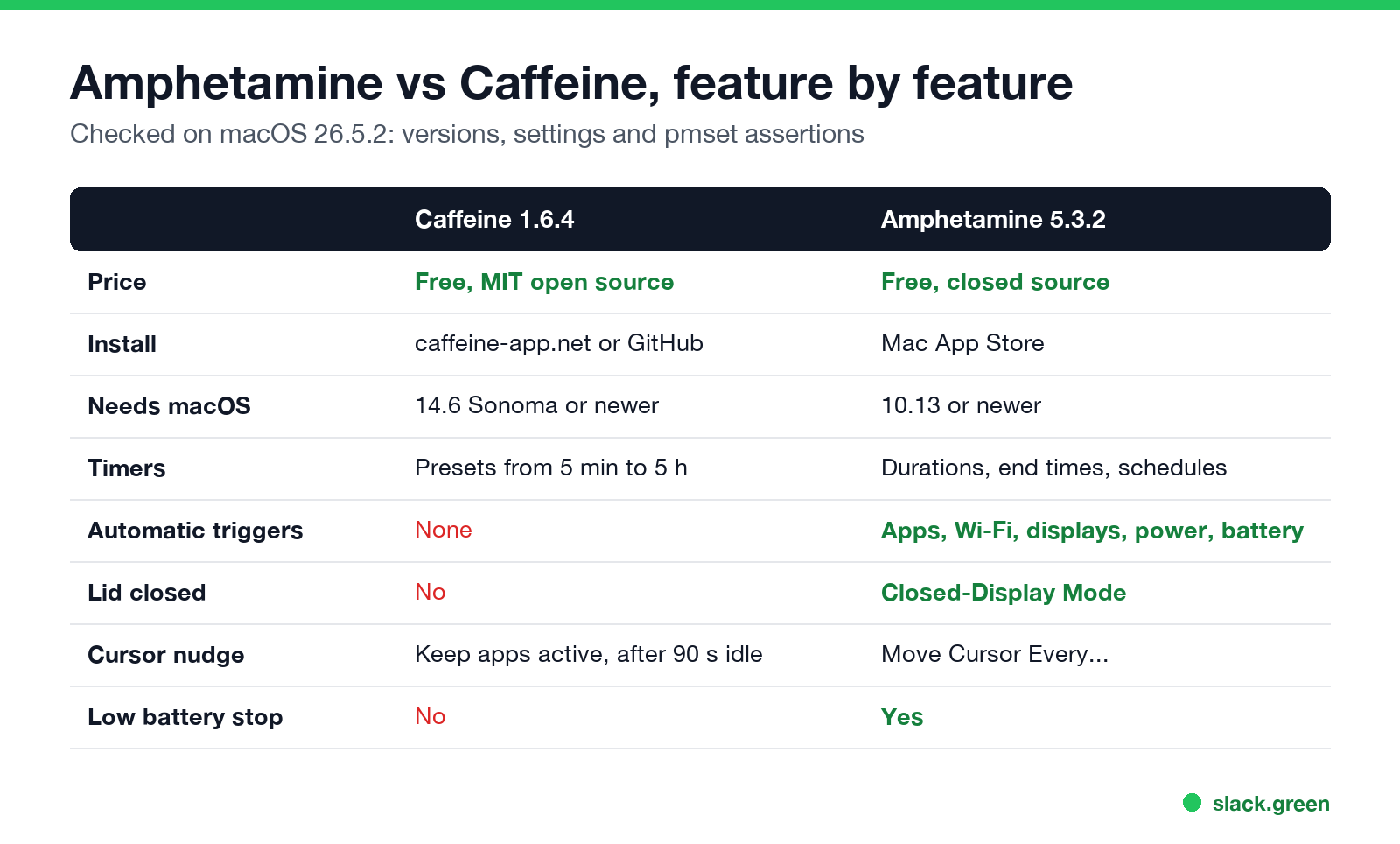
| Caffeine 1.6.4 | Amphetamine 5.3.2 | |
|---|---|---|
| Price | Free | Free, no ads or in-app purchases |
| Source | Open source, MIT license | Closed source |
| Developer | Dominic Rodemer (original by Tomas Franzén, 2006) | William Gustafson |
| Install | Download from caffeine-app.net or GitHub | Mac App Store |
| Minimum macOS | 14.6 Sonoma | 10.13 High Sierra |
| Timers | Presets from 5 minutes to 5 hours, or indefinite | Durations, end times, schedules |
| Automatic triggers | None | Apps, Wi-Fi, DNS, displays, power, battery, USB and more |
| Lid closed | No | Yes, Closed-Display Mode |
| Moves the cursor | Optional, "Keep apps active" | Optional, "Move Cursor Every..." |
| Stops on low battery | No | Yes |
| Automation | None | AppleScript |
We read both versions from the installed apps on macOS 26.5.2. One detail the Caffeine website gets wrong: its FAQ says the current version needs macOS 11, but the 1.6.4 download's Info.plist sets the minimum to 14.6. On an older Mac, the site links an older build from IntelliScape, and brew install --cask caffeine also installs that older 1.1.4 build.
How each one keeps the Mac awake
Both apps ask macOS for a power assertion, the same thing Apple's caffeinate command does. You can see them with pmset -g assertions. On our Mac with both running:
pid 56767(Caffeine): PreventUserIdleDisplaySleep named: "Caffeine prevents sleep"
pid 847(Amphetamine): PreventUserIdleSystemSleep named: "Amphetamine (Single-Use - System)"
pid 847(Amphetamine): PreventUserIdleDisplaySleep named: "Amphetamine (Single-Use - Display)"- • Caffeine holds one assertion that keeps the display on, which also keeps the Mac awake. Its source code renews it every 10 seconds with an 8-second timeout, so if Caffeine crashes the Mac goes back to normal within seconds. There is no setting to let the display sleep while the Mac stays awake.
- • Amphetamine holds separate system and display assertions, so it can keep the Mac awake and still let the screen turn off, which saves power on long downloads.
Neither is heavier than the other in practice. Both use almost no CPU, because the work is done by macOS once the assertion exists.
What Amphetamine adds
Never appear "away" on Slack again
Cloud-based. No downloads. Works 24/7 even when your laptop is off.
Amphetamine is built around triggers: rules that start a session on their own. Examples from its settings:
It can also keep a MacBook awake with the lid closed and no display attached. On many Macs that needs Amphetamine Enhancer, a free companion app from the same developer. The Enhancer is the usual fix when Closed-Display Mode "does not work". It also has Drive Alive, which keeps external drives from spinning down, and a battery cutoff that ends sessions below a set charge.
The cost is more settings to learn. For "stay awake while this file uploads", many people find Caffeine or a one-line caffeinate command enough.
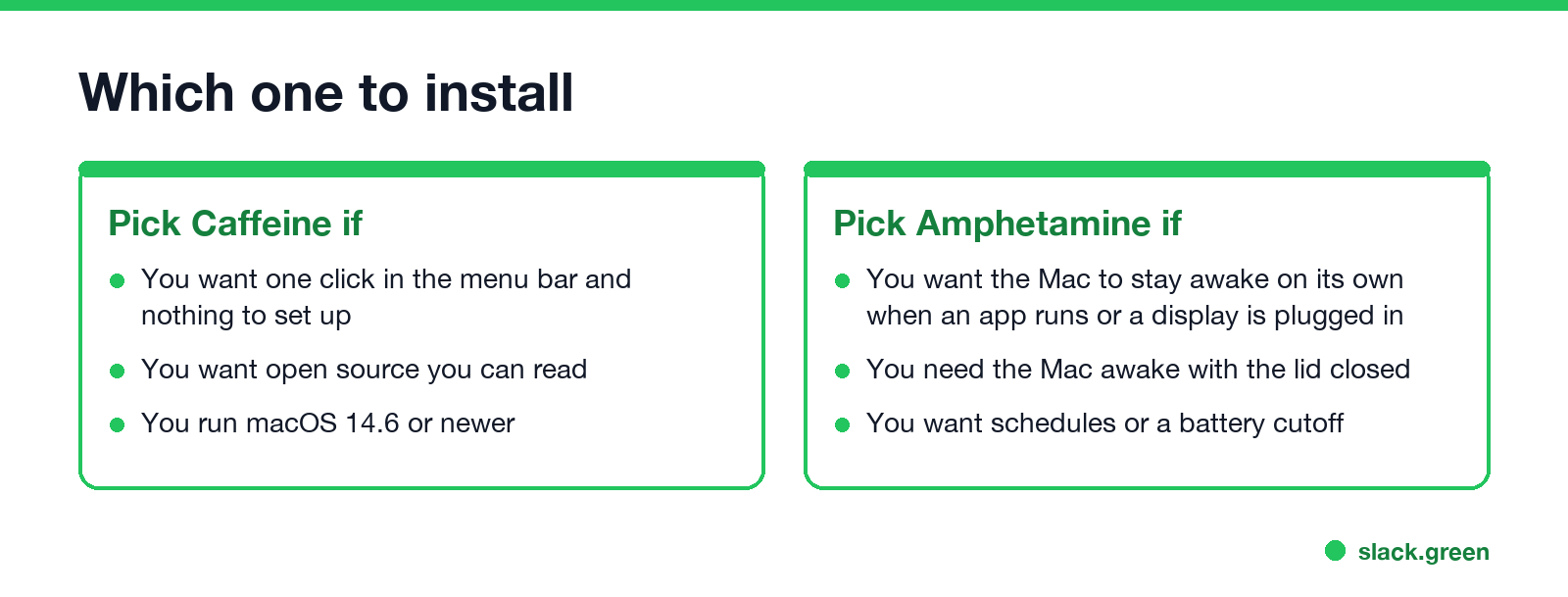
Which one to install
More options, including Lungo and KeepingYouAwake, are in Amphetamine alternatives for Mac and the best app to keep a Mac awake.
Is Amphetamine safe? Is Caffeine safe?
Both are safe from reputable sources. Amphetamine is distributed through the Mac App Store, so Apple reviews it and it runs in the App Store sandbox. The name is a joke on Caffeine; in 2021 Apple briefly told the developer it broke App Store rules because of the drug reference, then reversed the decision, and the app stayed. Caffeine 1.6.4 from caffeine-app.net is signed with a Developer ID and notarized by Apple: spctl on our Mac reported "accepted, source=Notarized Developer ID". Avoid Caffeine copies from download mirrors; get it from caffeine-app.net or its GitHub page.
Both cursor features need Accessibility permission in System Settings > Privacy & Security > Accessibility, because moving the pointer is input. Give it only if you use that feature.
Do they keep Slack or Teams active?
Never appear "away" on Slack again
Cloud-based. No downloads. Works 24/7 even when your laptop is off.
Slack: no, with either app. Slack counts input inside its own window, and the 10-minute timer runs even while the Mac is awake. We tested both: Caffeine and Amphetamine keep the screen on while the dot turns grey.
Teams: only with the cursor feature on. Teams reads idle time from the whole system, so a moved cursor resets it. Caffeine's "Keep apps active" posts a mouse-move event after 90 seconds of idle time, checked every 30 seconds, and Amphetamine's "Move Cursor Every..." does the same on the interval you set. With the feature off, Teams turns yellow after about 5 minutes. The same test for Windows is in does Caffeine keep Teams active.
FAQ
Is Amphetamine better than Caffeine? For automation and lid-closed use, yes. For a single on/off switch, Caffeine is simpler and open source.
Amphetamine vs caffeinate: what is the difference?
caffeinate is Apple's built-in Terminal command. Amphetamine uses the same macOS mechanism and adds a menu, triggers, schedules and a closed-lid mode.
Does Caffeine still work on macOS Tahoe? Yes. Caffeine 1.6.4 ran on macOS 26.5.2 in our test and created its assertion within seconds of launch.
Can Caffeine keep a Mac awake with the lid closed?
No. Closing the lid puts the Mac to sleep unless a display, keyboard and power are connected. Use Amphetamine's Closed-Display Mode or pmset disablesleep.
Do I need both apps? No. They do the same basic job. Running both is harmless, but one is enough.
Stop Jiggling Your Mouse.
Join hundreds of remote workers who never worry about their Slack status. Set it up once, stay green forever.
Related Articles
Can My Employer See What I Watch on YouTube at Work?
On a work laptop or the office network, your employer can see that you used YouTube, when, and for how long. With HTTPS inspection or monitoring software, they can see which videos, because the video address and the browser tab title both name it. On your own phone on mobile data, they see nothing.
Can My Employer See My iMessages on a Work Mac?
Not through device management or the network: Jamf or Intune cannot read Messages, and iMessage is end-to-end encrypted. But if you sign in to Messages on a work Mac, your texts are stored on that Mac, where monitoring screenshots, backups and admin access can reach them. How to check, and how to take iMessage off the Mac without deleting it from your iPhone.
Can My Boss See My Private Outlook Calendar Events?
Usually not the details. When you mark an Outlook event Private, someone who can read your calendar sees only Private appointment, the time and a lock. The exceptions are delegates you gave Can view private items, the people invited to the event, anyone with full access to your mailbox in new Outlook or the web, and compliance admins. How to check who has which access, and what Private does not hide.