
Slack conversations.replies: Read a Whole Thread, and a Paging Trap We Hit
conversations.replies returns a thread's parent and its replies. We paged a 25-reply thread on October 31, 2026: without oldest the pages run newest first, and with oldest plus a cursor one reply went missing at every page break.
conversations.replies returns one Slack thread: call it with the channel ID and the parent message's ts, and you get the parent first and then the replies, with a cursor when there are more. It needs channels:history for public channels (groups:history, im:history or mpim:history for the others), and a bot token only works in channels the bot is in. We seeded a 25-reply thread in a Free test workspace on October 31, 2026 and paged it every way we could think of. Two results surprised us, and both change how you should write the loop.
The call and what came back
curl -s "https://slack.com/api/conversations.replies?channel=C0123456789&ts=1793408967.041899&limit=10" \
  -H "Authorization: Bearer $SLACK_BOT_TOKEN"
This is the first page we got, cut to the parent, one reply and the paging fields:
{
  "ok": true,
  "messages": [
    {
      "user": "U0CDJPCQAN7",
      "type": "message",
      "ts": "1793408967.041899",
      "bot_id": "B0CEKBPC0RW",
      "text": "Deploy checklist for v2.4 (thread test, writer 10-31)",
      "thread_ts": "1793408967.041899",
      "reply_count": 25,
      "reply_users_count": 1,
      "latest_reply": "1793408975.424019",
      "reply_users": [
        "U0CDJPCQAN7"
      ],
      "is_locked": false,
      "subscribed": false
    },
    {
      "user": "U0CDJPCQAN7",
      "type": "message",
      "ts": "1793408972.410989",
      "bot_id": "B0CEKBPC0RW",
      "text": "Step 16 done",
      "thread_ts": "1793408967.041899",
      "parent_user_id": "U0CDJPCQAN7"
    },
    "... 9 more replies ..."
  ],
  "has_more": true,
  "response_metadata": {
    "next_cursor": "bmV4dF90czoxNzkzNDA4OTcyMDc0NDk5"
  }
}
The parent carries reply_count, reply_users and latest_reply, and each reply carries parent_user_id. Every message in the thread has the same thread_ts, which is the parent's ts. Look at the first reply, though: it is Step 16, not Step 1.
Trap 1: without oldest, the first page is the newest replies
With limit=10 and no oldest, the three pages came back as replies 16 to 25, then 6 to 15, then 1 to 5. Each page is in time order, but the pages walk backwards through the thread, and the parent is repeated at the top of every page. A loop that appends pages in order gets the thread scrambled and the parent three times. Sort the replies by ts at the end and drop the repeated parent, as the code below does.
Trap 2: oldest plus a cursor dropped replies
Setting oldest to the parent's ts makes the first page start at reply 1, which looks like the fix. It is not. Following next_cursor with oldest still set lost one reply at every page break:
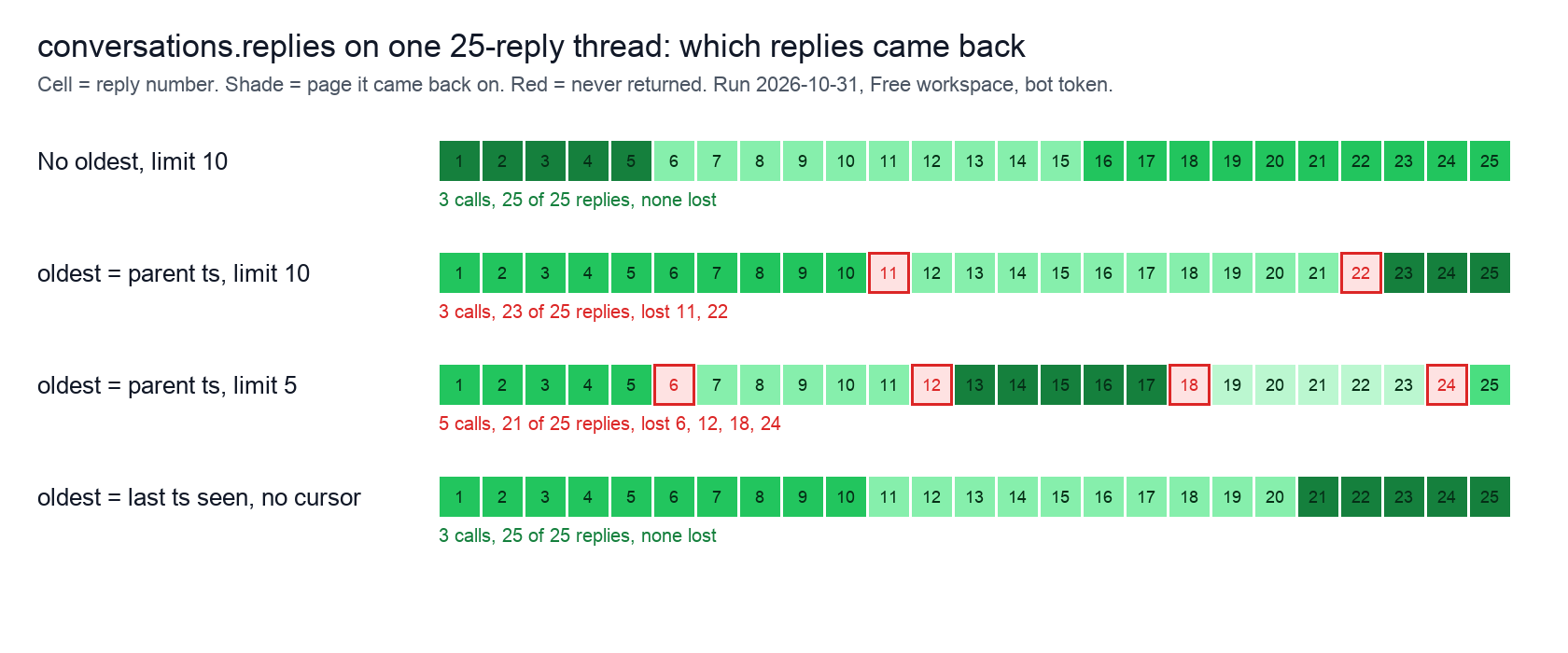
The cursor is base64 for next_ts: plus a timestamp, and in our run that timestamp was exactly the reply that went missing (Step 11 at limit=10). Adding inclusive=true changed nothing. Two loops returned all 25 replies:
- • No
oldestat all, followingnext_cursoruntilhas_moreis false, then sorting byts. - • No cursor at all: set
oldestto thetsof the last reply you got and call again. That took 3 calls atlimit=10and returned 1 to 10, 11 to 20 and 21 to 25.
Without a limit, one call returned all 26 messages; limit=1000 did the same. Big threads still need the loop, and apps under Slack's newer limits for non-Marketplace apps get far smaller pages, as our Slack API rate limits page explains.
Never appear "away" on Slack again
Cloud-based. No downloads. Works 24/7 even when your laptop is off.
Code that returned all 25 replies
import os, requests

TOKEN = os.environ["SLACK_BOT_TOKEN"]

def get_thread(channel, parent_ts):
    """Return the parent and every reply, oldest first."""
    url = "https://slack.com/api/conversations.replies"
    headers = {"Authorization": f"Bearer {TOKEN}"}
    params = {"channel": channel, "ts": parent_ts, "limit": 200}
    parent, replies, cursor = None, [], None
    while True:
        if cursor:
            params["cursor"] = cursor
        data = requests.get(url, headers=headers, params=params, timeout=30).json()
        if not data["ok"]:
            raise RuntimeError(data["error"])
        for m in data["messages"]:
            if m["ts"] == parent_ts:
                parent = m          # the parent comes back on every page
            else:
                replies.append(m)
        cursor = data.get("response_metadata", {}).get("next_cursor")
        if not data.get("has_more") or not cursor:
            break
    replies.sort(key=lambda m: float(m["ts"]))
    return parent, replies

if __name__ == "__main__":
    import sys
    parent, replies = get_thread(sys.argv[1], sys.argv[2])
    print(parent["text"], "| reply_count:", parent.get("reply_count"))
    print(len(replies), "replies:", replies[0]["text"], "...", replies[-1]["text"])
We ran it with the bot token and the test channel:
Deploy checklist for v2.4 (thread test, writer 10-31) | reply_count: 25
25 replies: Step 1 done ... Step 25 done
With limit set to 10 the output was the same, over 3 calls.
Errors and edge cases we hit
| What we sent | What Slack returned |
|---|---|
A reply's ts instead of the parent's | ok: true with only that one reply; its thread_ts points to the parent |
The ts of a message with no replies | ok: true with just that message, no thread_ts |
A ts that does not exist | thread_not_found |
No ts | invalid_arguments, "missing required field: ts" |
| A channel the bot is not in | not_in_channel |
| A channel ID that does not exist | channel_not_found |
The first row is useful: if you only have a reply's ts, call once, read its thread_ts, and call again with that. For not_in_channel, add the bot to the channel or call conversations.join first, as in Slack not_in_channel error.
Finding the thread ts
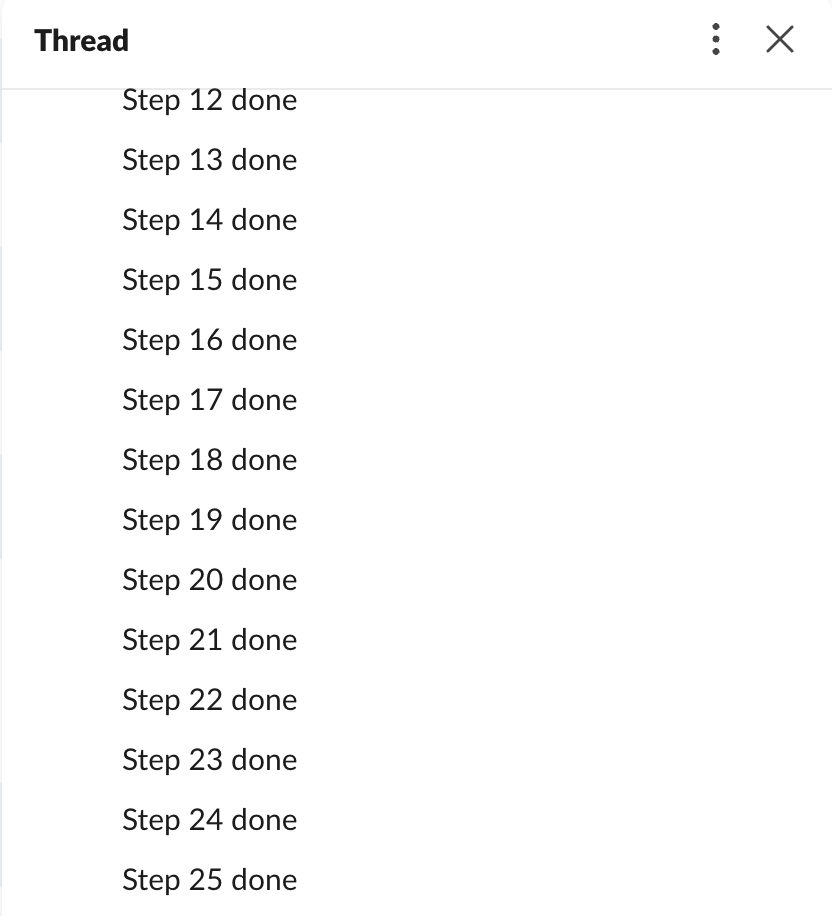
conversations.history returns only top-level messages, and a parent shows reply_count and thread_ts; that ts is what conversations.replies wants. In the Slack app the same thread looks like this, with the replies in a side panel:
How to post into a thread with thread_ts is in Slack thread_ts, and listing the channels to search is in Slack conversations.list.
FAQ
Does conversations.replies return the parent message?
Yes, first on every page, including every page after the first. Skip it by comparing each message's ts with the parent ts.
Stop Jiggling Your Mouse.
Join hundreds of remote workers who never worry about their Slack status. Set it up once, stay green forever.
Related Articles
How to Resolve or Close a Slack Thread (and Who Can Lock One)
Slack has no Resolve or Close button for threads. We checked every thread menu as a member, found the admin-only lock in Slack's code, and tested the workarounds that do work: a checkmark, a to-do you mark complete, and muting replies.
Send a Slack Message From a Cron Job: 4 Failures We Hit and the Fix
A Slack webhook call that works in your terminal often fails from cron. We ran six crontab entries and a launchd agent on a Mac for 10 minutes, logged each failure (empty env var, % in crontab, JSON quoting, macOS privacy block) and the script that posted every minute.
Slack Outgoing Webhooks: Payload, Trigger Words and Timeout, Tested
Slack's legacy Outgoing WebHooks still install on a Free workspace in November 2026. We set one up, sent 15 trigger messages through a tunnel, and logged the exact payload, how trigger words match, which replies Slack posts and when it gives up.