
Slack Java SDK: Post, Read History and Run a Bolt App (Tested 1.54.0)
The Slack Java SDK is com.slack.api:slack-api-client for Web API calls and com.slack.api:bolt for apps. We ran version 1.54.0 with Gradle on 8 November 2026: chat.postMessage, conversations.history with a cursor, a Socket Mode Bolt app and a Kotlin Block Kit post, plus the silent failure in ctx.say.
The Slack Java SDK is Slack's own library for the JVM: com.slack.api:slack-api-client calls any Web API method, and com.slack.api:bolt (with bolt-socket-mode) runs a full app that receives events. On 8 November 2026 we built a Gradle project with version 1.54.0, the newest on Maven Central (published 5 November), on OpenJDK 21.0.13 and Gradle 9.8.2, and ran it against a test workspace. This page has the build file, four programs, their real output, and two behaviors that cost us time: API errors never throw, and a Bolt reply can fail with no sign in the default log.
Gradle and Maven setup
This is the whole build.gradle we ran. The two websocket lines are only for Socket Mode; drop them and bolt-socket-mode if you only call the Web API:
plugins {
    id 'application'
}

repositories {
    mavenCentral()
}

dependencies {
    implementation 'com.slack.api:slack-api-client:1.54.0'
    implementation 'com.slack.api:bolt-socket-mode:1.54.0'
    implementation 'javax.websocket:javax.websocket-api:1.1'
    implementation 'org.glassfish.tyrus.bundles:tyrus-standalone-client:1.22'
    implementation 'org.slf4j:slf4j-simple:2.0.20'
}

application {
    mainClass = project.findProperty('main') ?: 'demo.Post'
}
For Maven, use the same coordinates: group com.slack.api, artifact slack-api-client (or bolt-socket-mode), version 1.54.0. The first build in a clean container took a few minutes, most of it downloading dependencies; later runs reused the Gradle cache.
You need a bot token (xoxb-) with chat:write to post and channels:history to read a public channel. Slack bot tokens covers how to get one.
Post a message, and what errors look like
package demo;

import com.slack.api.Slack;
import com.slack.api.methods.MethodsClient;
import com.slack.api.methods.response.chat.ChatPostMessageResponse;

public class Post {
    public static void main(String[] args) throws Exception {
        Slack slack = Slack.getInstance();
        MethodsClient client = slack.methods(System.getenv("SLACK_BOT_TOKEN"));
        String channel = System.getenv("SLACK_CHANNEL");

        ChatPostMessageResponse ok = client.chatPostMessage(r -> r
            .channel(channel)
            .text("Hello from the Slack Java SDK 1.54.0"));
        System.out.println("post: ok=" + ok.isOk() + " ts=" + ok.getTs() + " channel=" + ok.getChannel());

        ChatPostMessageResponse bad = client.chatPostMessage(r -> r
            .channel("C0000000000")
            .text("this channel does not exist"));
        System.out.println("bad channel: ok=" + bad.isOk() + " error=" + bad.getError());

        ChatPostMessageResponse badToken = slack.methods("xoxb-not-a-real-token")
            .chatPostMessage(r -> r.channel(channel).text("x"));
        System.out.println("bad token: ok=" + badToken.isOk() + " error=" + badToken.getError());

        slack.close();
    }
}
Output:
post: ok=true ts=1794130777.475749 channel=C0CFVTHBPCJ
bad channel: ok=false error=channel_not_found
[main] ERROR com.slack.api.methods.impl.TeamIdCache - Got an unsuccessful response from auth.test API (error: invalid_auth)
bad token: ok=false error=invalid_auth
Neither failure threw an exception. chatPostMessage returned a response with isOk() false and the Slack error code in getError(), so code that only wraps the call in try/catch treats a failed post as sent. Always check isOk(). The bad token also printed an ERROR line from TeamIdCache, because the SDK calls auth.test to learn the team ID; the error code is the same.
Read channel history with a cursor
conversations.history returns at most limit messages and a next_cursor for the rest. We set limit(3) to force paging:
package demo;

import com.slack.api.Slack;
import com.slack.api.methods.MethodsClient;
import com.slack.api.methods.response.conversations.ConversationsHistoryResponse;
import com.slack.api.model.Message;

public class History {
    public static void main(String[] args) throws Exception {
        Slack slack = Slack.getInstance();
        MethodsClient client = slack.methods(System.getenv("SLACK_BOT_TOKEN"));
        String channel = System.getenv("SLACK_CHANNEL");

        String cursor = null;
        int page = 0, total = 0;
        do {
            final String c = cursor;
            ConversationsHistoryResponse res = client.conversationsHistory(r -> r
                .channel(channel)
                .limit(3)
                .cursor(c));
            if (!res.isOk()) {
                System.out.println("error: " + res.getError());
                break;
            }
            page++;
            total += res.getMessages().size();
            for (Message m : res.getMessages()) {
                System.out.println("page " + page + "  " + m.getTs() + "  " + m.getText());
            }
            cursor = res.getResponseMetadata() == null ? null : res.getResponseMetadata().getNextCursor();
        } while (cursor != null && !cursor.isEmpty());
        System.out.println(total + " messages in " + page + " pages");
        slack.close();
    }
}
Output against our test channel:
page 1  1794130777.475749  Hello from the Slack Java SDK 1.54.0
page 1  1794130152.172229  :door: Front door opened at 09:29:12 UTC
page 1  1794129836.314579  <@U0CGQEKGYJU> is the garage door closed?
page 2  1794129807.105189  Hello from node-red-contrib-slack (slack-web-out)
page 2  1794129801.001149  :door: Front door opened at 09:23:20 UTC
page 2  1794129407.957319  <@U0CGQEKGYJU> has joined the channel
page 3  1794129400.146769  added an integration to this channel: <https://example.slack.com/services/B0000000000|sg1108 lab>
page 3  1794129328.754779  <@U0CDVBA6TMZ> has joined the channel
8 messages in 3 pages
Three calls, 3 + 3 + 2 messages, newest first. The loop stops when getNextCursor() comes back empty. The same cursor pattern works for conversations.list and users.list; our guide to reading messages from a channel shows the raw API fields.
Never appear "away" on Slack again
Cloud-based. No downloads. Works 24/7 even when your laptop is off.
A Bolt for Java app with Socket Mode
Socket Mode lets the app receive events over a WebSocket, so it needs no public URL. It takes the bot token and an app-level token (xapp-) with connections:write, and the app must have Socket Mode on and the app_mention event subscribed. We set SLACK_BOT_TOKEN and SLACK_APP_TOKEN as environment variables; new App() reads the bot token from there.
This was our first version:
package demo;

import com.slack.api.bolt.App;
import com.slack.api.bolt.socket_mode.SocketModeApp;
import com.slack.api.model.event.AppMentionEvent;

public class MentionApp {
    public static void main(String[] args) throws Exception {
        App app = new App(); // reads SLACK_BOT_TOKEN

        app.event(AppMentionEvent.class, (req, ctx) -> {
            AppMentionEvent e = req.getEvent();
            ctx.say(r -> r
                .threadTs(e.getTs())
                .text("Java Bolt got your mention: " + e.getText().replaceAll("<@[A-Z0-9]+>\\s*", "")));
            return ctx.ack();
        });

        new SocketModeApp(System.getenv("SLACK_APP_TOKEN"), app).start();
    }
}
It started, logged New session is open, and every mention got no reply. No error appeared at the default log level. With debug logging for com.slack.api on, the cause was in the chat.postMessage response:
{"ok":false,"error":"invalid_arguments","response_metadata":{"messages":["[ERROR] missing required field: channel"]}}When you pass a builder to ctx.say, Bolt does not fill in the channel for you, so the call failed and the handler still completed and acknowledged the event. Adding the channel fixed it:
package demo;

import com.slack.api.bolt.App;
import com.slack.api.bolt.socket_mode.SocketModeApp;
import com.slack.api.model.event.AppMentionEvent;

public class MentionApp {
    public static void main(String[] args) throws Exception {
        App app = new App(); // reads SLACK_BOT_TOKEN

        app.event(AppMentionEvent.class, (req, ctx) -> {
            AppMentionEvent e = req.getEvent();
            ctx.say(r -> r
                .channel(e.getChannel())
                .threadTs(e.getTs())
                .text("Java Bolt got your mention: " + e.getText().replaceAll("<@[A-Z0-9]+>\\s*", "")));
            return ctx.ack();
        });

        new SocketModeApp(System.getenv("SLACK_APP_TOKEN"), app).start();
    }
}
With that line, the threaded reply arrived 1.5 seconds after the mention. The unanswered mentions at the top of the screenshot are from the first version:
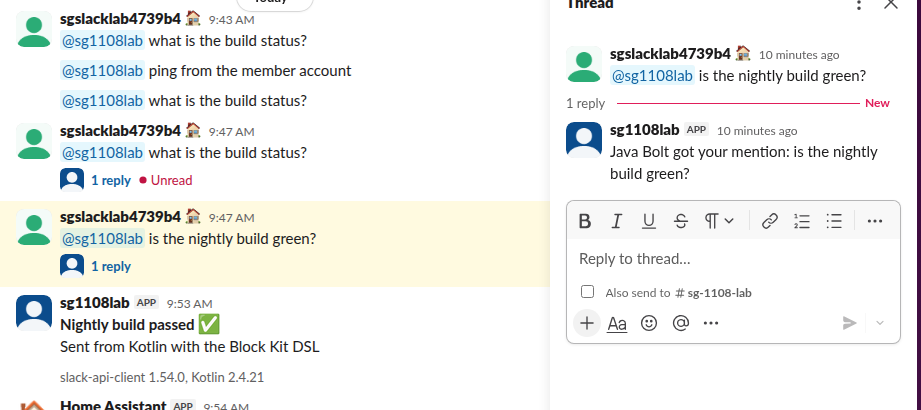
One more thing we saw: a mention we sent while the fixed app was still starting, with no Socket Mode connection open, was not lost. Slack delivered it when the app connected and the reply came 61 seconds after the mention. Make handlers safe to run late. Our Python Socket Mode guide has the same app in Python.
Kotlin
The SDK works from Kotlin as is, and two extra artifacts add a Block Kit DSL. Build file:
plugins {
    kotlin("jvm") version "2.4.21"
    application
}

repositories {
    mavenCentral()
}

dependencies {
    implementation("com.slack.api:slack-api-client:1.54.0")
    implementation("com.slack.api:slack-api-model-kotlin-extension:1.54.0")
    implementation("com.slack.api:slack-api-client-kotlin-extension:1.54.0")
    implementation("org.slf4j:slf4j-simple:2.0.20")
}

kotlin {
    jvmToolchain(21)
}

application {
    mainClass.set("MainKt")
}Main.kt:
import com.slack.api.Slack
import com.slack.api.model.kotlin_extension.block.withBlocks

fun main() {
    val slack = Slack.getInstance()
    val client = slack.methods(System.getenv("SLACK_BOT_TOKEN"))

    val res = client.chatPostMessage { req ->
        req.channel(System.getenv("SLACK_CHANNEL"))
            .text("Nightly build passed")
            .blocks(withBlocks {
                section {
                    markdownText("*Nightly build passed* :white_check_mark:\nSent from Kotlin with the Block Kit DSL")
                }
                context {
                    elements { markdownText("slack-api-client 1.54.0, Kotlin 2.4.21") }
                }
            })
    }
    println("ok=${res.isOk} ts=${res.ts} error=${res.error}")
    slack.close()
}
Output: ok=true ts=1794131587.984079 error=null, and the message is the "Nightly build passed" post in the screenshot. The first run spent most of its time downloading the Kotlin Gradle plugin.
FAQ
Is there an official Slack SDK for Java?
Yes. slack-api-client, bolt and the related artifacts are published by Slack under com.slack.api from the slackapi/java-slack-sdk repository. Version 1.54.0 is from 5 November 2026.
Does the Java SDK throw SlackApiException for Slack errors?
Not for errors in a normal response. In our run, channel_not_found and invalid_auth came back as isOk() == false with no exception, so check the response.
Can I use Bolt for Java without Socket Mode?
Yes. Bolt also runs as an HTTP app behind a public URL with the signing secret. We tested Socket Mode only, because it needs no tunnel. For local HTTP testing, see our Slack OAuth redirect URL on localhost guide.
Stop Jiggling Your Mouse.
Join hundreds of remote workers who never worry about their Slack status. Set it up once, stay green forever.
Related Articles
ngrok for a Slack Bot: What It Needs, and Two Free Alternatives Tested
A Slack bot on localhost needs a public HTTPS URL for events and slash commands, or Socket Mode. We tried ngrok 3.39.13 with no account (ERR_NGROK_4018), a Cloudflare quick tunnel and Socket Mode on 8 November 2026, timed the replies, and broke the tunnel URL on purpose.
Home Assistant Slack Integration: Notifications, Files and Status, Tested
Home Assistant's Slack integration sends notifications with a bot token through the notify.slack action, including Block Kit and file uploads. We set it up on Home Assistant 2026.11.0 on 8 November 2026, hit the missing-scope errors that stop file uploads, and set a Slack status from an automation.
Slack File Block: Post Remote and Uploaded Files in Block Kit
A Slack file block shows a file card inside a message. It takes source "remote" plus an external_id or file_id, and the file must exist first. We added remote files with files.remote.add, posted them in file blocks, and tried the mistakes, on 7 November 2026.