
Slack SDK for Rust: slack-morphism Tested (Post, History, Socket Mode)
Slack has no official Rust SDK. The community crate that works today is slack-morphism: on 5 November 2026 we used version 2.31.1 to post a message, page through history with a cursor and answer a mention over Socket Mode. Code and output below.
Slack does not publish a Rust SDK; its official SDKs cover Python, Node, Java and a few others. The Rust crate to use is the community-built slack-morphism, which covers the Web API, the Events API, Socket Mode and Block Kit and had its latest release on 21 October 2026. On 5 November 2026 we built a small project with slack-morphism 2.31.1 and Rust's cargo 1.99.1, posted a message, read channel history with a cursor, handled a bad channel ID and answered an @mention over Socket Mode in a test workspace. The code and its real output are below.
Which Rust crate to pick
We read each crate's record on crates.io on 5 November 2026:
| Crate | Latest version | Last release | Downloads (all time) | What it does |
|---|---|---|---|---|
slack-morphism | 2.31.1 | 2026-10-21 | 5,936,373 | Web API, Events API, Socket Mode, Block Kit |
slack-hook | 0.9.1 | 2025-02-13 | 395,085 | Incoming webhooks only |
slack-api | 0.23.1 | 2020-06-29 | 173,090 | Old Web API client, unmaintained |
slack-rust | 0.0.1-alpha | 2021-12-31 | 7,260 | Early alpha, abandoned |
slacko | 0.2.2 | 2026-01-03 | 579 | New, small; also supports browser session tokens |
Slack's own list of community tools still names rust-slack, a webhook-only crate. For a bot that reads and writes, slack-morphism is the only active choice; for one-way alerts, an incoming webhook needs no crate at all, as our Python webhook guide shows with plain HTTP.
Setup
Create a Slack app with a bot user and the scopes chat:write, channels:history, channels:read and app_mentions:read, install it, and copy the bot token (xoxb-). For Socket Mode, also turn Socket Mode on and generate an app-level token (xapp-) with the connections:write scope under Basic Information. Our Slack bot token guide explains the token types. Invite the bot to the channel it will use.
Cargo.toml:
[package]
name = "rustslack"
version = "0.1.0"
edition = "2021"

[dependencies]
slack-morphism = { version = "2.31", features = ["hyper"] }
tokio = { version = "1", features = ["full"] }
The hyper feature brings in the HTTP and WebSocket client. Without it the crate has no connector to send requests with.
Post a message and read history
This program posts one message, reads the channel's history two messages per page by following next_cursor, then sends a message to a channel ID that does not exist:
use slack_morphism::prelude::*;

#[tokio::main]
async fn main() -> Result<(), Box<dyn std::error::Error + Send + Sync>> {
    let client = SlackClient::new(SlackClientHyperConnector::new()?);
    let token = SlackApiToken::new(std::env::var("SLACK_BOT_TOKEN")?.into());
    let session = client.open_session(&token);
    let channel: SlackChannelId = std::env::var("SLACK_CHANNEL")?.into();

    // 1. Post a message
    let req = SlackApiChatPostMessageRequest::new(
        channel.clone(),
        SlackMessageContent::new().with_text("Hello from Rust (slack-morphism)".into()),
    );
    let resp = session.chat_post_message(&req).await?;
    println!("posted ts={}", resp.ts);

    // 2. Read history, two messages per page, following the cursor
    let mut cursor: Option<SlackCursorId> = None;
    let mut page = 0;
    loop {
        let mut req = SlackApiConversationsHistoryRequest::new()
            .with_channel(channel.clone())
            .with_limit(2);
        if let Some(c) = cursor.clone() {
            req = req.with_cursor(c);
        }
        let r = session.conversations_history(&req).await?;
        page += 1;
        for m in &r.messages {
            println!("page {page}: ts={} text={:?}", m.origin.ts, m.content.text);
        }
        cursor = r
            .response_metadata
            .and_then(|m| m.next_cursor)
            .filter(|c| !c.to_string().is_empty());
        if cursor.is_none() {
            break;
        }
    }

    // 3. A channel that does not exist
    let bad = SlackApiChatPostMessageRequest::new(
        "C000BAD0000".into(),
        SlackMessageContent::new().with_text("never sent".into()),
    );
    match session.chat_post_message(&bad).await {
        Ok(_) => println!("unexpected ok"),
        Err(e) => println!("error: {e}"),
    }
    Ok(())
}
The output of cargo run --release --bin post in our test channel:
posted ts=1793853916.619439
page 1: ts=1793853916.619439 text=Some("Hello from Rust (slack-morphism)")
page 1: ts=1793853434.892959 text=Some("<@U0CFWPG6XS4> has joined the channel")
page 2: ts=1793853434.081589 text=Some("<@U0CDVBA6TMZ> has joined the channel")
error: Slack API error: channel_not_found
Body: '{"ok":false,"error":"channel_not_found"}'
Three things to note. The ts comes back as a SlackTs value that prints as the exact string Slack sent, so you can pass it on as thread_ts without the float rounding trap described in our thread_ts guide. A Slack error such as channel_not_found is a Rust Err, not an ok: false field you have to check, and its text includes the raw response body. And the cursor loop stops when next_cursor is empty; our pagination guide covers the same rule for other languages.
Never appear "away" on Slack again
Cloud-based. No downloads. Works 24/7 even when your laptop is off.
Answer a mention over Socket Mode
Socket Mode lets a bot receive events over a WebSocket, so it needs no public URL. This listener answers every @mention in a thread:
use slack_morphism::prelude::*;
use std::sync::Arc;

async fn on_push(
    event: SlackPushEventCallback,
    client: Arc<SlackHyperClient>,
    _states: SlackClientEventsUserState,
) -> UserCallbackResult<()> {
    if let SlackEventCallbackBody::AppMention(m) = event.event {
        let token = SlackApiToken::new(std::env::var("SLACK_BOT_TOKEN")?.into());
        let session = client.open_session(&token);
        let req = SlackApiChatPostMessageRequest::new(
            m.channel.clone(),
            SlackMessageContent::new().with_text(format!("pong, <@{}>", m.user)),
        )
        .with_thread_ts(m.origin.ts.clone());
        let r = session.chat_post_message(&req).await?;
        println!("mention ts={} -> replied ts={}", m.origin.ts, r.ts);
    }
    Ok(())
}

#[tokio::main]
async fn main() -> Result<(), Box<dyn std::error::Error + Send + Sync>> {
    let client = Arc::new(SlackClient::new(SlackClientHyperConnector::new()?));
    let callbacks = SlackSocketModeListenerCallbacks::new().with_push_events(on_push);
    let env = Arc::new(SlackClientEventsListenerEnvironment::new(client.clone()));
    let listener = SlackClientSocketModeListener::new(
        &SlackClientSocketModeConfig::new(),
        env.clone(),
        callbacks,
    );
    let app_token = SlackApiToken::new(std::env::var("SLACK_APP_TOKEN")?.into());
    listener.listen_for(&app_token).await?;
    println!("listening over Socket Mode");
    listener.serve().await;
    Ok(())
}
We started it, then mentioned the bot from a second account. The listener printed:
listening over Socket Mode
mention ts=1793853937.341829 -> replied ts=1793853943.108929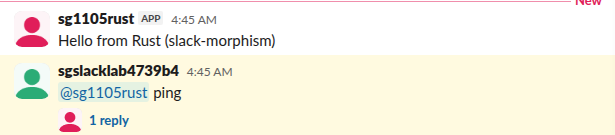
The reply landed in the thread:
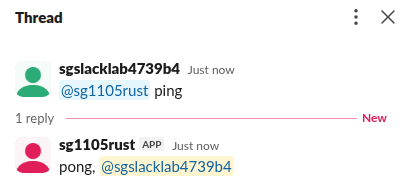
slack-morphism sends Slack the acknowledgement for each event after your callback returns (we read this in its socket_mode source), so keep slow work out of the callback or move it into tokio::spawn. If several copies of the bot are connected, Slack hands each event to only one of them, so stop other copies while you test.
Rust compared with the official SDKs
If you know the Python or Node SDK, the method names map one to one: chat_post_message is chat.postMessage, conversations_history is conversations.history. The difference is that every request and response is a typed struct, so a wrong field name fails at compile time. Our pages on the Node SDK and on reading channel messages show the same calls in other languages, and Slack API in Go covers the other popular compiled option.
FAQ
Does Slack have an official Rust SDK?
No. Slack lists Rust only under community-developed tools. slack-morphism is maintained by a community author, abdolence on GitHub.
Does slack-morphism handle rate limits?
It has a rate-control module (ratectl, with a SlackRateThrottler) for Slack's per-method tiers; the limits themselves are in our Slack API rate limits page. We did not test the throttler.
Can I use it with Axum for the Events API instead of Socket Mode?
Yes, the crate ships an axum feature with request signature checks for HTTP event delivery. We tested only Socket Mode.
Stop Jiggling Your Mouse.
Join hundreds of remote workers who never worry about their Slack status. Set it up once, stay green forever.
Related Articles
Slack Deep Links: Every slack:// Command in the Current App
A Slack deep link is a slack:// URL such as slack://channel?team=T123&id=C123 that opens the desktop or mobile app on a channel, person, file or setting. We read the handler in Slack's current code, listed the commands it accepts, and tested the https fallbacks.
Slack Message Character Limit: 40,000 Max, 4,000 Advised
Slack keeps up to 40,000 characters in a message's text and truncates anything longer, and its developer docs advise staying under 4,000 characters. Block Kit sections stop at 3,000 characters and headers at 150. What happens with long messages, other Slack text limits, and how to split a long post.
How to Turn Off Link Previews in Slack, for You or Everyone
To turn off link previews in Slack for yourself, open Preferences, Messages & media and uncheck Show images and files from linked websites and Show text previews of linked websites. To remove one preview, hover over it and click the x. How admins block a website, how bots send links without previews, and why a preview does not show.