
Slack Typing Indicator: How to Turn It Off, and Who Sees You Typing
Slack shows "is typing" to the people in a conversation while you write. You can turn off seeing other people's typing in Preferences, Messages & media, on desktop. No Slack setting hides your own typing from others, and nobody can see your drafts.
Yes, Slack shows when you are typing: people in the same DM or channel see "[your name] is typing" under the message box while you write. To stop seeing other people's typing, open Preferences, Messages & media, and under Additional options uncheck Display information about who is currently typing a message. That setting only changes your own screen. Slack has no setting that hides your typing from others, and it works on desktop only. Nobody can see the text of your draft until you send it.
Typing in Slack also counts as activity, so it keeps your dot green. When you stop, the dot turns grey 10 minutes later. Slack Green keeps it active during the working hours you set, from the cloud, whether you are typing or not.
How to turn off the Slack typing indicator
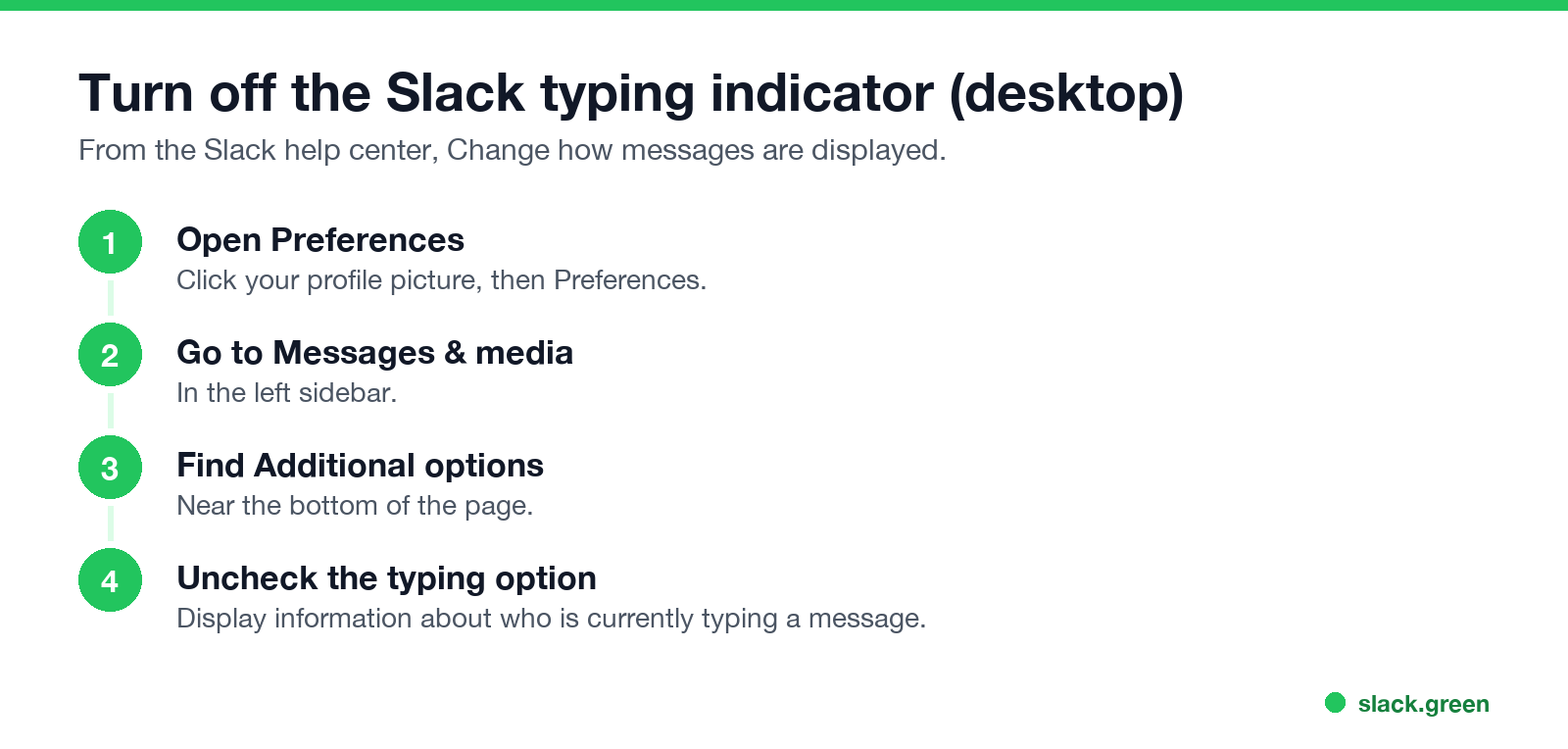
- Click your profile picture and select Preferences.
- Click Messages & media in the left sidebar.
- Scroll to Additional options.
- Uncheck Display information about who is currently typing a message.
- • Only that you are typing. Never the words.
- • Only in the conversation you are typing in. A DM, a channel, or a thread you have open.
- • Only while you type. The indicator disappears a few seconds after you stop.
The Slack help center lists this option with the other message display settings. It is not available in the mobile apps, which do not let you change message display.
Can others see me typing on Slack?
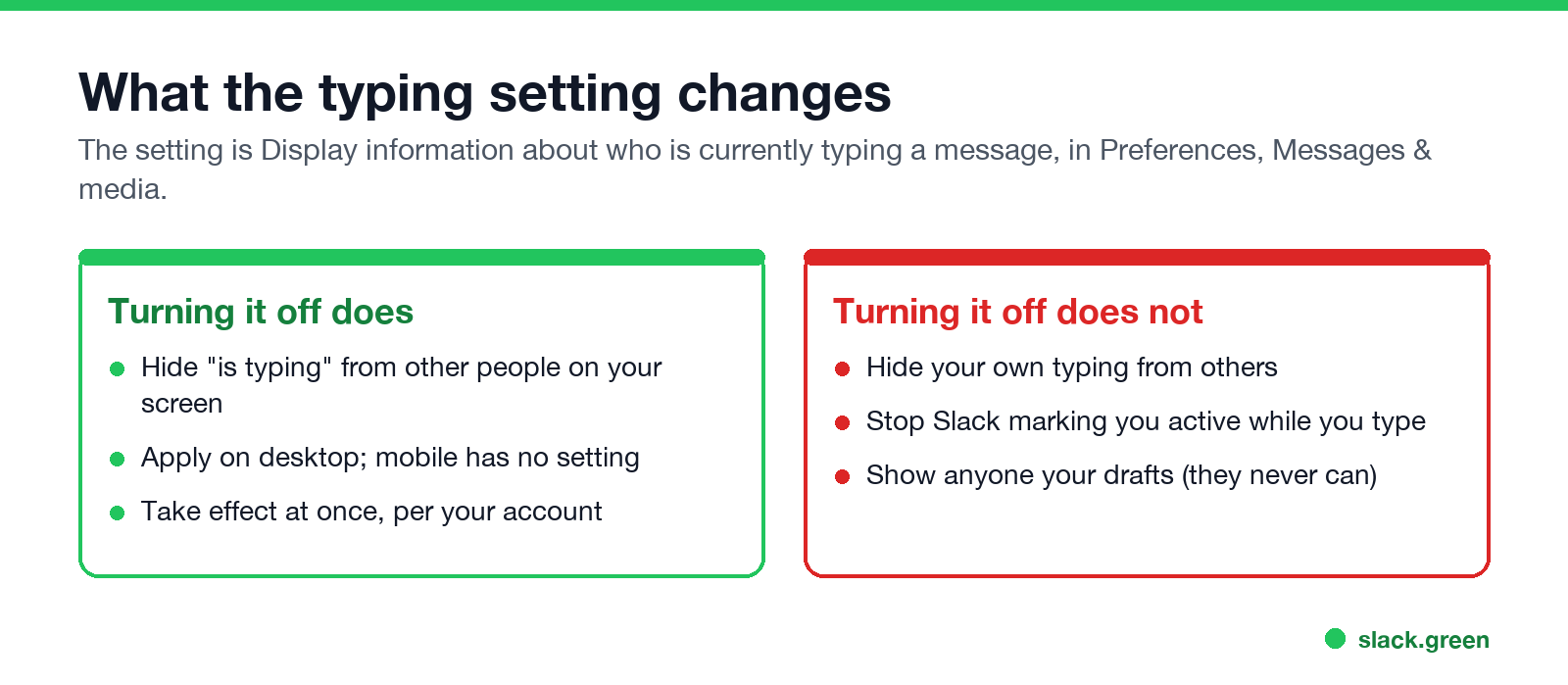
Yes, anyone viewing the same conversation sees that you are typing. The setting above does not change that; it only hides other people's typing from you. What they see:
Some people use browser extensions or scripts that block Slack from sending the typing signal. They are unofficial, need access to your Slack session in the browser, and may break or be blocked by your company. We do not recommend them.
Does Slack show when you are typing in a draft?
لا تظهر أبداً كـ "غائب" على Slack
يعمل على السحابة. بدون تنزيلات. يعمل 24/7 حتى عندما يكون الكمبيوتر مغلقاً.
Your draft text is private. Slack saves unsent messages as drafts in Drafts & sent, and no one else can read them. Starting to type a draft in a conversation does show "is typing" to people viewing it. To write without that, draft somewhere else, or write the message and then schedule it; see how to delay and schedule Slack messages.
Does typing keep you active on Slack?
Yes. Typing in the Slack window is input, so your dot stays green and the 10-minute idle timer restarts. Typing in other apps does not count. The rules are in how long does Slack stay active, and everything else others can see about you is in Slack status icons meaning.
Does Slack record typing?
No. Slack does not log keystrokes or typing speed, and admins cannot see what you typed and deleted before sending. What admins can see is in can Slack be used to monitor employees. Edited and deleted sent messages are a different matter; see can Slack see deleted messages.
FAQ
لا تظهر أبداً كـ "غائب" على Slack
يعمل على السحابة. بدون تنزيلات. يعمل 24/7 حتى عندما يكون الكمبيوتر مغلقاً.
Does Slack show when someone is typing?
Yes, "[name] is typing" appears under the message box in that conversation, unless you turned the indicator off in your preferences.
How do I hide that I am typing in Slack?
Slack has no setting for it. Draft the message elsewhere and paste it, or schedule it.
Can I turn off the typing indicator on mobile?
No. The setting exists only in the desktop app and browser.
Can people see what I am typing on Slack?
No. Only that you are typing. The text stays private until you send it.
Does the typing indicator show in threads?
It shows to people viewing the conversation where you are typing.
توقف عن تحريك الماوس.
مئات العاملين عن بعد لم يعودوا قلقين بشأن حالة Slack. قم بالإعداد مرة واحدة، ابقَ أخضر للأبد.
Related Articles
Slack Active on Multiple Devices: Which One Sets Your Status?
When you use Slack on a phone and a computer at once, one active device is enough to keep you green, and a manual away on any device sets you away on all of them. The rule, common cases, and how notifications pick a device.
How to Work Two Remote Jobs at the Same Time
Working two remote jobs at once takes four things: contracts that allow it, fully separate devices and accounts, a calendar that protects both jobs, and a chat status that stays believable in both. The practical setup, and the risks.
How to Share Audio in a Slack Huddle (Screen Share With Sound)
To share audio in a Slack huddle, click the share screen icon, pick a screen or window, check Share system audio, then click Share. Everyone hears what your computer plays. Where the option is missing, how Chrome differs, why a Mac needs a permission, and how to stop echo.