
Slack Video Block: Which URLs Work, Tested With Real Errors
A Block Kit video block needs video_url, thumbnail_url, title and alt_text, and its video_url must be an embeddable player URL on a domain your app claims. We made 26 posts with a bot token on 7 November 2026; a YouTube /embed/ URL worked with no setup, and every other host needed claimed unfurl domains plus a reinstall.
A Slack video block is a Block Kit block of "type": "video" that plays an embedded video player inside a message, modal or App Home. It needs four fields, video_url, thumbnail_url, title and alt_text, and Slack only accepts a video_url on a domain your app has claimed as an unfurl domain. On 7 November 2026 we made 26 test posts from an app on a Free workspace. One case surprised us: a YouTube /embed/ URL worked with no domain set up at all, while a normal YouTube watch link failed. Everything below comes from those posts, with the exact error text Slack sent back.
A video block that works
This is the block that posted and played, sent with chat.postMessage and a bot token:
{
  "type": "video",
  "title": { "type": "plain_text", "text": "Big Buck Bunny (Blender open movie)" },
  "title_url": "https://www.youtube.com/watch?v=aqz-KE-bpKQ",
  "description": { "type": "plain_text", "text": "Posted by a bot with a Block Kit video block" },
  "video_url": "https://www.youtube.com/embed/aqz-KE-bpKQ?autoplay=1",
  "thumbnail_url": "https://i.ytimg.com/vi/aqz-KE-bpKQ/hqdefault.jpg",
  "alt_text": "Big Buck Bunny trailer",
  "provider_name": "YouTube",
  "author_name": "Blender"
}
Slack shows the thumbnail with a Video button. provider_name and author_name become the grey "YouTube | Blender" line, description sits under it, and title_url turns the title into a link:
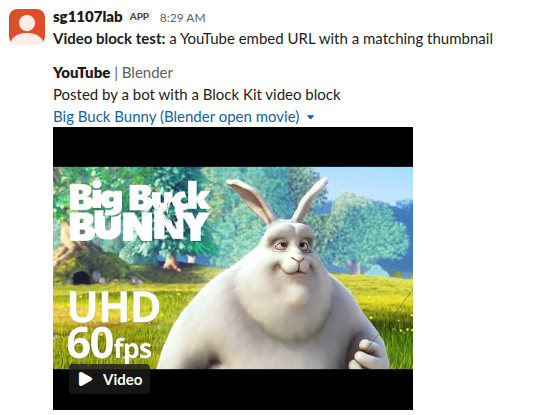
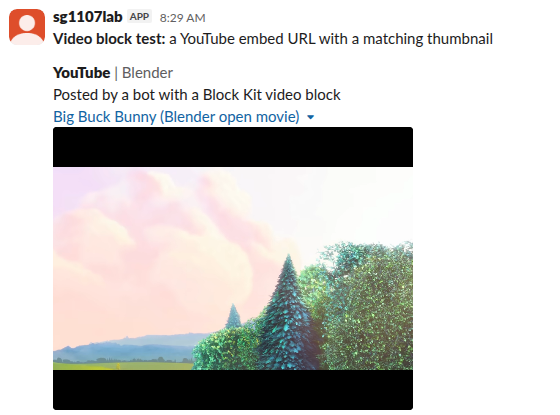
Clicking the thumbnail played the video inline, in the message itself. The player is an iframe whose source is https://slack-files.com/video_embed?url= followed by your encoded video_url, so Slack wraps your player page rather than linking out:
The thumbnail is not checked against the video. In our first test we paired one YouTube video with a different video's thumbnail, and Slack posted it and showed the wrong image. Pick the thumbnail yourself.
Which video URLs Slack accepted
Same bot, same channel, no unfurl domains in the app at first:
| video_url | Result |
|---|---|
https://www.youtube.com/embed/ID (with or without a query string) | Posted and played |
http://www.youtube.com/embed/ID | Posted |
https://www.youtube.com/watch?v=ID | Video validation failed: Domain is not a valid unfurl domain claimed by your app |
https://youtu.be/ID | Same error |
https://www.youtube.com/shorts/ID | Same error |
https://www.youtube-nocookie.com/embed/ID | Same error |
https://player.vimeo.com/video/ID | Same error |
https://www.loom.com/embed/ID | Same error |
https://www.dailymotion.com/embed/video/ID | Same error |
https://fast.wistia.net/embed/iframe/ID | Same error |
https://example.com/video/embed/123 | Same error |
A direct .mp4 file URL | Same error |
So YouTube's /embed/ path is the only form that worked out of the box. The watch, short-link and Shorts URLs of the same video were refused, which is why copying a link from the browser bar fails. Use https://www.youtube.com/embed/VIDEO_ID. A raw .mp4 is refused too: video_url must be a page that plays the video, not the file.
Missing fields and limits
Each of these returned invalid_blocks with a JSON pointer to the problem:
| What we sent | Error |
|---|---|
No thumbnail_url | missing required field: thumbnail_url [json-pointer:/blocks/0] |
No alt_text | missing required field: alt_text [json-pointer:/blocks/0] |
No title | missing required field: title [json-pointer:/blocks/0] |
| A 201-character title | must be less than 201 characters [json-pointer:/blocks/0/title/text] |
Our page on the invalid_blocks error explains how to read these pointers when a message has many blocks.
Never appear "away" on Slack again
Cloud-based. No downloads. Works 24/7 even when your laptop is off.
Videos from Vimeo, Loom or your own site
For any host other than YouTube's embed path, the app must claim the domain. Adding unfurl_domains to the manifest was not enough on its own. Slack rejected our first manifest with two errors: Unfurl Domains requires links:read bot scope and Unfurl Domains requires link_shared bot event subscription, which also needs a request URL that answers Slack's challenge. The manifest section that passed:
"features": { "unfurl_domains": ["vimeo.com", "loom.com"] },
"oauth_config": { "scopes": { "bot": ["chat:write", "links:read", "links.embed:write"] } },
"settings": {
  "event_subscriptions": {
    "request_url": "https://example.com/slack/events",
    "bot_events": ["link_shared"]
  }
}
After apps.manifest.update saved it, the Vimeo and Loom URLs still failed with the same "not a valid unfurl domain" error. They posted only after we reinstalled the app to the workspace. If you add a domain and nothing changes, reinstall. The app setup itself is the same as for link unfurling, which uses the same domain list.
Webhooks and other surfaces
An incoming webhook accepted the same YouTube embed block and answered ok, so you do not need a bot token to post a video. Slack's docs list the video block for messages, modals and App Home. We tested messages only. To try a layout before writing code, paste the JSON above into the Block Kit Builder.
FAQ
Why does my YouTube link fail in a video block?
Most likely it is a watch link (youtube.com/watch?v=), a youtu.be link or a Shorts link. In our test only youtube.com/embed/VIDEO_ID passed without claimed domains. Take the video ID and build the embed URL.
Can a video block play an MP4 file?
No. A direct .mp4 URL got the "not a valid unfurl domain" error. To show a video file, upload it as a file instead; our page on video formats Slack plays covers what plays inline.
Does the video block need the links.embed:write scope?
Slack's reference lists links.embed:write for apps that post video blocks. Our app had it in every test, so we did not see what happens without it.
Stop Jiggling Your Mouse.
Join hundreds of remote workers who never worry about their Slack status. Set it up once, stay green forever.
Related Articles
Slack File Block: Post Remote and Uploaded Files in Block Kit
A Slack file block shows a file card inside a message. It takes source "remote" plus an external_id or file_id, and the file must exist first. We added remote files with files.remote.add, posted them in file blocks, and tried the mistakes, on 7 November 2026.
ngrok for a Slack Bot: What It Needs, and Two Free Alternatives Tested
A Slack bot on localhost needs a public HTTPS URL for events and slash commands, or Socket Mode. We tried ngrok 3.39.13 with no account (ERR_NGROK_4018), a Cloudflare quick tunnel and Socket Mode on 8 November 2026, timed the replies, and broke the tunnel URL on purpose.
Slack Java SDK: Post, Read History and Run a Bolt App (Tested 1.54.0)
The Slack Java SDK is com.slack.api:slack-api-client for Web API calls and com.slack.api:bolt for apps. We ran version 1.54.0 with Gradle on 8 November 2026: chat.postMessage, conversations.history with a cursor, a Socket Mode Bolt app and a Kotlin Block Kit post, plus the silent failure in ctx.say.