
Slack Webhook vs Bot Token: 10 Things We Tested Both Ways
An incoming webhook can post, reply in a thread and do little else. A bot token can also edit, delete, upload files, pick the channel and post as a custom name. We sent the same Block Kit message both ways on 9 November 2026 and recorded each answer.
Use an incoming webhook when your code only needs to post into one fixed channel. Use a bot token (xoxb-) with chat.postMessage when you also need to edit or delete the message, reply with files, post to more than one channel, send ephemeral messages or read the channel. Both come from the same Slack app, and you can install both at once. On 9 November 2026 we created one app in a test workspace, installed it with an incoming webhook and a bot token, and sent the same Block Kit message both ways. Then we tried 10 more things with each.
Results
| Test | Incoming webhook | Bot token (chat.postMessage and friends) |
|---|---|---|
| Post the same Block Kit message | 200 ok | ok: true, with the message ts |
| Get the message ID back | No. The body is the 2 bytes ok | Yes, ts and channel in the response |
| Edit the message | No method | chat.update: ok on its own message, cant_update_message on the webhook's message |
| Delete the message | No method | chat.delete: cant_delete_message on the webhook's message |
Reply in a thread (thread_ts) | Works | Works |
Post to another channel ("channel" in the payload) | Ignored, by ID and by #name. Both posts went to the webhook's own channel | Works in any channel the bot is in |
Custom name and icon (username, icon_emoji) | Ignored | Works with the chat:write.customize scope |
| Upload a file | No way to send one. A "file" field was ignored and the text posted | files.getUploadURLExternal then files.completeUploadExternal, 1.34 s for a 96 KB PNG |
| Ephemeral message | No | chat.postEphemeral works |
| Read messages | No | conversations.history works with channels:history |
| 20 sends in a row, median time | 0.317 s (max 0.464 s), no errors | 0.328 s (max 0.339 s), no errors |
| Bad credential | 403 invalid_token | invalid_auth |
Speed is not a reason to pick one: both took about a third of a second per message from our server, and neither hit a rate limit in 20 sends.
Webhook messages are not the bot's messages
The webhook and the bot token belong to the same app, but Slack treats their messages as coming from two different senders. In conversations.history, the webhook's message had subtype: bot_message and a different bot_id than the bot user's message, and it showed the app's name, while the bot's message showed the bot user's display name. That is why the bot token could not edit or delete the webhook's message: chat.update answered cant_update_message and chat.delete answered cant_delete_message.
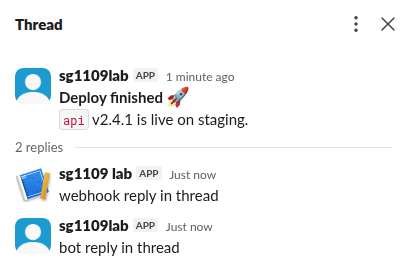
The thread above shows both senders. The webhook reply used thread_ts from the bot's message, so the webhook can join a thread, but only if something else gives it the ts, because the webhook's own response never includes one. If you plan to update a message later, for example to turn "Deploying" into "Deployed", post it with the bot token. Our chat.update guide covers that flow.
The channel and username fields are ignored
Old Slack integrations let a webhook payload set channel, username and icon_emoji. Webhooks from a Slack app ignore all three. Our two posts that asked for another channel landed in the webhook's channel, and the one that asked for "Deploy Bot" with a rocket kept the app's name and icon. The same fields sent with the bot token worked:
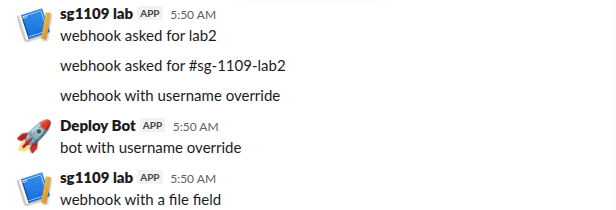
To post to a second channel with webhooks, add a second webhook. Each one is tied to the channel you picked when you installed it. The bot token needs chat:write plus a join (or an invite) for each channel. Add chat:write.public if it should post to public channels without joining.
Never appear "away" on Slack again
Cloud-based. No downloads. Works 24/7 even when your laptop is off.
The same message, both ways
The webhook needs only the URL:
curl -sS -H 'Content-Type: application/json' \
  -d '{"text":"Deploy finished: api v2.4.1","blocks":[{"type":"section","text":{"type":"mrkdwn","text":"*Deploy finished* :rocket:\n`api` v2.4.1 is live on staging."}}]}' \
  "$SLACK_WEBHOOK_URL"
# ok
The bot token needs the channel ID and returns the message ID:
curl -sS -H "Authorization: Bearer $SLACK_BOT_TOKEN" \
  -d channel=C0123456789 \
  -d text='Deploy finished: api v2.4.1' \
  --data-urlencode blocks='[{"type":"section","text":{"type":"mrkdwn","text":"*Deploy finished* :rocket:\n`api` v2.4.1 is live on staging."}}]' \
  https://slack.com/api/chat.postMessage
# {"ok":true,"channel":"C0123456789","ts":"1794203398.032479",...}
A broken webhook URL answers HTTP 403 invalid_token, a body that is not JSON answers 400 invalid_payload, and a payload with no text and no blocks answers 400 no_text. Those errors come back as plain text, not JSON, so check the status code. The Web API always answers HTTP 200 with "ok": false and an error string, so check ok.
Which one to use
- • A CI job, a cron script or an alert that posts to one channel and never changes the message: use a webhook. There is no token to rotate, and the URL can only post. Our webhook setup guide shows how to make one, and the Claude Code hooks guide is a working example.
- • Anything that edits its message, posts files, replies to people, picks a channel at run time or reads messages: use a bot token. The Slack bot token guide lists the scopes for each of the methods in the table.
- • If you need both, install both from the same app, but keep in mind that the bot cannot clean up after the webhook.
For files, the old files.upload method is gone. The two-step upload we used is in files.upload deprecation and its replacement.
FAQ
Is a webhook URL a secret?
Yes. Anyone with the URL can post to that channel as your app. It cannot read anything, so a leaked URL is less harmful than a leaked bot token. Slack lets you remove the webhook on the app's Incoming Webhooks page, which kills the URL.
Can a webhook send a DM?
Only if you pick a DM as its channel at install time. It cannot choose the recipient per message. For DMs to different people, use the bot token with chat.postMessage and the user ID as channel.
Do webhook messages count toward rate limits?
Slack documents about one message per second per webhook, with short bursts allowed. Our 20 back-to-back posts at about 3 per second all returned ok.
Stop Jiggling Your Mouse.
Join hundreds of remote workers who never worry about their Slack status. Set it up once, stay green forever.
Related Articles
Can a Slack Webhook Send a File? What We Tested, and What Works
An incoming webhook cannot upload a file. It can show an image from a public URL in an image block, or a link Slack unfurls. For a real file you need a bot token and the upload API. Every payload we tried on 9 November 2026, with Slack's answer.
Slack Progress Bar: Block Kit, Emoji and chat.update, Tested
Block Kit has no progress bar element, so a Slack progress bar is text you redraw with chat.update. We drew one three ways on 9 November 2026, timed every update, and pushed chat.update until Slack answered ratelimited.
Slack Channel Welcome Message: A Tested Bot and the Free-Plan Catch
Slack has no built-in welcome message per channel, and Workflow Builder is closed to Free workspaces. A 30-line Bolt app that listens for member_joined_channel does the job on any plan. We ran it on 9 November 2026 and timed the welcome.