
Logitech Mouse Jiggler: MX Master, G HUB and What Works
Logitech does not make a mouse jiggler, and Logi Options+ has no keep-awake setting. What works with a Logitech mouse: a mover platform wide enough for an MX Master, a USB jiggler next to your receiver, a G HUB Lua script for G-series mice, or a keep-awake app. What each one does for Slack and Teams.
Logitech does not sell a mouse jiggler, and neither Logi Options+ nor Logitech Flow has a setting that keeps your computer awake. With a Logitech mouse you have four working options: put the mouse on a mechanical mover platform (check that it is wide enough for an MX Master), plug a USB jiggler in next to your Logitech receiver, run a small Lua script in G HUB if you have a G-series mouse, or use a keep-awake app and leave the mouse alone. None of them keeps you green in Slack, which only counts input inside its own window.
Logitech's Smart Actions page describes actions you start with a trigger, such as a button or a key combination. It lists no timer or repeat, so a Smart Action cannot move the pointer every minute by itself. Logitech Flow moves your cursor between two computers; it does not keep either one awake.
We build Slack Green, which keeps your Slack dot green from our servers during the hours you set, with nothing on your computer.
Ways to jiggle with a Logitech mouse
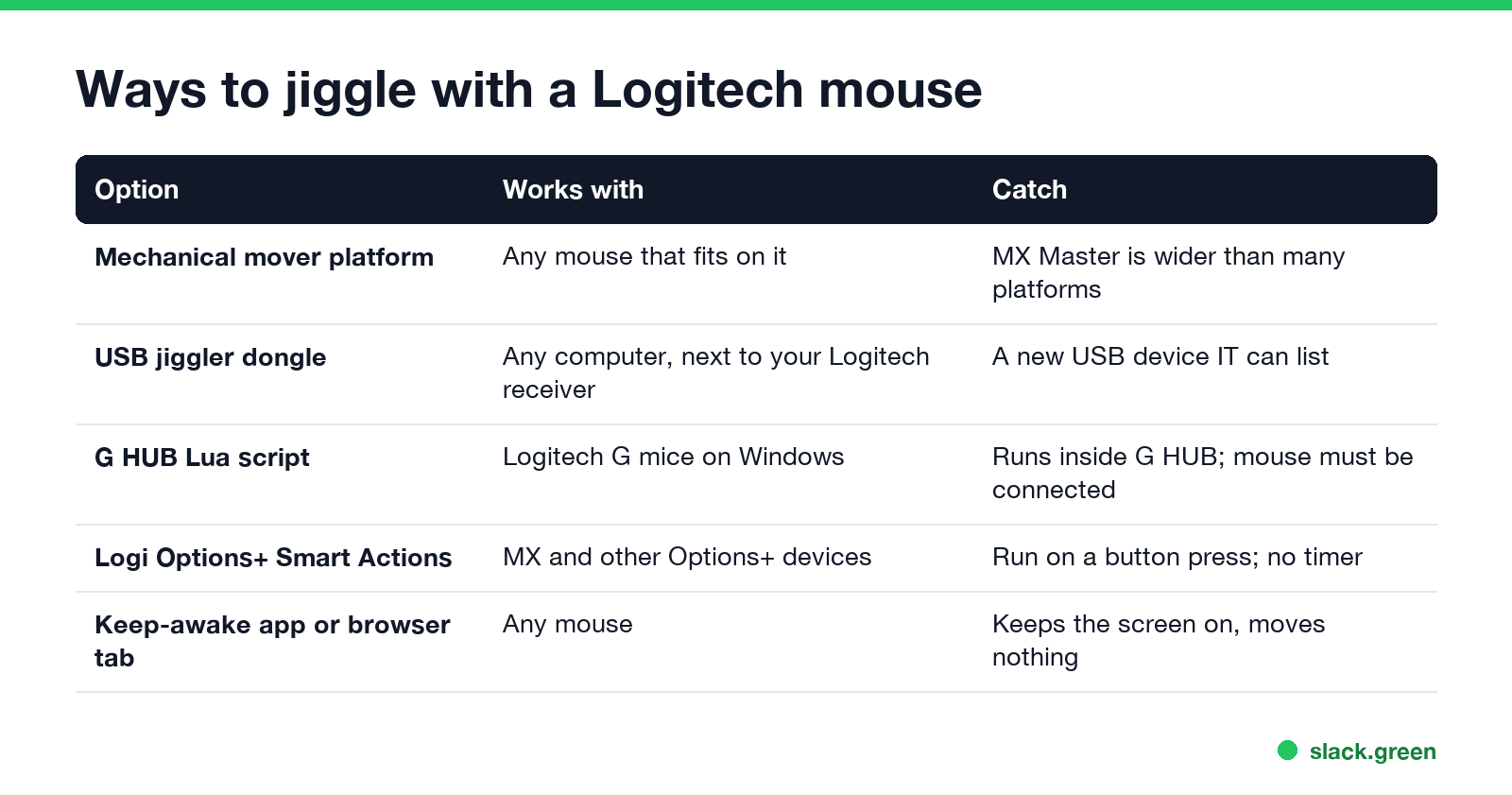
| Option | Works with | Catch |
|---|---|---|
| Mechanical mover platform | Any mouse that fits on it | The MX Master is wider than many platforms |
| USB jiggler dongle | Any computer, next to your Logitech receiver | A new USB device your IT team can list |
| G HUB Lua script | Logitech G-series mice in G HUB | Runs inside G HUB; the mouse must be connected |
| Logi Options+ Smart Actions | MX and other Options+ devices | Start on a trigger; no timer |
| Keep-awake app or browser tab | Any mouse | Keeps the screen on; moves nothing |
The types in general, and which one to buy, are in best mouse jiggler and mouse mover vs mouse jiggler.
Mouse jiggler for an MX Master
The most common complaint on r/logitech is fit. One poster tried two mover platforms from Amazon, and neither fit "the wide footprint" of the MX Master. Before you buy one:
- • Check the platform width against your mouse. Logitech lists the MX Master 3S at about 84 mm wide; many turntable movers are made for smaller mice.
- • Look for a flat, open platform rather than a cup that the mouse sits in.
- • Watch the sensor. The MX Master tracks on glass. A mover that works by spinning a patterned disc under the mouse still works, because the mouse sees the pattern move.
Phone apps that "move the surface" under the mouse do not work well; another r/logitech thread reports that none of the ones they tried moved the pointer. A USB dongle avoids the fit problem, because it does not touch the mouse at all. It plugs in next to your Logi Bolt or Unifying receiver and shows up as a second mouse.
Logitech G HUB jiggle script
Never appear "away" on Slack again
Cloud-based. No downloads. Works 24/7 even when your laptop is off.
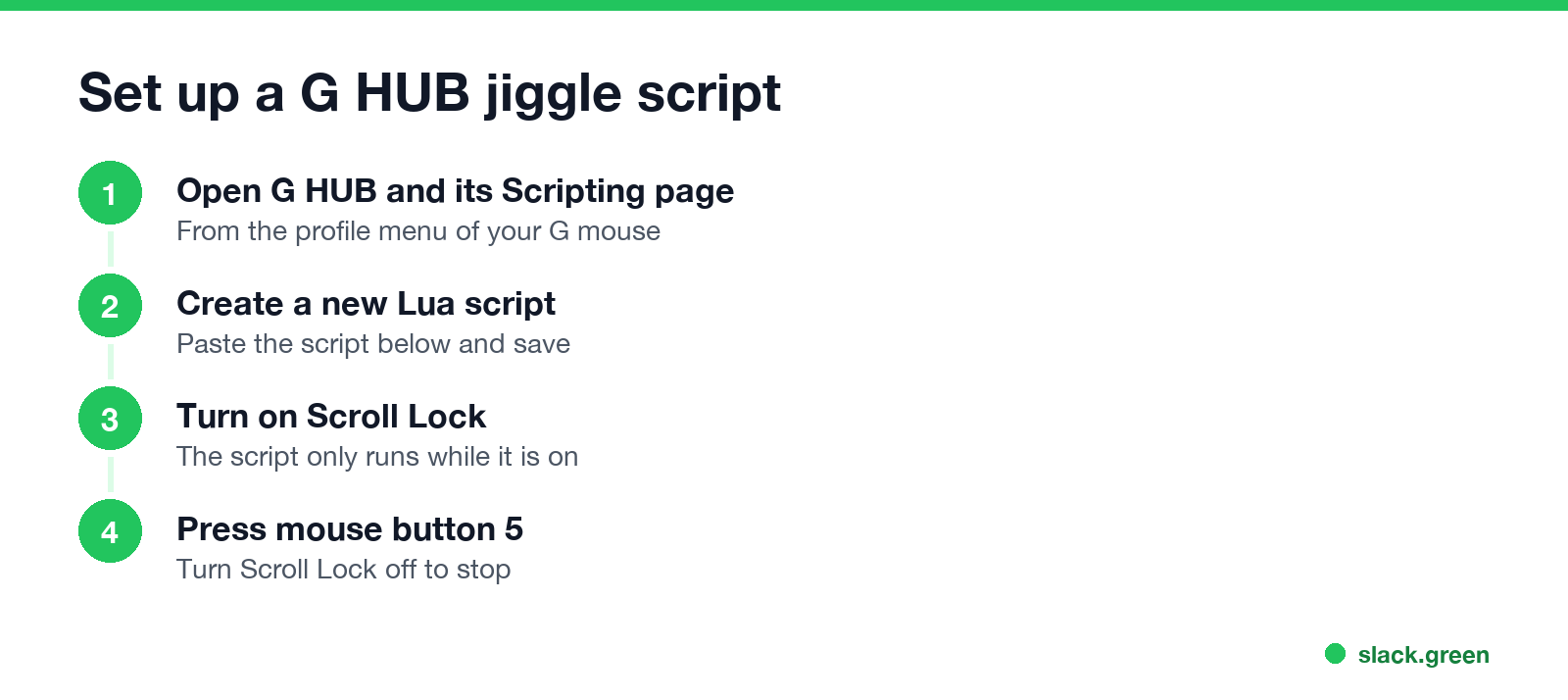
G HUB, the software for Logitech G mice, can run Lua scripts with a MoveMouseRelative function. This one moves the pointer 2 pixels right and back every 30 seconds while Scroll Lock is on:
-- Logitech G HUB: jiggle while Scroll Lock is on, start with mouse button 5
function OnEvent(event, arg)
  if event == "MOUSE_BUTTON_PRESSED" and arg == 5 then
    while IsKeyLockOn("scrolllock") do
      MoveMouseRelative(2, 0)
      Sleep(100)
      MoveMouseRelative(-2, 0)
      for i = 1, 300 do -- wait about 30 seconds, checking Scroll Lock
        if not IsKeyLockOn("scrolllock") then break end
        Sleep(100)
      end
    end
  end
endThe functions come from Logitech's G-series Lua API. We did not run this script here, because we have no G-series mouse. It moves the pointer by 2 pixels, so you will see a small twitch. While the loop runs, the script does not react to other button events.
What a Logitech jiggler does for Slack and Teams
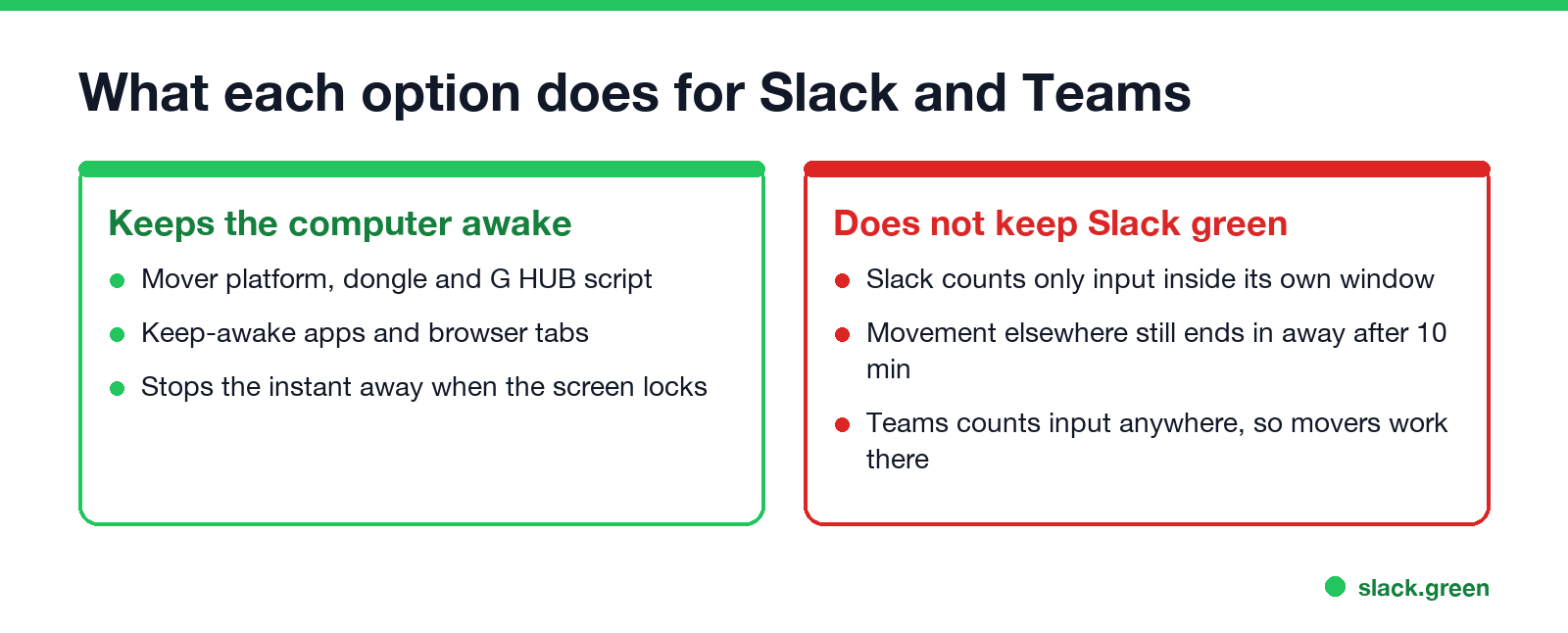
All of these keep the computer from sleeping or locking, which stops the instant away you get when the screen locks. After that, the apps differ:
If all you need is a screen that stays on, our free online mouse jiggler holds a Screen Wake Lock from a browser tab, with nothing to install. It does not move your real pointer.
FAQ
Does Logitech make a mouse jiggler?
No. Logitech sells no jiggler, and Logi Options+ has no keep-awake or jiggle setting.
Can Logi Options+ keep my computer awake?
Not by itself. Smart Actions start on a trigger such as a button press; they have no timer.
What mouse jiggler works with an MX Master?
A mover platform wide enough for the mouse, or a USB dongle that does not touch the mouse at all.
Can I make my Logitech G mouse jiggle?
Yes, with a Lua script in G HUB that uses MoveMouseRelative. See the script above.
Does Logitech Flow keep the computer awake?
No. Flow moves the cursor and clipboard between computers. It does not stop either from sleeping.
Can IT detect a mouse jiggler on a Logitech mouse?
A mover platform sends normal input from your real mouse. A USB dongle is a new device. The details are in can a mouse jiggler be detected.
Stop Jiggling Your Mouse.
Join hundreds of remote workers who never worry about their Slack status. Set it up once, stay green forever.
Related Articles
Slack Emoji for Approved, Perfect and Sounds Good
The Slack emoji for approved is ✅ :white_check_mark:. For perfect, use 💯 :100: or 🤌 :pinched_fingers:; for sounds good or sure, 👍 :+1: or 👌 :ok_hand:. Every code checked in Slack, what each one means to readers, custom LGTM and SGTM emoji, and a pinned legend for approval channels.
Tips for Working Across Time Zones: 10 Habits That Work
Working across time zones works when the team writes things down, keeps a short overlap window for live talk, says the zone with every time, and lets tools deliver messages in each person's working hours. Ten habits, a follow-the-sun handoff note, the Slack settings that help, and a script that shows your team's local times.
Slack Webhook curl Example, Plus Python and Node.js
Send a Slack message with one curl command: POST a JSON body with a text field to your incoming webhook URL, and Slack answers ok. Tested examples for curl, jq, Block Kit, Python with retries and Node.js, how to escape quotes and new lines, and what 400 invalid_payload and 429 mean in code.