
Auto Clicker for Mac: Free Options That Work on macOS
The free auto clickers that run on a Mac: the open-source Autoclick app, cliclick in Terminal, and a few lines of Python. How to set each one up, why each needs the Accessibility permission, and why OP Auto Clicker is not one of them.
The free auto clickers that work on a Mac are the open-source Autoclick app, the cliclick command from Homebrew, and a short Python script with pyautogui. All three run on Apple silicon and Intel Macs, and all three need one permission first: System Settings > Privacy & Security > Accessibility, turned on for the app or for Terminal. Without it, macOS drops the clicks and nothing happens. OP Auto Clicker, the name most people search for, is a Windows program. A "Mac version" on a download site is a repackage from someone else.
If you want an auto clicker so your chat status stays green, it is the wrong tool for Slack. Slack counts only input inside its own window, so the clicks have to land on Slack, and every click presses whatever is under the pointer. Slack Green keeps your Slack status active from a server during the hours you set, with no clicks at all.
The free auto clickers that run on macOS
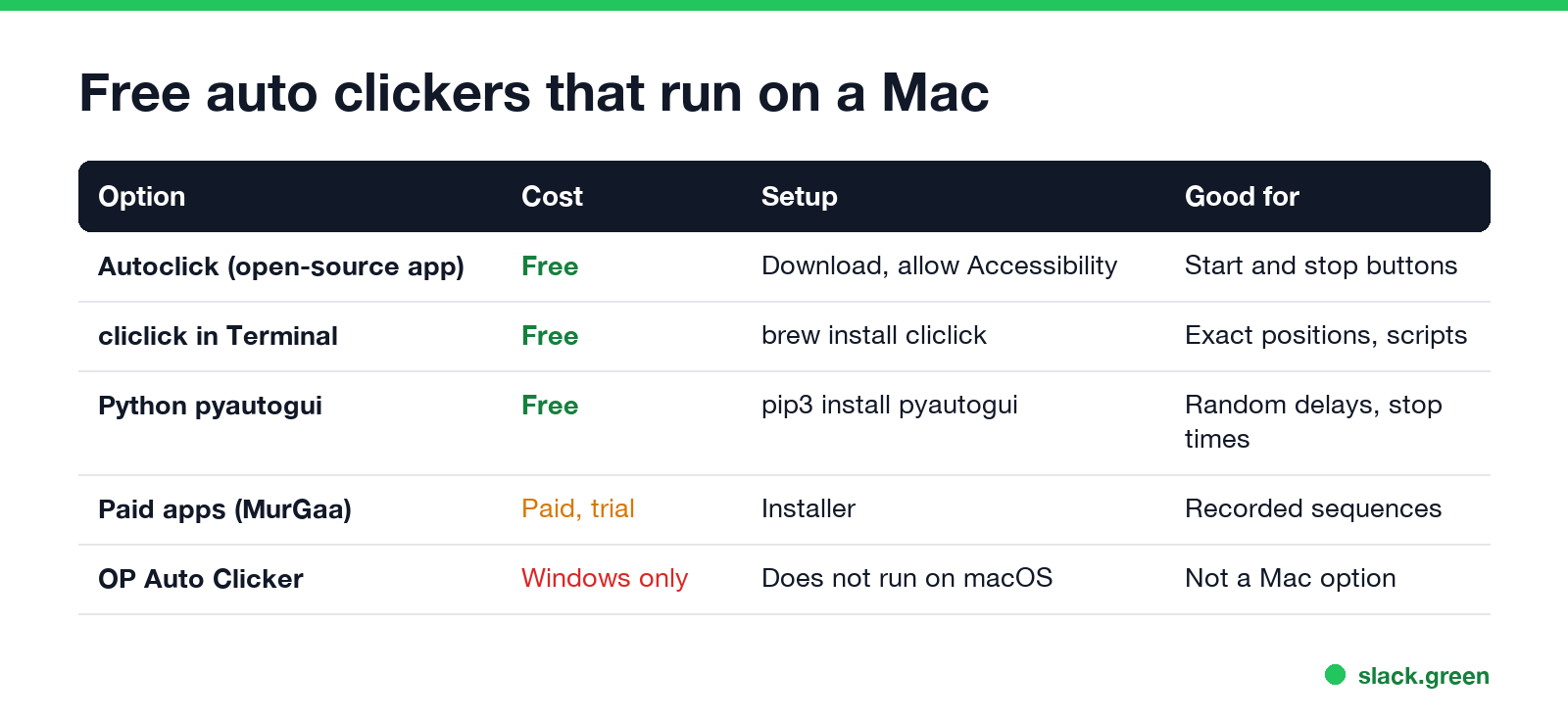
| Option | Cost | Setup | Good for |
|---|---|---|---|
| Autoclick (open-source app) | Free | Download, move to Applications, allow Accessibility | A window with start and stop buttons |
cliclick in Terminal | Free | brew install cliclick | Clicks at exact screen positions, scripts |
Python with pyautogui | Free | pip install pyautogui | Loops with conditions, random delays |
| Paid apps such as MurGaa Auto Clicker | Paid, with a trial | Installer | Recorded click sequences, hotkeys |
| OP Auto Clicker | Free | Windows only | Not a Mac option |
The top search results for "auto clicker for mac" are download mirrors (SourceForge, Softonic) and a GitHub repository. The mirrors often list Windows tools next to Mac ones. Get an app from its own GitHub page or developer site, and check that it is a .dmg or .app, never an .exe.
Option 1: Autoclick, a free app with a window
Autoclick is an open-source Mac app on GitHub (the inket/Autoclick repository). It opens a small window where you pick the mouse button, the click rate and an optional start delay, then press Start. It clicks wherever the pointer is.
- Download the latest release from the repository's Releases page and unzip it.
- Move
Autoclick.appto Applications and open it. If macOS says it cannot check the developer, open System Settings > Privacy & Security and click Open Anyway. - Open System Settings > Privacy & Security > Accessibility and turn Autoclick on.
- Set the rate, put the pointer where you want the clicks, and press Start. Press the stop key or the Stop button to end it.
The app is small and old. If a release does not open on your macOS version, use Option 2, which Homebrew keeps up to date.
Option 2: cliclick in Terminal
Never appear "away" on Slack again
Cloud-based. No downloads. Works 24/7 even when your laptop is off.
cliclick is a command-line tool by Carsten Blüm that sends mouse clicks and key presses on macOS. It is the most reliable free auto clicker on a Mac because it is one command with no window to break.
# install once
brew install cliclick

# click once at the current pointer position
cliclick c:.

# click at x=800, y=450 (points from the top-left of the main screen)
cliclick c:800,450

# auto click every 2 seconds where the pointer is, until you press Ctrl+C
while true; do cliclick c:.; sleep 2; done
The first time it runs, macOS asks for the Accessibility permission for Terminal (or iTerm). Turn it on in Privacy & Security > Accessibility, then run the command again. To find the coordinates of a spot, run cliclick p with the pointer over it; it prints the current position.
cliclick also does double clicks (dc:), right clicks (rc:), moves (m:) and key presses (kp:). A loop of m:+1,+0 and m:-1,+0 turns it into a mouse jiggler instead of a clicker.
Option 3: a Python auto clicker
If you want random delays, a stop time, or clicks only while a condition is true, a few lines of Python do it. pyautogui works on macOS with the same Accessibility permission for Terminal.
# pip3 install pyautogui
import random, time
import pyautogui

end = time.time() + 30 * 60          # stop after 30 minutes
while time.time() < end:
    pyautogui.click()                # click where the pointer is
    time.sleep(random.uniform(1.5, 3.0))
Move the pointer to the top-left corner of the screen to stop it at once. That is pyautogui's fail-safe, and it raises an error that ends the loop.
Turn on the Accessibility permission
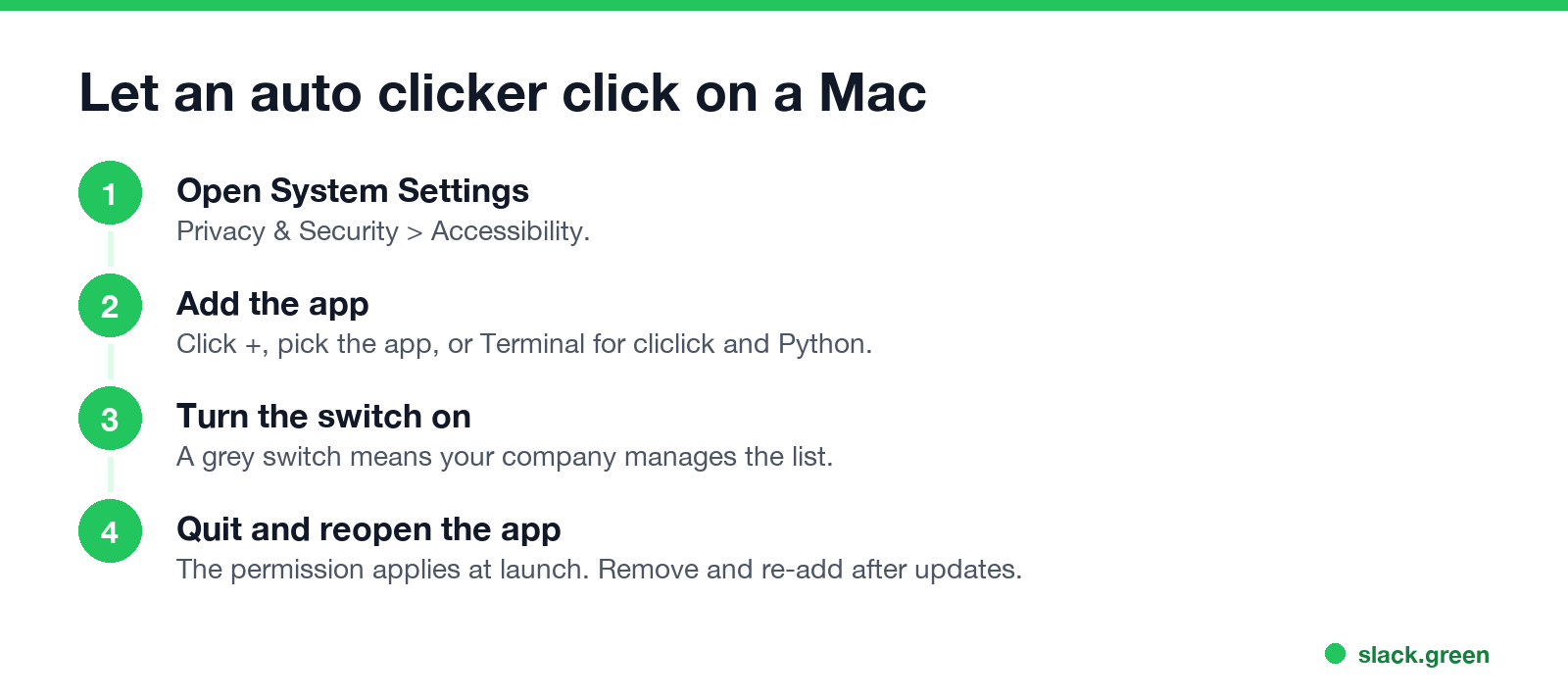
Every auto clicker posts fake mouse events, and macOS allows that only for apps in the Accessibility list. This is the step behind most "my auto clicker does nothing on Mac" reports.
/Applications/Utilities/Terminal.app for cliclick and Python), and turn its switch on.A work Mac managed by your company may block this list. If the switch is grey, IT controls it, and no auto clicker will run.
Auto clickers, games and staying active
Never appear "away" on Slack again
Cloud-based. No downloads. Works 24/7 even when your laptop is off.
Most people who search for a Mac auto clicker want one of three things: clicker games in a browser, repeated clicks in a form or a spreadsheet, or keeping the computer and their status active while they are away from the desk.
For the first two, any option above works. For the third, a click is the riskiest kind of fake input, because it lands on whatever is under the pointer: a Send button, a meeting invite, a close box. A jiggler moves the pointer and presses nothing, which is why auto clicker vs mouse jiggler comes out in favour of the jiggler for staying active. If all you need is a Mac that does not sleep, you need no input at all: caffeinate -d keeps the display on, as shown in caffeinate on Mac, and the best apps to keep a Mac awake covers the menu bar apps.
Chat status is a different problem. Microsoft Teams watches input anywhere on the Mac, so a clicker or a mouse jiggler on Mac keeps Teams green while the Mac is awake. Slack watches input only in its own window and shows you away after 10 minutes without it. To keep Slack green with a clicker, the pointer has to sit over Slack, and each click presses something in Slack. How to keep Slack active on a Mac lists the ways that avoid that, and Slack Green sets your presence from a server so your Mac can sleep.
Is a Mac auto clicker safe?
The open-source options are safe to run: you can read the code of Autoclick and cliclick, and pyautogui is a widely used Python package. The risk is in where you download. A search for "auto clicker mac free download" returns mirrors that bundle installers, and some pages offer Windows .exe files that cannot run on a Mac at all. Get the app from its GitHub page, or install it with Homebrew.
On a work Mac, also think about what the clicks look like. Monitoring tools can log input with perfect timing, and a click every 2.000 seconds for an hour does not look like a person. Company policy decides whether that matters to you.
FAQ
Is there an OP Auto Clicker for Mac? No. OP Auto Clicker is a Windows program. Pages that offer a Mac download point to other apps or to repackages. Use Autoclick or cliclick instead.
Why does my auto clicker not click on Mac? It is missing the Accessibility permission, or it has a stale one after an update. Remove it from Privacy & Security > Accessibility, add it again and restart the app.
Does an auto clicker work on an Apple silicon Mac? Yes. cliclick installs natively through Homebrew, Python runs natively, and Autoclick runs under Rosetta if its release is Intel-only.
Can an auto clicker keep my Mac awake? Yes, any input resets the idle timer. caffeinate does the same without clicking anything.
Stop Jiggling Your Mouse.
Join hundreds of remote workers who never worry about their Slack status. Set it up once, stay green forever.
Related Articles
Best Chrome Extensions for Remote Workers, by the Job They Do
14 Chrome extensions for remote work, grouped by the job: async video, meetings, focus, writing, passwords, tabs, screenshots, time tracking and keeping the screen on. Each checked on the Chrome Web Store, with user counts, cost, and the extensions to avoid on a work laptop.
Can My Employer See My Zoom Chats? Meeting Chat vs Team Chat
It depends which Zoom chat. In a meeting, the host cannot read private messages between two other people, even in a saved chat. Zoom Team Chat on a work account is different: the company owns it, and admins can archive and search it. What hosts, admins and your manager can each see, and what stays private.
Slack: Get Notified When Someone Comes Online (No Built-In Alert)
Slack has no alert for when a coworker becomes active. No preference, Workflow Builder trigger or profile button does it. You can watch their green dot, send a message they will see when they return, or run a short script that checks users.getPresence every minute and DMs you.