
Can My Employer See My Facebook Messages? Network No, Screen Yes
Not from the network. Meta encrypts personal Messenger chats end to end by default, so the company firewall sees only that you used facebook.com or messenger.com. On a work laptop it is different: monitoring software can capture the chat on your screen and the words you type, and a browser left signed in shows your whole inbox. What each method reveals, and how to keep Messenger private.
Your employer cannot read your Facebook messages from the office network. Since December 2023, Meta encrypts personal chats and calls on Messenger and Facebook end to end by default, so the company firewall and Wi-Fi logs show only that you visited facebook.com or messenger.com, when, and how much data moved. On a work laptop the network is not the main risk. Monitoring software can take screenshots of the chat on your screen and record the words you type, and a browser that stays signed in to Facebook shows your whole inbox to anyone who opens it. If the laptop belongs to the company, treat anything you open on it as visible to the company.
On your own phone, on mobile data, your employer sees nothing of Messenger at all.
The same logic covers the work apps you are paid to be in. Slack shows every coworker a green or grey dot, and it turns grey after 10 minutes without input in the Slack window. Slack Green keeps your Slack status active during the hours you set, from the cloud, with nothing installed on the work laptop.
What your employer can see, method by method
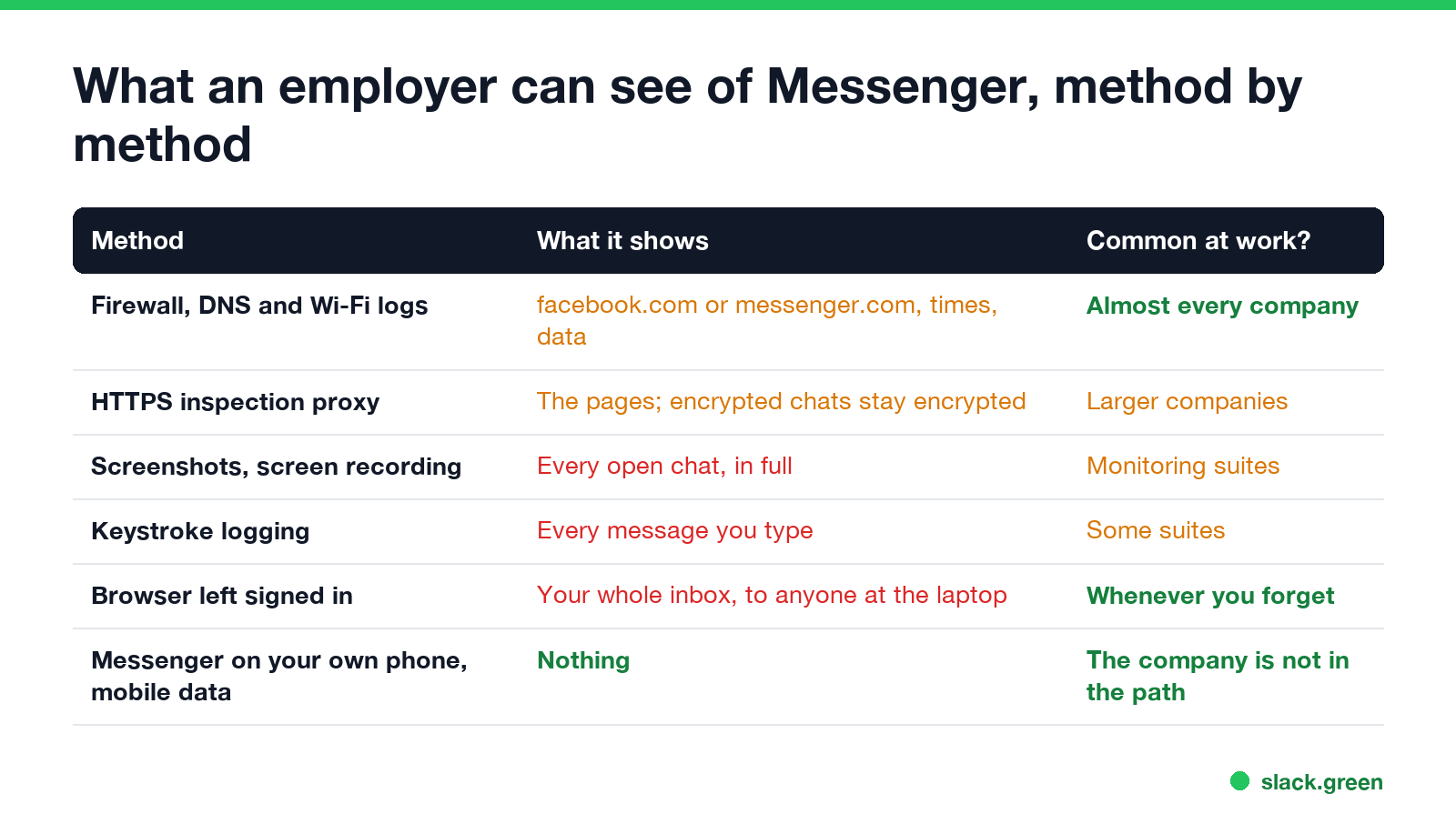
| Method | What it shows about Facebook messages | Common on work laptops? |
|---|---|---|
| Firewall, DNS and Wi-Fi logs | That you opened facebook.com or messenger.com, when, and how much data | Yes, on almost every company network |
| HTTPS inspection on a web proxy | The Facebook pages. End-to-end encrypted chats stay encrypted inside them | Yes in larger companies |
| Screenshots or screen recording | Every chat that is open on screen, in full | Yes with monitoring suites |
| Keystroke logging | Every message you type, word for word | Some monitoring suites |
| A browser left signed in | Your whole inbox, to anyone with the laptop | Whenever you forget to log out |
| Downloads and backups | Photos, voice messages and files you saved | Yes if the laptop is backed up |
| Messenger on your own phone, on mobile data | Nothing | The company is not in the path |
The pattern: what travels over the network is encrypted, and what happens on the laptop is not. End-to-end encryption protects a message between your browser and the other person's device. It does nothing about a program that records the screen of the device you read it on.
Why the network cannot read your Messenger chats
With end-to-end encryption, only the devices in the chat hold the keys. Meta's own servers pass the messages along without being able to read them, and a company firewall between your laptop and Meta sees only encrypted data. Meta's help center says to check a chat's settings for the label "End-to-end encrypted" to confirm it.
HTTPS inspection, which some companies run by installing their own certificate on work laptops, opens the ordinary web traffic of facebook.com. That can show the pages you load, your news feed, and posts. It does not open the encrypted message content inside Messenger. What HTTPS inspection does reveal on other sites is covered in can my employer see my browsing history.
Where Facebook messages are exposed on a work laptop
Never appear "away" on Slack again
Cloud-based. No downloads. Works 24/7 even when your laptop is off.
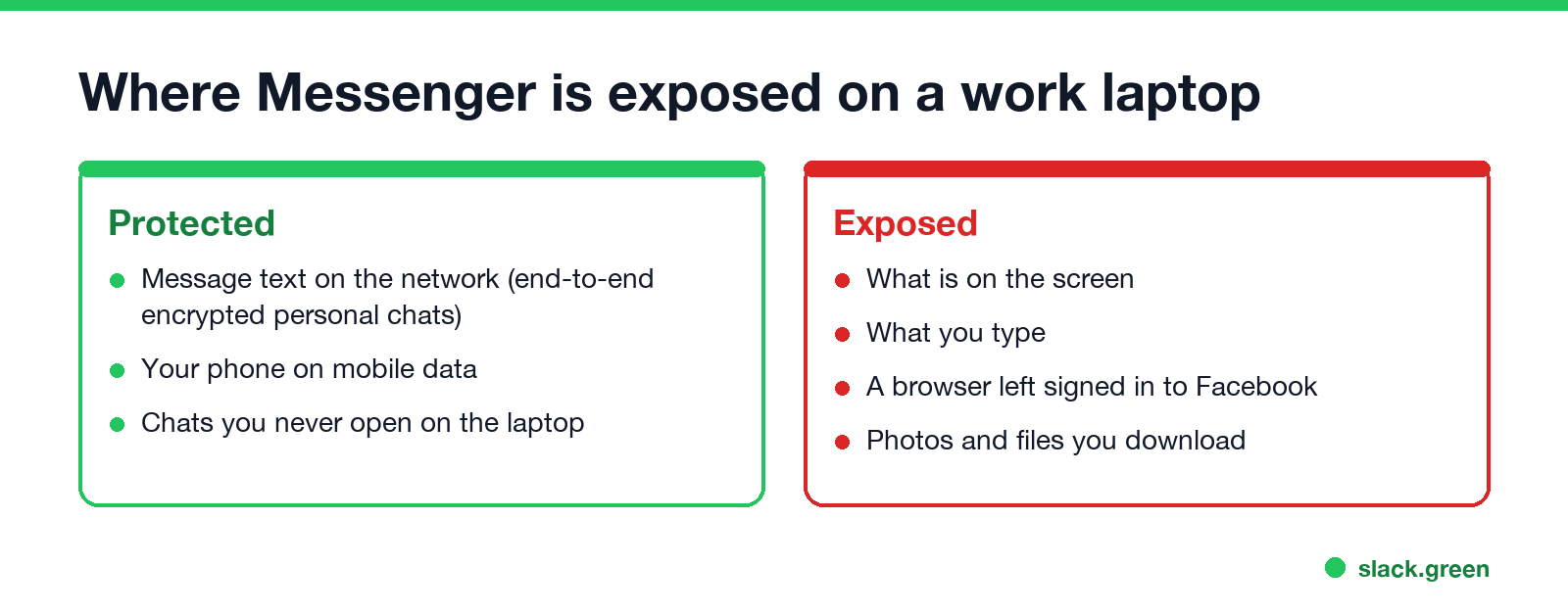
The screen. Employee monitoring suites such as Teramind, ActivTrak or Hubstaff can take screenshots every few minutes or record the screen. If Messenger is open when the screenshot is taken, the chat is in the image. Details in can my employer see my screen.
What you type. Some suites log keystrokes. Every message you type in Messenger ends up in that log in plain text, encrypted chat or not. See can my employer see my keystrokes.
The browser session. Meta shut down its separate Messenger desktop apps for Windows and Mac in December 2025, so on a computer you now use Messenger in a browser. A browser that stays signed in to Facebook keeps your inbox one click away for anyone who uses the laptop, including IT when they service it. Use a private window and log out when you finish.
Downloads. Photos and files you save from a chat land in the Downloads folder, which company backup tools may copy.
Is it legal for an employer to look?
In the United States, employers can generally monitor company-owned laptops and networks, and some states require written notice first, New York among them. Reading the content of your private messages is a different step. Courts have treated accessing an employee's personal account without permission, for example by using a saved password, as a possible violation of the Stored Communications Act. In the EU and UK, monitoring has to be necessary and proportionate, and you must be told. The wider rules are in is it legal for my employer to monitor me.
How to keep Facebook messages private at work
- Use your phone on mobile data. The company network and laptop are then not involved at all.
- If you use the work laptop, open Messenger in a private window and log out when you finish. Do not let the browser save your Facebook password.
- Do not download photos or files from personal chats to the work laptop.
- Assume screenshots. If the laptop runs monitoring software, anything on screen can be captured. How to tell if you are being monitored at work lists the signs.
- Keep work and personal on separate devices if you can. That is the only setup where none of the above applies.
The same answer for other messaging apps: can my employer see my WhatsApp Web and can my employer see my Telegram messages.
FAQ
Never appear "away" on Slack again
Cloud-based. No downloads. Works 24/7 even when your laptop is off.
Can my work Wi-Fi see my Facebook messages? No. It sees that you used Facebook or Messenger and when, not the message text of end-to-end encrypted chats.
Can my employer see my Facebook messages on my personal phone? Not if you use mobile data and the phone is not enrolled in company management. On company Wi-Fi they see only the site names.
Can my boss see my Facebook activity at work? The network shows when you are on Facebook and for how long. Monitoring software on a work laptop can show what is on screen.
Are group chats on Messenger encrypted too? Meta's December 2023 rollout covered personal one-to-one chats and calls first. Check a chat's settings for the "End-to-end encrypted" label to be sure.
Stop Jiggling Your Mouse.
Join hundreds of remote workers who never worry about their Slack status. Set it up once, stay green forever.
Related Articles
Can My Employer See What I Watch on YouTube at Work?
On a work laptop or the office network, your employer can see that you used YouTube, when, and for how long. With HTTPS inspection or monitoring software, they can see which videos, because the video address and the browser tab title both name it. On your own phone on mobile data, they see nothing.
Can My Employer See My iMessages on a Work Mac?
Not through device management or the network: Jamf or Intune cannot read Messages, and iMessage is end-to-end encrypted. But if you sign in to Messages on a work Mac, your texts are stored on that Mac, where monitoring screenshots, backups and admin access can reach them. How to check, and how to take iMessage off the Mac without deleting it from your iPhone.
Can My Boss See My Private Outlook Calendar Events?
Usually not the details. When you mark an Outlook event Private, someone who can read your calendar sees only Private appointment, the time and a lock. The exceptions are delegates you gave Can view private items, the people invited to the event, anyone with full access to your mailbox in new Outlook or the web, and compliance admins. How to check who has which access, and what Private does not hide.