
Convert a Slack Message to Markdown (Tested Python Code)
Read the rich_text blocks, not the text field. We pasted a Markdown note into Slack on 18 November 2026, read it back with the API, and a 29-line Python function rebuilt the exact Markdown we pasted.
To convert a Slack message to Markdown, read the message's blocks and map each rich_text element to its Markdown form: bold to **, strike to ~~, links to [label](url), lists to - and 1., quotes to > and preformatted text to a fenced block. The text field looks close to Markdown, but it is Slack's own mrkdwn, and it drops the blank lines around lists, escapes > as > and glues the code fence to the first line of code. We tested both routes on 18 November 2026 in a test workspace: we pasted a Markdown note into the Slack composer, sent it, read it back with conversations.history, and the blocks route gave back the exact Markdown we pasted.
The test message
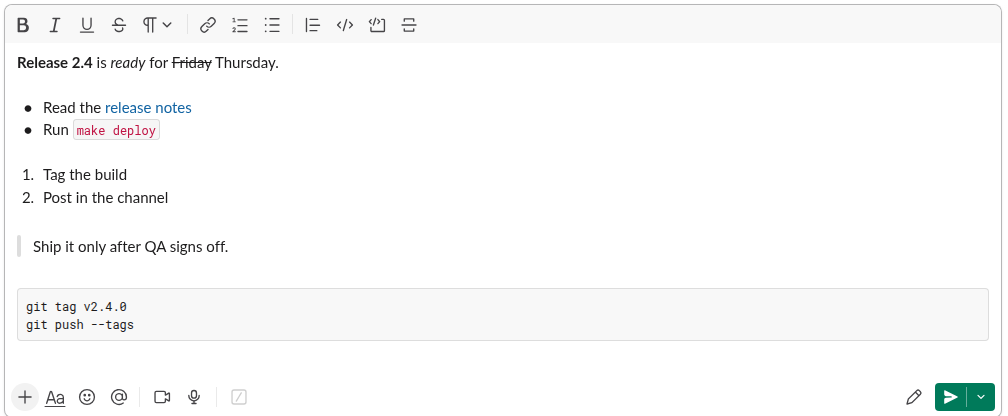
We pasted this Markdown into the message box of a channel in the Slack web app:
**Release 2.4** is _ready_ for ~~Friday~~ Thursday.

- Read the [release notes](https://example.com/notes)
- Run `make deploy`

1. Tag the build
2. Post in the channel

> Ship it only after QA signs off.

```
git tag v2.4.0
git push --tags
```
Slack turned every part into formatting as it landed in the composer, before we sent anything:
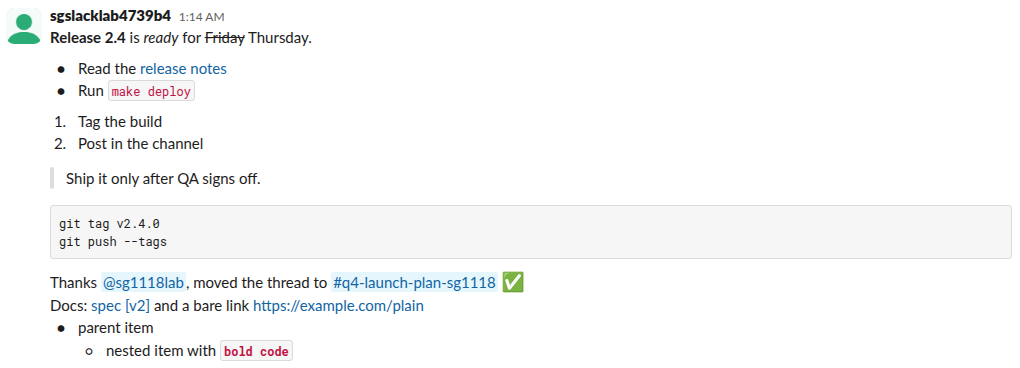
A second message, posted from the same session, added what a paste cannot make: a user mention, a channel link, an emoji, a link whose label holds brackets, a bare link and a nested list.
What Slack stores: two copies of the same message
conversations.history returns each message with two copies of its content. The text field of the first message came back like this:
*Release 2.4* is _ready_ for ~Friday~ Thursday.
• Read the <https://example.com/notes|release notes>
• Run `make deploy`
1. Tag the build
2. Post in the channel
> Ship it only after QA signs off.
```git tag v2.4.0
git push --tags```
The blocks field holds one rich_text block. Each part of the message is its own element with its style spelled out. Here are the bullet list and the code block from it:
[
 {
  "type": "rich_text_list",
  "elements": [
   {
    "type": "rich_text_section",
    "elements": [
     {
      "type": "text",
      "text": "Read the "
     },
     {
      "type": "link",
      "url": "https://example.com/notes",
      "text": "release notes"
     }
    ]
   },
   {
    "type": "rich_text_section",
    "elements": [
     {
      "type": "text",
      "text": "Run "
     },
     {
      "type": "text",
      "text": "make deploy",
      "style": {
       "code": true
      }
     }
    ]
   }
  ],
  "style": "bullet",
  "indent": 0,
  "border": 0
 },
 {
  "type": "rich_text_quote",
  "elements": [
   {
    "type": "text",
    "text": "Ship it only after QA signs off."
   }
  ]
 }
]
Blank lines between parts are separate rich_text_section elements that hold only "\n", so the spacing survives in the blocks.
Never appear "away" on Slack again
Cloud-based. No downloads. Works 24/7 even when your laptop is off.
The converter: blocks to Markdown
This is the function we ran. It walks the elements in order and writes Markdown for each one. users and channels map IDs to names, because both copies of a message hold only IDs; fill them from users.info and conversations.info, or skip them and keep the IDs.
def inline(el, users={}, channels={}):
    t = el["type"]
    if t == "text":
        s, st = el["text"], el.get("style", {})
        if st.get("code"): s = "`" + s + "`"
        if st.get("italic"): s = "_" + s + "_"
        if st.get("strike"): s = "~~" + s + "~~"
        if st.get("bold"): s = "**" + s + "**"
        return s
    if t == "link": return "[" + el["text"] + "](" + el["url"] + ")" if el.get("text") else "<" + el["url"] + ">"
    if t == "user": return "@" + users.get(el["user_id"], el["user_id"])
    if t == "channel": return "#" + channels.get(el["channel_id"], el["channel_id"])
    if t == "emoji": return "".join(chr(int(c, 16)) for c in el["unicode"].split("-")) if el.get("unicode") else ":" + el["name"] + ":"
    return ""

def blocks_to_md(blocks, users={}, channels={}):
    out = []
    for block in blocks:
        for el in block.get("elements", []):
            body = lambda e: "".join(inline(x, users, channels) for x in e["elements"])
            if el["type"] == "rich_text_section": out.append(body(el))
            elif out and not out[-1].endswith("\n"): out.append("\n")
            if el["type"] == "rich_text_list":
                for n, item in enumerate(el["elements"], el.get("offset", 0) + 1):
                    mark = str(n) + "." if el["style"] == "ordered" else "-"
                    out.append("  " * el.get("indent", 0) + mark + " " + body(item) + "\n")
            elif el["type"] == "rich_text_quote": out.append("> " + body(el).replace("\n", "\n> ") + "\n")
            elif el["type"] == "rich_text_preformatted": out.append("```\n" + body(el) + "\n```\n")
    return "".join(out).strip() + "\n"
For the text field, a regex pass gets most of the way. We ran this too, to compare:
import html, json, re

def mrkdwn_to_md(text, users={}, channels={}):
    text = re.sub(r"<@(U\w+)>", lambda m: "@" + users.get(m.group(1), m.group(1)), text)
    text = re.sub(r"<#(C\w+)(?:\|([^>]*))?>", lambda m: "#" + (m.group(2) or channels.get(m.group(1), m.group(1))), text)
    text = re.sub(r"<(https?://[^|>]+)\|([^>]+)>", r"[\2](\1)", text)
    text = re.sub(r"<(https?://[^>]+)>", r"<\1>", text)
    text = re.sub(r"(?<![\w*])\*([^*\n]+)\*(?![\w*])", r"**\1**", text)
    text = re.sub(r"(?<![\w~])~([^~\n]+)~(?![\w~])", r"~~\1~~", text)
    text = re.sub(r"```(?!\n)", "```\n", text, count=1)
    text = re.sub(r"(?<!\n)```$", "\n```", text)
    text = re.sub(r"^\u2022 ", "- ", text, flags=re.M)
    text = re.sub(r"^ {4}\u25e6 ", "  - ", text, flags=re.M)
    return html.unescape(text)
Output: the blocks route rebuilt the paste exactly
Run on the first message, blocks_to_md returned the same 10 lines we pasted, character for character (we checked with == in Python). The text route returned this:
**Release 2.4** is _ready_ for ~~Friday~~ Thursday.

- Read the [release notes](https://example.com/notes)
- Run `make deploy`
1. Tag the build
2. Post in the channel
> Ship it only after QA signs off.
```
git tag v2.4.0
git push --tags
```
It reads right in most Markdown viewers, but the blank lines between the lists and the quote are gone, and a strict renderer can join the numbered list and the quote. On the second message both routes agreed except for the emoji: the text field says :white_check_mark:, and the block carries "unicode": "2705", so the blocks route printed the real character.
Thanks @sg1118lab, moved the thread to #q4-launch-plan-sg1118 ✅
Docs: [spec [v2]](https://example.com/a_b*c) and a bare link <https://example.com/plain>
- parent item
  - nested item with **`bold code`**
What each route keeps
| Part of the message | text field (mrkdwn) | rich_text blocks |
|---|---|---|
| Bold | *Release 2.4*, one asterisk | "style": {"bold": true} |
| Strikethrough | ~Friday~, one tilde | "style": {"strike": true} |
| Link with a label | <https://example.com/notes\|release notes> | "type": "link" with url and text |
| Bullet list | • characters, nested items as 4 spaces and ◦ | rich_text_list with style and indent |
| Blank lines around lists | Lost | Kept as \n sections |
| Quote | > Ship it..., HTML-escaped | rich_text_quote |
| Code block | The opening fence is glued to the first line of code | rich_text_preformatted |
| Emoji | :white_check_mark: | name plus a unicode hex code |
| Mention | <@U0CJJ3D6V9B> | "type": "user" with the same ID |
Two practical rules come out of the test. Prefer blocks whenever a message has them; both of our messages from the Slack web app had them. Fall back to the text field only for old messages and plain bot posts that have no blocks, and run html.unescape on it, or every quote starts with >.
To go the other way, from Markdown into a Slack message, our Markdown to Slack converter handles the formatting. If pasted Markdown does not format for you, Slack markdown not working covers the cases we found, and how to get messages from a channel with the API shows the history call and its paging.
Stop Jiggling Your Mouse.
Join hundreds of remote workers who never worry about their Slack status. Set it up once, stay green forever.
Related Articles
Slack App Configuration Token: Generate, Rotate and Revoke
An app configuration token lets a script create Slack apps from manifests. We generated one, rotated it five times and tested it again 28 hours later.
Slack App Collaborators: Add, Remove and Transfer Ownership
Collaborators are the people who can edit a Slack app. We added and removed one on 20 November 2026 as a regular member of a test workspace, recorded who can be added and what Slack asks you to do after a removal, and wrote down the hand-over path Slack documents.
Slack Bolt Middleware: Global and Listener, Tested
Global middleware runs for every request and listener middleware for one listener. We ran both in Bolt for Python and Bolt for JavaScript on 20 November 2026 and logged what Slack did when next() was skipped: Python answered 404 and Slack sent the event again.